Bolt Scraper vs Threat Watch
Side-by-side comparison to help you choose the right tool.

Bolt Scraper
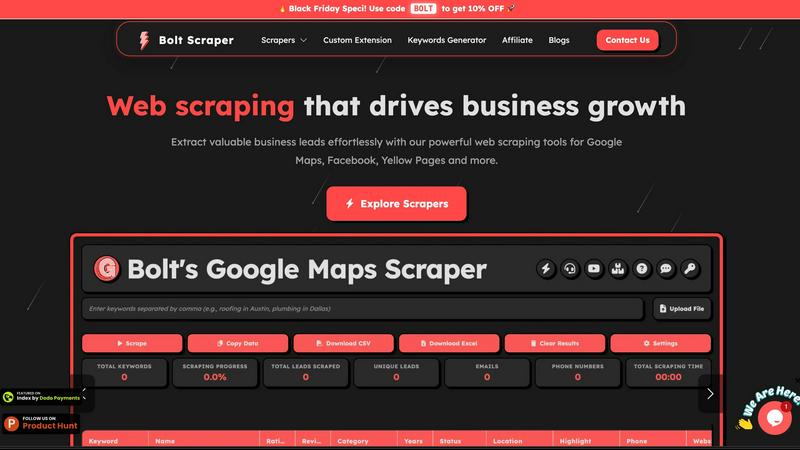
Unlock unlimited B2B leads from Google Maps and Facebook effortlessly with Bolt Scraper's powerful web scraping tools.
Last updated: February 28, 2026

Threat Watch
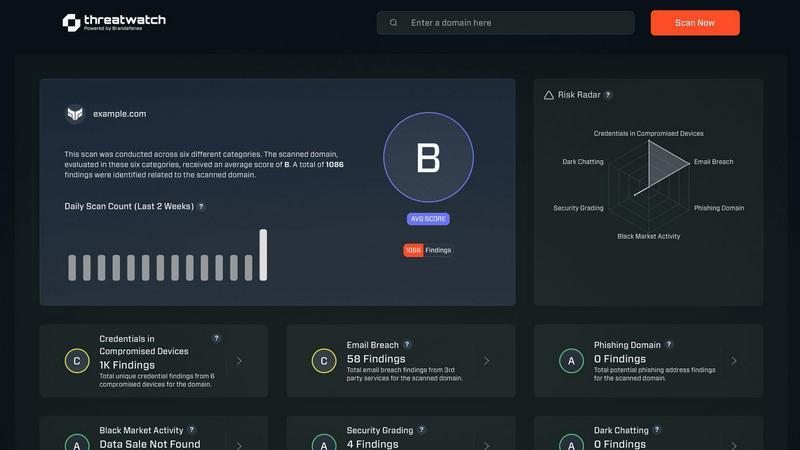
Threat Watch instantly reveals your cybersecurity health by scanning for compromised accounts and dark web threats.
Last updated: March 1, 2026
Visual Comparison
Bolt Scraper
Threat Watch
Feature Comparison
Bolt Scraper
Google Maps Scraper
The Google Maps Scraper from Bolt Scraper enables users to effortlessly gather business leads from Google Maps. This feature boasts powerful data extraction capabilities, allowing users to quickly accumulate the necessary information for business growth. It simplifies the lead generation process, saving you time and resources.
Facebook Pages Scraper
With the Facebook Pages Scraper, extracting business leads has never been easier. This feature allows users to efficiently gather contact information from Facebook Pages, ensuring that you have the data needed to expand your reach and grow your business. Its intuitive design makes it accessible for everyone.
Yellow Pages Scraper
The Yellow Pages Scraper is a completely free tool that allows users to extract valuable business information from Yellow Pages in both the USA and Canada. It is designed specifically for professionals, marketers, and researchers who rely on reliable business data to inform their strategies and decisions.
Email Extractor
Bolt Scraper's Email Extractor tool is an advanced feature that enables users to find verified email addresses from any website. This tool is perfect for email marketing campaigns and lead generation efforts, ensuring you can identify contact emails, business emails, and personal emails with high accuracy.
Threat Watch
Comprehensive Cyber Health Score
This is your north star. Threat Watch doesn't just dump data on you; it synthesizes findings from compromised credentials, devices, phishing, and dark web exposure into a single, understandable health score. This immediate grade is invaluable for benchmarking your posture, tracking improvements over time, and communicating risk to non-technical stakeholders. It turns complex threat data into a clear, actionable metric.
Real-Time Dark Web Surveillance
This is the feature that often delivers the biggest "oh no" moments—and that's a good thing. Threat Watch continuously monitors underground forums, marketplaces, and leak sites for your organization's data. If employee emails, company passwords, or internal documents appear for sale, you're alerted immediately. This proactive surveillance is critical for containing breaches before they're exploited at scale.
Compromised Credential Detection
Relying on employees to know they've been pwned is a losing strategy. Threat Watch automates this by cross-referencing your corporate email domains against vast databases of known breaches. It instantly identifies which employee accounts have leaked passwords, allowing your IT team to enforce resets before those credentials can be used in a targeted attack.
Phishing & Impersonation Monitoring
Beyond data breaches, Threat Watch scours the internet for phishing kits and fake domains impersonating your brand. It looks for suspicious sites using your company's name, logos, or similar URLs designed to trick customers or employees. Discovering these campaigns early allows you to take them down swiftly, protecting your brand's reputation and your users.
Use Cases
Bolt Scraper
Lead Generation for Sales Teams
Sales teams can leverage Bolt Scraper to automate their lead generation efforts. By extracting contact information from various sources like Google Maps and Facebook, sales professionals can build a robust pipeline of potential clients, significantly increasing their outreach efficiency.
Market Research for Professionals
Professionals conducting market research can use Bolt Scraper to gather data on competitors, industry trends, and consumer behavior. By scraping valuable insights from multiple platforms, they can make informed decisions and strategize effectively to stay ahead in their respective markets.
Email Marketing Campaigns
Businesses looking to enhance their email marketing efforts can utilize the Email Extractor feature. By collecting verified email addresses from targeted websites, companies can create tailored campaigns that resonate with their audience, leading to higher engagement and conversion rates.
Data Enrichment for CRM Systems
Bolt Scraper can be used to enrich existing customer databases in CRM systems. By extracting additional contact information and leads from various online sources, businesses can maintain up-to-date records, allowing for more personalized marketing efforts and improved customer relationships.
Threat Watch
Proactive Risk Management for IT Teams
Instead of waiting for a breach to happen, IT and security teams can use Threat Watch as their daily briefing. The platform prioritizes risks, allowing them to focus on resetting compromised accounts, isolating infected devices, and issuing phishing warnings before a major incident occurs. It transforms their role from reactive firefighting to strategic defense.
Executive & Board-Level Reporting
For leaders who need to understand cyber risk without technical jargon, the Cyber Health Score and clear category breakdowns are perfect. A CISO can use Threat Watch reports to visually demonstrate the organization's exposure, justify security budget requests, and show tangible improvement over time, building crucial boardroom confidence.
Due Diligence for Mergers & Acquisitions
Before acquiring or merging with another company, you need to know what you're buying into. Threat Watch can provide a rapid assessment of the target company's exposed credentials, dark web presence, and phishing risk. This cybersecurity due diligence can reveal hidden liabilities and inform negotiation or integration strategies.
Enhanced Security Posture for Remote Workforces
With employees using personal devices and accessing corporate data from everywhere, the attack surface has exploded. Threat Watch helps identify compromised personal emails linked to work accounts and malicious software on remote devices, providing essential visibility for securing a distributed workforce.
Overview
About Bolt Scraper
Bolt Scraper is an exceptional web scraping tool tailored for businesses eager to gather valuable leads and essential contact information from diverse online sources. With its sophisticated capabilities, users can efficiently extract data from platforms like Google Maps, Facebook, Yellow Pages, and many more. This tool is specifically designed for marketers, sales teams, and researchers who require accurate, real-time data to enhance their lead generation strategies and ultimately drive business growth. One of Bolt Scraper's main value propositions lies in its user-friendly interface and robust features that allow users to generate unlimited leads for a one-time payment. This makes it a cost-effective choice in a competitive market. By automating the data extraction process, Bolt Scraper not only saves users substantial time and effort but also allows them to concentrate on converting leads into loyal customers, making it an indispensable asset for any data-driven business.
About Threat Watch
Let's cut through the noise: in today's digital jungle, feeling secure is an illusion unless you have the right intelligence. That's where Threat Watch comes in, and frankly, it's one of the most straightforward and actionable cybersecurity health dashboards I've seen for businesses. This isn't just another alarmist scanner; it's a curated intelligence platform designed to give you a clear, real-time snapshot of your most critical exposures. The core genius of Threat Watch is its focus on the tangible threats that actually cause breaches: compromised employee credentials, hijacked devices, phishing traps, and your data being traded on the dark web. It meticulously analyzes your organization's digital footprint across these key categories, delivering what I like to call a "cyber vital signs" report. It's built for proactive leaders—from the resource-strapped startup founder to the enterprise CISO—who are tired of operating in the dark and need prioritized insights, not just raw data. The main value proposition is undeniable: speed and clarity. You get automated, continuous assessments that tell you exactly what's wrong and, by implication, where to direct your team's efforts first. If you believe that prevention is infinitely cheaper than reaction, Threat Watch provides the foundational intelligence to make that possible.
Frequently Asked Questions
Bolt Scraper FAQ
How does Bolt Scraper handle CAPTCHA?
Bolt Scraper includes an auto-solve CAPTCHA feature, ensuring that users can extract data seamlessly without interruptions. This feature saves time and enhances the overall scraping experience.
Is there a free version of Bolt Scraper?
Yes, Bolt Scraper offers a forever free version that allows users to access certain features while still enabling them to extract valuable leads and contact information without any cost.
Can I scrape multiple websites at once?
Absolutely! Bolt Scraper supports multi-keyword batch processing, enabling users to scrape data from multiple websites simultaneously. This feature significantly reduces the time spent on data collection.
What kind of support does Bolt Scraper provide?
Bolt Scraper offers dedicated 24/7 support to assist users with any issues they may encounter. The support team is committed to providing timely responses and ensuring a smooth experience for all users.
Threat Watch FAQ
How does the free scan work?
The free scan is a brilliant, no-commitment way to see the power of the platform. You simply provide your company's primary domain name (e.g., yourcompany.com). Threat Watch then performs a non-intrusive scan of its databases and monitoring sources for compromised credentials, dark web mentions, and phishing sites associated with that domain. You get an immediate snapshot of your exposed surface area without needing to install any software.
What kind of alerts will I receive?
You'll receive prioritized, actionable alerts, not noise. These include specific notifications when employee credentials are found in a new data breach, when your company is mentioned on a dark web forum, when a new phishing domain targeting your brand is registered, and if company-owned IP addresses are associated with malware infections. Each alert includes context and recommended steps.
Is Threat Watch suitable for a small business without a dedicated IT person?
Absolutely, and this is one of its strongest suits. The interface is designed for clarity, not complexity. The health score and categorized results make it easy for a business owner or office manager to understand the top risks. For very small teams, even just using it to identify and reset compromised employee passwords is a massive security win.
How is this different from my antivirus software?
Antivirus software is a vital internal guard—it tries to stop malware already on a device. Threat Watch is an external intelligence service. It looks for threats outside your walls: stolen data on the internet, phishing campaigns, and discussions about your company on the dark web. They are complementary layers; one protects the endpoint, the other gives you strategic warning about incoming attacks.
Alternatives
Bolt Scraper Alternatives
Bolt Scraper is a robust web scraping tool designed to help businesses extract unlimited B2B leads from various online sources like Google Maps, Facebook, and Yellow Pages. As a versatile solution, it caters to marketers, sales teams, and researchers who need accurate data to support their growth and lead generation efforts. Users often seek alternatives due to varying needs such as pricing structures, specific features, or compatibility with different platforms. When choosing an alternative, it's essential to assess the tool's data extraction capabilities, user-friendliness, cost-effectiveness, and the range of sources it can scrape. A reliable alternative should also offer strong customer support and regular updates to ensure it meets evolving market demands.
Threat Watch Alternatives
Threat Watch is a cybersecurity intelligence platform that falls squarely into the business intelligence category, transforming raw threat data into a clear picture of your organization's digital health. It's designed to give you actionable insights on compromised accounts and vulnerabilities in real-time. Users often seek alternatives for a variety of practical reasons. Perhaps the pricing model doesn't align with their budget, they need deeper integration with a specific tech stack, or they require a feature set tailored to a niche compliance framework. The search for the right tool is less about finding a "better" product and more about finding the right fit for your specific operational and financial landscape. When evaluating alternatives, focus on the core value: actionable intelligence. Look beyond flashy dashboards and ask if the tool provides clear, prioritized steps to improve your security posture. Consider the quality of data sources, the automation of routine assessments, and the platform's ability to grow with your business without becoming a management burden itself.