
PDF Compiler vs Tradepal
Side-by-side comparison to help you choose the right tool.

PDF Compiler
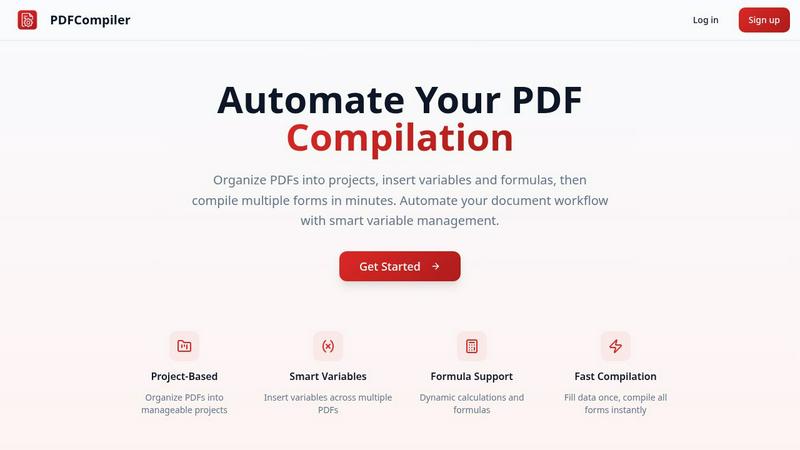
Effortlessly automate your PDF workflow by entering data once to instantly populate multiple forms with ease.
Last updated: February 28, 2026

Tradepal
Tradepal transforms stock screenshots into actionable insights with AI-driven analysis and real-time market sentiment.
Last updated: February 28, 2026
Visual Comparison
PDF Compiler
Tradepal
Feature Comparison
PDF Compiler
Configurable Fields
PDF Compiler allows users to define a variety of fields in their documents, including text inputs, dates, variables, selections, and even Excel-style formulas. This flexibility ensures that all necessary data can be efficiently captured and managed, catering to the unique requirements of each project.
Minimal Input
One of the standout features of PDF Compiler is its ability to minimize user input. Users only need to enter essential data once, and the software automatically populates all linked documents with the appropriate information, adhering to the predefined configurations. This not only saves time but also reduces the likelihood of data entry errors.
Data Linking
With PDF Compiler, any updates made to a field automatically propagate across all PDFs within the project. This means that users can make changes to a single data point, and the software will ensure that all related documents reflect those updates, maintaining consistency and accuracy throughout the entire set.
Automated Workflows
The software enables users to generate complete document sets in mere minutes. With its dynamic calculations and formatting capabilities, PDF Compiler streamlines the entire process of document preparation, allowing users to compile all necessary forms instantly, ready for submission, sharing, or printing.
Tradepal
AI Forecasts
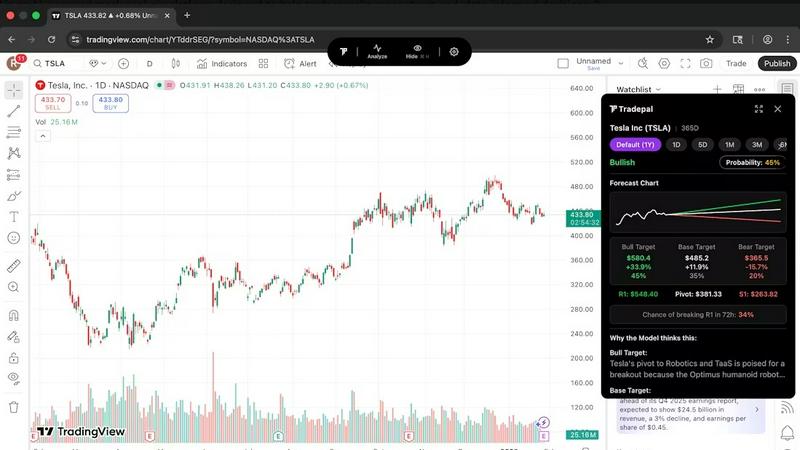
Tradepal provides intraday forecasts for potential price ranges, reversals, and volatility. Utilizing a blended AI ensemble, these forecasts are updated in real-time, enabling traders to see risks before they manifest in price movements.
Price Cone Projections
With Tradepal, users can view forward price cones displayed on their charts. The intuitive layout allows for easy customization, ensuring that traders can personalize their views to match their trading styles and save them for future analysis sessions.
News and Sentiment Analysis
Stay on top of market sentiment with Tradepal's ability to track mood across professional trader sources and financial news. This feature alerts users to shifts in crowd conviction, helping them anticipate market movements before they happen.
Breakout Signals
Tradepal's breakout signals feature identifies early signs of strength or weakness by scanning live sentiment streams, order flow hints, and momentum shifts. This allows traders to act promptly on opportunities or avoid potential pitfalls.
Use Cases
PDF Compiler
Tender and Proposal Documentation
In scenarios where organizations frequently prepare tenders and proposals, PDF Compiler excels by automating the completion of these documents. By reducing repetitive data entry, teams can create professional proposals swiftly, ensuring they meet tight deadlines without compromising quality.
Financial and Administrative Reports
For finance and admin teams tasked with generating comprehensive reports, PDF Compiler simplifies the process. The ability to link data across multiple PDFs means that any adjustments made to core figures will automatically update all related reports, enhancing both accuracy and efficiency.
Multi-Document Workflows
Any workflow that involves multiple documents requiring repetitive data entry can benefit from PDF Compiler. Whether it's contracts, invoices, or project documentation, the software streamlines the compilation process, saving time and ensuring consistency across all documents.
Compliance and Regulatory Filings
Organizations that must adhere to strict compliance and regulatory standards find PDF Compiler invaluable. By automating the completion of required forms and ensuring that all data is accurate and up-to-date, businesses can minimize risks associated with manual entry and ensure adherence to legal obligations.
Tradepal
Enhancing Decision-Making
Active traders can leverage Tradepal's AI insights to confirm their analysis and trading strategies. By reducing emotional bias, traders can make more rational decisions based on data rather than instinct.
Quick Market Analysis
Investors looking to quickly assess stock performance can use Tradepal to analyze charts in seconds. This feature is particularly useful for those who need to make rapid decisions in fast-moving markets.
Risk Management
Tradepal's AI forecasts and sentiment analysis help traders identify potential risks in their trades. By understanding market psychology and volatility, users can better manage their positions and protect their investments.
Customizable Alerts
Traders who want to stay informed without being glued to their screens can utilize Tradepal's watchlist features. Smart alerts for unusual activity and risk stress events keep users prepared to act without constant monitoring.
Overview
About PDF Compiler
PDF Compiler is an innovative tool designed to automate the completion of PDF forms across multiple documents, significantly enhancing efficiency and accuracy in various workflows. This software caters to professionals and organizations that deal with repetitive data entry tasks, such as proposal teams, financial analysts, and administrative personnel. The primary value proposition of PDF Compiler lies in its ability to reduce manual input, ensuring consistency and minimizing the risk of errors. Unlike traditional PDF editors, PDF Compiler excels in handling data propagation, complex formulas, and field references throughout an entire document set. By streamlining the compilation process, users can focus on high-value tasks while the software takes care of the tedious details, ultimately resulting in faster project completions and enhanced productivity.
About Tradepal
Tradepal is an innovative AI-powered trading assistant designed specifically for active traders and investors seeking rapid, objective analysis of stock charts without the hassle of manual guesswork. This powerful tool allows users to analyze any U.S.-listed stock chart by simply clicking the "Analyze" button while viewing the chart or by uploading a screenshot through the web app. Tradepal harnesses advanced AI to detect critical technical patterns, identify support and resistance levels, evaluate trend strength, and gauge momentum. The platform generates clear scenarios—bull, base, and bear—along with confidence scores and price targets, empowering traders to make informed decisions.
What sets Tradepal apart from traditional trading platforms is its role as a supportive tool rather than a trade executor. It acts as a second set of eyes for traders, helping to validate ideas, mitigate emotional bias, and enhance decision-making. Compatible with various popular charting platforms, Tradepal is designed to be lightweight, fast, and focused solely on the needs of traders. This makes it an excellent fit for those who desire AI assistance that integrates seamlessly into their existing workflows, allowing them to trade confidently and efficiently.
Frequently Asked Questions
PDF Compiler FAQ
How does PDF Compiler ensure data accuracy?
PDF Compiler eliminates manual entry errors by allowing users to enter data only once. Changes to linked fields automatically propagate across all related documents, ensuring that all information remains consistent and accurate.
Can I customize the fields in my PDF documents?
Yes, PDF Compiler offers configurable fields, allowing users to define the types of data they need, including text, dates, variables, selections, and formulas. This customization ensures that each document meets specific project requirements.
Is there a limit to the number of PDFs I can compile at once?
No, PDF Compiler is designed to handle multiple PDFs within a single project. Users can organize their documents efficiently and compile all forms simultaneously, regardless of the number of files involved.
Is a demo available for PDF Compiler?
Absolutely! Users can try an interactive demo with sample documents to experience the automated compilation process firsthand. No account is required to see the power of PDF Compiler in action.
Tradepal FAQ
How do I use Tradepal?
After signing up, download Tradepal for macOS or Windows, which will remain accessible on your screen while you trade. Simply click "Analyze" when viewing a U.S.-listed stock chart on any platform, or use the web app to upload a screenshot for analysis.
Is Tradepal financial advice?
Tradepal does not provide financial advice; it serves as an analytical tool that offers insights based on technical patterns and market sentiment. Users should make their own investment decisions based on a combination of Tradepal's analysis and their research.
Do I need trading experience to use Tradepal?
While prior trading experience can be beneficial, Tradepal is designed to support traders at all levels. Its user-friendly interface and objective analysis make it accessible for beginners and useful for experienced traders alike.
Does Tradepal work on all timeframes?
Yes, Tradepal is versatile and supports analysis across various timeframes. Whether you are a day trader or a long-term investor, you can utilize Tradepal to gain insights that suit your trading style.
Alternatives
PDF Compiler Alternatives
PDF Compiler is a powerful tool designed for automating PDF form completion, falling within the realm of business productivity and task management solutions. By allowing users to enter data just once and having it populate across multiple PDFs, PDF Compiler streamlines workflows that involve repetitive data entry, making it invaluable for tasks like tender documentation and financial reporting. However, users often seek alternatives due to various factors such as pricing, specific feature sets, or compatibility with different operating systems. When choosing an alternative, it's essential to consider aspects like ease of use, the ability to handle complex data linking, automation capabilities, and the overall scalability of the solution to meet your unique needs.
Tradepal Alternatives
Tradepal is an innovative AI-powered trading assistant specifically designed for active traders and investors. It excels in providing rapid and objective analysis of stock charts, helping users identify bullish, bearish, and neutral scenarios along with accompanying price targets and confidence scores. By leveraging advanced technology, Tradepal offers a unique approach to trading that enhances decision-making without the emotional bias that often comes with manual analysis. Users frequently seek alternatives to Tradepal for various reasons, including pricing structures, specific feature sets, or compatibility with their preferred trading platforms. When searching for an alternative, it’s essential to consider the tools’ effectiveness in providing clear insights, the ease of integration into existing workflows, and overall user experience. A well-rounded alternative should also deliver timely analysis while minimizing guesswork, ensuring that traders can make informed decisions efficiently.