
AI Formatter vs LuxSign
Side-by-side comparison to help you choose the right tool.
AI Formatter
Transform raw text into polished professional documents effortlessly with AI Formatter’s intuitive tools and templates.
Last updated: March 1, 2026

LuxSign simplifies secure document signing with legally valid electronic signatures across the EU in minutes.
Last updated: February 28, 2026
Visual Comparison
AI Formatter
LuxSign

Feature Comparison
AI Formatter
Template Selection
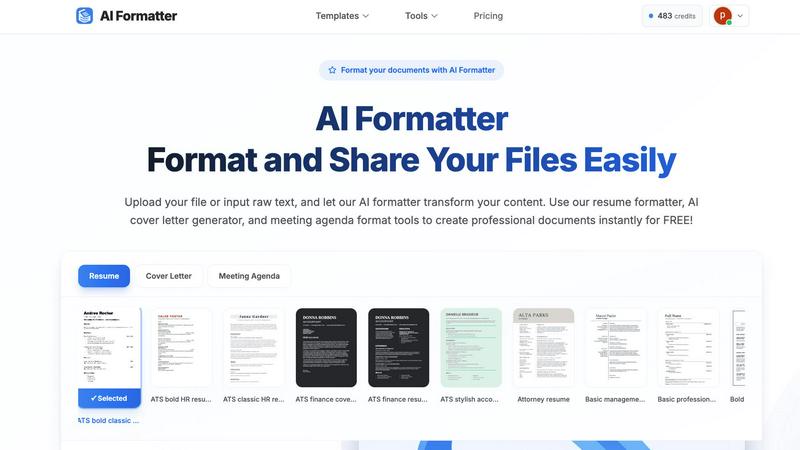
AI Formatter offers an extensive library of 162 professional templates, specifically designed for ATS optimization. This ensures that your resumes and cover letters not only meet aesthetic standards but also pass through automated screening processes effectively.
Automatic Formatting
Once you upload your content or input raw text, the AI Formatter takes over, applying professional formatting and structure instantly. This feature minimizes manual work, allowing users to focus on the quality of their content rather than the complexities of formatting.
Intuitive Editing Tools
After the AI processes your document, you can review and customize it using an intuitive editor. This feature lets you make necessary adjustments easily, ensuring that the final output aligns with your vision and brand.
Multiple Format Downloads
AI Formatter allows users to download their polished documents in various formats such as Word and PDF. This flexibility ensures that you can choose the best format for your needs, whether for print or digital sharing.
LuxSign
Multiple Signature Methods
LuxSign offers various signature methods to accommodate different preferences. Users can draw their signature with a mouse, type their name, or upload an image of their signature. This flexibility ensures quick and easy signing, catering to diverse user needs.
Advanced Security Measures
Security is paramount with LuxSign. The platform employs industry-standard encryption for document storage and transmission, ensuring that sensitive data remains secure. Additionally, documents are hosted on secure servers in Luxembourg, reinforcing compliance with EU data protection regulations.
Collaboration Workspaces
For teams that require seamless collaboration, LuxSign provides dedicated workspaces. These shared environments allow team members to organize documents, manage access rights, and collaborate on signing workflows, enhancing productivity and efficiency.
Complete Audit Trail
LuxSign maintains comprehensive audit trails for every document signed, providing detailed logs with timestamps, signer information, and IP addresses. This feature not only aids in compliance but also ensures transparency and accountability throughout the signing process.
Use Cases
AI Formatter
Job Seekers
For job seekers, AI Formatter provides a reliable way to create ATS-optimized resumes and cover letters that stand out in competitive job markets. The ability to transform raw content into professional documents quickly can significantly enhance your job application process.
Business Professionals
Business professionals can utilize AI Formatter to produce consistent invoices, meeting agendas, and reports. The tool ensures that all documents maintain a professional appearance, reinforcing brand identity and credibility.
Academics and Researchers
Academics can streamline their report writing and presentation materials using AI Formatter. By transforming raw notes and drafts into well-structured documents, they can focus on research and analysis instead of formatting headaches.
Freelancers and Entrepreneurs
Freelancers and entrepreneurs benefit from AI Formatter by creating polished proposals and contracts. The tool helps ensure that all client-facing documents are professional and visually appealing, enhancing the chances of winning new business.
LuxSign
Legal Agreements
Law firms and legal departments can utilize LuxSign to streamline the signing of contracts and agreements. With its compliance with eIDAS SES, legal documents signed through LuxSign hold validity across the EU, ensuring that legal requirements are met.
Human Resources Onboarding
HR departments can simplify the onboarding process for new employees by using LuxSign for employment contracts and policy documents. The ability to send documents for signature and track their status in real-time makes the onboarding process more efficient.
Real Estate Transactions
Real estate professionals can benefit from LuxSign by expediting the signing of purchase agreements and lease contracts. The platform’s multiple signer capabilities are perfect for transactions involving buyers, sellers, and agents.
Financial Services
Financial institutions can leverage LuxSign for signing loan agreements, investment documents, and other financial contracts. The platform’s robust security measures and compliance with regulations make it a trustworthy solution for sensitive financial transactions.
Overview
About AI Formatter
AI Formatter from Sun Sky LLC is an innovative cloud-based SaaS platform designed to alleviate the frustration of document formatting. If you've ever spent hours perfecting your content, only to face the daunting task of making it visually appealing, this tool is a breath of fresh air. With AI Formatter, users can upload files in various formats such as Word, PDF, or TXT, or simply input raw text. Within seconds, the AI processes this content and transforms it into a polished, professional document tailored to specific needs. Its standout feature is the ATS optimization, boasting a 95%+ pass rate on Applicant Tracking Systems, ensuring that resumes and other professional documents not only look good but are also seen by potential employers. Whether you're a job seeker struggling with endless templates, a business professional needing consistent documentation, or an academic aiming for streamlined reports, AI Formatter serves as your personal formatting assistant, saving you precious time and enhancing your professional image. With an initial offering of 10 free credits to explore its capabilities, trying out AI Formatter is a no-brainer for anyone serious about their documentation needs.
About LuxSign
LuxSign is a cutting-edge electronic signature platform designed for businesses that demand a high level of security and compliance. Developed in Luxembourg, LuxSign prioritizes data protection by ensuring that all documents are encrypted end-to-end and stored exclusively within the country, adhering to GDPR regulations. This cloud-based solution is ideal for companies operating within the European Union, as it complies with eIDAS SES standards, providing legal validity for contracts across member states. With its user-friendly interface, LuxSign allows users to sign and manage documents quickly and efficiently. Features such as customizable signing workflows, automated email notifications, and a robust REST API set LuxSign apart as a top-notch choice for businesses seeking a reliable electronic signature solution.
Frequently Asked Questions
AI Formatter FAQ
How does AI Formatter ensure ATS compatibility?
AI Formatter is designed with ATS optimization in mind, utilizing templates and formatting rules that are recognized by Applicant Tracking Systems, increasing the likelihood of your documents being seen by recruiters.
What file formats does AI Formatter support?
AI Formatter supports a variety of file formats including PDF, DOC, DOCX, and TXT, making it versatile for different types of documents and user preferences.
Is there a limit to the number of documents I can format?
While users receive 10 free credits to start, additional details regarding formatting limits or subscription options can be explored within the platform to accommodate various needs.
Can I edit my documents after formatting?
Yes, AI Formatter provides an intuitive editing tool that allows you to customize your formatted documents, ensuring that you can make any necessary adjustments before finalizing your output.
LuxSign FAQ
How does LuxSign ensure document security?
LuxSign employs end-to-end encryption, which secures documents during upload, storage, and transmission. Additionally, all data is hosted on secure servers located in Luxembourg, ensuring compliance with EU data protection standards.
What types of documents can I sign with LuxSign?
LuxSign supports various document formats, including PDF, DOC, and DOCX. Users can easily upload files of up to 10MB, making it versatile for different business needs.
Can I customize the signing workflow?
Yes, LuxSign allows users to create both parallel and sequential signing workflows. This feature facilitates better control over the signing process, enabling users to designate the order in which signers receive documents.
What support options are available for LuxSign users?
LuxSign offers email support for all users, with premium plans providing priority support. This ensures that users can receive assistance promptly, enhancing their overall experience with the platform.
Alternatives
AI Formatter Alternatives
AI Formatter is a cloud-based SaaS platform designed to transform raw text into professionally formatted documents with ease. This tool is a game-changer for users who find document formatting time-consuming and frustrating, especially when it comes to optimizing for Applicant Tracking Systems (ATS). Users often seek alternatives due to various reasons, including pricing concerns, specific feature requirements, or the need for compatibility with different platforms. When looking for an alternative to AI Formatter, consider factors such as the variety of templates offered, the quality of AI formatting, user-friendliness, and the ability to meet specific professional needs. Assessing these features can help you find a solution that aligns with your requirements, ultimately saving you time and improving your document presentation.
LuxSign Alternatives
LuxSign is an electronic signature platform developed in Luxembourg that operates within the realm of productivity and management tools. It is designed to facilitate secure document signing while ensuring compliance with eIDAS SES regulations across the European Union. Businesses often seek alternatives to LuxSign for various reasons, such as pricing constraints, specific feature sets, or integration capabilities that align more closely with their operational needs. When searching for an alternative to LuxSign, users should consider factors such as the level of security offered, the ease of use of the interface, and the ability to customize workflows. It’s also vital to evaluate the platform's compatibility with existing tools and systems, as well as the support and customer service provided.