AI Formatter vs Outbid
Side-by-side comparison to help you choose the right tool.
Transform raw text into polished professional documents effortlessly with AI Formatter’s intuitive tools and templates.
Last updated: March 1, 2026

OutBid sends instant job alerts from Upwork and AI-crafted proposals via Telegram, helping freelancers apply quickly and secure more jobs.
Last updated: March 19, 2026
Visual Comparison
AI Formatter
Outbid

Feature Comparison
AI Formatter
Template Selection
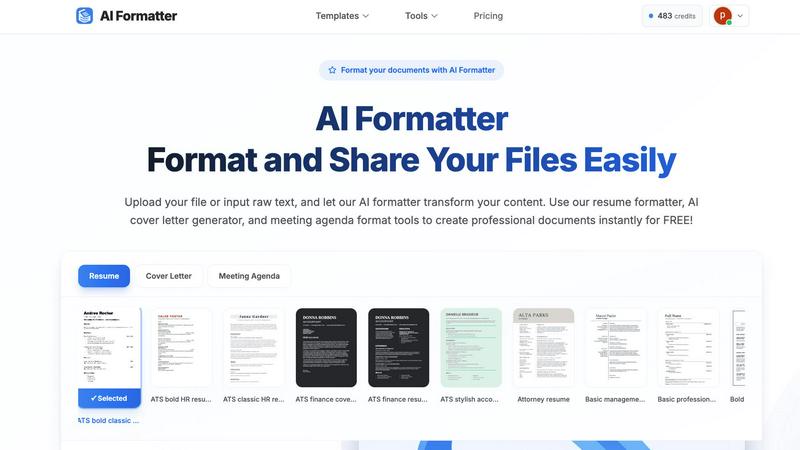
AI Formatter offers an extensive library of 162 professional templates, specifically designed for ATS optimization. This ensures that your resumes and cover letters not only meet aesthetic standards but also pass through automated screening processes effectively.
Automatic Formatting
Once you upload your content or input raw text, the AI Formatter takes over, applying professional formatting and structure instantly. This feature minimizes manual work, allowing users to focus on the quality of their content rather than the complexities of formatting.
Intuitive Editing Tools
After the AI processes your document, you can review and customize it using an intuitive editor. This feature lets you make necessary adjustments easily, ensuring that the final output aligns with your vision and brand.
Multiple Format Downloads
AI Formatter allows users to download their polished documents in various formats such as Word and PDF. This flexibility ensures that you can choose the best format for your needs, whether for print or digital sharing.
Outbid
Instant Alerts
OutBid provides instant notifications within seconds of a new job being posted on Upwork. While most freelancers may check listings hours later, OutBid ensures you are already in the application process, giving you a competitive edge.
AI Proposals
With OutBid, each proposal is crafted using advanced AI technology, resulting in personalized drafts for every job. This feature allows users to quickly copy, tweak, and submit proposals with just a tap, streamlining the application process significantly.
Smart Filtering
OutBid's smart filtering system allows freelancers to see only the jobs that are worth their time. Users can filter job listings based on skills, budget, experience level, and even quiet hours, ensuring a tailored job search experience.
War Room Strategy Mode
In highly competitive job markets, strategy is essential. OutBid's War Room strategy mode enables users to add custom instructions and regenerate proposals, allowing them to stand out even in crowded job listings.
Use Cases
AI Formatter
Job Seekers
For job seekers, AI Formatter provides a reliable way to create ATS-optimized resumes and cover letters that stand out in competitive job markets. The ability to transform raw content into professional documents quickly can significantly enhance your job application process.
Business Professionals
Business professionals can utilize AI Formatter to produce consistent invoices, meeting agendas, and reports. The tool ensures that all documents maintain a professional appearance, reinforcing brand identity and credibility.
Academics and Researchers
Academics can streamline their report writing and presentation materials using AI Formatter. By transforming raw notes and drafts into well-structured documents, they can focus on research and analysis instead of formatting headaches.
Freelancers and Entrepreneurs
Freelancers and entrepreneurs benefit from AI Formatter by creating polished proposals and contracts. The tool helps ensure that all client-facing documents are professional and visually appealing, enhancing the chances of winning new business.
Outbid
Quick Job Applications
Freelancers who want to apply for jobs as soon as they are posted can rely on OutBid to deliver alerts in under a minute, enabling them to submit applications faster than their competitors.
Proposal Assistance for New Freelancers
New freelancers who struggle with crafting compelling proposals can leverage OutBid's AI-generated drafts, making it easier for them to start applying for jobs confidently without worrying about proposal quality.
Time-Saving for Busy Professionals
Freelancers with demanding schedules can benefit from OutBid's 24/7 monitoring. This means they can focus on their current projects while still being alerted to new job opportunities, saving them countless hours.
Strategic Positioning in Competitive Fields
Experienced freelancers looking to enhance their application strategy can utilize the War Room strategy mode. This feature enables them to tweak their proposals and instructions, helping them to differentiate themselves in a crowded marketplace.
Overview
About AI Formatter
AI Formatter from Sun Sky LLC is an innovative cloud-based SaaS platform designed to alleviate the frustration of document formatting. If you've ever spent hours perfecting your content, only to face the daunting task of making it visually appealing, this tool is a breath of fresh air. With AI Formatter, users can upload files in various formats such as Word, PDF, or TXT, or simply input raw text. Within seconds, the AI processes this content and transforms it into a polished, professional document tailored to specific needs. Its standout feature is the ATS optimization, boasting a 95%+ pass rate on Applicant Tracking Systems, ensuring that resumes and other professional documents not only look good but are also seen by potential employers. Whether you're a job seeker struggling with endless templates, a business professional needing consistent documentation, or an academic aiming for streamlined reports, AI Formatter serves as your personal formatting assistant, saving you precious time and enhancing your professional image. With an initial offering of 10 free credits to explore its capabilities, trying out AI Formatter is a no-brainer for anyone serious about their documentation needs.
About Outbid
OutBid is a groundbreaking tool designed specifically for freelancers who want to rise above the competition in the Upwork marketplace. By continuously monitoring job postings around the clock, OutBid ensures that users receive instant alerts via Telegram, allowing them to be among the first to apply for new opportunities. This critical advantage empowers freelancers to respond to job postings in less than 60 seconds, which significantly boosts their visibility to potential clients. Each alert includes a customized, AI-generated proposal draft tailored to the specific job description and the freelancer's skills, making the application process efficient and straightforward. OutBid caters to freelancers of all experience levels, whether you are a seasoned professional with a busy schedule or a newcomer grappling with proposal writing. By simplifying the application process and offering real-time insights, OutBid not only helps freelancers secure more jobs but also maximizes their earning potential in a competitive landscape.
Frequently Asked Questions
AI Formatter FAQ
How does AI Formatter ensure ATS compatibility?
AI Formatter is designed with ATS optimization in mind, utilizing templates and formatting rules that are recognized by Applicant Tracking Systems, increasing the likelihood of your documents being seen by recruiters.
What file formats does AI Formatter support?
AI Formatter supports a variety of file formats including PDF, DOC, DOCX, and TXT, making it versatile for different types of documents and user preferences.
Is there a limit to the number of documents I can format?
While users receive 10 free credits to start, additional details regarding formatting limits or subscription options can be explored within the platform to accommodate various needs.
Can I edit my documents after formatting?
Yes, AI Formatter provides an intuitive editing tool that allows you to customize your formatted documents, ensuring that you can make any necessary adjustments before finalizing your output.
Outbid FAQ
How fast are the alerts?
OutBid sends alerts within seconds of a job being posted on Upwork, allowing you to apply almost immediately and stay ahead of the competition.
Do I need to be tech-savvy?
Not at all! OutBid is designed to be user-friendly and easy to navigate. If you can use Telegram, you can use OutBid without any technical expertise.
Can I customize the proposals?
Yes, each AI-generated proposal can be easily customized. You can tweak specific phrases or details to better match your style before submitting.
Is this affiliated with Upwork?
No, OutBid is an independent tool. While it integrates seamlessly with Upwork, it is not officially affiliated with the platform and operates separately to enhance your freelancing experience.
Alternatives
AI Formatter Alternatives
AI Formatter is a cloud-based SaaS platform designed to transform raw text into professionally formatted documents with ease. This tool is a game-changer for users who find document formatting time-consuming and frustrating, especially when it comes to optimizing for Applicant Tracking Systems (ATS). Users often seek alternatives due to various reasons, including pricing concerns, specific feature requirements, or the need for compatibility with different platforms. When looking for an alternative to AI Formatter, consider factors such as the variety of templates offered, the quality of AI formatting, user-friendliness, and the ability to meet specific professional needs. Assessing these features can help you find a solution that aligns with your requirements, ultimately saving you time and improving your document presentation.
Outbid Alternatives
OutBid is an innovative tool designed to enhance the productivity of freelancers by delivering instant job alerts from Upwork and AI-generated proposals via Telegram. This productivity and management application empowers users to stay ahead in the competitive freelance market, facilitating quicker application processes and increasing the likelihood of securing jobs. Users often seek alternatives to OutBid for various reasons, such as pricing, specific feature sets, or compatibility with different platforms. When considering alternatives, it's essential to evaluate the specific needs of your freelance business, including the level of automation desired, integration with other tools, and user experience. A suitable alternative should streamline your workflow and enhance your job application process without compromising on functionality.