ConvertBankToExcel vs Resume Free Pro
Side-by-side comparison to help you choose the right tool.

ConvertBankToExcel
Effortlessly convert PDF bank statements to Excel and other formats in under 30 seconds with 99% accuracy.
Last updated: February 28, 2026

Resume Free Pro
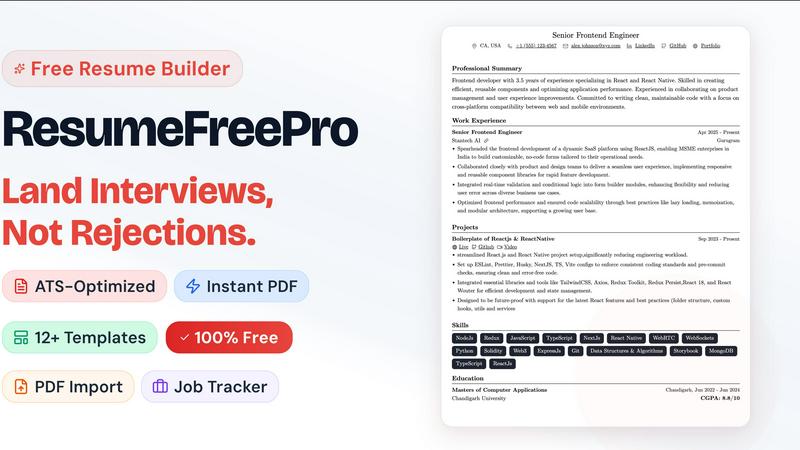
Land interviews, not silence, with this free ATS-optimized resume builder that creates professional resumes in minutes.
Last updated: April 13, 2026
Visual Comparison
ConvertBankToExcel

Resume Free Pro
Feature Comparison
ConvertBankToExcel
99%+ Accuracy Rate
ConvertBankToExcel boasts an impressive accuracy rate of over 99%, verified by CPA professionals. This ensures that the data extracted from bank statements is reliable and precise, significantly reducing the risk of errors in financial reporting and analysis.
Fast Processing Time
The platform is designed for efficiency, processing bank statements in under 30 seconds on average. This rapid turnaround time allows accounting professionals to quickly import data into their accounting systems, enhancing workflow and saving valuable time.
Extensive Bank Support
With support for over 20 major US and Canadian banks, ConvertBankToExcel is versatile and widely applicable. It automatically detects the bank associated with the statement, streamlining the conversion process and ensuring compatibility with various banking institutions.
Multiple Export Formats
ConvertBankToExcel offers a wide range of export formats, including Excel, CSV, QuickBooks (QBO/QFX/OFX/IIF), JSON, and XML. This flexibility allows users to choose the format that best fits their needs, whether for manual analysis, importing into accounting software, or for personal finance management.
Resume Free Pro
ATS-Certified Template Library
Forget pretty designs that get shredded by automated Applicant Tracking Systems (ATS). Resume Free Pro’s core strength is its curated collection of over 12 single-column, two-column, modern, and executive templates that are rigorously tested to pass ATS screening. This isn't a guess; it's a guarantee. The layouts are designed with clean formatting, standard headings, and logical structures that ensure your content is parsed correctly every time. You get the visual appeal of a modern design with the technical backbone needed to actually land an interview.
Real-Time Visual Editor & PDF Export
This is where the magic happens. The WYSIWYG (What You See Is What You Get) editor lets you type, format, and adjust your resume while watching a live preview update simultaneously. Change a font, tweak a margin, or reorder a section—you see the exact result instantly. When you're ready, the export is a pixel-perfect, A4-formatted PDF with intelligent page breaks. You get unlimited downloads, and critically, there are zero watermarks. The file you create is professionally yours.
LinkedIn Import & Resume Parser
Dreading the hours of manual data entry? These two features are absolute game-changers. Simply paste your LinkedIn profile URL, and Resume Free Pro will intelligently pull in your work history, education, and skills, auto-populating the editor. Alternatively, upload your old, outdated PDF or DOCX resume, and the built-in AI parser will meticulously extract every section—from contact info to bullet points—into clean, editable fields. It’s the fastest way to modernize your application.
Integrated Job Application Tracker
Resume Free Pro understands that the job search is a pipeline. That’s why it includes a powerful, built-in Kanban-style tracker. You can create customizable stages (e.g., Applied, Interview, Offer), add job cards with notes and deadlines, and even use a calendar view. It keeps your entire search organized in one place, turning a scattered, stressful process into a manageable project. This feature alone elevates it from a simple builder to a strategic career management platform.
Use Cases
ConvertBankToExcel
Mortgage Applications
Accounting professionals can utilize ConvertBankToExcel to prepare organized bank statements for mortgage applications. This ensures that lenders receive accurate and well-structured financial documentation, facilitating smoother approval processes.
Tax Preparation
During tax season, ConvertBankToExcel can significantly ease the burden of organizing financial statements. Users can quickly convert bank statements into formats required for tax filing, helping ensure compliance with IRS regulations and deadlines.
Visa Applications
Many visa applications require proof of financial stability. With ConvertBankToExcel, users can convert their bank statements into clear and concise formats that meet the requirements of visa and immigration applications, enhancing their chances of approval.
Business Financial Management
Small business owners can leverage ConvertBankToExcel to maintain accurate financial records. By converting bank statements into manageable formats, they can track expenses, revenue, and overall financial health more effectively, aiding in better decision-making.
Resume Free Pro
The Career Changer
Switching industries or roles is daunting. You need a resume that translates your existing skills into the new field's language. Resume Free Pro helps by providing clean, professional templates that focus on transferable skills and achievements. The parsing tool lets you quickly import your old resume, and the visual editor makes it easy to restructure and emphasize relevant experience, creating a compelling narrative for your new path without starting from a blank page.
The Recent Graduate
With limited professional experience, graduates need a resume that maximizes impact. The ATS-optimized templates ensure their application isn't filtered out before a human sees it. The guided prompts in the editor help them articulate projects, coursework, and internships effectively. The completely free model is perfect for students on a budget, allowing them to create a polished, professional document that competes with seasoned candidates.
The Active Job Seeker Managing Multiple Applications
When you're applying to dozens of roles, organization is key. Resume Free Pro’s integrated Job Application Tracker is a lifesaver. You can build your resume, tailor it for a specific role, and then immediately create a card for that application in your pipeline—tracking its status, interview dates, and follow-ups all in one unified dashboard. It eliminates spreadsheets and sticky notes, bringing clarity and control to a hectic process.
The Professional Needing a Rapid Update
Maybe you're happy in your role but need an updated resume for a sudden opportunity or performance review. The LinkedIn import feature is perfect for this. In under two minutes, you can have your current profile transformed into a fresh, professionally formatted resume. The real-time editor then lets you quickly add recent accomplishments before downloading a pristine PDF, ready to send.
Overview
About ConvertBankToExcel
ConvertBankToExcel is an innovative, AI-powered platform designed specifically for accounting professionals to streamline the process of converting bank statements into usable formats. This technology addresses the cumbersome task of manual data entry, which is often time-consuming and prone to errors. By automatically extracting transaction data from PDF bank statements, ConvertBankToExcel enables users to convert files into popular formats like Excel, CSV, and QuickBooks in a matter of seconds. With a proven accuracy rate of over 99%, verified by CPAs, this tool is trusted by more than 50,000 accounting professionals who have collectively processed over 1 million bank statements. Ideal for CPAs, bookkeepers, and financial analysts, ConvertBankToExcel not only saves time but also enhances productivity and accuracy, allowing professionals to focus on more strategic tasks.
About Resume Free Pro
Let's be brutally honest: the job market is a battlefield, and your resume is your primary weapon. Yet, for far too long, we've been told we need to pay a premium just to craft a document that presents our professional worth. Resume Free Pro is the long-overdue rebellion against that notion. This is a completely free, no-strings-attached online resume builder engineered for one purpose: to get you hired. It’s built for every job seeker—from fresh graduates to seasoned executives—who is tired of subscription traps, watermarks, and credit card requirements for what should be a fundamental tool. The core value proposition is stunningly simple: professional, ATS-optimized resumes that actually get seen by human recruiters, created and downloaded in minutes, entirely for free. With features like LinkedIn import and a resume parser, it eliminates the grunt work. With its real-time visual editor and pixel-perfect PDF export, it delivers stunning, controlled results. And with a built-in job application tracker, it becomes the central command center for your entire job search. This isn't just another template site; it's a comprehensive career toolkit that respects your time, your wallet, and your ambition.
Frequently Asked Questions
ConvertBankToExcel FAQ
How does ConvertBankToExcel ensure the security of my data?
ConvertBankToExcel employs bank-grade encryption to protect your data during the conversion process. Additionally, all uploaded files are automatically deleted after 24 hours to ensure maximum security and privacy.
Can ConvertBankToExcel handle both digital and scanned PDFs?
Yes, ConvertBankToExcel's AI-powered OCR technology is capable of processing both digital and scanned PDF bank statements. This means you can convert a wide variety of statement formats with ease.
Is there a limit to the number of pages I can convert for free?
Yes, ConvertBankToExcel offers a free tier that allows users to convert up to 7 pages daily without the need for a credit card. This is a great way to test the platform before committing to a paid plan.
What accounting software can I import my converted statements into?
Converted statements can be imported into popular accounting software including QuickBooks, Quicken, and Xero. This compatibility makes it easy for users to integrate their financial data into their existing systems.
Resume Free Pro FAQ
Is Resume Free Pro really free forever?
Yes, absolutely. The core product—including all ATS-certified templates, the visual editor, unlimited PDF downloads without watermarks, LinkedIn import, resume parsing, the job tracker, and cloud storage—is 100% free forever. No subscription, no trial period, no credit card required. The company offers optional AI-powered premium features for those who want them, but the essential toolkit for building a winning resume is completely free.
How do the ATS-optimized templates work?
ATS software scans resumes for keywords and parses information into categories. Poor formatting (like complex graphics, unusual fonts, or text boxes) can cause parsing errors, getting your resume rejected. Resume Free Pro's templates are built with clean, standard code and logical section hierarchies that ATS systems can read perfectly. They are designed to look great to humans while also being technically compliant with the software that screens them first.
Can I customize the resume templates?
Extensively. You have full design control within the editor. This includes changing fonts, colors, line spacing, margin sizes, and header layouts. You can also reorder entire sections (like putting Skills before Experience) with simple drag-and-drop. This level of customization ensures your resume reflects your personal brand while maintaining its ATS-friendly integrity.
What are the "AI-powered premium features"?
These are advanced, optional tools that use artificial intelligence to enhance your resume further. They include features like resume tailoring, where the AI suggests edits to better match a specific job description; ATS compatibility scoring, which gives your resume a grade and improvement tips; keyword optimization suggestions; and a bullet point improver that helps strengthen your accomplishment statements. The core builder remains free without these.
Alternatives
ConvertBankToExcel Alternatives
ConvertBankToExcel is an AI-driven bank statement conversion tool designed specifically for accounting professionals. By transforming PDF bank statements into editable formats like Excel, CSV, and QuickBooks, it streamlines data entry processes, saving users significant time and effort. As financial tasks become increasingly complex, many users seek alternatives due to factors such as pricing, specific feature requirements, or integration capabilities with their existing platforms. When choosing an alternative to ConvertBankToExcel, consider the accuracy of data extraction, supported file formats, processing speed, and security measures. It's essential to assess how well the alternative meets your unique needs, including compatibility with your banking institutions and the scalability of the solution for your business.
Resume Free Pro Alternatives
Resume Free Pro is a standout in the crowded field of free online resume builders, offering a surprisingly robust suite of tools for job seekers. It belongs to the category of career and productivity software, specifically designed to help you create, manage, and optimize your job application materials without ever reaching for your wallet. People look for alternatives for various reasons. Some may outgrow the platform's core features and seek more advanced analytics or deeper AI integration. Others might have specific workflow needs, like wanting a fully offline desktop application or a tool that integrates directly with their company's HR software. The search often comes down to finding the perfect balance of power, simplicity, and cost for an individual's unique job hunt. When evaluating other options, focus on what truly matters for your success. Prioritize ATS-friendly templates and clean PDF exports above flashy designs. Consider whether you need collaborative features, extensive storage, or mobile editing. Ultimately, the best alternative is one that removes friction from your process, letting you focus on landing the interview, not fighting with formatting.