DigitalMagicWand vs QuickImg
Side-by-side comparison to help you choose the right tool.

DigitalMagicWand
DigitalMagicWand transforms your creative process by seamlessly generating and refining visuals, audio, video, and text with AI precision.
Last updated: March 18, 2026

QuickImg is my top pick for effortlessly generating and editing stunning images with AI.
Last updated: February 28, 2026
Visual Comparison
DigitalMagicWand

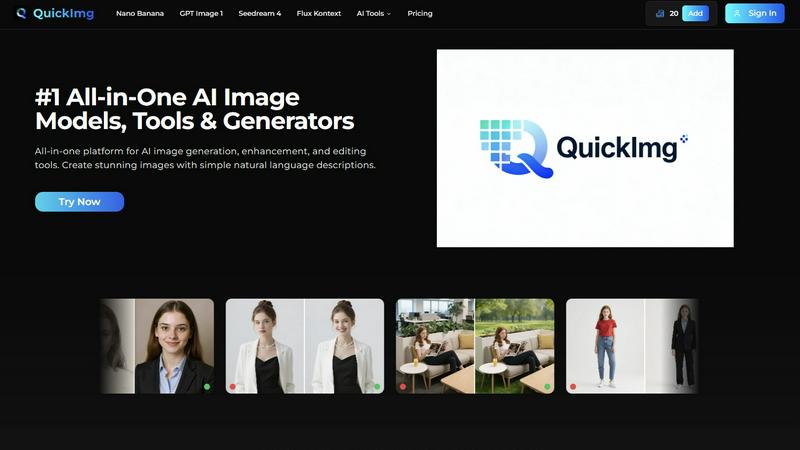
QuickImg
Feature Comparison
DigitalMagicWand
Accurate AI Detector for Text
The Accurate AI Detector for Text feature allows users to effortlessly determine if a piece of writing is human-generated or AI-created. With just one click, you receive confidence scores that detail the likelihood of AI involvement, making it an essential tool for educators, editors, and anyone who relies on the authenticity of written content.
Undetectable AI Text Humanizer
The Undetectable AI Text Humanizer transforms machine-generated text into natural, human-like writing. Utilizing proprietary linguistic algorithms, it removes statistical patterns that trigger AI detectors while maintaining the original message. This feature is perfect for professionals needing to present AI-generated content in a more humanized manner.
Digital Ear™: Convert Piano Tracks to MIDI
Digital Ear™ offers a specialized edition for piano that provides accurate and expressive MIDI transcription. This feature leverages over two decades of expertise to convert complex piano performances into MIDI format, making it an invaluable tool for musicians and producers looking to capture and manipulate musical ideas seamlessly.
UnMixIt™ Pro: Stems for Musicians & DJs
UnMixIt™ Pro allows users to isolate various elements of a track such as vocals, drums, and instruments with studio-grade precision. This feature is ideal for DJs crafting custom mashups, producers creating remixes, and audio professionals restoring archival content, ensuring that you have complete creative control over your music projects.
QuickImg
Unified Multi-Model AI Playground
This is, hands down, my favorite feature. Instead of subscribing to five different services, QuickImg gives you a curated dashboard of the latest and greatest AI models. Want the hyper-detailed text rendering of GPT Image 1 for a logo concept? Need the blazing speed and 4K output of Seedream 4 for a landscape? It's all here. This consolidation saves you immense time and money, letting you pick the perfect tool for the job without ever leaving the platform. It turns the complex decision of "which AI should I use?" into a simple, informed choice.
Natural Language Command Center
QuickImg completely eliminates the barrier of "prompt engineering." The platform is built around the premise that you should describe your vision as you would to a colleague. Type in "a cozy bookstore on a rainy street at night" or "change this model's jacket to a leather bomber" and the AI handles the technical translation. This intuitive approach unlocks creativity for non-technical users while speeding up the workflow for experts who are tired of syntactic guesswork.
One-Click Professional Editing Tools
Beyond generation, QuickImg shines with its arsenal of specialized, single-function tools. Need a transparent background? The "PNG Maker" does it in one click. Have a photo ruined by a watermark? The "AI Watermark Remover" is your savior. These tools, like the superb "AI Background Changer" and "Remove Text From Image," take complex Photoshop-level tasks and distill them into instant actions. They are incredibly reliable for quick fixes and are a major reason I keep QuickImg open in a permanent browser tab.
Ready-to-Use Template Library
For those moments when you're staring at a blank canvas with zero inspiration, the template library is a lifesaver. It offers professionally designed starting points for common scenarios—social media posts, product mockups, marketing banners. This isn't just about convenience; it's a learning tool that shows you what's possible and helps you achieve polished results instantly, ensuring brand consistency and saving hours of layout work.
Use Cases
DigitalMagicWand
Academic Integrity Verification
Educators and researchers can utilize the Accurate AI Detector for Text to verify the authenticity of written assignments and papers. This ensures that students submit original work, maintaining the integrity of academic standards.
Content Creation for Marketing
Marketers can leverage tools like the AI Image Editor and Undetectable AI Text Humanizer to create compelling content. By generating engaging visuals and optimizing written material, businesses can enhance their marketing efforts and attract more customers.
Music Production and Arrangement
Musicians can benefit from Digital Ear™ and UnMixIt™ Pro to streamline their workflow. Whether converting intricate piano compositions into MIDI or isolating vocal tracks for remixing, these features provide the technical support needed to elevate their music production process.
Creative Writing and Storytelling
Writers can harness the power of AI Text Tools to refine their narratives. The Undetectable AI Text Humanizer helps in creating polished drafts, while the Accurate AI Detector ensures that the final product is authentic and resonates well with the audience.
QuickImg
Rapid Social Media Content Creation
For social media managers and content creators, QuickImg is a game-changer. You can generate a week's worth of unique, eye-catching graphics for posts, stories, and ads in an afternoon. Use the templates for consistency, generate original artwork for blog headers, or use the "Photo to Anime" tool to create viral-style content. The speed and variety directly translate to a more engaged audience and a less stressed creator.
E-commerce Product Visualization
Online sellers can use QuickImg to generate professional product photos in various settings without expensive photoshoots. Need your product on a beach, in a modern kitchen, or with a different color variant? Describe it. You can also use the "Change Background Color" and "Green Screen" tools to create clean, uniform catalog images. It dramatically reduces costs and accelerates listing times.
Creative Brainstorming & Prototyping
Designers, writers, and marketing teams can use QuickImg as a dynamic brainstorming partner. Quickly visualize concepts for characters, book covers, website layouts, or ad campaigns before committing to final art. The ability to iterate rapidly with different models ("what does this look like in Flux Kontext style?") fuels creativity and aligns team vision faster than any mood board.
Personal Fun and Digital Art Projects
Its appeal isn't just professional. Hobbyists can have a blast transforming personal photos into anime characters with "Photo to Anime," creating fantastical avatars with the "AI Character Generator," or even using the delightfully weird "Pet to Human" tool for some laughs. It makes advanced digital art creation accessible and enjoyable for everyone.
Overview
About DigitalMagicWand
DigitalMagicWand™ is an innovative online platform designed to meet the demands of modern creators, offering an extensive suite of AI-powered tools for image, audio, video, and text processing. Tailored for professionals, educators, musicians, and content creators alike, it enables users to enhance, transform, and create compelling digital content with ease. The main value proposition of DigitalMagicWand lies in its cutting-edge artificial intelligence technology, which simplifies complex processes, drastically reduces time spent on manual tasks, and enhances creativity. Whether you are a marketer looking to generate eye-catching graphics, a musician wanting to convert audio files, or a writer needing to refine text, this all-in-one platform provides the tools you need to bring your ideas to life. With a user-friendly interface and powerful capabilities, DigitalMagicWand is your go-to solution for all things digital.
About QuickImg
Let's cut through the noise: QuickImg is the Swiss Army knife of AI image creation that actually lives up to the "all-in-one" hype. In a market flooded with single-purpose tools that force you to hop between a dozen different websites, QuickImg consolidates the entire workflow into one sleek, intuitive platform. Its core genius is democratization. It takes the intimidating, technical world of AI image generation and makes it accessible to absolutely anyone who can describe what they want in plain English. Forget crafting perfect, arcane prompts; you just tell it what you see in your mind's eye. But don't mistake its simplicity for a lack of power. Under the hood, it aggregates top-tier models like Google's Gemini 3 Pro (Nano Banana Pro), OpenAI's offerings, and ByteDance's Seedream 4, giving professionals the firepower they need without the friction. Whether you're a solo entrepreneur needing social media graphics, a marketer brainstorming ad concepts, a designer seeking rapid prototypes, or just someone who wants to turn their pet into a anime character for fun, QuickImg is your starting line and finish line. It’s not just a generator; it's a full suite covering creation, enhancement (like upscaling to 4K), and sophisticated editing (think background changes, object removal, style transfer), making it an indispensable tool for elevating any visual content strategy.
Frequently Asked Questions
DigitalMagicWand FAQ
What types of files can I upload for processing?
DigitalMagicWand supports various file types including text documents, audio files, and images. This versatility allows users to engage with multiple features seamlessly.
Is there a limit to how many documents I can process at once?
The platform is designed to handle bulk processing efficiently. However, specific limits may apply based on your subscription plan. Check the details within your account settings for more information.
Can I use DigitalMagicWand for commercial purposes?
Yes, DigitalMagicWand can be used for commercial projects. Just ensure that you adhere to any licensing agreements associated with the specific tools and outputs.
How secure is my data when using DigitalMagicWand?
DigitalMagicWand prioritizes user privacy and data security. All uploaded files are handled with the utmost confidentiality, and measures are in place to protect your information against unauthorized access.
QuickImg FAQ
Do I need any design experience to use QuickImg?
Absolutely not. This is the core of QuickImg's design philosophy. The platform is built for complete beginners. You interact using simple natural language descriptions and one-click tools. If you can describe what you want to see or know which problem you need to solve (e.g., "remove background"), you can achieve professional-grade results without any prior design or AI prompt skills.
What makes QuickImg different from other AI image generators?
The key difference is consolidation and curation. While most tools offer one model or one function, QuickImg is a unified platform. It gives you access to multiple leading AI models (like Nano Banana Pro, GPT Image 1) and a full suite of editing/enhancement tools (like upscaling, background removal) in one place. You don't need separate subscriptions for generation, editing, and upscaling. It's a complete workflow solution.
Which AI model on QuickImg is the best?
There's no single "best" model; it depends on your need. For images requiring flawless text (like posters or logos), I personally lean towards GPT Image 1. For ultra-high-resolution 4K outputs and speed, Seedream 4 is phenomenal. For advanced control and character consistency in edits, Flux Kontext is a powerhouse. The beauty of QuickImg is you can test them all on the same prompt to see which result you prefer.
Are the images I create owned by me?
Based on standard practices for platforms like this, you typically own the output images you create for personal and commercial use. However, it is always crucial to review QuickImg's specific Terms of Service for the most accurate and detailed information regarding licensing, usage rights, and any limitations, especially for very large-scale commercial projects.
Alternatives
DigitalMagicWand Alternatives
DigitalMagicWand is an innovative online platform that harnesses the power of artificial intelligence to offer tools for processing visuals, audio, video, and text. As an AI assistant, it caters to a wide range of creative and professional needs, providing users with the ability to enhance and transform their digital content seamlessly. However, users often seek alternatives to DigitalMagicWand due to various reasons such as pricing concerns, specific feature requirements, or compatibility with different platforms. When considering alternatives, it's essential to evaluate factors such as user interface, the range of features offered, pricing structures, and customer support. You want an alternative that not only meets your budget but also aligns with your creative vision and workflow preferences. Flexibility, ease of use, and the ability to integrate with other tools or platforms can also play a significant role in your decision-making process.
QuickImg Alternatives
QuickImg is a powerful all-in-one AI platform for generating, enhancing, and editing images. It belongs to the category of AI assistants, specifically those focused on visual creation. It's designed to turn simple text descriptions into stunning visuals using multiple advanced models. Users often seek alternatives for various reasons. Some might find the pricing structure doesn't fit their budget, while others may need specific features QuickImg lacks, like integration with other tools or a different user interface. Platform needs, such as preferring a mobile-first experience or a desktop application, also drive the search for other options. When choosing an alternative, consider your primary use case. Are you mostly generating images from scratch, or do you need powerful editing tools? Evaluate the quality and style of the AI models, the ease of use, and the overall value for money. The right tool should align with your skill level and creative goals without unnecessary complexity.