DocuExtractor vs Fill PDF from Excel
Side-by-side comparison to help you choose the right tool.

DocuExtractor
DocuExtractor transforms messy receipts and invoices into clean, structured data effortlessly, saving you time and.
Last updated: February 28, 2026

Fill PDF from Excel
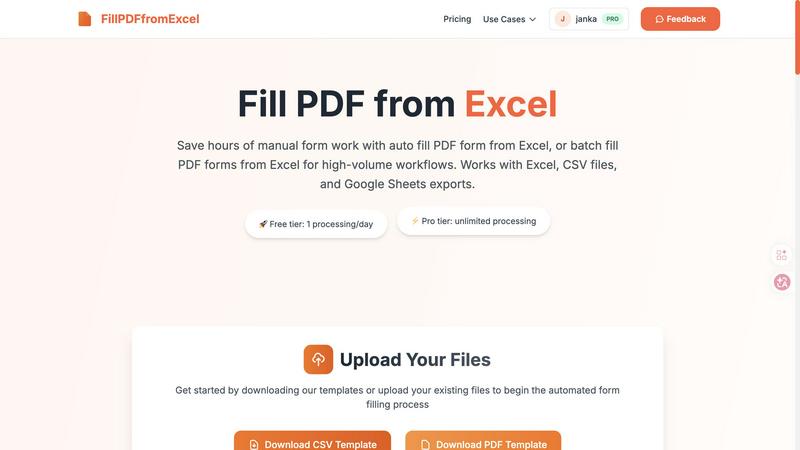
Fill PDF from Excel automates your form workflows by instantly populating PDFs with data from your spreadsheets.
Last updated: March 19, 2026
Visual Comparison
DocuExtractor

Fill PDF from Excel
Feature Comparison
DocuExtractor
Easy Document Upload
DocuExtractor allows users to effortlessly upload their financial documents with a simple drag-and-drop interface. Whether you are dealing with receipts, invoices, or bank statements, the upload process is quick and user-friendly, enabling users to process multiple documents in batches for maximum efficiency.
Intelligent Data Extraction
Using advanced optical character recognition (OCR) technology combined with deep learning and large language models (LLMs), DocuExtractor automatically extracts key information from documents. This feature ensures that essential data like payment details, tax amounts, and document numbers are accurately captured, significantly reducing the workload for finance professionals.
Flexible Output Formats
Once the data is extracted, users can choose to download their structured data in various formats, including CSV and Excel. This flexibility ensures that the output is compatible with a wide range of accounting software, making it simple to integrate into existing workflows without any manual cleanup.
Robust Security Measures
DocuExtractor prioritizes user privacy and data security. All documents uploaded for processing are automatically deleted after extraction, ensuring that sensitive financial information remains confidential. This level of security gives users peace of mind knowing their data is protected during the extraction process.
Fill PDF from Excel
Intelligent Field Mapping
This is the secret sauce and my absolute favorite feature. The tool doesn't just dump data; it actively scans your PDF form for fillable fields and attempts to match them with the column headers in your spreadsheet. While you should always review the mapping, this smart detection eliminates about 80% of the setup work. It understands that a column named "First_Name" likely corresponds to a PDF field asking for a first name, making the initial configuration surprisingly intuitive.
True Batch Processing Power
Forget filling one PDF at a time. This tool is engineered for scale. Each row in your Excel spreadsheet becomes a uniquely filled PDF document. Need 500 employment contracts for new hires? Upload one master PDF template and a spreadsheet with 500 rows of employee data. The system processes them all in one automated batch, outputting a neat set of completed, professional forms ready for distribution or signing. This is where you go from saving minutes to reclaiming entire workdays.
Flexible File Format Support
I appreciate tools that work within real-world workflows, and this one does exactly that. It accepts the most common data sources: native Excel files (.xlsx, .xls), universal CSV files, and exports from Google Sheets. This means your team isn't forced into a specific ecosystem. Whether your data lives in a legacy Excel macro sheet or a shared Google Sheet, you can leverage the automation without cumbersome file conversion steps first.
Reliable & Repeatable Workflows
Once you've perfected the mapping between your specific PDF template and data columns, you can save that configuration. This creates a reusable, hands-free processing pipeline. Next month, when you get a new CSV with updated client information for the same form type, you just upload the new data file and run the exact same flow. The consistency eliminates human error and turns a complex task into a simple, repeatable button-press operation.
Use Cases
DocuExtractor
Streamlining Bookkeeping Tasks
Bookkeepers can leverage DocuExtractor to automate the extraction of data from invoices and receipts, saving significant time and reducing the risk of human error. This allows them to focus on more value-added activities, such as financial analysis and reporting.
Accelerating Expense Reporting
Employees can use DocuExtractor to quickly upload their receipts for expense reporting. The tool extracts the necessary data, making it easy to compile expense reports without the hassle of manual entry, thus streamlining the reimbursement process.
Enhancing Financial Audits
During financial audits, auditors can utilize DocuExtractor to efficiently gather and process multiple documents. The high accuracy of data extraction minimizes the chances of discrepancies, making the audit process smoother and more reliable.
Supporting Small Business Owners
Small business owners can benefit from DocuExtractor by automating their financial documentation processes. With the ability to extract data quickly and accurately, they can keep their finances organized without needing extensive accounting knowledge or resources.
Fill PDF from Excel
HR & Employee Onboarding
HR departments are perpetually buried under paperwork. This tool is a game-changer for generating personalized offer letters, I-9 forms, W-4s, and benefits enrollment packets. Simply maintain a master spreadsheet of new hires with their personal details, and automatically produce a complete, error-free document packet for each individual. It streamlines what is typically a major administrative bottleneck.
Legal & Client Document Preparation
Law firms and paralegals can use it to populate standard client engagement letters, confidentiality agreements, or court forms. By pulling data from a case management spreadsheet or client list, they ensure accuracy in critical legal documents and free up billable hours previously spent on manual data entry, allowing focus on higher-value legal analysis.
Financial Services & Tax Preparation
Accountants and tax professionals can batch-generate client invoices, 1099 forms, or annual tax summary documents. By linking their client database (often already in Excel) to the relevant IRS or internal forms, they achieve massive efficiency during peak seasons, reduce transposition errors in sensitive financial data, and ensure every form is uniformly completed.
Educational Administration
Schools and training institutions can automate the creation of student enrollment forms, permission slips, or course certificates. Administrators can export a roster from their student information system into a CSV, and within minutes, have a filled PDF form for every single student, ready for parent signatures or filing.
Overview
About DocuExtractor
DocuExtractor is a cutting-edge AI tool designed to revolutionize the way finance professionals handle data extraction from receipts, invoices, and other financial documents. In an era where manual data entry is not only time-consuming but also prone to errors, DocuExtractor serves as a digital ally, automating the tedious process of data extraction. With its intelligent algorithms, this tool can process various formats such as PDFs, JPGs, and even crumpled receipts, converting them into clean, structured data ready for export in CSV or Excel formats. This functionality is not just beneficial but essential for accountants, bookkeepers, and business owners who want to reclaim their time and focus on more strategic tasks. With a remarkable accuracy rate of 99.6%, DocuExtractor goes beyond typical OCR capabilities by understanding the context of financial documents and automatically identifying key fields like dates, supplier names, total amounts, and more. By choosing DocuExtractor, users can eliminate manual entry, reduce errors, and enhance their overall productivity.
About Fill PDF from Excel
Let's be brutally honest: manually copying data from a spreadsheet into a PDF form is one of the most soul-crushingly tedious tasks in modern office work. It's a guaranteed recipe for errors, wrist strain, and wasted hours that could be spent on actual thinking. This is where Fill PDF from Excel comes in as a genuine lifesaver. It's a specialized automation tool with one laser-focused mission: to obliterate the manual process of populating PDF forms by intelligently pulling data directly from your Excel, CSV, or Google Sheets files. The core value proposition is breathtakingly simple yet powerful: configure your data-to-form mapping once, and then process hundreds or thousands of forms with a single click. It's built for professionals and teams drowning in high-volume paperwork—think HR onboarding documents, client contracts, tax forms, or registration packets. If you find yourself repeatedly opening the same PDF, tabbing between fields, and copying from a spreadsheet row, this tool isn't just a nice-to-have; it's an essential productivity upgrade that pays for itself in sanity and time saved.
Frequently Asked Questions
DocuExtractor FAQ
How does DocuExtractor ensure data accuracy?
DocuExtractor employs a combination of advanced OCR, deep learning, and LLMs to achieve a remarkable accuracy rate of 99.6%. This technology not only reads text but also understands the context of financial documents for precise data extraction.
Is my data safe with DocuExtractor?
Absolutely. DocuExtractor takes data security seriously. All uploaded documents are automatically deleted after processing, ensuring your sensitive information is protected and remains confidential at all times.
Can I process documents in different languages?
Yes, DocuExtractor supports over 45 languages with automatic language detection. This feature allows users from diverse backgrounds to efficiently extract data from documents in their native language.
What file formats does DocuExtractor support for uploads?
Users can upload a variety of file formats, including PDF, JPEG, PNG, WEBP, HEIC, and TIFF, with a maximum file size of 7 MB per image. This versatility allows for seamless document processing across different types of financial documents.
Fill PDF from Excel FAQ
What file formats are supported for the automation?
The tool supports PDF files with fillable form fields as the template. For your data source, it accepts Microsoft Excel files (.xlsx and .xls), Comma-Separated Values (CSV) files, and exports from Google Sheets. This covers the vast majority of data storage methods used by teams today.
Do you store the PDF or Excel files I upload?
Based on the provided information, a core feature is that uploaded files are processed to generate your results, but the service does not permanently store your uploaded PDF templates or data files as part of its standard operation. Always check the latest privacy policy for definitive details on data handling.
How does the tool handle checkbox fields in a PDF?
Checkbox fields are fully supported through your data file. You can populate them using simple indicators like "Yes"/"No", "True"/"False", or "1"/"0" in the corresponding spreadsheet column. The tool intelligently interprets these values and checks (or unchecks) the box in the final PDF accordingly.
Is there a free tier to test the service?
Yes, there is a free tier that allows you to process one PDF per day. This is perfect for testing the workflow with your own documents, verifying the field mapping accuracy, and seeing the quality of the output before committing to the unlimited Pro tier for high-volume work.
Alternatives
DocuExtractor Alternatives
DocuExtractor is an advanced AI-powered tool designed to transform messy financial documents like receipts and invoices into clean, structured data. It falls under the category of productivity and management software, specifically aimed at streamlining the data entry process for accountants and bookkeepers. Users often seek alternatives to DocuExtractor due to factors such as pricing, feature sets, compatibility with various platforms, or specific needs related to data security and integration with existing systems. When looking for an alternative, it's essential to consider the accuracy of data extraction, the ability to process multiple document formats, and the efficiency of batch processing capabilities. Additionally, evaluating user support and the overall user experience can help ensure that the chosen tool aligns with your workflow and delivers reliable results.
Fill PDF from Excel Alternatives
Fill PDF from Excel is a productivity and management tool that automates the tedious process of populating PDF forms with data from spreadsheets. It's a powerful solution for anyone drowning in repetitive paperwork, from HR onboarding to client contracts. Users often seek alternatives for a variety of reasons. Budget constraints, the need for a free tier, or specific feature gaps like e-signature integration or cloud storage compatibility can prompt a search. Others might require a tool that works natively on Mac, Linux, or within a specific software ecosystem their team already uses. When evaluating other options, focus on your core workflow. Prioritize the accuracy of data mapping, batch processing limits, and output quality. Security is non-negotiable for sensitive data, so scrutinize their data handling policies. Ultimately, the best fit is the one that disappears into your process, making the task effortless.