
DocuExtractor
DocuExtractor transforms messy receipts and invoices into clean, structured data effortlessly, saving you time and.
Visit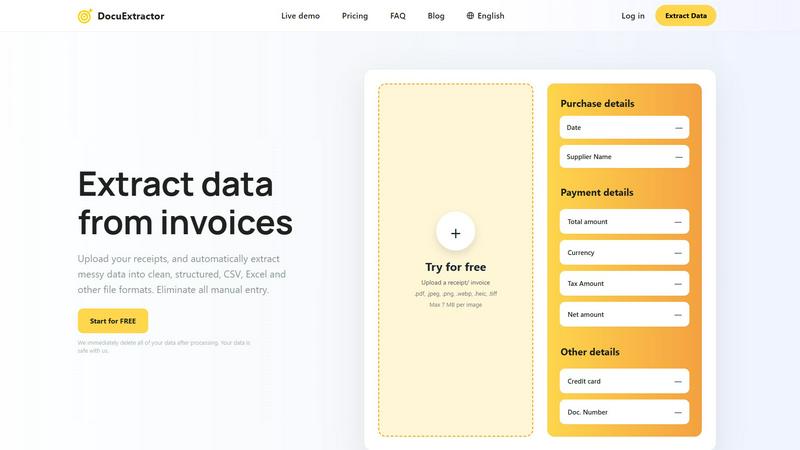
About DocuExtractor
DocuExtractor is a cutting-edge AI tool designed to revolutionize the way finance professionals handle data extraction from receipts, invoices, and other financial documents. In an era where manual data entry is not only time-consuming but also prone to errors, DocuExtractor serves as a digital ally, automating the tedious process of data extraction. With its intelligent algorithms, this tool can process various formats such as PDFs, JPGs, and even crumpled receipts, converting them into clean, structured data ready for export in CSV or Excel formats. This functionality is not just beneficial but essential for accountants, bookkeepers, and business owners who want to reclaim their time and focus on more strategic tasks. With a remarkable accuracy rate of 99.6%, DocuExtractor goes beyond typical OCR capabilities by understanding the context of financial documents and automatically identifying key fields like dates, supplier names, total amounts, and more. By choosing DocuExtractor, users can eliminate manual entry, reduce errors, and enhance their overall productivity.
Features of DocuExtractor
Easy Document Upload
DocuExtractor allows users to effortlessly upload their financial documents with a simple drag-and-drop interface. Whether you are dealing with receipts, invoices, or bank statements, the upload process is quick and user-friendly, enabling users to process multiple documents in batches for maximum efficiency.
Intelligent Data Extraction
Using advanced optical character recognition (OCR) technology combined with deep learning and large language models (LLMs), DocuExtractor automatically extracts key information from documents. This feature ensures that essential data like payment details, tax amounts, and document numbers are accurately captured, significantly reducing the workload for finance professionals.
Flexible Output Formats
Once the data is extracted, users can choose to download their structured data in various formats, including CSV and Excel. This flexibility ensures that the output is compatible with a wide range of accounting software, making it simple to integrate into existing workflows without any manual cleanup.
Robust Security Measures
DocuExtractor prioritizes user privacy and data security. All documents uploaded for processing are automatically deleted after extraction, ensuring that sensitive financial information remains confidential. This level of security gives users peace of mind knowing their data is protected during the extraction process.
Use Cases of DocuExtractor
Streamlining Bookkeeping Tasks
Bookkeepers can leverage DocuExtractor to automate the extraction of data from invoices and receipts, saving significant time and reducing the risk of human error. This allows them to focus on more value-added activities, such as financial analysis and reporting.
Accelerating Expense Reporting
Employees can use DocuExtractor to quickly upload their receipts for expense reporting. The tool extracts the necessary data, making it easy to compile expense reports without the hassle of manual entry, thus streamlining the reimbursement process.
Enhancing Financial Audits
During financial audits, auditors can utilize DocuExtractor to efficiently gather and process multiple documents. The high accuracy of data extraction minimizes the chances of discrepancies, making the audit process smoother and more reliable.
Supporting Small Business Owners
Small business owners can benefit from DocuExtractor by automating their financial documentation processes. With the ability to extract data quickly and accurately, they can keep their finances organized without needing extensive accounting knowledge or resources.
Frequently Asked Questions
How does DocuExtractor ensure data accuracy?
DocuExtractor employs a combination of advanced OCR, deep learning, and LLMs to achieve a remarkable accuracy rate of 99.6%. This technology not only reads text but also understands the context of financial documents for precise data extraction.
Is my data safe with DocuExtractor?
Absolutely. DocuExtractor takes data security seriously. All uploaded documents are automatically deleted after processing, ensuring your sensitive information is protected and remains confidential at all times.
Can I process documents in different languages?
Yes, DocuExtractor supports over 45 languages with automatic language detection. This feature allows users from diverse backgrounds to efficiently extract data from documents in their native language.
What file formats does DocuExtractor support for uploads?
Users can upload a variety of file formats, including PDF, JPEG, PNG, WEBP, HEIC, and TIFF, with a maximum file size of 7 MB per image. This versatility allows for seamless document processing across different types of financial documents.
Explore more in this category:
Similar to DocuExtractor

DockGroups
Your Dock, your rules. Simple and clean. Workflows in one click


Screen Tester
Free online screen tester for checking dead pixels, colors, brightness, contrast, refresh rate, and display quality.


IZIPAY
IZIPAY is a virtual and physical crypto card service that lets users top up with digital assets and pay online like with a regular card.

LinkedIn Translator
Turn rough notes into credible LinkedIn writing, or decode professional jargon into plain English.
