
Foreman
See every app and what it's using in plain English, and end or slow down the one that's hogging your Mac.
Visit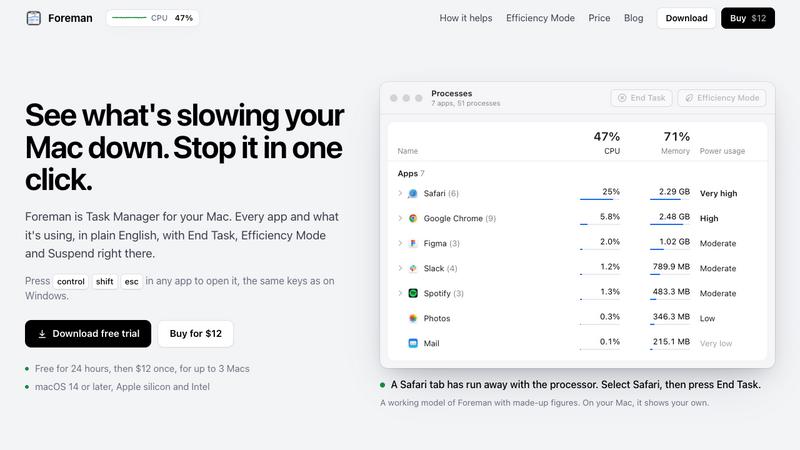
About Foreman
Foreman is a Windows-style Task Manager for the Mac. Press Control Shift Escape in any app to open it and see every app and what it's using, in plain English, with End Task, Efficiency Mode and Suspend right there.
Six pages in the sidebar: Processes, Performance with live graphs for CPU, memory, disk, Wi-Fi and GPU, App History, Startup Apps (including leftovers of deleted apps), Details and Services. System processes get a plain description beside their real name.
Efficiency Mode lets an app you need open run slowly in the background, on the efficiency cores of Apple silicon, and at full speed again when you switch to it. A live readout sits in the menu bar.
Free for 24 hours, then $12 once for up to 3 Macs. macOS 14 or later, Apple silicon and Intel.
Explore more in this category:
Similar to Foreman

Greatooly
Greatooly is a curated directory of small, useful apps — discover focused tools for art, learning, money, health, travel and everyday life.

ZeraBooks
Bookkeeping software that works from your bank statements and reconciles every month to the cent.

Zalcro
AI app planning tool for vibe coders and developers

mytoolsbench
My Tools Bench provides simple and useful online tools designed to make everyday tasks easier. From productivity tools to helpful web utilities, our p

RenewRoster
Track every client domain and SSL expiry in one list with 60/30/14/3-day alerts and white-label client reminders.

Nitrozen
Publish product updates, embed an in-app changelog widget and host a public changelog page with Markdown, API and MCP.

ResourcesHunt
Discover, Submit, Save, Compare and Share Useful Resources.

Safe Outreach
AI-powered platform that evaluates the safety of LinkedIn automation tools and helps reduce the risk of account restrictions.