Facejam vs poseup
Side-by-side comparison to help you choose the right tool.

Facejam
Transform your selfies into stunning professional headshots in minutes with FaceJam's AI-powered photo creation tool.
Last updated: February 28, 2026

poseup
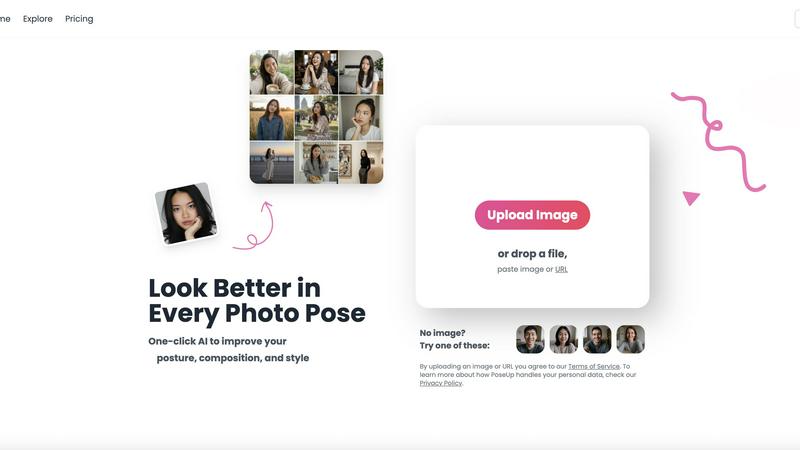
Elevate your photography effortlessly with PoseUp's AI, transforming posture and composition for stunning results in.
Last updated: February 28, 2026
Visual Comparison
Facejam

poseup
Feature Comparison
Facejam
100+ Professional Styles
With over 100 unique styles to choose from, FaceJam allows users to find the perfect look tailored to their industry. Whether you are in tech, real estate, or law, you can select a headshot style that resonates with your professional image, ensuring you stand out in a competitive market.
Instant Results
One of the standout features of FaceJam is its speed. Users can create stunning, high-resolution headshots in mere minutes, eliminating the hassle of scheduling appointments or waiting for retouching. This efficiency means you can update your professional image without the typical delays associated with traditional photography.
Privacy and Ownership
FaceJam prioritizes user privacy and ownership rights. When you upload your selfies, they are used solely to generate your headshots. You maintain full ownership of the images produced, granting you commercial rights to use them across your professional platforms without any restrictions.
High-Quality Outputs
FaceJam ensures that every generated headshot meets high standards of quality. The AI technology used produces realistic images that rival those taken by professional photographers. This commitment to quality means that you can confidently use your headshots for crucial professional applications like job interviews and networking events.
poseup
AI Pose Enhancement
PoseUp utilizes sophisticated AI algorithms to automatically analyze your images and enhance photo poses in an instant. This feature is perfect for users looking to quickly improve their photography without needing technical skills.
Posture Correction Technology
With advanced posture correction capabilities, PoseUp identifies and suggests optimal positioning for your subjects. This ensures that your photos not only look good but also convey the right message and emotion.
Composition Optimization
PoseUp goes beyond simple pose enhancement by optimizing the overall composition of your images. The tool evaluates factors like lighting and framing to offer suggestions that elevate the visual appeal of your photos.
Versatile Photo Support
Supporting multiple formats, PoseUp can handle JPG, PNG, WEBP, and HEIC images, allowing users to upload photos up to 5MB with ease. This versatility makes it accessible for a wide range of users and use cases.
Use Cases
Facejam
LinkedIn Profiles
In today's job market, a strong LinkedIn profile is essential. FaceJam provides you with professional headshots that enhance your profile, making a memorable first impression on potential employers and connections.
Resume Photos
Adding a polished headshot to your resume can increase your chances of standing out to hiring managers. FaceJam allows you to create a visually appealing image that complements your professional qualifications, showcasing your personal brand effectively.
Corporate Team Pages
For businesses looking to present a unified and professional image, FaceJam offers an efficient way to create consistent headshots for team pages, pitch decks, and company directories, enhancing overall brand credibility.
Personal Branding
Whether you are a consultant, coach, or entrepreneur, maintaining a consistent and professional appearance across your website and social media is crucial. FaceJam helps you create a cohesive visual identity that aligns with your personal brand, making it easier to attract and retain clients.
poseup
Casual Selfies
For individuals capturing everyday moments, PoseUp provides quick enhancements that make casual selfies stand out. Users can upload their images and instantly receive suggestions to improve their poses and composition, resulting in eye-catching photos.
Professional Portraits
Photographers can leverage PoseUp to refine their portrait techniques. With automatic enhancements, they can focus on creativity and artistry while the tool handles the technical aspects of pose and composition.
Social Media Content Creation
Influencers and content creators can use PoseUp to elevate their visual storytelling. By achieving professional-looking images with ease, they can maintain a high standard of content that engages their audience effectively.
Fitness and Wellness Photography
Fitness enthusiasts can benefit from PoseUp’s ability to optimize poses and posture in workout photos. This ensures that their images not only showcase their physique but also convey strength and confidence, perfect for social media sharing.
Overview
About Facejam
FaceJam is a cutting-edge AI tool that transforms your everyday selfies into professionally polished headshots, ideal for personal branding and professional use. Whether you're looking to enhance your LinkedIn profile, update your resume, or simply need a clean image for your corporate website, FaceJam provides a quick and efficient solution. The process is incredibly straightforward: upload several photos of yourself, choose from over 50 curated styles designed for various industries, and in a matter of minutes, you will receive high-quality images ready for download. This service is perfect for individuals who want to save time and money, eliminating the need for expensive photographers, awkward photo shoots, and lengthy editing processes. With a promise of realistic results and a commitment to privacy, FaceJam ensures that your photos remain yours, empowering you to showcase your best self across all platforms.
About poseup
PoseUp is a cutting-edge AI-driven tool that revolutionizes photo enhancement by improving poses, posture, and overall composition effortlessly. This tool is tailored for a wide audience, ranging from casual selfie-takers to seasoned photographers aiming to perfect their portrait techniques. Additionally, social media influencers seeking to elevate their visual content will find PoseUp indispensable. By harnessing the power of advanced AI technology, PoseUp analyzes uploaded images and provides automatic suggestions for enhancing poor poses, correcting posture, and optimizing composition. The beauty of PoseUp lies in its one-click functionality, allowing users without extensive photography training to achieve professional-quality results easily. With PoseUp, transforming ordinary photos into breathtaking visual masterpieces becomes a seamless experience, enabling users to present themselves or their subjects in the most flattering light possible.
Frequently Asked Questions
Facejam FAQ
How does your AI headshot generator work?
FaceJam operates in two simple steps: you upload your selfies, and then you select your preferred template from a wide range of options. The AI then processes your images to generate realistic and professional headshots tailored to your specifications.
What do you do with my uploaded photos?
The selfies you upload are exclusively used to teach the AI model to recognize your features, allowing it to create authentic representations of you. Your photos are not retained for model improvement or shared with other users.
How many good photos can I expect?
FaceJam guarantees at least one high-quality image per package. However, users who provide clear and well-lit selfies often receive multiple excellent photos, with many reporting 5-10 stunning options to choose from.
Who owns my AI photos?
You retain full ownership of all AI-generated photos. FaceJam grants you a commercial license, so you can use your headshots across various platforms without any restrictions, ensuring you have complete control over your visual branding.
poseup FAQ
How does PoseUp enhance my photos?
PoseUp uses advanced AI algorithms to analyze your uploaded images, suggesting improvements in pose, posture, and composition to elevate the overall quality of your photographs.
Is PoseUp suitable for beginners?
Absolutely! PoseUp is designed for users of all skill levels, enabling even those without professional photography training to achieve stunning results effortlessly.
What image formats does PoseUp support?
PoseUp supports multiple image formats including JPG, PNG, WEBP, and HEIC, allowing you to upload your photos easily regardless of their original format.
Do I need to create an account to use PoseUp?
While you can start using PoseUp without an account, signing up allows you to access additional features, manage your credits, and join the community for tips and support.
Alternatives
Facejam Alternatives
Facejam is an innovative tool that leverages AI technology to transform selfies into high-quality, studio-style headshots. This product falls under the image and photo category, catering to professionals who need polished images without the hassle of traditional photography. Users often seek alternatives to Facejam for various reasons, such as pricing, specific features, or the need for compatibility with different platforms. When choosing an alternative, it’s essential to consider factors like the quality of output, the variety of styles available, and the overall user experience to ensure it meets your unique needs. In a market flooded with options, finding the right solution can be daunting. Look for alternatives that offer realistic results, a range of professional styles tailored to your industry, and a quick turnaround time. Additionally, prioritize platforms that respect your privacy and provide a seamless user interface, allowing you to achieve your desired results effortlessly.
poseup Alternatives
PoseUp is an AI-powered tool designed to enhance photos by improving poses, posture, and composition effortlessly. It falls under the category of image and photo editing tools, making it popular among casual users, professional photographers, and social media influencers alike. Users often seek alternatives to PoseUp due to various reasons, including pricing concerns, the need for specific features, or compatibility with different platforms. When choosing an alternative, it's essential to consider the functionality offered, ease of use, and how well the tool meets your personal photography needs.