
FilexHost vs MeetingMind
Side-by-side comparison to help you choose the right tool.

FilexHost
Effortlessly host and share your files in seconds with FilexHost's simple drag-and-drop interface and instant links.
Last updated: February 28, 2026

MeetingMind
MeetingMind automatically records and summarizes your Zoom meetings, ensuring you never miss important insights again.
Last updated: March 1, 2026
Visual Comparison
FilexHost

MeetingMind
Feature Comparison
FilexHost
Instant Subdomains
FilexHost provides users with instant subdomains (your-file.filex.host) for every uploaded file, allowing for quick and easy access without any setup hassle. This feature enhances user experience by ensuring that files can be shared immediately, streamlining workflows for professionals and casual users alike.
Free SSL Encryption
Every link generated through FilexHost is secured with free SSL encryption, which means that your data is protected during transit. This feature is essential for maintaining privacy and security, especially when sharing sensitive documents or files with clients and collaborators.
Smart View Modes
FilexHost offers smart view modes that allow users to choose between direct rendering or a download page for their files. This flexibility ensures that recipients can access content in the format that suits them best, enhancing usability and engagement without the need for additional downloads or plugins.
Optional Password Protection
Users can add an extra layer of security to their files by utilizing optional password protection and expiry settings. This feature allows individuals to control who can access their files and for how long, making it perfect for sharing confidential information or time-sensitive content.
MeetingMind
Automatic Detection
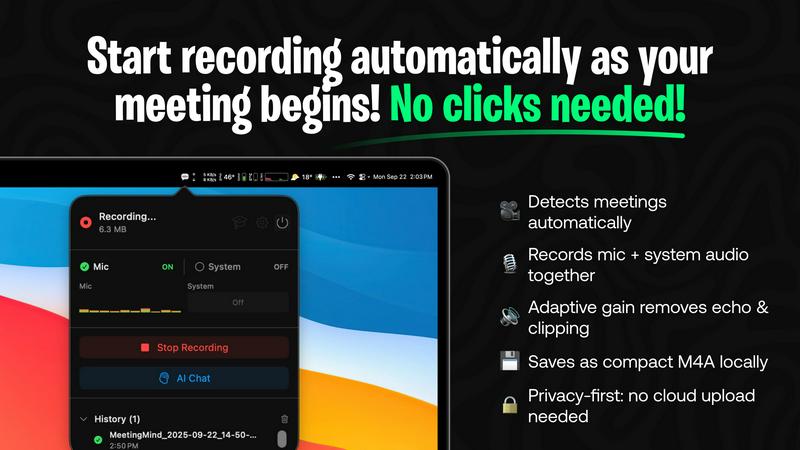
MeetingMind automatically detects when a Zoom meeting begins, requiring no manual input from the user. This seamless integration allows professionals to join meetings without the hassle of starting the recording, ensuring that every moment is captured effortlessly.
AI Assistant
Choose between local processing with Ollama or cloud-based insights with OpenRouter. This flexibility ensures that users can tailor their experience based on their preferences for speed and data processing, providing intelligent summaries and insights post-meeting.
Markdown Export
After your meeting, MeetingMind generates a neatly formatted markdown file containing transcripts, summaries, and actionable items. This feature not only makes it easy to share notes with team members but also helps in organizing information for future reference.
100% Private
MeetingMind prioritizes user privacy by performing all processing locally on your Mac. This means that sensitive meeting information never leaves your device, giving users peace of mind while discussing confidential topics.
Use Cases
FilexHost
Professional Reporting
Business professionals can utilize FilexHost to share client reports and presentations with ease. By simply uploading files and generating secure links, users can eliminate the back-and-forth email exchanges often associated with file sharing, leading to more efficient communication.
Developer File Hosting
For developers, FilexHost serves as an excellent platform for hosting landing pages or mock APIs. The ability to share files quickly with instant subdomains allows for seamless collaboration and testing, ensuring that projects progress smoothly without technical barriers.
Creative Product Distribution
Creators can leverage FilexHost to distribute digital products, such as eBooks, courses, or design assets. The straightforward upload and sharing process enables them to focus on their creative work rather than getting bogged down by technical details, making it easier to reach their audience.
Educational Resource Sharing
Educators can use FilexHost to share teaching materials and resources with students. The platform’s ability to host various file types, including PDFs and media, allows teachers to provide a rich learning experience without worrying about file size limitations or compatibility issues.
MeetingMind
Efficient Meeting Recaps
For teams that frequently hold meetings, MeetingMind provides an efficient way to recap discussions. Users can quickly review transcripts and summaries, ensuring that everyone is on the same page without having to revisit lengthy recordings.
Streamlined Action Item Tracking
MeetingMind helps in tracking action items by highlighting tasks discussed during meetings. This feature allows professionals to follow up on responsibilities easily, ensuring that nothing falls through the cracks after discussions.
Enhanced Collaboration
With the ability to share markdown notes, MeetingMind fosters enhanced collaboration among team members. Participants can access meeting summaries and transcripts, making it easier to engage in ongoing projects and discussions, regardless of their presence in the original meeting.
Ideal for Remote Work
In the era of remote work, MeetingMind serves as an essential tool for virtual teams. It captures every detail of online discussions, ensuring that remote employees stay informed and connected, which is vital for cohesive teamwork.
Overview
About FilexHost
FilexHost is an innovative file hosting and sharing platform designed to simplify the way users manage and distribute their digital content. With its intuitive "Drop & Share" workflow, users can effortlessly upload files of any type—be it documents, media, spreadsheets, or entire websites—and receive an instant secure URL for sharing. This hassle-free approach eliminates the need for complex server setups, DNS configurations, or logins for recipients, making it an ideal solution for both casual users and professionals alike. The platform is particularly beneficial for those who require fast and reliable file delivery without the usual headaches associated with traditional file sharing methods. Whether you are a developer sharing project files, a business professional distributing client reports, or a creator showcasing digital products, FilexHost delivers seamless file hosting with a focus on viewer experience.
About MeetingMind
MeetingMind is an innovative meeting assistant that leverages advanced artificial intelligence to enhance the efficiency of professional meetings. Designed specifically for Zoom, this tool automatically detects and records meetings, allowing users to concentrate on the dialogue rather than being distracted by manual note-taking. The core value proposition of MeetingMind lies in its ability to transform spoken conversations into searchable, interactive notes, complete with real-time, speaker-attributed transcripts formatted in clean markdown. Ideal for busy professionals, teams, and organizations, MeetingMind ensures that crucial insights and action items are not overlooked, fostering a culture of clarity and productivity. It operates using on-device AI, which guarantees that sensitive discussions remain confidential while enabling users to query their meeting notes effortlessly. With MeetingMind, you can say goodbye to the anxiety of missing important details and embrace a more organized approach to work-related discussions.
Frequently Asked Questions
FilexHost FAQ
What is FilexHost?
FilexHost is a file hosting and sharing service that allows users to upload and share files of any type quickly and securely. Its user-friendly interface and features make it suitable for professionals, developers, and casual users alike.
Is it really free?
Yes, FilexHost offers a free plan that allows users to host up to 1,000 files with a maximum size of 25MB each. This plan includes ad-supported hosting with an expiry of 7 days, making it a great option for quick sharing and testing.
What file types are supported?
FilexHost supports a wide range of file types, including documents (PDFs, Excel sheets), media (audio, video), images (JPG, PNG), and archived files (ZIP). This versatility makes it a comprehensive solution for various hosting needs.
How do I update my site?
To update your hosted file or website on FilexHost, simply upload the new version of the file using the same process as before. The platform will generate a new link that can be shared with your audience, ensuring they always access the latest version of your content.
MeetingMind FAQ
How does MeetingMind ensure privacy?
MeetingMind processes all data locally on your Mac, meaning that your meetings and discussions are never uploaded to the cloud. This local processing guarantees that your sensitive information remains confidential and secure.
What happens if I exceed the 60-minute daily limit?
If you regularly exceed the 60-minute daily limit provided in the free version, you can upgrade to the unlimited plan. This one-time purchase allows for unlimited recording, perfect for teams with longer meeting schedules.
How can I access MeetingMind?
You can download MeetingMind directly from the Mac App Store, where you can also find the most up-to-date pricing and features. The installation process is straightforward and takes less than a minute to complete.
Is there support available if I encounter issues?
Yes, MeetingMind offers robust support options for users. If you encounter any issues or have questions, you can reach out through the support section of their website for assistance and troubleshooting.
Alternatives
FilexHost Alternatives
FilexHost is a user-friendly file hosting and sharing service that allows individuals and businesses to upload and disseminate files effortlessly. As part of the productivity and management category, it excels in providing a simple drag-and-drop interface for sharing various file types, from documents to entire websites. Users often seek alternatives to FilexHost for a variety of reasons, including pricing constraints, specific feature requirements, or compatibility with unique platform needs. When evaluating alternatives, it’s essential to consider factors such as storage limits, security features, user experience, and the range of file types supported. Additionally, look for services that offer robust sharing options, like password protection or customizable expiry settings, to ensure your files are secure while remaining accessible to intended recipients.
MeetingMind Alternatives
MeetingMind is an intelligent meeting assistant designed specifically for professionals seeking to enhance their productivity during virtual meetings. By capturing, transcribing, and summarizing Zoom meetings automatically, it allows users to engage in discussions without the distraction of manual note-taking. As a tool that falls into the productivity and management category, MeetingMind appeals to those looking for efficiency and clarity in their communication. Users often seek alternatives to MeetingMind for various reasons, including pricing concerns, specific feature requirements, or compatibility with different platforms outside of Zoom. When choosing an alternative, it's essential to consider factors such as transcription accuracy, integration capabilities, ease of use, and how well the tool addresses your unique meeting needs. Finding a solution that aligns with your workflow can significantly improve your meeting experience and overall productivity.