
MeetingMind
MeetingMind automatically records and summarizes your Zoom meetings, ensuring you never miss important insights again.
Visit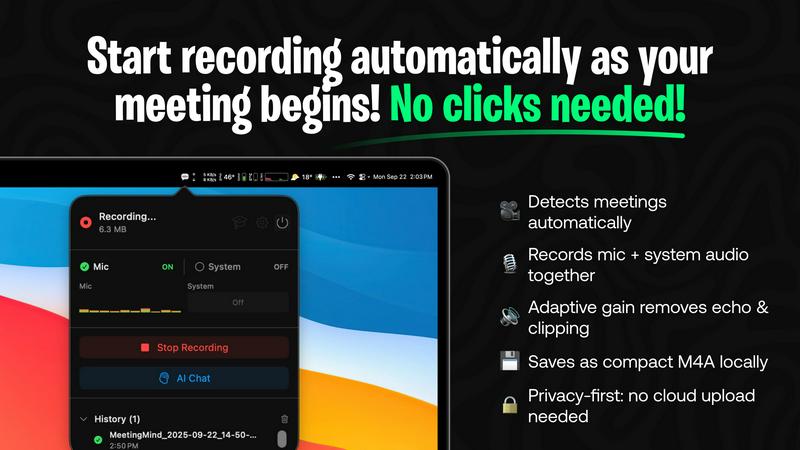
About MeetingMind
MeetingMind is an innovative meeting assistant that leverages advanced artificial intelligence to enhance the efficiency of professional meetings. Designed specifically for Zoom, this tool automatically detects and records meetings, allowing users to concentrate on the dialogue rather than being distracted by manual note-taking. The core value proposition of MeetingMind lies in its ability to transform spoken conversations into searchable, interactive notes, complete with real-time, speaker-attributed transcripts formatted in clean markdown. Ideal for busy professionals, teams, and organizations, MeetingMind ensures that crucial insights and action items are not overlooked, fostering a culture of clarity and productivity. It operates using on-device AI, which guarantees that sensitive discussions remain confidential while enabling users to query their meeting notes effortlessly. With MeetingMind, you can say goodbye to the anxiety of missing important details and embrace a more organized approach to work-related discussions.
Features of MeetingMind
Automatic Detection
MeetingMind automatically detects when a Zoom meeting begins, requiring no manual input from the user. This seamless integration allows professionals to join meetings without the hassle of starting the recording, ensuring that every moment is captured effortlessly.
AI Assistant
Choose between local processing with Ollama or cloud-based insights with OpenRouter. This flexibility ensures that users can tailor their experience based on their preferences for speed and data processing, providing intelligent summaries and insights post-meeting.
Markdown Export
After your meeting, MeetingMind generates a neatly formatted markdown file containing transcripts, summaries, and actionable items. This feature not only makes it easy to share notes with team members but also helps in organizing information for future reference.
100% Private
MeetingMind prioritizes user privacy by performing all processing locally on your Mac. This means that sensitive meeting information never leaves your device, giving users peace of mind while discussing confidential topics.
Use Cases of MeetingMind
Efficient Meeting Recaps
For teams that frequently hold meetings, MeetingMind provides an efficient way to recap discussions. Users can quickly review transcripts and summaries, ensuring that everyone is on the same page without having to revisit lengthy recordings.
Streamlined Action Item Tracking
MeetingMind helps in tracking action items by highlighting tasks discussed during meetings. This feature allows professionals to follow up on responsibilities easily, ensuring that nothing falls through the cracks after discussions.
Enhanced Collaboration
With the ability to share markdown notes, MeetingMind fosters enhanced collaboration among team members. Participants can access meeting summaries and transcripts, making it easier to engage in ongoing projects and discussions, regardless of their presence in the original meeting.
Ideal for Remote Work
In the era of remote work, MeetingMind serves as an essential tool for virtual teams. It captures every detail of online discussions, ensuring that remote employees stay informed and connected, which is vital for cohesive teamwork.
Frequently Asked Questions
How does MeetingMind ensure privacy?
MeetingMind processes all data locally on your Mac, meaning that your meetings and discussions are never uploaded to the cloud. This local processing guarantees that your sensitive information remains confidential and secure.
What happens if I exceed the 60-minute daily limit?
If you regularly exceed the 60-minute daily limit provided in the free version, you can upgrade to the unlimited plan. This one-time purchase allows for unlimited recording, perfect for teams with longer meeting schedules.
How can I access MeetingMind?
You can download MeetingMind directly from the Mac App Store, where you can also find the most up-to-date pricing and features. The installation process is straightforward and takes less than a minute to complete.
Is there support available if I encounter issues?
Yes, MeetingMind offers robust support options for users. If you encounter any issues or have questions, you can reach out through the support section of their website for assistance and troubleshooting.
Explore more in this category:
Similar to MeetingMind

DebutPin
A launch platform where products keep collecting visibility, feedback and connections long after launch day.

Product Launch Checklist
A free launch checklist for SaaS, apps, AI tools and more. Every step says why it matters and when you can skip it.
Kody Tools
Free collection of online developer utilities, code formatters, and digital converters designed to streamline your daily workflow.




tallycounterweb.com
Online tally counter for tracking attendance, workouts, inventory, sports scores, visitors, habits, and everyday counting tasks.