Fill PDF from Excel vs Vowen
Side-by-side comparison to help you choose the right tool.

Fill PDF from Excel
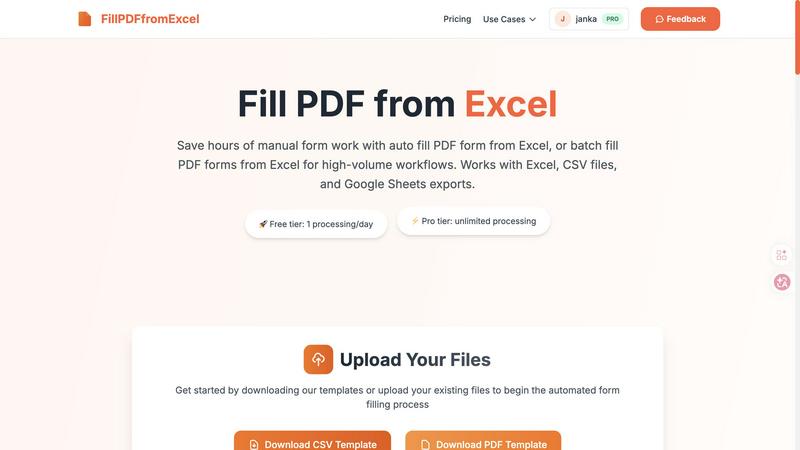
Fill PDF from Excel automates your form workflows by instantly populating PDFs with data from your spreadsheets.
Last updated: March 19, 2026

Vowen is your voice command center, turning speech into instant action across all your favorite apps.
Last updated: March 1, 2026
Visual Comparison
Fill PDF from Excel
Vowen

Feature Comparison
Fill PDF from Excel
Intelligent Field Mapping
This is the secret sauce and my absolute favorite feature. The tool doesn't just dump data; it actively scans your PDF form for fillable fields and attempts to match them with the column headers in your spreadsheet. While you should always review the mapping, this smart detection eliminates about 80% of the setup work. It understands that a column named "First_Name" likely corresponds to a PDF field asking for a first name, making the initial configuration surprisingly intuitive.
True Batch Processing Power
Forget filling one PDF at a time. This tool is engineered for scale. Each row in your Excel spreadsheet becomes a uniquely filled PDF document. Need 500 employment contracts for new hires? Upload one master PDF template and a spreadsheet with 500 rows of employee data. The system processes them all in one automated batch, outputting a neat set of completed, professional forms ready for distribution or signing. This is where you go from saving minutes to reclaiming entire workdays.
Flexible File Format Support
I appreciate tools that work within real-world workflows, and this one does exactly that. It accepts the most common data sources: native Excel files (.xlsx, .xls), universal CSV files, and exports from Google Sheets. This means your team isn't forced into a specific ecosystem. Whether your data lives in a legacy Excel macro sheet or a shared Google Sheet, you can leverage the automation without cumbersome file conversion steps first.
Reliable & Repeatable Workflows
Once you've perfected the mapping between your specific PDF template and data columns, you can save that configuration. This creates a reusable, hands-free processing pipeline. Next month, when you get a new CSV with updated client information for the same form type, you just upload the new data file and run the exact same flow. The consistency eliminates human error and turns a complex task into a simple, repeatable button-press operation.
Vowen
Universal App Integration
Vowen's killer feature is its ability to work anywhere. Unlike tools locked into a specific window, Vowen listens and inputs text directly into whichever app has your focus. Whether you're drafting an email in Gmail, coding in VS Code, brainstorming in Notion, or messaging in Slack, you can simply speak and watch your words appear. This context-aware functionality means you never have to copy-paste or switch windows, creating a truly fluid and uninterrupted workflow that adapts to your tasks, not the other way around.
Local-First, Private Processing
Privacy isn't an afterthought with Vowen; it's the foundation. The core speech recognition engine runs entirely on your computer. Your voice data is transcribed locally, ensuring that your private thoughts, confidential meeting notes, and creative drafts are never sent to a remote server. This architecture provides two huge benefits: blazing-fast transcription with no internet lag and complete peace of mind. You maintain full control over your data, with the option to use more powerful cloud models only when you explicitly choose to.
Multilingual & Translation Support
Vowen shatters language barriers. It supports transcription across 99+ languages and dialects, from common ones like Spanish and Mandarin to less widely served languages. Even more impressively, it can translate these languages into English in real-time as you speak. This is a game-changer for multilingual teams, researchers, students learning a new language, or anyone consuming global content. It transforms your computer into a universal communicator.
Custom Vocabulary & File Transcription
Vowen learns your world. You can teach it specialized terminology—like technical jargon "EBITDA," unique product names, or complex phrases—and it will recognize them perfectly every time. Furthermore, it's not just for live speech. You can drag and drop any audio or video file (MP3, WAV, MP4, MOV) and get a accurate, formatted transcript in seconds. This is perfect for journalists transcribing interviews, students reviewing lectures, or professionals documenting meetings.
Use Cases
Fill PDF from Excel
HR & Employee Onboarding
HR departments are perpetually buried under paperwork. This tool is a game-changer for generating personalized offer letters, I-9 forms, W-4s, and benefits enrollment packets. Simply maintain a master spreadsheet of new hires with their personal details, and automatically produce a complete, error-free document packet for each individual. It streamlines what is typically a major administrative bottleneck.
Legal & Client Document Preparation
Law firms and paralegals can use it to populate standard client engagement letters, confidentiality agreements, or court forms. By pulling data from a case management spreadsheet or client list, they ensure accuracy in critical legal documents and free up billable hours previously spent on manual data entry, allowing focus on higher-value legal analysis.
Financial Services & Tax Preparation
Accountants and tax professionals can batch-generate client invoices, 1099 forms, or annual tax summary documents. By linking their client database (often already in Excel) to the relevant IRS or internal forms, they achieve massive efficiency during peak seasons, reduce transposition errors in sensitive financial data, and ensure every form is uniformly completed.
Educational Administration
Schools and training institutions can automate the creation of student enrollment forms, permission slips, or course certificates. Administrators can export a roster from their student information system into a CSV, and within minutes, have a filled PDF form for every single student, ready for parent signatures or filing.
Vowen
The Developer in Flow State
For developers, Vowen is a productivity multiplier. Instead of breaking concentration to type long comments, documentation, or variable names, you can narrate them while keeping your eyes on the code. You can verbally command it to write boilerplate functions, debug by describing an issue aloud, or quickly jot down notes in your project's README. It integrates directly into IDEs like VS Code, Cursor, and GitHub, making the development process more expressive and less interruptive.
The Writer Capturing Ideas
Writers and content creators can finally capture ideas at the speed of thought. Use Vowen to dictate first drafts, brainstorm outlines, or jot down sudden inspirations directly into tools like Google Docs, Notion, or Obsidian. Speaking often feels more natural than typing, helping to overcome writer's block and maintain a creative flow. You can articulate complex sentences and nuanced ideas without your fingers struggling to keep up, making the initial drafting process remarkably fluid.
The Student & Researcher
Students can use Vowen to transcribe live lectures in real-time, creating searchable notes without frantic typing. Researchers can analyze interviews and focus groups by easily transcribing recorded audio files. The multilingual support allows for reviewing source material in different languages, with instant translation aiding comprehension. It's an essential tool for organizing vast amounts of spoken information into actionable, written text.
The Accessibility Power User
Vowen is a powerful assistive technology. For users with mobility challenges, RSI, or other conditions that make typing difficult, it provides a robust, private, and fast alternative for computer control and communication. The ability to operate any application by voice—not just a dedicated dictation pad—empowers users to work, create, and communicate with full autonomy and efficiency, breaking down traditional input barriers.
Overview
About Fill PDF from Excel
Let's be brutally honest: manually copying data from a spreadsheet into a PDF form is one of the most soul-crushingly tedious tasks in modern office work. It's a guaranteed recipe for errors, wrist strain, and wasted hours that could be spent on actual thinking. This is where Fill PDF from Excel comes in as a genuine lifesaver. It's a specialized automation tool with one laser-focused mission: to obliterate the manual process of populating PDF forms by intelligently pulling data directly from your Excel, CSV, or Google Sheets files. The core value proposition is breathtakingly simple yet powerful: configure your data-to-form mapping once, and then process hundreds or thousands of forms with a single click. It's built for professionals and teams drowning in high-volume paperwork—think HR onboarding documents, client contracts, tax forms, or registration packets. If you find yourself repeatedly opening the same PDF, tabbing between fields, and copying from a spreadsheet row, this tool isn't just a nice-to-have; it's an essential productivity upgrade that pays for itself in sanity and time saved.
About Vowen
Vowen is the voice-first productivity tool I wish I'd had years ago. It's not just another dictation app; it's a fundamental reimagining of how we interact with our computers, designed for anyone who thinks faster than they type. At its core, Vowen is an intelligent, always-listening assistant that lives on your Mac or Windows machine, ready to transcribe your thoughts into text, execute commands, or capture meeting notes with uncanny speed and accuracy. What truly sets it apart is its commitment to privacy—everything is processed locally on your device by default, meaning your ideas, notes, and conversations never leave your computer unless you want them to. It supports a staggering array of languages and dialects, making it a global tool. But the real magic is in its seamless integration. Vowen works inside any application you're using, from VS Code and Obsidian to Slack, Gmail, and Figma. It removes the friction between thought and action, empowering writers, developers, students, and professionals to work more expressively and efficiently. For me, it's become an indispensable extension of my mind, turning spoken word into written action effortlessly.
Frequently Asked Questions
Fill PDF from Excel FAQ
What file formats are supported for the automation?
The tool supports PDF files with fillable form fields as the template. For your data source, it accepts Microsoft Excel files (.xlsx and .xls), Comma-Separated Values (CSV) files, and exports from Google Sheets. This covers the vast majority of data storage methods used by teams today.
Do you store the PDF or Excel files I upload?
Based on the provided information, a core feature is that uploaded files are processed to generate your results, but the service does not permanently store your uploaded PDF templates or data files as part of its standard operation. Always check the latest privacy policy for definitive details on data handling.
How does the tool handle checkbox fields in a PDF?
Checkbox fields are fully supported through your data file. You can populate them using simple indicators like "Yes"/"No", "True"/"False", or "1"/"0" in the corresponding spreadsheet column. The tool intelligently interprets these values and checks (or unchecks) the box in the final PDF accordingly.
Is there a free tier to test the service?
Yes, there is a free tier that allows you to process one PDF per day. This is perfect for testing the workflow with your own documents, verifying the field mapping accuracy, and seeing the quality of the output before committing to the unlimited Pro tier for high-volume work.
Vowen FAQ
Is Vowen really free?
Yes, the core functionality of Vowen is free forever. This includes unlimited local dictation, meeting notes, and voice commands across all your applications. The free tier is powered by its fast, on-device processing model. They offer optional cloud-powered features for more advanced capabilities, but the essential, private, local-first experience has no cost or usage limits.
How does the privacy and local processing work?
Vowen's primary speech recognition model runs directly on your macOS or Windows computer. When you speak, the audio is processed immediately on your device's hardware (like your Apple Silicon or Intel chip), converted to text, and inserted into your app. No audio or transcript data is sent over the internet for this core function. Your data stays with you. You have the option to enable cloud models for specific tasks, but this is always a conscious choice.
Which applications does Vowen work with?
Vowen works with virtually any application that accepts text input. It acts at the system level, so it can input text wherever your cursor is. The website highlights popular apps like Slack, Notion, VS Code, Google Docs, Gmail, Figma, Outlook, Obsidian, and Linear, but the list is essentially endless. If you can type in it, you can dictate into it with Vowen.
Can I use my own AI API key with Vowen?
Absolutely. For users who want to leverage more powerful AI models for commands or advanced features, Vowen supports a "Bring Your Own AI" model. You can connect your own API key from providers like OpenAI, Claude, Gemini, and Groq (8+ providers in total). This gives you flexibility and control over which AI services power your enhanced voice commands and interactions.
Alternatives
Fill PDF from Excel Alternatives
Fill PDF from Excel is a productivity and management tool that automates the tedious process of populating PDF forms with data from spreadsheets. It's a powerful solution for anyone drowning in repetitive paperwork, from HR onboarding to client contracts. Users often seek alternatives for a variety of reasons. Budget constraints, the need for a free tier, or specific feature gaps like e-signature integration or cloud storage compatibility can prompt a search. Others might require a tool that works natively on Mac, Linux, or within a specific software ecosystem their team already uses. When evaluating other options, focus on your core workflow. Prioritize the accuracy of data mapping, batch processing limits, and output quality. Security is non-negotiable for sensitive data, so scrutinize their data handling policies. Ultimately, the best fit is the one that disappears into your process, making the task effortless.
Vowen Alternatives
Vowen is a powerful voice-first productivity tool that lets you control your computer and automate workflows with your voice. It's part of a growing category of AI-powered assistants that move beyond simple dictation to offer smart, contextual actions. People often seek alternatives for various reasons, whether it's budget constraints, a need for specific integrations, or simply preferring a different user interface or platform availability. When you're evaluating other options, it's crucial to look beyond basic transcription. Consider the depth of application control, the quality of AI assistance for tasks like writing and summarizing, and how the tool handles privacy. The best alternative for you will align with your primary use case, be it detailed note-taking, hands-free coding, or managing a complex digital workspace. --- FAQ_SEPARATOR--- [
{"question": "What is Vowen?", "answer": "Vowen is an innovative voice-first productivity tool for macOS and Windows that transforms voice into text and actions, enabling seamless dictation, smart workflows, and efficient automation across your device."},
{"question": "Who is Vowen for?", "answer": "Vowen caters to a wide audience, including writers, developers, students, and accessibility users who want to work more efficiently and expressively using their voice."},
{"question": "Is Vowen secure?", "answer": "Yes, Vowen processes voice inputs locally on your device, ensuring ultra-fast and private transcription without sending your data to the cloud."},
{"question": "What are the main features of Vowen?", "answer": "Key features include instant transcription in 99 languages, an AI writing partner for generating content, smart meeting notes, and full voice-control of files and applications."}
]