Fusedash vs Threat Watch
Side-by-side comparison to help you choose the right tool.

Fusedash transforms raw data into intuitive dashboards and charts, empowering teams to act on insights instantly.
Last updated: March 4, 2026

Threat Watch
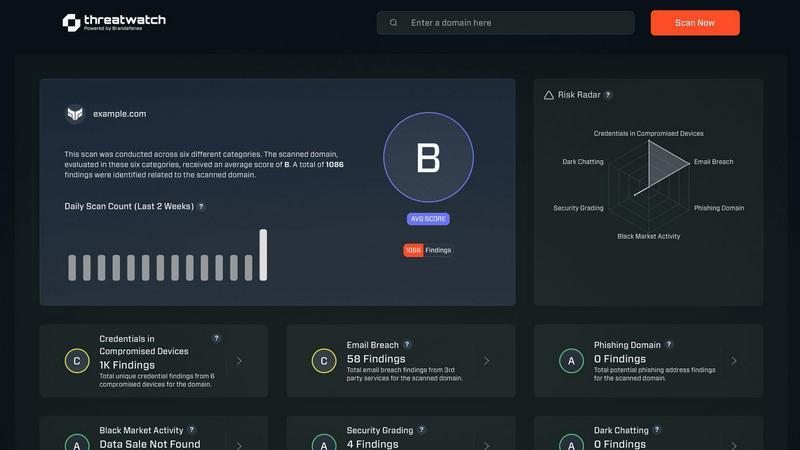
Threat Watch instantly reveals your cybersecurity health by scanning for compromised accounts and dark web threats.
Last updated: March 1, 2026
Visual Comparison
Fusedash

Threat Watch
Feature Comparison
Fusedash
Flexible Views
Fusedash allows you to create tailored dashboard views for different audiences. Whether you need dashboards, charts, maps, or report-style presentations, you can customize layouts, filters, and time ranges, ensuring stakeholders see exactly what they need without unnecessary back and forth.
AI Chart Generator
With the AI Chart Generator, you can quickly create clear visuals from your CSV files or APIs in mere minutes. This feature enables you to select the right chart type, apply comparisons, and refine labels, streamlining the reporting process while ensuring that your charts effectively convey the intended narrative.
Dashboard Software
Fusedash provides a comprehensive workspace for dashboards and reporting, allowing teams to combine KPIs with narrative elements. This integration helps stakeholders understand not just the numbers, but also the context behind them, reducing the risk of conflicting information and keeping teams aligned.
AI Chat
The Smart Chat feature leverages AI to facilitate data exploration. Users can ask questions in plain language, receive suggestions for relevant metrics and charts, and easily transform insights into shareable dashboard views, making data analysis more intuitive and collaborative.
Threat Watch
Comprehensive Cyber Health Score
This is your north star. Threat Watch doesn't just dump data on you; it synthesizes findings from compromised credentials, devices, phishing, and dark web exposure into a single, understandable health score. This immediate grade is invaluable for benchmarking your posture, tracking improvements over time, and communicating risk to non-technical stakeholders. It turns complex threat data into a clear, actionable metric.
Real-Time Dark Web Surveillance
This is the feature that often delivers the biggest "oh no" moments—and that's a good thing. Threat Watch continuously monitors underground forums, marketplaces, and leak sites for your organization's data. If employee emails, company passwords, or internal documents appear for sale, you're alerted immediately. This proactive surveillance is critical for containing breaches before they're exploited at scale.
Compromised Credential Detection
Relying on employees to know they've been pwned is a losing strategy. Threat Watch automates this by cross-referencing your corporate email domains against vast databases of known breaches. It instantly identifies which employee accounts have leaked passwords, allowing your IT team to enforce resets before those credentials can be used in a targeted attack.
Phishing & Impersonation Monitoring
Beyond data breaches, Threat Watch scours the internet for phishing kits and fake domains impersonating your brand. It looks for suspicious sites using your company's name, logos, or similar URLs designed to trick customers or employees. Discovering these campaigns early allows you to take them down swiftly, protecting your brand's reputation and your users.
Use Cases
Fusedash
Marketing Performance Tracking
Marketing teams can utilize Fusedash to monitor campaign performance in real-time. By visualizing key metrics and KPIs in customizable dashboards, marketers can quickly assess what strategies are working and adjust their tactics accordingly.
Sales Insights and Forecasting
Sales departments can leverage Fusedash to create detailed reports and dashboards that highlight sales trends and forecasts. With the ability to drill down into segments and time periods, sales teams can better understand their performance and make data-driven decisions.
Operational Efficiency Monitoring
Operations teams can use Fusedash to track efficiency metrics, such as production rates or supply chain performance. The platform's ability to visualize data from various sources allows for comprehensive analysis, leading to improved operational strategies.
Financial Reporting and Analysis
Finance teams can benefit from Fusedash by streamlining their reporting processes. By consolidating financial data into a single view and utilizing narrative reporting alongside traditional dashboards, finance professionals can provide stakeholders with clear insights and actionable recommendations.
Threat Watch
Proactive Risk Management for IT Teams
Instead of waiting for a breach to happen, IT and security teams can use Threat Watch as their daily briefing. The platform prioritizes risks, allowing them to focus on resetting compromised accounts, isolating infected devices, and issuing phishing warnings before a major incident occurs. It transforms their role from reactive firefighting to strategic defense.
Executive & Board-Level Reporting
For leaders who need to understand cyber risk without technical jargon, the Cyber Health Score and clear category breakdowns are perfect. A CISO can use Threat Watch reports to visually demonstrate the organization's exposure, justify security budget requests, and show tangible improvement over time, building crucial boardroom confidence.
Due Diligence for Mergers & Acquisitions
Before acquiring or merging with another company, you need to know what you're buying into. Threat Watch can provide a rapid assessment of the target company's exposed credentials, dark web presence, and phishing risk. This cybersecurity due diligence can reveal hidden liabilities and inform negotiation or integration strategies.
Enhanced Security Posture for Remote Workforces
With employees using personal devices and accessing corporate data from everywhere, the attack surface has exploded. Threat Watch helps identify compromised personal emails linked to work accounts and malicious software on remote devices, providing essential visibility for securing a distributed workforce.
Overview
About Fusedash
Fusedash is an innovative AI-powered data visualization platform that revolutionizes how teams interpret and act on their data. Designed for organizations that struggle with disparate data sources and inefficient reporting processes, Fusedash offers a unified workspace for creating insightful dashboards, interactive charts, detailed maps, and narrative reports. The platform stands out by allowing users to define key performance indicators (KPIs) and metrics once, ensuring that everyone across departments is aligned on the same trusted data. This eliminates the frustration of conflicting reports and manual data compilations. Whether you are in leadership, marketing, or operations, Fusedash empowers you to monitor real-time data and understand the underlying trends driving your business decisions. By integrating AI features such as natural language data chat and smart visualization assistance, Fusedash not only accelerates data exploration but also enhances accessibility, transforming raw data into actionable insights that foster alignment and drive strategic initiatives.
About Threat Watch
Let's cut through the noise: in today's digital jungle, feeling secure is an illusion unless you have the right intelligence. That's where Threat Watch comes in, and frankly, it's one of the most straightforward and actionable cybersecurity health dashboards I've seen for businesses. This isn't just another alarmist scanner; it's a curated intelligence platform designed to give you a clear, real-time snapshot of your most critical exposures. The core genius of Threat Watch is its focus on the tangible threats that actually cause breaches: compromised employee credentials, hijacked devices, phishing traps, and your data being traded on the dark web. It meticulously analyzes your organization's digital footprint across these key categories, delivering what I like to call a "cyber vital signs" report. It's built for proactive leaders—from the resource-strapped startup founder to the enterprise CISO—who are tired of operating in the dark and need prioritized insights, not just raw data. The main value proposition is undeniable: speed and clarity. You get automated, continuous assessments that tell you exactly what's wrong and, by implication, where to direct your team's efforts first. If you believe that prevention is infinitely cheaper than reaction, Threat Watch provides the foundational intelligence to make that possible.
Frequently Asked Questions
Fusedash FAQ
What types of data can I use with Fusedash?
Fusedash supports various data sources, including CSV uploads and API connections. This flexibility allows you to integrate diverse datasets into a unified workspace for comprehensive analysis.
How does Fusedash ensure data consistency across reports?
Fusedash allows users to define KPIs and metrics once and reuse them across dashboards, charts, and reports. This eliminates discrepancies and ensures that all teams are aligned on the same data.
Can I customize the visualizations in Fusedash?
Yes, Fusedash provides extensive customization options for visualizations. You can tailor layouts, filters, and chart types to meet the specific needs of different stakeholders, enhancing the clarity and relevance of your data presentations.
Is there a learning curve for using Fusedash?
Fusedash is designed with user-friendliness in mind, featuring intuitive interfaces and AI-powered tools. While new users may require some time to familiarize themselves, the platform's comprehensive resources and support help facilitate a smooth onboarding process.
Threat Watch FAQ
How does the free scan work?
The free scan is a brilliant, no-commitment way to see the power of the platform. You simply provide your company's primary domain name (e.g., yourcompany.com). Threat Watch then performs a non-intrusive scan of its databases and monitoring sources for compromised credentials, dark web mentions, and phishing sites associated with that domain. You get an immediate snapshot of your exposed surface area without needing to install any software.
What kind of alerts will I receive?
You'll receive prioritized, actionable alerts, not noise. These include specific notifications when employee credentials are found in a new data breach, when your company is mentioned on a dark web forum, when a new phishing domain targeting your brand is registered, and if company-owned IP addresses are associated with malware infections. Each alert includes context and recommended steps.
Is Threat Watch suitable for a small business without a dedicated IT person?
Absolutely, and this is one of its strongest suits. The interface is designed for clarity, not complexity. The health score and categorized results make it easy for a business owner or office manager to understand the top risks. For very small teams, even just using it to identify and reset compromised employee passwords is a massive security win.
How is this different from my antivirus software?
Antivirus software is a vital internal guard—it tries to stop malware already on a device. Threat Watch is an external intelligence service. It looks for threats outside your walls: stolen data on the internet, phishing campaigns, and discussions about your company on the dark web. They are complementary layers; one protects the endpoint, the other gives you strategic warning about incoming attacks.
Alternatives
Fusedash Alternatives
Fusedash is an AI-powered data visualization platform that enables teams to transform raw data into actionable insights through clear dashboards and charts. As part of the Analytics & Data and Business Intelligence categories, it aims to streamline data reporting and foster alignment across organizations by ensuring that everyone is working from the same set of trusted metrics. Users often seek alternatives to Fusedash for a variety of reasons, including pricing considerations, specific feature sets, or compatibility with their existing platforms. When searching for an alternative, it's essential to assess the platform's ability to deliver real-time data insights, the flexibility in visualizations, and the overall ease of use to ensure it meets your team's unique needs and enhances decision-making processes.
Threat Watch Alternatives
Threat Watch is a cybersecurity intelligence platform that falls squarely into the business intelligence category, transforming raw threat data into a clear picture of your organization's digital health. It's designed to give you actionable insights on compromised accounts and vulnerabilities in real-time. Users often seek alternatives for a variety of practical reasons. Perhaps the pricing model doesn't align with their budget, they need deeper integration with a specific tech stack, or they require a feature set tailored to a niche compliance framework. The search for the right tool is less about finding a "better" product and more about finding the right fit for your specific operational and financial landscape. When evaluating alternatives, focus on the core value: actionable intelligence. Look beyond flashy dashboards and ask if the tool provides clear, prioritized steps to improve your security posture. Consider the quality of data sources, the automation of routine assessments, and the platform's ability to grow with your business without becoming a management burden itself.