Genstory vs Gleem.AI Studio
Side-by-side comparison to help you choose the right tool.

Genstory
Create captivating novels, comics, and videos instantly with Genstory, your go-to AI storybook generator.
Last updated: February 27, 2026

Gleem.AI Studio
Gleem.AI Studio is my favorite all-in-one workspace for generating and editing AI images without switching tools.
Last updated: February 28, 2026
Visual Comparison
Genstory
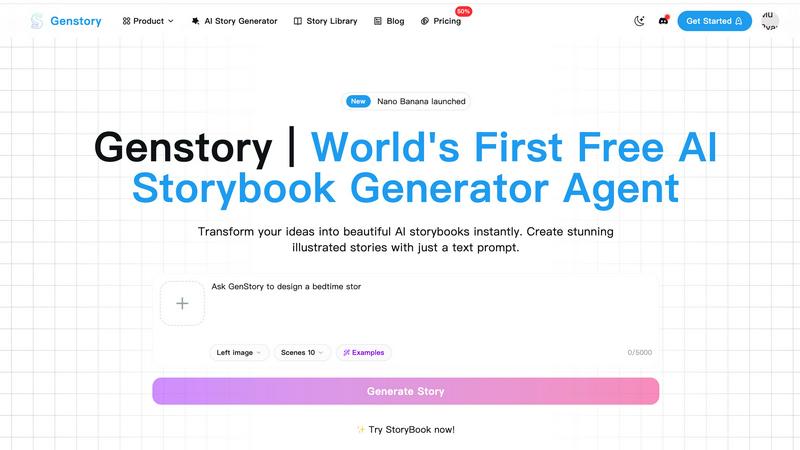
Gleem.AI Studio

Feature Comparison
Genstory
Lightning-Fast Generation
GenStory is designed for speed, allowing users to complete the full creation process—from text generation to illustrations—in mere seconds. This rapid output is perfect for busy parents and educators who need quick, engaging stories.
Simple and Intuitive Interface
Forget about mastering complex commands or software. With GenStory, all you need is a natural language prompt to guide the AI’s storytelling. This intuitive approach makes story creation accessible to users of all ages.
Multi-Dimensional Output
GenStory supports various output formats, including PDF and interactive web stories. This flexibility makes it easy to share your creations with friends and family or even print them as physical storybooks.
Beautiful Illustrations
Every story generated comes with AI-created artwork that enhances the narrative. These vivid illustrations bring your story to life, captivating the imagination of children and adults alike.
Gleem.AI Studio
Unified Creative Workspace
This is the cornerstone feature and, in my opinion, Gleem's killer advantage. Everything—generation, editing, avatar posing—happens in a single, cohesive workspace. You no longer have to start from scratch every time you need a tweak. You can generate an image, then immediately use AI to edit it, add an object, or adjust a pose without ever leaving the project. This seamless workflow eliminates context-switching and preserves your creative momentum, making iteration incredibly fast and natural.
Intelligent Text-to-Image Generation
Gleem's text-to-image generator is built for real people, not prompt engineers. You can describe your vision in plain language, and the built-in Prompt Enhance feature intelligently refines your words for better, more consistent visual results. Coupled with straightforward aspect ratio and style controls, it removes the guesswork from generation. You get professional-grade imagery from simple, natural descriptions, which is a game-changer for teams without dedicated AI specialists.
All-in-One AI Image Editing
Forget complex layers and masks. Gleem's AI editing suite lets you make powerful changes with simple prompts. Need to remove an unwanted object, add an element, adjust a subject's pose, or apply a specific filter? You describe the edit naturally, and the AI executes it within the same project file. This integrated approach to editing is what transforms a static image generator into a dynamic creative studio, allowing for true refinement and customization.
Project-Centric Organization
Gleem organizes your work into dedicated project spaces, which is a lifesaver for managing multiple campaigns or ideas. Each project contains all its associated assets: the original prompts, every edit, and all previous versions. This creates a visual history of your creative process, making it easy to backtrack, reuse successful elements, and build upon iterations without losing anything. It turns chaotic creation into a manageable, organized workflow.
Use Cases
Genstory
For Parents
Parents can quickly generate unique bedtime stories that make their children the main characters. By customizing elements like favorite animals or magical worlds, parents can create personalized adventures that foster a love for reading.
For Educators
Teachers can leverage GenStory to create visual narratives that explain complex concepts or inspire creativity in the classroom. It’s an excellent resource for ESL teachers and those looking to engage students through storytelling.
For Creative Writers
Aspiring authors can use GenStory as a brainstorming tool. By inputting various prompts, writers can explore different narrative possibilities and develop their storytelling skills through AI-generated content.
For Gift-Giving
Looking for a special gift? Use GenStory to create personalized storybooks for birthdays or holidays. Tailor the characters and plot to fit the recipient’s interests, making for a thoughtful and unique present.
Gleem.AI Studio
Rapid Social Media Content Creation
For social media managers and content creators, speed and volume are everything. Gleem.AI Studio is perfect for quickly generating a week's worth of unique, on-brand visuals for Instagram, LinkedIn, or TikTok. You can create a base image, then use the integrated editor to swiftly produce multiple variations—changing backgrounds, adding text callouts, or applying different filters—all within minutes and without leaving the app.
Marketing Asset Production & Iteration
Marketing teams can use Gleem to prototype and finalize assets for ads, blog graphics, email headers, and landing pages. The ability to generate an initial concept and then iteratively edit it based on stakeholder feedback in one place drastically cuts down revision cycles. Testing different creative directions (like changing a model's outfit or a product's setting) becomes a task of minutes, not hours.
Personalized Avatar Scenarios
This is a standout use case. Professionals, influencers, or anyone needing a personal brand can generate a custom AI avatar. Then, they can place that avatar into any scene—be it a professional conference setting, a tropical vacation backdrop, or wearing different outfits—without a single photoshoot. It's incredibly powerful for creating relatable, personalized content at scale.
Product Visualization & Mockups
E-commerce teams and product designers can generate realistic lifestyle images of their products. Imagine creating a scene of your new coffee mug on a rustic kitchen table, then using AI editing to change the table's wood finish or add steam rising from the mug. It allows for endless, cost-effective visual testing and asset creation for product pages and promotional materials.
Overview
About Genstory
GenStory is an innovative AI story generator that harnesses the power of advanced artificial intelligence to turn your imaginative ideas into beautifully illustrated digital storybooks. This versatile tool is perfect for parents, educators, and anyone with a flair for storytelling. With just a simple natural language prompt, GenStory can create a complete storybook that includes engaging plots and stunning visuals. Whether you're looking to craft a unique bedtime story for your child, develop educational materials, or simply explore your creativity, GenStory provides an effortless platform for storytelling. Its user-friendly interface allows anyone, regardless of technical skill, to generate captivating narratives in seconds, making the magic of storytelling accessible to everyone. With GenStory, your creative moments can be transformed into delightful storybooks that can be shared, printed, or enjoyed as interactive web stories.
About Gleem.AI Studio
Let's be honest: the current state of AI image creation is a fragmented mess. You generate an image in one tool, only to realize you need to edit it, so you export it to another app, lose your prompt context, and start the tedious cycle all over again. Gleem.AI Studio is the breath of fresh air we've all been waiting for. It's a unified AI image workspace built on a single, powerful premise: let creators create, not configure. This platform elegantly combines AI image generation, sophisticated editing, and avatar management into one seamless environment. No more juggling tabs, wrestling with endless parameters, or losing your creative flow to technical complexity. It's designed specifically for marketers, content creators, and small teams who need to produce consistent, high-quality visuals at speed. Whether you're crafting social media assets, product mockups, or testing a dozen creative variations for a campaign, Gleem.AI Studio keeps you in the zone. Your ideas stay at the center, and the tool quietly handles the rest, making it one of the most intuitive and streamlined creative toolkits I've seen emerge in the AI space.
Frequently Asked Questions
Genstory FAQ
How does GenStory generate stories?
GenStory utilizes advanced AI technology to interpret your natural language prompts and generate complete storybooks, including text and illustrations, almost instantaneously.
Can I customize the stories generated by GenStory?
Yes, after the AI generates a story, you can review and customize it to better fit your vision. This feature allows for personal touches and adjustments to the narrative or style.
What formats does GenStory support for output?
GenStory supports various output formats, including downloadable PDFs for physical printing and interactive web stories, making it easy to share your creations.
Is there a limit to the types of stories I can create?
Not at all! GenStory offers a wide range of possibilities for story creation, from imaginative adventures to educational narratives, allowing your creativity to flourish without limitations.
Gleem.AI Studio FAQ
What makes Gleem.AI Studio different from other AI image tools?
Most AI tools are siloed: one app for generation, another for editing, a third for upscaling. Gleem's fundamental difference is its unified workspace. It combines generation and advanced, prompt-based editing into a single, fluid environment. This eliminates the export/import shuffle and allows for true step-by-step iteration, making the entire creative process faster and more intuitive.
Do I need to be good at prompt engineering to use Gleem?
Absolutely not. In fact, Gleem is explicitly designed for people who aren't prompt experts. Its Prompt Enhance feature is built to take your natural language descriptions and optimize them for the AI model to produce high-quality results. You focus on the creative idea; Gleem helps with the technical translation.
What is the "Project" organization system?
Think of a Project in Gleem as a dedicated container for a single creative idea or campaign. Inside it, you'll find all the generated images, every edit you've made using AI tools, and a complete version history. This keeps your work incredibly organized, makes collaboration and iteration easier, and ensures you never lose a previous version you might want to revisit.
Can I really edit images with just a text prompt?
Yes, that's the core of the integrated editing experience. Instead of manual brushes or complex selection tools, you describe the change you want. For example, you can type "remove the trash can in the background," "add a golden retriever sitting on the left," or "make the sky more dramatic at sunset." The AI interprets your request and applies the edit directly to your image within the project.
Alternatives
Genstory Alternatives
GenStory is an innovative AI-driven platform that specializes in creating personalized novels, comics, and cinematic videos. Positioned within the design tools category, it appeals to parents, educators, and aspiring storytellers by allowing them to effortlessly generate illustrated digital storybooks. Users often seek alternatives to GenStory for various reasons, such as exploring different pricing structures, feature sets, or compatibility with specific platforms. When considering an alternative, it's important to evaluate ease of use, the quality of generated content, and the range of output formats to find a solution that best fits your creative needs.
Gleem.AI Studio Alternatives
Gleem.AI Studio is an all-in-one AI image workspace designed for marketers and creators who need to generate and edit visuals in a single, streamlined environment. It eliminates the need to switch between complex tools, focusing instead on creative flow and fast iteration. Users often explore alternatives for various reasons. Some may find the pricing model doesn't fit their budget, while others might require more advanced features or specific integrations that Gleem doesn't offer. Platform preferences, like needing a desktop app or a different user experience, also drive the search. When choosing an alternative, consider your core needs. Look for a tool that balances power with simplicity, supports your specific use cases like social media or product images, and offers a workflow that keeps you in a creative state rather than bogged down in technical settings. The right fit should feel intuitive and accelerate your visual production.