Dokta vs Gimme-A-Quote
Side-by-side comparison to help you choose the right tool.

Dokta is my top pick for freelancers to automate invoices, track cash flow, and chase payments effortlessly.
Last updated: April 4, 2026

Gimme-A-Quote
Gimme-A-Quote is the stupid simple way to send RFQs and get quotes without the software drama.
Last updated: March 1, 2026
Visual Comparison
Dokta

Gimme-A-Quote
Feature Comparison
Dokta
Instant AI Document Analysis
This is the brilliant core of Dokta. Forget manual data entry. You drag and drop a photo, scan, or PDF of any invoice, quote, or contract, and in under 60 seconds, the AI performs OCR and intelligent classification. It doesn't just read text; it understands the document type, extracts the amount, due date, client or supplier details, and populates your system. This feature alone can save hours per week and eliminates the risk of human error from manual transcription.
Automated Invoicing & Quote-to-Invoice Workflow
Dokta moves beyond analysis into creation. You can generate professional invoices and quotes in clicks. For freelancers on day-rate contracts, it offers automatic monthly invoicing. But my favorite part is the online quote acceptance: send a quote with a link, the client accepts it online, and you can convert it to a finalized invoice with a single click. This seamless flow from proposal to payment is a game-changer for project-based work.
Real-Time Cash Flow & Anomaly Detection
Dokta provides a crystal-clear, visual dashboard of your financial health—invoiced revenue, collected revenue, unpaid amounts, and VAT—with a 12-month graph. More impressively, its AI acts as a guardian. It proactively detects anomalies like changed IBAN numbers, duplicate invoices, inconsistent VAT, or missing numbering. This protective layer is invaluable for avoiding costly mistakes or fraud.
Intelligent Client Database & Automated Reminders
Every document you process automatically enriches a centralized client and supplier database, complete with SIRET-based information. Dokta assigns payment behavior scores, giving you insight at a glance. Crucially, it automates the awkward but necessary task of chasing late payments by sending polite, professional payment reminders for you, saving you the stress and preserving client relationships.
Gimme-A-Quote
Stupid Simple Setup
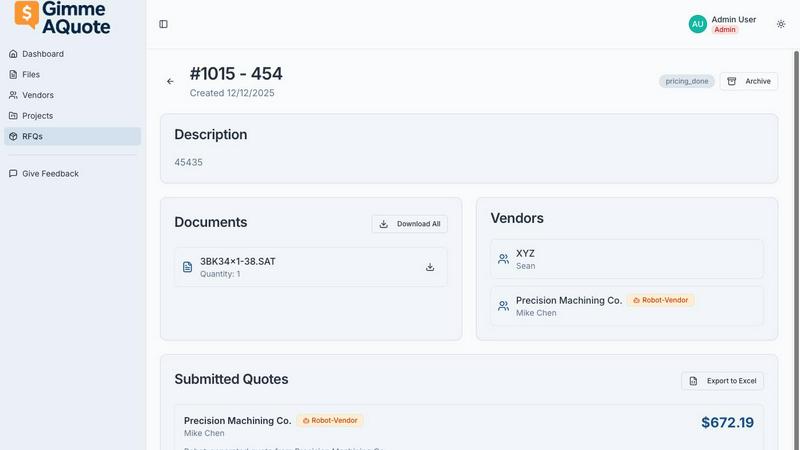
Forget about implementation cycles and onboarding specialists. Getting started with Gimme-A-Quote is a three-step process you can complete in under five minutes: create an account, invite a vendor, and send your first RFQ. That's it. There are no modules to configure, no labyrinthine settings menus, and certainly no mandatory training videos. The entire user manual is practically those three steps. It’s software that respects your time from the very first click.
Vendor-Friendly by Design
This is a killer feature most procurement tools completely miss. Gimme-A-Quote is built not just for you, but for your suppliers. You're not forcing your vendors to create an account on yet another complicated platform. The experience for them is streamlined and intuitive, designed to be accessible even for the least tech-savvy contact. This dramatically increases response rates because you're removing the barrier to entry for the people you need quotes from.
Zero-Friction RFQ Creation
The process of creating a request for quote is stripped down to the absolute essentials. You describe what you need, attach any relevant files or drawings, and send it. There are no fifteen-step workflows, no mandatory fields that require a PhD to fill out, and no confusing jargon. It’s a clean, straightforward interface that gets you from "I need a price" to "quote sent" in record time, without any frustration.
Clean, Centralized Communication
Stop digging through a chaotic inbox thread with six different vendors. Gimme-A-Quote keeps all your RFQs and the subsequent quote responses organized in one clear, searchable place. All communication, questions, and submitted quotes are tied to the original request, creating a single source of truth for each procurement need. This alone saves countless hours of administrative headache.
Use Cases
Dokta
The Freelance Developer or IT Consultant
For a freelance developer on a TJM (daily rate) contract, Dokta is a dream. Set up the contract once, and the system automatically generates and sends monthly invoices. It tracks payments, chases late ones, and provides a real-time view of earnings versus expenses. This allows the developer to focus entirely on coding while knowing the business admin is handled flawlessly and automatically.
The Creative Freelance Designer or Photographer
Managing the project lifecycle from proposal to final payment is chaotic for creatives. Dokta streamlines this: create a beautiful quote, send it for online acceptance, and with one click after approval, convert it to an invoice. It then manages the payment timeline and reminders. This professional workflow impresses clients and ensures the creative spends time designing, not chasing paperwork.
The Auto-Entrepreneur / Micro-Entrepreneur
Simplicity and compliance are key here. Dokta generates compliant invoices, tracks collections against the URSSAF ceiling (a critical feature in France), and sends alerts for contribution deadlines. It demystifies financial tracking for the solo operator, eliminating the stress of manual calculations and potential errors come declaration time.
The Growing Small Business or Agency
As a small business scales, document chaos multiplies. Dokta becomes the central source of truth for all financial documents. It automates accounts payable (reading supplier invoices) and receivable (creating and chasing invoices), provides a real-time cash flow picture for decision-making, and exports clean CSV data for an accountant, saving significant reconciliation time and cost.
Gimme-A-Quote
The Small Machine Shop Owner
A machine shop owner needs pricing on a specific raw material or a custom-machined component from three different suppliers. Instead of crafting three separate emails, chasing down attachments, and managing three different reply threads, they use Gimme-A-Quote. They create one RFQ, select their vendors, and hit send. All quotes come back to a single dashboard, making comparison and decision-making effortless.
The Trade Business Procuring Materials
A plumbing or electrical contractor needs to get costs for a large batch of fixtures or wiring for an upcoming job. Their usual process involves phone calls and back-and-forth emails. With Gimme-A-Quote, they can send a detailed RFQ with specs and project drawings to multiple suppliers simultaneously, ensuring everyone is bidding on the exact same scope and receiving all necessary information upfront.
The Manufacturer Sourcing Custom Parts
A small manufacturer is prototyping a new product and needs quotes for several custom injection-molded or fabricated parts. They use Gimme-A-Quote to send technical drawings and material specifications to a shortlist of fabricators. The tool ensures the files are delivered intact and provides a structured way for vendors to ask clarifying questions and submit formal, apples-to-apples quotes.
The Business Managing Recurring Supply Needs
A shop that regularly orders consumables, safety supplies, or standard components can use Gimme-A-Quote to streamline re-ordering. Instead of calling or emailing a sales rep every time, they can quickly generate an RFQ from a template and send it out for competitive pricing, ensuring they're always getting the best value on repeat purchases without the repetitive administrative work.
Overview
About Dokta
If you're a freelancer, solo entrepreneur, or small business owner, you already know the dirty secret: the "freedom" of being your own boss is often buried under hours of soul-crushing administrative work. Chasing invoices, manually creating quotes, and trying to remember contract deadlines isn't just tedious; it's time stolen from your actual craft and revenue-generating work. This is the profound problem Dokta solves. It's not just another document scanner; it's an AI-powered command center that puts your entire document lifecycle on autopilot. You simply drop any document—a PDF invoice from a supplier, a scanned receipt, a client contract—and Dokta's engine (powered by Anthropic's Claude AI) reads, classifies, and extracts all the key data in under 60 seconds. From there, it builds your client database, tracks your cash flow in real-time, generates tasks like "pay this" or "follow up on that," and even automates payment reminders. What truly sets it apart is its deep understanding of the European, particularly French, freelance ecosystem, with features tailored for auto-entrepreneurs and SIRET-based business info enrichment. With a generous free tier, GDPR-compliant European hosting, and plans starting at a very accessible €9/month, Dokta is the proactive business partner every independent professional wishes they had from day one.
About Gimme-A-Quote
Let's be brutally honest: most business software is a punishment, not a tool. It's built for IT departments and consultants, not for the people who are actually trying to get work done. Gimme-A-Quote is the glorious, pragmatic exception. This tool exists for one purpose and one purpose only: to let you send Requests for Quotation (RFQs) to your vendors without the soul-crushing complexity of a full-blown ERP or CRM system. Its target audience is crystal clear: small manufacturing shops, machine shops, and trade businesses—the folks who are allergic to buzzwords like "digital transformation" and just need a damn price on a part, fast. The core value proposition here is stunning, almost radical simplicity. If you can send an email, you can use Gimme-A-Quote. It’s designed for the owner-operator who wears ten hats and for the vendor who still uses a flip-phone and dreads another clunky portal login. This isn't about building a "platform"; it's about surgically removing a daily point of friction with a tool that feels obvious, necessary, and refreshingly drama-free from the moment you open it. In a world of over-engineered solutions, Gimme-A-Quote is the breath of fresh, pragmatic air you've been waiting for.
Frequently Asked Questions
Dokta FAQ
How accurate is Dokta's AI document reading?
The AI, powered by Claude from Anthropic, is highly accurate for standard document formats like invoices, quotes, and contracts. It's trained on a vast dataset and excels at extracting key fields like dates, amounts, and parties. The system includes a validation step where you can quickly review and correct any extracted data, ensuring 100% accuracy while still saving the bulk of the manual work.
Is my data secure and compliant with European regulations?
Absolutely. This is a major strength of Dokta. Your data is 100% GDPR compliant and hosted on Amazon Web Services (AWS) servers in Paris, Europe. It uses AES-256 encryption for data at rest and in transit. For European freelancers and businesses concerned about data sovereignty, Dokta's infrastructure is a significant trust and compliance advantage.
What happens if I exceed my document limit on my plan?
If you exceed your monthly document limit (e.g., 15 on the free tier, 50 on Starter), you will be notified. You will likely have the option to upgrade your plan for the remainder of the billing cycle or purchase a top-up pack of additional documents. It's designed to be flexible so your workflow isn't interrupted.
Can I connect Dokta to my accounting software or bank?
Currently, Dokta focuses on being a powerful, standalone source of truth. It offers robust CSV export functionality, allowing you to generate perfectly formatted files to import into any accounting software (like Sage, QuickBooks, or local solutions). While direct bank integrations aren't highlighted, the export feature ensures smooth compatibility with your existing financial stack.
Gimme-A-Quote FAQ
Is this a full procurement or ERP system?
Absolutely not, and that's the entire point. Gimme-A-Quote is a focused, single-purpose tool for sending RFQs and collecting quotes. It does not handle inventory, accounting, complex BOMs, or purchase orders. It is designed to do one job perfectly, without the bloat, cost, and complexity of an enterprise system. You're buying a scalpel, not a Swiss Army knife.
How difficult is it for my vendors to use?
This was a primary design constraint. It is built to be exceptionally easy for vendors. In many cases, they don't even need to create a full account. The experience is tailored to be as simple as receiving and replying to an email. If your vendor can open a link and type a number, they can use it. We built it for the flip-phone crowd.
What if I need to send drawings or spec sheets?
File attachments are a core part of the RFQ process. You can easily attach PDFs, image files, CAD drawings, or any other necessary documents directly to your request. This ensures all bidders have the exact same information, eliminating errors and confusion that come from sending files in separate, disjointed emails.
How is my data and pricing information secured?
While the provided content doesn't detail specific security protocols, the nature of the tool implies a centralized, secure platform. Your RFQ history, vendor communications, and submitted quotes are stored in your account, not scattered across individual email inboxes. This offers more security and control than standard email while providing a clear audit trail for your sourcing decisions.
Alternatives
Dokta Alternatives
Dokta is a sharp, AI-driven document management platform squarely in the business automation category. It’s designed to take the administrative grind out of running a solo practice or small business by reading, organizing, and acting on your documents automatically. For freelancers and SMBs drowning in paperwork, it’s a compelling central hub. People explore alternatives for all sorts of reasons. Maybe Dokta’s pricing or document limit doesn’t fit a specific workflow, or perhaps they need deeper integrations with other software. Some might prioritize a different platform or require features outside Dokta’s core focus on document lifecycle automation. When evaluating other options, think about what truly matters for your operation. Prioritize the core pain point: is it invoice tracking, contract management, or simply reducing manual data entry? Scrutinize the AI’s accuracy, the transparency of pricing, and where your data is stored. The goal is to find a tool that disappears into your workflow, not adds to it.
Gimme-A-Quote Alternatives
Gimme-A-Quote is a refreshingly simple tool in the procurement and RFQ software category, designed specifically for small manufacturing and trade businesses. It cuts through the complexity of enterprise platforms to offer a single, focused solution: sending quote requests to your vendors without any of the usual software drama. Users often look for alternatives for a few key reasons. Some may outgrow the tool's laser focus and need more integrated features like inventory management or purchase order generation. Others might be on a tighter budget and seek a free tier, or they might require a solution that works on a different platform, like a mobile-first app or a desktop program. When evaluating alternatives, your north star should be your own frustration level. If you're drowning in spreadsheets and email chaos, prioritize simplicity and a fast setup. If you need to scale a process across a team, look for basic collaboration features. But always ask: does this tool solve my immediate problem without creating ten new ones? The best alternative removes friction, not adds it.