Hello Aria vs Prompt Builder
Side-by-side comparison to help you choose the right tool.

Hello Aria
Hello Aria transforms your conversations into organized tasks, enhancing productivity and clarity across all platforms.
Last updated: February 28, 2026

Prompt Builder
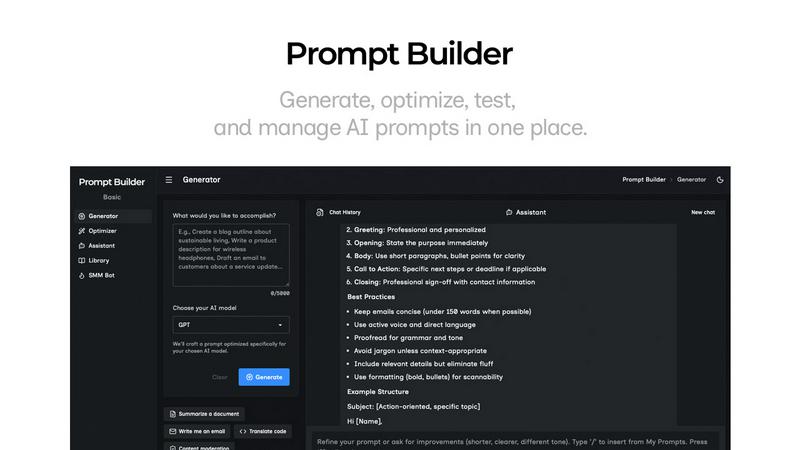
Generate, optimize, test, and manage AI prompts in one place. Turn an idea into a ready-to-use prompt in seconds.
Visual Comparison
Hello Aria

Prompt Builder
Overview
About Hello Aria
Hello Aria is a groundbreaking AI assistant that redefines how individuals manage their daily tasks, notes, reminders, emails, and meetings. Designed for busy professionals and anyone seeking a more organized life, Aria stands out by seamlessly integrating with popular platforms such as WhatsApp, Telegram, Email, and Web applications. Its primary value proposition is centered around organization and accessibility, ensuring that users can easily transform everyday messages into actionable reminders and to-do lists. With Hello Aria, you can capture thoughts in real time, sync calendars and files, and coordinate with your team without the endless meetings. This intelligent companion enhances productivity, enabling users to focus on what truly matters—be it personal tasks or professional projects. With a user-friendly interface and powerful AI capabilities, Hello Aria promises to streamline your workflow, making it an indispensable tool for anyone looking to enhance their productivity and regain peace of mind.
About Prompt Builder
Prompt Builder is a prompt engineering workspace for writing, testing, and saving prompts. Describe the task in plain English, and it helps you create a prompt that matches the model you choose. Start with a draft, refine it in chat, save or pin versions, then run them when you are ready. It works with GPT, Claude, Gemini, Llama, Mistral, DeepSeek, Grok, Perplexity, and more. You also get an Optimizer, an assistant for quick tests, and a library of reusable prompts and templates from the community. Turn an idea into a ready-to-use prompt in seconds. Refine it in chat, save it to your Library, and run it anytime.