HuntingPad vs Nabbed
Side-by-side comparison to help you choose the right tool.

HuntingPad organizes your job search and uses AI to get you more interviews.
Last updated: March 1, 2026

Nabbed is your career CRM, using AI to manage your job search pipeline like a professional salesperson.
Last updated: April 13, 2026
Visual Comparison
HuntingPad
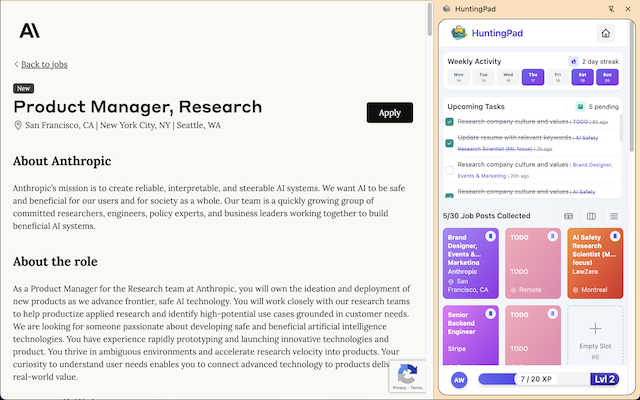
Nabbed

Feature Comparison
HuntingPad
One-Click Job Capture
This is the foundational feature that eliminates the tab explosion. Instead of manually copying job details, company names, and URLs into a separate document, you simply click the HuntingPad icon on any job posting. It instantly saves the full job description, link, company, and role title into your organized, local dashboard. This single action saves hours of tedious data entry and prevents the all-too-common "Where did I see that role?" panic.
AI-Powered Resume Matching & Insights
Going beyond simple storage, HuntingPad's AI analyzes the job description you've saved and compares it against your uploaded resume. It provides an instant compatibility score and, more importantly, specific, actionable insights. It will highlight missing keywords, suggest areas to emphasize, and guide you on how to tailor your resume for that specific opportunity, dramatically increasing your chances of passing automated screenings and catching a recruiter's eye.
Smart Application Tracking & Reminders
HuntingPad automatically creates a centralized tracker for every job you save. It moves beyond a static spreadsheet by allowing you to update the status (Applied, Interviewing, Offer, etc.) and set smart, customizable reminders for critical follow-ups. Never miss a deadline to apply or forget to send a thank-you note after an interview again. The dashboard gives you a crystal-clear, real-time overview of your entire search campaign.
Local-First Data Storage & Privacy
In an era of data breaches, HuntingPad takes a principled stand. All your data—your saved jobs, your resume, your notes—is stored locally on your computer, not on a cloud server. This means your sensitive career information remains completely private and secure. You maintain full control, with the peace of mind that your job search strategy isn't being mined or exposed.
Nabbed
Dual Sales Pipelines
Nabbed features two distinct, interactive Kanban boards that mirror the CRM experience you already know. One pipeline is dedicated to tracking your job applications through stages like Outreach, Discovery, and Closed Won. The second is a Networking Pipeline to manage your relationships and warm introductions. This dual-system allows you to visualize momentum, track velocity, and understand exactly where your search stands, transforming a chaotic process into a manageable, measurable sales funnel.
AI Career Suite
This integrated suite contains four powerful AI tools designed to automate the most time-consuming parts of your search. It generates tailored cover letters, optimizes your resume for specific job descriptions, provides personalized interview coaching with sample answers, and drafts compelling outreach emails. The AI is trained to write in a professional tone that matches your style, saving you hours of work and elevating the quality of every interaction in seconds.
Chrome Extension with ATS Autofill
The free browser extension is the workhorse of your search. With one click, you can save any job listing from over 10 platforms directly to your pipeline. Its killer feature is the ability to autofill application forms on more than 60 Applicant Tracking Systems (ATS) like Greenhouse, Lever, and Workday, pulling data from your profile. This "stealth apply" functionality eliminates tedious manual data entry, letting you apply to more roles in less time.
Company Intelligence & Hiring Signals
Nabbed automatically enriches every company you save with real-time intelligence, including funding status, employee headcount, tech stack, and Glassdoor ratings. More critically, it monitors your target accounts for "hiring signals" like rapid headcount growth or new funding rounds, alerting you when a company is most likely to be hiring. This turns reactive job searching into proactive territory planning.
Use Cases
HuntingPad
The Strategic Mass Applicant
For the professional who knows that landing a role today requires sending 100-150 targeted applications, HuntingPad is non-negotiable. It provides the infrastructure to manage this volume without collapsing into chaos. You can systematically save, prioritize, and track dozens of applications per week, ensuring consistent follow-up and allowing you to focus energy on customization rather than organization.
The Senior Professional Re-Entering the Market
If you haven't job-hunted in years, the process has changed dramatically. HuntingPad acts as your modern co-pilot. It helps you efficiently capture opportunities across multiple new platforms, uses AI to help translate your extensive experience into the right keywords for today's market, and provides the organizational framework you're accustomed to in your professional life, applied directly to your search.
The Passive Job Seeker
Even if you're just casually browsing to see what's out there, HuntingPad is perfect. That interesting role you see but aren't ready to apply for? One click saves it for later review. Over time, you build a private, curated list of potential opportunities and companies, allowing you to make a move strategically and quickly when the time is right, with all the research already done.
The Networked Candidate with Multiple Leads
When you're combining direct applications with referrals and recruiter conversations, details blur fast. HuntingPad becomes your single source of truth. You can attach notes to each saved job ("Referred by Sarah in Engineering," "Spoke with recruiter John on 10/21"), keeping every interaction and application detail linked and immediately accessible for any surprise call or interview.
Nabbed
The Strategic Job Seeker in Active Search
For a sales leader actively looking for a new CRO or VP of Sales role, Nabbed provides the structure to manage 50+ target companies, track numerous applications, and orchestrate a complex networking campaign. The pipeline analytics help prioritize efforts on high-potential opportunities, while AI tools ensure every application and follow-up is perfectly polished.
The Passive Candidate Building an Opportunity Pipeline
A high-performing Account Executive not actively applying can use Nabbed to quietly build a "territory" of dream companies. They can save interesting roles, build a contact list, and monitor for hiring triggers. When the perfect signal hits, they're prepared to engage with a warm network and a tailored resume, moving quickly from passive to candidate.
The Career Pivot into a New Industry
Someone transitioning from, say, SaaS sales to Fintech sales needs deep company research and to rebuild their network. Nabbed's Company Intelligence provides instant due diligence on potential employers, while the Contact CRM helps map and track new relationships within the target industry, making a complex pivot more manageable.
The Organized Professional Managing Referrals
Leveraging a warm network for referrals is crucial but messy. Nabbed's Networking Pipeline allows you to track who you've asked for an intro, the status of that request, and required follow-ups. Combined with email tracking, you have full visibility into your referral chain, ensuring no valuable connection falls through the cracks.
Pricing Comparison
HuntingPad
HuntingPad offers a free version to get started. The website emphasizes a "Start Organizing for Free" approach with no credit card required. While specific tier details or premium feature lists are not provided in the given context, the core value proposition of one-click capture, local storage, and basic organization is accessible at no cost, allowing users to set up and experience the fundamental benefits immediately.
Nabbed
Nabbed operates on a freemium model. The core Chrome extension with job capture and basic autofill functionality is completely free to install and use. For professionals who want the full strategic advantage, the Core plan is priced at $19 per month. This subscription unlocks the complete feature set, including the AI Career Suite, advanced ATS autofill, Gmail and email tracking, full company intelligence with hiring alerts, LinkedIn contact capture, and outreach sequences. This tier is designed to provide maximum value for a single, transparent fee.
Overview
About HuntingPad
Let's be brutally honest: the modern job search is broken. You're a high-achieving professional, yet you're forced to fight for attention in a sea of 200+ applicants using tools from the last decade—spreadsheets, bookmarks, and a prayer. HuntingPad is the surgical strike against this chaos. It's a Chrome extension that installs a command center directly into your browser, right where you're already hunting for jobs on LinkedIn, Indeed, and Glassdoor. Its core genius is in transforming the frantic, multi-tab, copy-paste nightmare into a streamlined, intelligent process. With one click, it captures any job posting, saving all the crucial details so you never lose track. Its AI doesn't just organize; it actively coaches you, providing instant resume compatibility scores and insights to tailor your application. Crucially, it respects your privacy by storing everything locally on your device. For developers, managers, and any ambitious professional tired of their job search feeling like a second, unpaid job, HuntingPad is the essential upgrade. It turns your hunt from a game of administrative survival into a strategic, organized campaign.
About Nabbed
Nabbed is the first and only CRM built specifically for revenue professionals who are serious about managing their careers. Forget the spray-and-pray approach of generic job boards. Nabbed empowers you to run your job search with the same precision, strategy, and data-driven rigor you use to manage a sales pipeline. It’s built by a CRO for anyone in sales, revenue operations, or business development who knows that their next role is their most important deal. The core value proposition is simple: stop treating your career like an afterthought and start treating it like your top account. The platform centralizes everything from target account research and visual pipeline tracking to intelligent outreach and performance analytics. With unique tools like Gmail open tracking for recruiters, AI-powered company intelligence, and a Chrome extension that autofills applications across 60+ ATS platforms, Nabbed provides the unfair advantage that top performers demand. It’s not just a tracker; it’s a strategic command center for your career progression.
Frequently Asked Questions
HuntingPad FAQ
Is my data safe with HuntingPad?
Absolutely. This is a core tenet of HuntingPad's design. The extension operates on a local-first principle. All the information you save—job posts, your resume, your notes—is stored directly on your own computer. Nothing is sent to or stored on HuntingPad's servers unless you explicitly choose to use a cloud sync feature (if offered in future plans). Your privacy is fully protected.
How does the AI resume matching work?
After you save a job posting, you can upload your resume (stored locally) for analysis. HuntingPad's AI scans the job description for key skills, technologies, and qualifications. It then compares this against your resume to identify matches, gaps, and suggested keywords. It provides a compatibility score and concrete recommendations to help you tailor your resume, making it more relevant for that specific role and applicant tracking systems (ATS).
Can I use HuntingPad on sites other than LinkedIn?
Yes. While LinkedIn, Indeed, and Glassdoor are primary targets, the one-click capture feature is designed to work on most major job boards and even company career pages. If you can view a job posting in your Chrome browser, there's a very high likelihood HuntingPad can capture it cleanly and organize the details for you automatically.
Do I need to create another account and password?
No, and this is a beautiful part of the design. Because HuntingPad stores your data locally on your device, there is no central account to create or password to remember. You install the Chrome extension, and it's ready to use. This eliminates friction and aligns with the tool's philosophy of integrating seamlessly into your existing workflow without adding more logins to your life.
Nabbed FAQ
How does the Gmail email tracking work?
Nabbed places a secure, invisible tracking pixel in the emails you send to recruiters and contacts through its system. When the recipient opens your email, the pixel is loaded, and Nabbed instantly notifies you. This gives you valuable insight into engagement before you get a reply, allowing for perfectly timed follow-ups. This feature is exclusive to the paid Core plan.
Is my data and job search activity private?
Absolutely. Nabbed takes privacy seriously. Your data is encrypted, and the platform includes features like "Stealth Mode" in the Chrome extension to discreetly save jobs. You can review how your information is used in their detailed Privacy Policy and Cookie Policy, available on their website.
What makes Nabbed different from other job trackers like Teal or Huntr?
Nabbed is built from the ground up for the workflow of a revenue professional, while others are generalized trackers. Key differentiators include the dual pipeline system, actual email open tracking (which competitors lack), AI tools trained for sales communication, and a focus on company intelligence and hiring signals rather than just storing links.
Can I use Nabbed for free?
Yes, Nabbed offers a robust free tier that includes the essential Chrome extension for capturing jobs and basic autofill. This allows you to manage a core pipeline. For advanced features like the AI Career Suite, Gmail tracking, full company intelligence, and outreach sequences, you would upgrade to the Core plan at $19 per month.
Alternatives
HuntingPad Alternatives
HuntingPad is a standout tool in the job search productivity category, designed to cut through the noise of modern applications. It helps ambitious professionals capture listings, match resumes with AI, and track everything from their browser. For many, it’s a game-changer in organizing a chaotic process. Yet, no single tool is perfect for everyone. Users often seek alternatives for various reasons, such as needing a different pricing model, requiring features beyond a Chrome extension, or preferring a cloud-based system over local storage. The specific demands of one's job hunt—like a focus on networking or a need for collaborative features—can also drive the search for other options. When evaluating alternatives, consider your core needs. Prioritize whether AI matching, application tracking, or privacy is most critical. Look at the platform compatibility—do you need a mobile app or a web dashboard? Finally, assess the value: does the tool save you enough time and frustration to justify its cost or learning curve? The best choice aligns with your personal workflow.
Nabbed Alternatives
Nabbed is a specialized career management CRM designed for sales and revenue professionals actively navigating the job market. It combines job tracking, contact management, and AI-powered intelligence into a single platform, helping users organize their search and gain a competitive edge. This places it squarely in the productivity and management software category, with a laser focus on career advancement. People explore alternatives to a tool like Nabbed for several common reasons. Budget is a primary factor, as some may seek a completely free solution or a different pricing model. Others might need a platform that works on mobile or integrates with a specific set of tools they already use. The feature set itself can also be a driver; perhaps someone wants a simpler, more generic tracker or a tool with a stronger emphasis on networking over application automation. When evaluating other options, consider what’s truly essential for your job hunt. Do you need robust ATS autofill, or is manual entry acceptable? Is AI company intelligence a must-have, or are you comfortable doing that research separately? Prioritize the core functionality that will save you the most time and give you the clearest advantage, then see which tools align with that vision and your budget.