
HuntingPad vs Zovo
Side-by-side comparison to help you choose the right tool.

HuntingPad
HuntingPad organizes your job search and uses AI to get you more interviews.
Last updated: March 1, 2026

Zovo offers 20 privacy-focused Chrome extensions for developers and writers, all under one subscription with no data.
Last updated: February 28, 2026
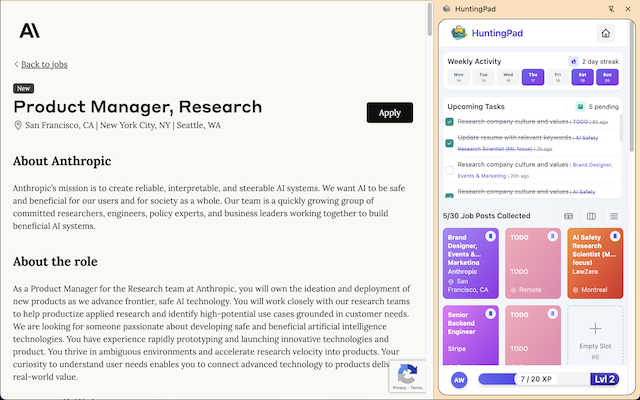
Visual Comparison
HuntingPad
Zovo

Feature Comparison
HuntingPad
One-Click Job Capture
This is the foundational feature that eliminates the tab explosion. Instead of manually copying job details, company names, and URLs into a separate document, you simply click the HuntingPad icon on any job posting. It instantly saves the full job description, link, company, and role title into your organized, local dashboard. This single action saves hours of tedious data entry and prevents the all-too-common "Where did I see that role?" panic.
AI-Powered Resume Matching & Insights
Going beyond simple storage, HuntingPad's AI analyzes the job description you've saved and compares it against your uploaded resume. It provides an instant compatibility score and, more importantly, specific, actionable insights. It will highlight missing keywords, suggest areas to emphasize, and guide you on how to tailor your resume for that specific opportunity, dramatically increasing your chances of passing automated screenings and catching a recruiter's eye.
Smart Application Tracking & Reminders
HuntingPad automatically creates a centralized tracker for every job you save. It moves beyond a static spreadsheet by allowing you to update the status (Applied, Interviewing, Offer, etc.) and set smart, customizable reminders for critical follow-ups. Never miss a deadline to apply or forget to send a thank-you note after an interview again. The dashboard gives you a crystal-clear, real-time overview of your entire search campaign.
Local-First Data Storage & Privacy
In an era of data breaches, HuntingPad takes a principled stand. All your data—your saved jobs, your resume, your notes—is stored locally on your computer, not on a cloud server. This means your sensitive career information remains completely private and secure. You maintain full control, with the peace of mind that your job search strategy isn't being mined or exposed.
Zovo
BeLikeNative
BeLikeNative is an exceptional writing assistant that helps users compose text in a manner akin to native speakers. It offers one-keystroke rewrites across 80 languages, making it an invaluable tool for non-native speakers who wish to enhance their writing skills and communicate more effectively.
Tab Suspender Pro
Tab Suspender Pro is a brilliant extension designed to optimize your browser's memory usage by suspending inactive tabs. This feature not only improves performance but also helps reduce lag and crashes, allowing you to maintain a smooth browsing experience even with numerous tabs open.
JSON Formatter Pro
For developers and data enthusiasts, JSON Formatter Pro is an essential tool. It simplifies the process of viewing and editing JSON data, providing clear formatting and validation features. This makes it easier to work with APIs and manage data structures efficiently.
Clipboard History Pro
Clipboard History Pro transforms how you manage copied content. This extension saves your clipboard history, allowing you to access and paste previously copied items seamlessly. With a limit of up to 100 items in the free version, it’s perfect for anyone who frequently works with multiple pieces of text.
Use Cases
HuntingPad
The Strategic Mass Applicant
For the professional who knows that landing a role today requires sending 100-150 targeted applications, HuntingPad is non-negotiable. It provides the infrastructure to manage this volume without collapsing into chaos. You can systematically save, prioritize, and track dozens of applications per week, ensuring consistent follow-up and allowing you to focus energy on customization rather than organization.
The Senior Professional Re-Entering the Market
If you haven't job-hunted in years, the process has changed dramatically. HuntingPad acts as your modern co-pilot. It helps you efficiently capture opportunities across multiple new platforms, uses AI to help translate your extensive experience into the right keywords for today's market, and provides the organizational framework you're accustomed to in your professional life, applied directly to your search.
The Passive Job Seeker
Even if you're just casually browsing to see what's out there, HuntingPad is perfect. That interesting role you see but aren't ready to apply for? One click saves it for later review. Over time, you build a private, curated list of potential opportunities and companies, allowing you to make a move strategically and quickly when the time is right, with all the research already done.
The Networked Candidate with Multiple Leads
When you're combining direct applications with referrals and recruiter conversations, details blur fast. HuntingPad becomes your single source of truth. You can attach notes to each saved job ("Referred by Sarah in Engineering," "Spoke with recruiter John on 10/21"), keeping every interaction and application detail linked and immediately accessible for any surprise call or interview.
Zovo
Improving Language Skills
For language learners and professionals, BeLikeNative offers a straightforward way to improve writing proficiency. Users can quickly rewrite sentences to sound more natural, enhancing communication for personal or professional use in a new language.
Enhancing Browser Performance
Tab Suspender Pro is ideal for users who often juggle multiple tabs. By suspending unused tabs, it conserves system resources, ensuring that your browser operates efficiently without slowing down your workflow, especially during intensive tasks.
Simplifying Data Management
Developers can rely on JSON Formatter Pro to handle complex data effortlessly. Whether debugging or developing, this tool ensures data is presented clearly, making it easier to identify issues and streamline the coding process.
Efficient Text Management
Clipboard History Pro is perfect for writers, researchers, or anyone who regularly copies and pastes text. This extension allows users to retrieve and reuse previously copied content quickly, significantly speeding up the writing or data entry process.
Overview
About HuntingPad
Let's be brutally honest: the modern job search is broken. You're a high-achieving professional, yet you're forced to fight for attention in a sea of 200+ applicants using tools from the last decade—spreadsheets, bookmarks, and a prayer. HuntingPad is the surgical strike against this chaos. It's a Chrome extension that installs a command center directly into your browser, right where you're already hunting for jobs on LinkedIn, Indeed, and Glassdoor. Its core genius is in transforming the frantic, multi-tab, copy-paste nightmare into a streamlined, intelligent process. With one click, it captures any job posting, saving all the crucial details so you never lose track. Its AI doesn't just organize; it actively coaches you, providing instant resume compatibility scores and insights to tailor your application. Crucially, it respects your privacy by storing everything locally on your device. For developers, managers, and any ambitious professional tired of their job search feeling like a second, unpaid job, HuntingPad is the essential upgrade. It turns your hunt from a game of administrative survival into a strategic, organized campaign.
About Zovo
Zovo is an innovative suite of 20 Chrome extensions designed by a solo developer with over a decade of experience and a remarkable track record of earning over $400K on Upwork with a perfect success rate. At its core, Zovo aims to enhance your browsing experience while prioritizing your privacy. With flagship tools like BeLikeNative, which enables over 3,300 users to effortlessly write like native speakers through one-keystroke rewrites in 80 languages, Zovo stands out as a must-have collection for anyone looking to improve their workflow. The suite includes a variety of utilities, such as Tab Suspender Pro for memory management, JSON Formatter Pro for developers, and Clipboard History Pro for efficient text management. Every extension is built with a privacy-first approach, ensuring that your data remains on your device, with zero data harvesting or tracking. Users actively participate in shaping the roadmap by voting on features, while new extensions are released monthly. With many tools available for free online at zovo.one, Zovo truly offers every tool your browser needs—all while keeping your data secure and private.
Frequently Asked Questions
HuntingPad FAQ
Is my data safe with HuntingPad?
Absolutely. This is a core tenet of HuntingPad's design. The extension operates on a local-first principle. All the information you save—job posts, your resume, your notes—is stored directly on your own computer. Nothing is sent to or stored on HuntingPad's servers unless you explicitly choose to use a cloud sync feature (if offered in future plans). Your privacy is fully protected.
How does the AI resume matching work?
After you save a job posting, you can upload your resume (stored locally) for analysis. HuntingPad's AI scans the job description for key skills, technologies, and qualifications. It then compares this against your resume to identify matches, gaps, and suggested keywords. It provides a compatibility score and concrete recommendations to help you tailor your resume, making it more relevant for that specific role and applicant tracking systems (ATS).
Can I use HuntingPad on sites other than LinkedIn?
Yes. While LinkedIn, Indeed, and Glassdoor are primary targets, the one-click capture feature is designed to work on most major job boards and even company career pages. If you can view a job posting in your Chrome browser, there's a very high likelihood HuntingPad can capture it cleanly and organize the details for you automatically.
Do I need to create another account and password?
No, and this is a beautiful part of the design. Because HuntingPad stores your data locally on your device, there is no central account to create or password to remember. You install the Chrome extension, and it's ready to use. This eliminates friction and aligns with the tool's philosophy of integrating seamlessly into your existing workflow without adding more logins to your life.
Zovo FAQ
How does Zovo protect my privacy?
Zovo is committed to privacy by design, ensuring that all extensions run locally on your device. No data is collected, tracked, or sent to servers, meaning your browsing habits and activity remain entirely private.
Can I request new features for Zovo?
Absolutely! Users can submit feature requests directly to the developer. The most requested features are prioritized, and your input directly influences the roadmap for future extensions.
Are any of the extensions free?
Yes, Zovo offers many tools for free, including core functionalities of all extensions. Users can access essential features without creating an account, while premium features are available through a one-time purchase.
How often are new extensions released?
New extensions are shipped monthly, with early access provided to members. This ensures that users who contribute to the community can try out new tools before they become available to the public.
Alternatives
HuntingPad Alternatives
HuntingPad is a standout tool in the job search productivity category, designed to cut through the noise of modern applications. It helps ambitious professionals capture listings, match resumes with AI, and track everything from their browser. For many, it’s a game-changer in organizing a chaotic process. Yet, no single tool is perfect for everyone. Users often seek alternatives for various reasons, such as needing a different pricing model, requiring features beyond a Chrome extension, or preferring a cloud-based system over local storage. The specific demands of one's job hunt—like a focus on networking or a need for collaborative features—can also drive the search for other options. When evaluating alternatives, consider your core needs. Prioritize whether AI matching, application tracking, or privacy is most critical. Look at the platform compatibility—do you need a mobile app or a web dashboard? Finally, assess the value: does the tool save you enough time and frustration to justify its cost or learning curve? The best choice aligns with your personal workflow.
Zovo Alternatives
Zovo is a suite of 20 Chrome extensions designed specifically for developers and writers, prioritizing user privacy and data security. This collection includes tools like JSON Formatter, Tab Suspender, and Clipboard History, all crafted by a solo developer with extensive experience in the field. Users often seek alternatives to Zovo for various reasons, including pricing structures, feature sets, or compatibility with specific workflows and platforms. When searching for a suitable alternative, it's essential to consider factors such as the range of features offered, the emphasis on user privacy, and the overall usability of the extensions. Finding the right alternative involves assessing how well the tools align with your needs. Look for extensions that offer a comprehensive feature set while maintaining a commitment to data security. Additionally, consider whether the platform allows customization and community engagement, as these elements can enhance your experience and ensure the tools evolve according to user feedback.