
ImaginePro vs Shrinkpad
Side-by-side comparison to help you choose the right tool.

ImaginePro
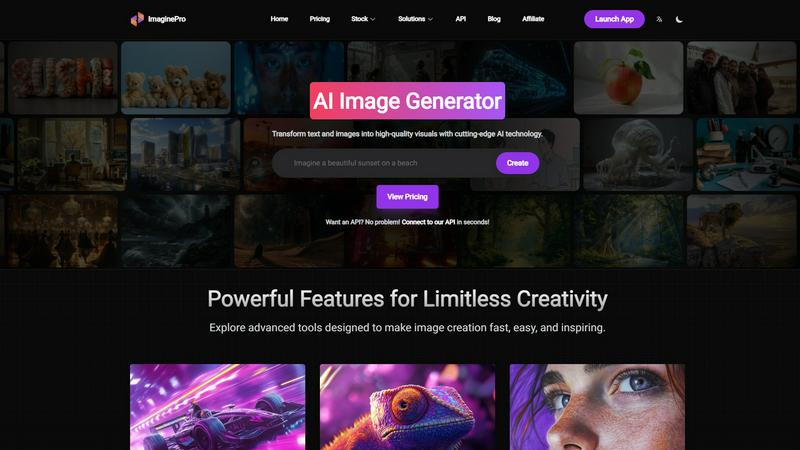
ImaginePro instantly creates stunning, lifelike AI images and effortlessly removes backgrounds for you.
Last updated: March 1, 2026

Shrinkpad
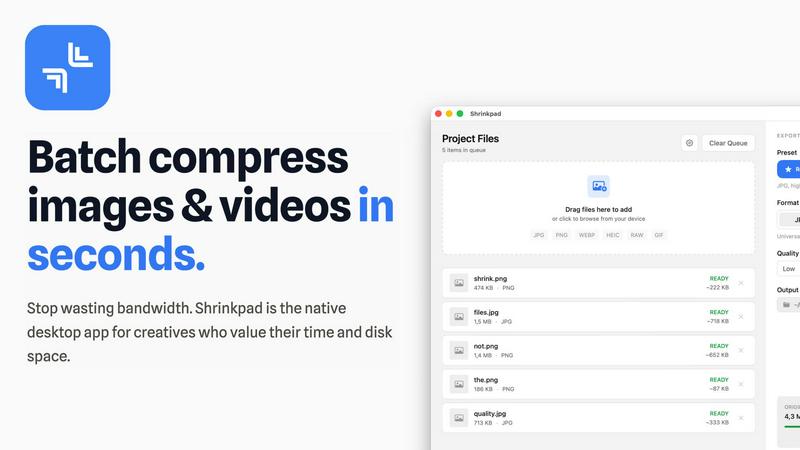
Effortlessly batch compress images and videos on Mac, saving time and space while enhancing quality with Shrinkpad.
Last updated: February 28, 2026
Visual Comparison
ImaginePro
Shrinkpad
Feature Comparison
ImaginePro
Professional-Grade AI Image Generation
This is the powerhouse engine. Forget fuzzy, generic outputs. ImaginePro uses cutting-edge AI models to generate lifelike, high-resolution images from text prompts that are ready for commercial use. The interface simplifies the process with presets for colors, framing, and lighting, making it easy to achieve professional results without needing a PhD in prompt engineering. The speed and quality here are what set the foundation for everything else.
One-Click Background Removal
This feature alone saves hours of tedious work. ImaginePro's background remover is remarkably accurate, effortlessly isolating subjects from their backgrounds. It's perfect for creating clean product shots for e-commerce, professional headshots, or any graphic design project where you need a subject on a transparent or new background. The precision and speed make it an indispensable tool in the kit.
Text Behind Image Effect
This is a standout, uniquely creative feature that solves a specific design challenge. The AI intelligently detects subjects in your image, allowing you to seamlessly place text behind objects for a dynamic, magazine-cover look. You can customize the text with various fonts and styles. It’s an eye-catching effect that adds serious polish to social media graphics, posters, or any promotional material.
AI Agent & Developer API Integration
For the tech-savvy user, this is a game-changer. ImaginePro offers a powerful API and a zero-dependency Python skill that allows AI coding agents (like Claude or Codex) to generate images programmatically. It bundles access to multiple models, upscaling, and even background removal into a single CLI script with JSON output. This is perfect for building automated content pipelines, chatbots, or any developer workflow that requires dynamic image creation.
Shrinkpad
Automatic Compression Adjustment
Shrinkpad intelligently analyzes the visual complexity of each file, applying the optimal compression ratio without introducing artifacts. This ensures that your images and videos maintain their quality while benefiting from reduced file sizes.
Unlimited Batch Processing
Unlike many web-based tools that struggle with large quantities of files, Shrinkpad handles thousands of assets simultaneously without crashing. This feature is essential for photographers and designers who often work with extensive media libraries.
One-Drop Folder Compression
Forget the tedious task of dragging and dropping individual files. With Shrinkpad's folder mode, you can simply drop an entire folder, and the application will automatically detect and prepare all images and videos for compression in one go.
Privacy-First Processing
Shrinkpad prioritizes user privacy by ensuring that all processing happens locally. There are no cloud uploads, meaning your sensitive media files stay safely on your device during and after the compression process.
Use Cases
ImaginePro
Social Media & Marketing Content Creation
For social media managers and marketers, ImaginePro is a content powerhouse. You can generate a week's worth of unique, high-quality graphics for posts, ads, and stories in an afternoon. Need a specific visual to match a campaign theme? Describe it and get a polished image in seconds. The background remover and text effects then let you tailor those images perfectly for each platform, maintaining a professional brand aesthetic effortlessly.
E-commerce Product Photography
E-commerce entrepreneurs can create stunning product shots without a photo studio. Generate lifestyle images of your product in use, or use the AI to create complementary scene visuals. The background remover is essential here, allowing you to clean up real product photos or place AI-generated products on pure white or custom backgrounds, creating a consistent, professional-looking catalog at a fraction of the cost.
Design & Creative Project Acceleration
Graphic designers and artists under tight deadlines can use ImaginePro as a powerful ideation and asset-creation tool. Quickly generate concept art, textures, or unique visual elements to incorporate into larger projects. The "text behind image" feature is perfect for creating compelling key art, posters, or album covers with a sophisticated, layered look that would take much longer to achieve manually.
Automated Developer Workflows
Developers and teams building applications can integrate ImaginePro's API to automate image generation. Use it to create dynamic featured images for blog posts, generate unique visuals for user-generated content, or power a chatbot that can create images on demand. The structured JSON output and agent-friendly design make it a reliable and scalable solution for programmatic creative needs.
Shrinkpad
Optimizing Web Assets
Web developers and designers can use Shrinkpad to compress images and videos for websites, significantly improving load times and user experience. Faster loading pages can enhance SEO, making it a vital tool in digital marketing.
Preparing Media for Social Media
Content creators who frequently post on social media can utilize Shrinkpad to quickly compress their media files, allowing them to share high-quality images and videos without the worry of exceeding size limits on platforms.
Streamlining Project Workflows
For teams using design tools like Figma or Photoshop, Shrinkpad automates the export process of multiple assets. By compressing files in bulk, it saves hours of busywork, enabling creatives to focus more on their design work.
Reducing Storage Costs
Businesses and individual users alike can benefit from Shrinkpad by significantly reducing the size of their media libraries. This not only saves space on local devices but can also decrease costs associated with cloud storage solutions.
Overview
About ImaginePro
Let's be brutally honest: most AI image generators are glorified toys. They're fun for a few minutes, but when you need something that actually looks professional, you're left with uncanny, low-res results that scream "AI-made." That's why ImaginePro feels like such a breath of fresh air. This isn't just another text-to-image tool; it's a full-fledged creative suite built from the ground up for professionals who need quality and speed. Its core mission is to transform simple text prompts or existing images into stunning, high-resolution visuals that are genuinely commercial-ready right out of the gate. What truly won me over, however, is its laser focus on solving real-world creative problems. Instead of stopping at generation, ImaginePro includes practical post-generation tools like its flawless background remover and the ingenious "text behind image" feature that tackle common design headaches in seconds. It's built for a specific, busy audience: the social media manager drowning in content calendars, the e-commerce seller needing perfect product shots, the designer on a crushing deadline, and the developer building automated content pipelines via its robust API. The value proposition is crystal clear: stop juggling five different apps and wrestling with impossibly complex prompts. With ImaginePro, you get a single, intuitive platform that delivers polished, professional visuals in the time it takes to describe them. If you need results that look like you spent hours, not seconds, this is your new starting point.
About Shrinkpad
Shrinkpad is a robust macOS application tailored for creatives who need to batch compress images and videos swiftly and effectively. Whether you are a photographer, designer, or content creator, managing large media files can be a daunting task. Shrinkpad simplifies this process with its user-friendly drag-and-drop functionality, allowing you to import hundreds of files or entire folders with ease. What sets Shrinkpad apart is its commitment to privacy; all processing occurs locally on your device, ensuring that your sensitive files remain secure and never touch the cloud. With the capability to reduce file sizes by up to 90% while preserving the original visual quality, Shrinkpad not only saves storage space but also optimizes bandwidth usage. Supporting over 50 media formats, it is an invaluable tool for anyone looking to enhance their digital asset management without compromising on quality or efficiency.
Frequently Asked Questions
ImaginePro FAQ
What makes ImaginePro different from free AI image generators?
While free tools are great for experimentation, they often lack the resolution, commercial licensing, and nuanced control needed for professional work. ImaginePro is built specifically for quality and real-world application. It combines top-tier generation models with practical post-production tools like background removal and advanced text effects in one platform, ensuring the final output is actually ready to use in commercial projects without additional editing software.
Do I own the images I create with ImaginePro?
Yes, you typically own the images you generate for use in your personal and commercial projects. However, it's always crucial to review the specific Terms of Service on ImaginePro's website for the most current and detailed information regarding licensing, usage rights, and any limitations to ensure compliance with their policies.
Is ImaginePro suitable for beginners with no design experience?
Absolutely. One of ImaginePro's greatest strengths is its intuitive web interface. It's designed to be user-friendly, with streamlined presets and simple controls that guide you. You don't need to write complex prompts or know design software. You describe your idea, choose a style, and let the AI do the heavy lifting, making professional-grade visual creation accessible to everyone.
Can I use ImaginePro for automated or bulk image creation?
Yes, this is a core strength for developers and businesses. Through ImaginePro's robust API and its dedicated Python skill for AI agents, you can fully automate image generation. This allows for the creation of bulk visuals for catalogs, dynamic images for user profiles, or integrated creative features within your own applications and automated content pipelines.
Shrinkpad FAQ
Can I use Shrinkpad for free?
Yes, Shrinkpad offers a free starter version that includes essential tools for casual users, allowing you to batch process a limited number of files without any cost.
What file formats does Shrinkpad support?
Shrinkpad supports over 50 media formats, including popular ones like JPG, PNG, WEBP, AVIF, MP4, and MOV, making it a versatile solution for various media types.
Does Shrinkpad support video compression?
Absolutely! Shrinkpad is designed to handle both image and video compression, ensuring that all your media files can be optimized efficiently.
How many files can I process at once?
With Shrinkpad, you can process thousands of files simultaneously, thanks to its unlimited batch processing capability. This feature allows for efficient handling of large media libraries without performance issues.
Alternatives
ImaginePro Alternatives
ImaginePro is a professional-grade AI image generation and editing tool. It stands out in the crowded field of AI art platforms by focusing on delivering commercial-ready visuals and practical post-generation tools like one-click background removal. It's designed for users who need polished results fast, without the typical AI weirdness. People often seek alternatives for a few key reasons. Budget is a major factor, as some need a free tier or different pricing model. Others might require a specific feature ImaginePro lacks, like a particular art style or more advanced control. Platform needs also vary; some users prefer a mobile-first experience or need deeper integration capabilities than an API offers. When evaluating other options, prioritize what matters most for your workflow. Look closely at output quality and consistency—many tools generate images, but few produce reliably professional results. Consider the total toolkit: does it also handle essential edits like background removal? Finally, assess the learning curve and speed; your time is valuable, and a complex interface can negate any cost savings.
Shrinkpad Alternatives
Shrinkpad is an innovative macOS application that specializes in batch compressing images and videos, making it a go-to tool for photographers, designers, and content creators alike. By allowing users to effortlessly drag and drop hundreds of files or entire folders, Shrinkpad streamlines the process of managing large media files while ensuring optimal quality and significant space savings. However, users often seek alternatives due to various factors, including pricing structures, specific feature sets, or compatibility with different platforms. When searching for an alternative to Shrinkpad, consider what aspects are most important to your workflow. This might include the ease of batch processing, the ability to maintain file privacy through local processing, or the range of supported formats. Additionally, customization options can significantly enhance your user experience, so look for tools that allow you to fine-tune compression settings to meet your unique needs. Ultimately, the right choice will depend on your specific requirements and preferences.