
Shrinkpad
Effortlessly batch compress images and videos on Mac, saving time and space while enhancing quality with Shrinkpad.
Visit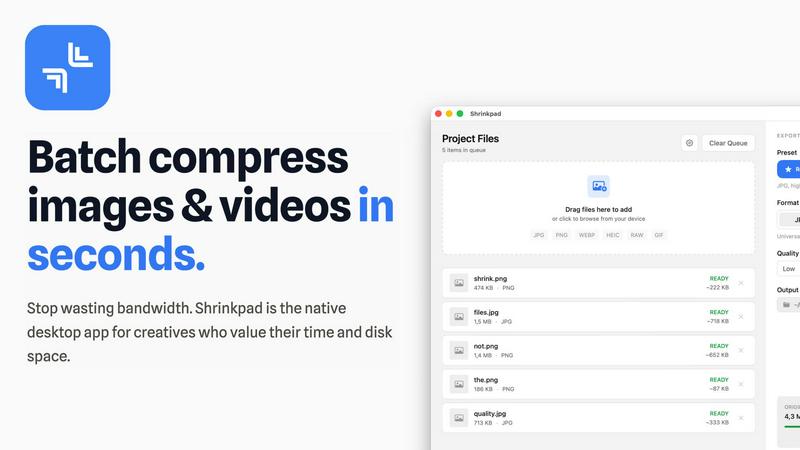
About Shrinkpad
Shrinkpad is a robust macOS application tailored for creatives who need to batch compress images and videos swiftly and effectively. Whether you are a photographer, designer, or content creator, managing large media files can be a daunting task. Shrinkpad simplifies this process with its user-friendly drag-and-drop functionality, allowing you to import hundreds of files or entire folders with ease. What sets Shrinkpad apart is its commitment to privacy; all processing occurs locally on your device, ensuring that your sensitive files remain secure and never touch the cloud. With the capability to reduce file sizes by up to 90% while preserving the original visual quality, Shrinkpad not only saves storage space but also optimizes bandwidth usage. Supporting over 50 media formats, it is an invaluable tool for anyone looking to enhance their digital asset management without compromising on quality or efficiency.
Features of Shrinkpad
Automatic Compression Adjustment
Shrinkpad intelligently analyzes the visual complexity of each file, applying the optimal compression ratio without introducing artifacts. This ensures that your images and videos maintain their quality while benefiting from reduced file sizes.
Unlimited Batch Processing
Unlike many web-based tools that struggle with large quantities of files, Shrinkpad handles thousands of assets simultaneously without crashing. This feature is essential for photographers and designers who often work with extensive media libraries.
One-Drop Folder Compression
Forget the tedious task of dragging and dropping individual files. With Shrinkpad's folder mode, you can simply drop an entire folder, and the application will automatically detect and prepare all images and videos for compression in one go.
Privacy-First Processing
Shrinkpad prioritizes user privacy by ensuring that all processing happens locally. There are no cloud uploads, meaning your sensitive media files stay safely on your device during and after the compression process.
Use Cases of Shrinkpad
Optimizing Web Assets
Web developers and designers can use Shrinkpad to compress images and videos for websites, significantly improving load times and user experience. Faster loading pages can enhance SEO, making it a vital tool in digital marketing.
Preparing Media for Social Media
Content creators who frequently post on social media can utilize Shrinkpad to quickly compress their media files, allowing them to share high-quality images and videos without the worry of exceeding size limits on platforms.
Streamlining Project Workflows
For teams using design tools like Figma or Photoshop, Shrinkpad automates the export process of multiple assets. By compressing files in bulk, it saves hours of busywork, enabling creatives to focus more on their design work.
Reducing Storage Costs
Businesses and individual users alike can benefit from Shrinkpad by significantly reducing the size of their media libraries. This not only saves space on local devices but can also decrease costs associated with cloud storage solutions.
Frequently Asked Questions
Can I use Shrinkpad for free?
Yes, Shrinkpad offers a free starter version that includes essential tools for casual users, allowing you to batch process a limited number of files without any cost.
What file formats does Shrinkpad support?
Shrinkpad supports over 50 media formats, including popular ones like JPG, PNG, WEBP, AVIF, MP4, and MOV, making it a versatile solution for various media types.
Does Shrinkpad support video compression?
Absolutely! Shrinkpad is designed to handle both image and video compression, ensuring that all your media files can be optimized efficiently.
How many files can I process at once?
With Shrinkpad, you can process thousands of files simultaneously, thanks to its unlimited batch processing capability. This feature allows for efficient handling of large media libraries without performance issues.
Explore more in this category:
Similar to Shrinkpad

Screen Tester
Free online screen tester for checking dead pixels, colors, brightness, contrast, refresh rate, and display quality.

PixRestorer
Restore and colorize old photos with AI in seconds. PixRestorer repairs scratches, fading, blur, and tears, brings black-and-white prints to life in n

Nano AI Prompts
NanoAIPrompts is a free AI image prompt library built for creators, photographers, designers, and AI enthusiasts. It offers ready-to-use prompts.

Magic Eraser
AI photo editor for removing objects and backgrounds, enhancing images, and creating visuals on web and mobile.

Seedance 2.5 Free
Create polished AI videos from text or images with Seedance 2.5 Free.
Imagine2
Private browser-based AI image generation and editing with text-to-image, targeted edits, and multi-image references.

Kogashitsuka AI
An online AI image tool that enhances photos and illustrations at their original size or upscales them by 2x or 4x.

PerchanceAI
PerchanceAI is an AI creative studio for image generation, editing, background removal, product photos, and image-to-video creation.