Mailopoly vs Prompt Builder
Side-by-side comparison to help you choose the right tool.

Mailopoly transforms your inbox into a smart assistant that prioritizes emails, extracts key info, and drafts replies.
Last updated: February 28, 2026

Prompt Builder
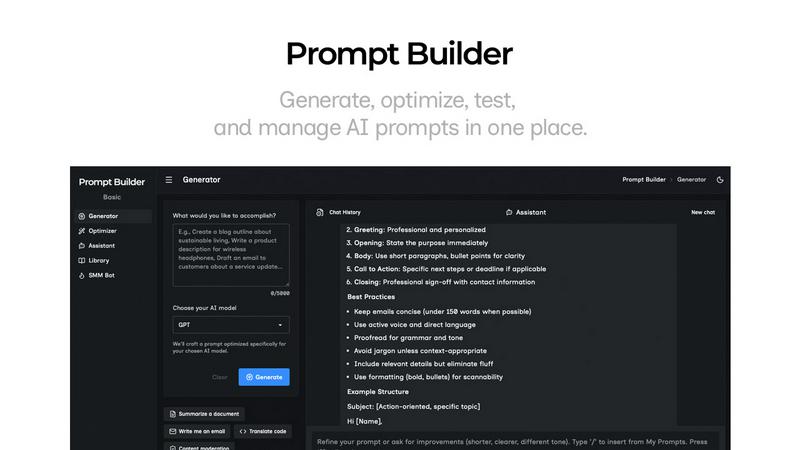
Generate, optimize, test, and manage AI prompts in one place. Turn an idea into a ready-to-use prompt in seconds.
Visual Comparison
Mailopoly

Prompt Builder
Overview
About Mailopoly
Mailopoly is a revolutionary email client designed to streamline your digital life. Unlike traditional email applications, Mailopoly employs advanced AI technology to automatically extract key information from your emails, allowing you to focus on what truly matters without the clutter. This unique approach not only reduces the volume of notifications and the size of your inbox by over 50%, but it also enhances your overall email experience. Mailopoly is perfect for busy professionals, multitaskers, and anyone overwhelmed by their inboxes, as it consolidates emails, tasks, and life management into one intuitive platform. With features like a built-in AI chatbot and a task manager, Mailopoly transforms your inbox into a personal command center, enabling you to manage personal finances, events, and shipments effortlessly. By leveraging Mailopoly, you can regain control of your email, reduce stress, and enhance your productivity.
About Prompt Builder
Prompt Builder is a prompt engineering workspace for writing, testing, and saving prompts. Describe the task in plain English, and it helps you create a prompt that matches the model you choose. Start with a draft, refine it in chat, save or pin versions, then run them when you are ready. It works with GPT, Claude, Gemini, Llama, Mistral, DeepSeek, Grok, Perplexity, and more. You also get an Optimizer, an assistant for quick tests, and a library of reusable prompts and templates from the community. Turn an idea into a ready-to-use prompt in seconds. Refine it in chat, save it to your Library, and run it anytime.