
LuxSign vs MeetingMind
Side-by-side comparison to help you choose the right tool.

LuxSign simplifies secure document signing with legally valid electronic signatures across the EU in minutes.
Last updated: February 28, 2026

MeetingMind
MeetingMind automatically records and summarizes your Zoom meetings, ensuring you never miss important insights again.
Last updated: March 1, 2026
Visual Comparison
LuxSign

MeetingMind
Feature Comparison
LuxSign
Multiple Signature Methods
LuxSign offers various signature methods to accommodate different preferences. Users can draw their signature with a mouse, type their name, or upload an image of their signature. This flexibility ensures quick and easy signing, catering to diverse user needs.
Advanced Security Measures
Security is paramount with LuxSign. The platform employs industry-standard encryption for document storage and transmission, ensuring that sensitive data remains secure. Additionally, documents are hosted on secure servers in Luxembourg, reinforcing compliance with EU data protection regulations.
Collaboration Workspaces
For teams that require seamless collaboration, LuxSign provides dedicated workspaces. These shared environments allow team members to organize documents, manage access rights, and collaborate on signing workflows, enhancing productivity and efficiency.
Complete Audit Trail
LuxSign maintains comprehensive audit trails for every document signed, providing detailed logs with timestamps, signer information, and IP addresses. This feature not only aids in compliance but also ensures transparency and accountability throughout the signing process.
MeetingMind
Automatic Detection
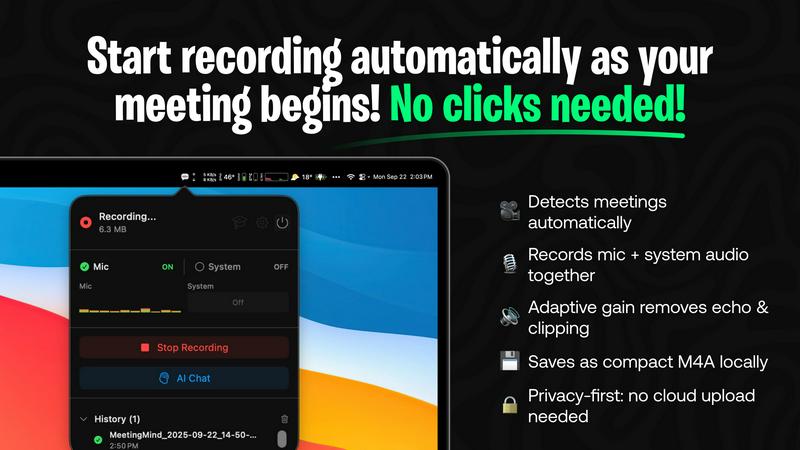
MeetingMind automatically detects when a Zoom meeting begins, requiring no manual input from the user. This seamless integration allows professionals to join meetings without the hassle of starting the recording, ensuring that every moment is captured effortlessly.
AI Assistant
Choose between local processing with Ollama or cloud-based insights with OpenRouter. This flexibility ensures that users can tailor their experience based on their preferences for speed and data processing, providing intelligent summaries and insights post-meeting.
Markdown Export
After your meeting, MeetingMind generates a neatly formatted markdown file containing transcripts, summaries, and actionable items. This feature not only makes it easy to share notes with team members but also helps in organizing information for future reference.
100% Private
MeetingMind prioritizes user privacy by performing all processing locally on your Mac. This means that sensitive meeting information never leaves your device, giving users peace of mind while discussing confidential topics.
Use Cases
LuxSign
Legal Agreements
Law firms and legal departments can utilize LuxSign to streamline the signing of contracts and agreements. With its compliance with eIDAS SES, legal documents signed through LuxSign hold validity across the EU, ensuring that legal requirements are met.
Human Resources Onboarding
HR departments can simplify the onboarding process for new employees by using LuxSign for employment contracts and policy documents. The ability to send documents for signature and track their status in real-time makes the onboarding process more efficient.
Real Estate Transactions
Real estate professionals can benefit from LuxSign by expediting the signing of purchase agreements and lease contracts. The platform’s multiple signer capabilities are perfect for transactions involving buyers, sellers, and agents.
Financial Services
Financial institutions can leverage LuxSign for signing loan agreements, investment documents, and other financial contracts. The platform’s robust security measures and compliance with regulations make it a trustworthy solution for sensitive financial transactions.
MeetingMind
Efficient Meeting Recaps
For teams that frequently hold meetings, MeetingMind provides an efficient way to recap discussions. Users can quickly review transcripts and summaries, ensuring that everyone is on the same page without having to revisit lengthy recordings.
Streamlined Action Item Tracking
MeetingMind helps in tracking action items by highlighting tasks discussed during meetings. This feature allows professionals to follow up on responsibilities easily, ensuring that nothing falls through the cracks after discussions.
Enhanced Collaboration
With the ability to share markdown notes, MeetingMind fosters enhanced collaboration among team members. Participants can access meeting summaries and transcripts, making it easier to engage in ongoing projects and discussions, regardless of their presence in the original meeting.
Ideal for Remote Work
In the era of remote work, MeetingMind serves as an essential tool for virtual teams. It captures every detail of online discussions, ensuring that remote employees stay informed and connected, which is vital for cohesive teamwork.
Overview
About LuxSign
LuxSign is a cutting-edge electronic signature platform designed for businesses that demand a high level of security and compliance. Developed in Luxembourg, LuxSign prioritizes data protection by ensuring that all documents are encrypted end-to-end and stored exclusively within the country, adhering to GDPR regulations. This cloud-based solution is ideal for companies operating within the European Union, as it complies with eIDAS SES standards, providing legal validity for contracts across member states. With its user-friendly interface, LuxSign allows users to sign and manage documents quickly and efficiently. Features such as customizable signing workflows, automated email notifications, and a robust REST API set LuxSign apart as a top-notch choice for businesses seeking a reliable electronic signature solution.
About MeetingMind
MeetingMind is an innovative meeting assistant that leverages advanced artificial intelligence to enhance the efficiency of professional meetings. Designed specifically for Zoom, this tool automatically detects and records meetings, allowing users to concentrate on the dialogue rather than being distracted by manual note-taking. The core value proposition of MeetingMind lies in its ability to transform spoken conversations into searchable, interactive notes, complete with real-time, speaker-attributed transcripts formatted in clean markdown. Ideal for busy professionals, teams, and organizations, MeetingMind ensures that crucial insights and action items are not overlooked, fostering a culture of clarity and productivity. It operates using on-device AI, which guarantees that sensitive discussions remain confidential while enabling users to query their meeting notes effortlessly. With MeetingMind, you can say goodbye to the anxiety of missing important details and embrace a more organized approach to work-related discussions.
Frequently Asked Questions
LuxSign FAQ
How does LuxSign ensure document security?
LuxSign employs end-to-end encryption, which secures documents during upload, storage, and transmission. Additionally, all data is hosted on secure servers located in Luxembourg, ensuring compliance with EU data protection standards.
What types of documents can I sign with LuxSign?
LuxSign supports various document formats, including PDF, DOC, and DOCX. Users can easily upload files of up to 10MB, making it versatile for different business needs.
Can I customize the signing workflow?
Yes, LuxSign allows users to create both parallel and sequential signing workflows. This feature facilitates better control over the signing process, enabling users to designate the order in which signers receive documents.
What support options are available for LuxSign users?
LuxSign offers email support for all users, with premium plans providing priority support. This ensures that users can receive assistance promptly, enhancing their overall experience with the platform.
MeetingMind FAQ
How does MeetingMind ensure privacy?
MeetingMind processes all data locally on your Mac, meaning that your meetings and discussions are never uploaded to the cloud. This local processing guarantees that your sensitive information remains confidential and secure.
What happens if I exceed the 60-minute daily limit?
If you regularly exceed the 60-minute daily limit provided in the free version, you can upgrade to the unlimited plan. This one-time purchase allows for unlimited recording, perfect for teams with longer meeting schedules.
How can I access MeetingMind?
You can download MeetingMind directly from the Mac App Store, where you can also find the most up-to-date pricing and features. The installation process is straightforward and takes less than a minute to complete.
Is there support available if I encounter issues?
Yes, MeetingMind offers robust support options for users. If you encounter any issues or have questions, you can reach out through the support section of their website for assistance and troubleshooting.
Alternatives
LuxSign Alternatives
LuxSign is an electronic signature platform developed in Luxembourg that operates within the realm of productivity and management tools. It is designed to facilitate secure document signing while ensuring compliance with eIDAS SES regulations across the European Union. Businesses often seek alternatives to LuxSign for various reasons, such as pricing constraints, specific feature sets, or integration capabilities that align more closely with their operational needs. When searching for an alternative to LuxSign, users should consider factors such as the level of security offered, the ease of use of the interface, and the ability to customize workflows. It’s also vital to evaluate the platform's compatibility with existing tools and systems, as well as the support and customer service provided.
MeetingMind Alternatives
MeetingMind is an intelligent meeting assistant designed specifically for professionals seeking to enhance their productivity during virtual meetings. By capturing, transcribing, and summarizing Zoom meetings automatically, it allows users to engage in discussions without the distraction of manual note-taking. As a tool that falls into the productivity and management category, MeetingMind appeals to those looking for efficiency and clarity in their communication. Users often seek alternatives to MeetingMind for various reasons, including pricing concerns, specific feature requirements, or compatibility with different platforms outside of Zoom. When choosing an alternative, it's essential to consider factors such as transcription accuracy, integration capabilities, ease of use, and how well the tool addresses your unique meeting needs. Finding a solution that aligns with your workflow can significantly improve your meeting experience and overall productivity.