Nani vs Prompt Builder
Side-by-side comparison to help you choose the right tool.

Nani empowers your creativity by streamlining AI image generation with organized prompts and reusable sets for.
Last updated: February 28, 2026

Prompt Builder
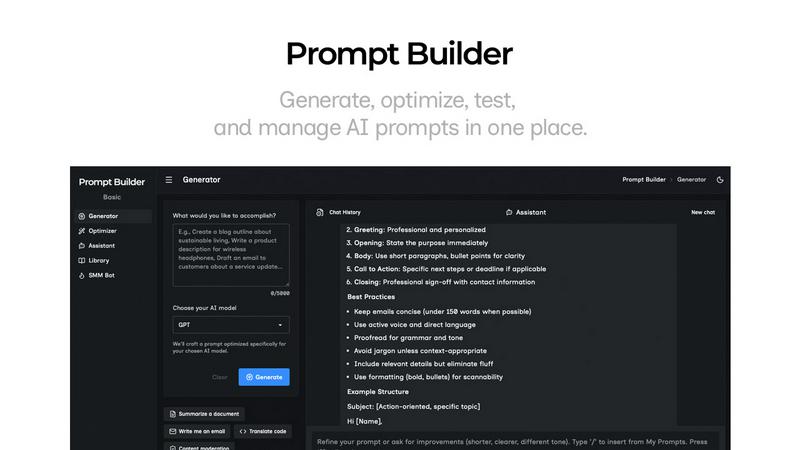
Generate, optimize, test, and manage AI prompts in one place. Turn an idea into a ready-to-use prompt in seconds.
Visual Comparison
Nani

Prompt Builder
Overview
About Nani
Nani is a revolutionary workflow tool that redefines AI image generation, specifically tailored for individuals who frequently engage in repetitive creative tasks. Unlike conventional AI image tools that are often limited to one-off projects, Nani is built to streamline the entire creative process, making it an indispensable resource for artists, designers, and content creators. Its foundation is based on Google's advanced Nano Banana Pro (Gemini), which powers its impressive capabilities. Nani simplifies the image generation workflow, allowing users to bypass the tedious process of rewriting prompts or sifting through endless image feeds. With features like reusable prompt sets and organized folder structures, Nani enhances consistency and efficiency, enabling users to focus on their creative vision. The intuitive interface ensures that even those with minimal tech experience can jump right in and start creating stunning images in just seconds. Nani is more than just a tool; it is a partner in creativity, allowing users to unleash their imagination while minimizing administrative burdens.
About Prompt Builder
Prompt Builder is a prompt engineering workspace for writing, testing, and saving prompts. Describe the task in plain English, and it helps you create a prompt that matches the model you choose. Start with a draft, refine it in chat, save or pin versions, then run them when you are ready. It works with GPT, Claude, Gemini, Llama, Mistral, DeepSeek, Grok, Perplexity, and more. You also get an Optimizer, an assistant for quick tests, and a library of reusable prompts and templates from the community. Turn an idea into a ready-to-use prompt in seconds. Refine it in chat, save it to your Library, and run it anytime.