
NB2 Hub vs Shrinkpad
Side-by-side comparison to help you choose the right tool.

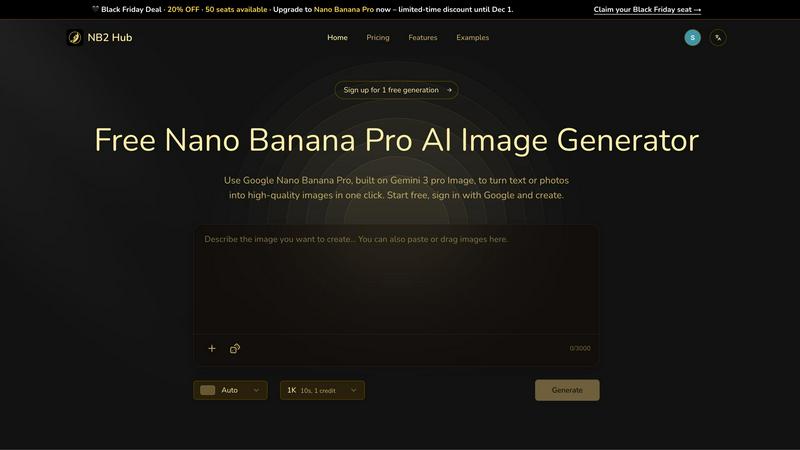
NB2 Hub
Create stunning, high-quality AI images with perfect control over text and layout in just one click using Nano Banana.
Last updated: March 1, 2026

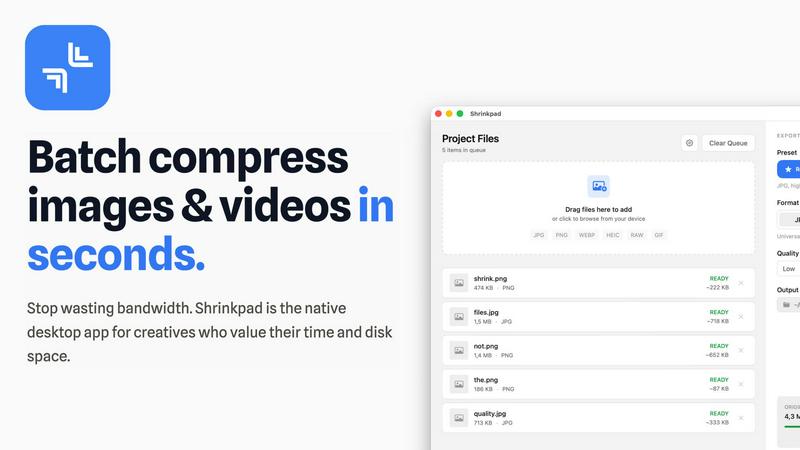
Shrinkpad
Effortlessly batch compress images and videos on Mac, saving time and space while enhancing quality with Shrinkpad.
Last updated: February 28, 2026
Visual Comparison
NB2 Hub
Shrinkpad
Feature Comparison
NB2 Hub
Faithful text + image remix
With this feature, users can upload a reference image and a brief prompt. The Nano Banana Pro model excels at preserving the original layout and lighting while enhancing details and textures. This is particularly beneficial for tasks such as UI iterations, product photography, and comic panels, ensuring that the core elements of the original image remain intact while improvements are made.
Crisp text inside images
This feature allows users to generate clean and legible text directly within images, free from blurriness or halo effects. It supports multilingual typography, making it perfect for a variety of applications, from posters and advertisements to social media covers. The ability to create visually appealing text-heavy designs without compromising quality is a significant advantage for marketers and content creators.
Grounded to real-world facts
NB2 Hub harnesses the power of world knowledge and retrieval grounding to produce images that are not only beautiful but also factually accurate. This feature enables users to visualize data, places, and styles authentically, which is essential for educational and informative content. The integrity of the generated images supports credibility and trust in professional settings.
Multi-reference fusion & identity consistency
This feature allows users to fuse multiple reference images while maintaining consistency in characters, products, and brand elements across different shots. It is particularly useful for creating storyboards or multi-angle product sets, ensuring that all elements adhere to a unified visual style. This functionality is invaluable for content creators aiming for cohesive branding.
Shrinkpad
Automatic Compression Adjustment
Shrinkpad intelligently analyzes the visual complexity of each file, applying the optimal compression ratio without introducing artifacts. This ensures that your images and videos maintain their quality while benefiting from reduced file sizes.
Unlimited Batch Processing
Unlike many web-based tools that struggle with large quantities of files, Shrinkpad handles thousands of assets simultaneously without crashing. This feature is essential for photographers and designers who often work with extensive media libraries.
One-Drop Folder Compression
Forget the tedious task of dragging and dropping individual files. With Shrinkpad's folder mode, you can simply drop an entire folder, and the application will automatically detect and prepare all images and videos for compression in one go.
Privacy-First Processing
Shrinkpad prioritizes user privacy by ensuring that all processing happens locally. There are no cloud uploads, meaning your sensitive media files stay safely on your device during and after the compression process.
Use Cases
NB2 Hub
Marketing Campaigns
NB2 Hub can be utilized to create compelling visuals for marketing campaigns that require high-quality images with accurate branding. The ability to generate crisp text within images and maintain brand consistency makes it an essential tool for marketers looking to enhance their promotional materials.
UI/UX Design
Designers can leverage NB2 Hub to iterate on user interfaces quickly. By remixing existing designs while preserving the original layout and lighting, users can refine their work efficiently, allowing for rapid prototyping and testing of new concepts.
Educational Content Creation
The grounded real-world facts feature makes NB2 Hub an excellent choice for educators and content creators who need to produce accurate infographics or visual aids. This ensures that the information presented is not only visually appealing but also factually sound, enhancing the learning experience.
Product Development
For product teams, NB2 Hub offers the capability to create detailed mockups and prototypes, applying branding elements to 3D objects. This allows teams to visualize their products in marketing contexts, facilitating better decision-making and stakeholder engagement.
Shrinkpad
Optimizing Web Assets
Web developers and designers can use Shrinkpad to compress images and videos for websites, significantly improving load times and user experience. Faster loading pages can enhance SEO, making it a vital tool in digital marketing.
Preparing Media for Social Media
Content creators who frequently post on social media can utilize Shrinkpad to quickly compress their media files, allowing them to share high-quality images and videos without the worry of exceeding size limits on platforms.
Streamlining Project Workflows
For teams using design tools like Figma or Photoshop, Shrinkpad automates the export process of multiple assets. By compressing files in bulk, it saves hours of busywork, enabling creatives to focus more on their design work.
Reducing Storage Costs
Businesses and individual users alike can benefit from Shrinkpad by significantly reducing the size of their media libraries. This not only saves space on local devices but can also decrease costs associated with cloud storage solutions.
Overview
About NB2 Hub
NB2 Hub is redefining the landscape of digital creativity through its integration of advanced AI technology. At its core is the Google Nano Banana Pro model, which operates on the innovative Gemini 3 Pro Image architecture. This potent combination ensures that users can generate high-quality images that boast incredible character consistency and layout fidelity. Unlike many other AI tools that tend to produce unpredictable results, NB2 Hub is designed specifically for professionals—designers, marketers, content creators, and product teams—who require reliable outputs that maintain brand integrity and accurate text rendering. The platform allows users to transform text into stunning 4K images or make precise edits to existing photos, offering a level of control that is almost surgical. With the option to start for free, users can experience the power of this tool risk-free, making it feel less like just another image generator and more like an essential, professional-grade extension of their creative toolkit.
About Shrinkpad
Shrinkpad is a robust macOS application tailored for creatives who need to batch compress images and videos swiftly and effectively. Whether you are a photographer, designer, or content creator, managing large media files can be a daunting task. Shrinkpad simplifies this process with its user-friendly drag-and-drop functionality, allowing you to import hundreds of files or entire folders with ease. What sets Shrinkpad apart is its commitment to privacy; all processing occurs locally on your device, ensuring that your sensitive files remain secure and never touch the cloud. With the capability to reduce file sizes by up to 90% while preserving the original visual quality, Shrinkpad not only saves storage space but also optimizes bandwidth usage. Supporting over 50 media formats, it is an invaluable tool for anyone looking to enhance their digital asset management without compromising on quality or efficiency.
Frequently Asked Questions
NB2 Hub FAQ
What types of images can I create with NB2 Hub?
You can create a wide range of images, including high-quality 4K images from text prompts, remixed photos, and educational infographics. The platform is versatile enough for both artistic and professional applications.
Is there a cost to use NB2 Hub?
NB2 Hub offers a free tier that allows users to generate two high-quality 4K images at no cost. For more extensive use, there are options to upgrade to the full Nano Banana Pro capabilities.
How does NB2 Hub ensure accuracy in generated images?
NB2 Hub utilizes advanced AI technology, specifically the Google Nano Banana Pro model, which grounds its outputs in real-world knowledge. This ensures that the images produced are not only visually appealing but also factually accurate.
Can I use NB2 Hub for multilingual text?
Yes, NB2 Hub supports multilingual typography, allowing users to generate clean and legible text in various languages without any blurriness, making it perfect for global marketing efforts.
Shrinkpad FAQ
Can I use Shrinkpad for free?
Yes, Shrinkpad offers a free starter version that includes essential tools for casual users, allowing you to batch process a limited number of files without any cost.
What file formats does Shrinkpad support?
Shrinkpad supports over 50 media formats, including popular ones like JPG, PNG, WEBP, AVIF, MP4, and MOV, making it a versatile solution for various media types.
Does Shrinkpad support video compression?
Absolutely! Shrinkpad is designed to handle both image and video compression, ensuring that all your media files can be optimized efficiently.
How many files can I process at once?
With Shrinkpad, you can process thousands of files simultaneously, thanks to its unlimited batch processing capability. This feature allows for efficient handling of large media libraries without performance issues.
Alternatives
NB2 Hub Alternatives
NB2 Hub is a powerful production-ready platform that utilizes state-of-the-art AI technology to generate stunning 4K images with precise text and layout control. This tool is particularly favored by designers, marketers, and content creators who require accuracy and fidelity in their visual assets. As users explore their creative needs, they often seek alternatives due to factors such as pricing, feature sets, or compatibility with specific workflows and platforms. When searching for alternatives to NB2 Hub, it's essential to consider the core functionalities that suit your project requirements. Look for platforms that offer similar capabilities in image generation, text clarity, and user-friendly interfaces. Additionally, assess whether the alternatives can seamlessly integrate into your existing processes or if they provide unique features that enhance your creative endeavors.
Shrinkpad Alternatives
Shrinkpad is an innovative macOS application that specializes in batch compressing images and videos, making it a go-to tool for photographers, designers, and content creators alike. By allowing users to effortlessly drag and drop hundreds of files or entire folders, Shrinkpad streamlines the process of managing large media files while ensuring optimal quality and significant space savings. However, users often seek alternatives due to various factors, including pricing structures, specific feature sets, or compatibility with different platforms. When searching for an alternative to Shrinkpad, consider what aspects are most important to your workflow. This might include the ease of batch processing, the ability to maintain file privacy through local processing, or the range of supported formats. Additionally, customization options can significantly enhance your user experience, so look for tools that allow you to fine-tune compression settings to meet your unique needs. Ultimately, the right choice will depend on your specific requirements and preferences.