
OC Maker vs poseup
Side-by-side comparison to help you choose the right tool.

OC Maker
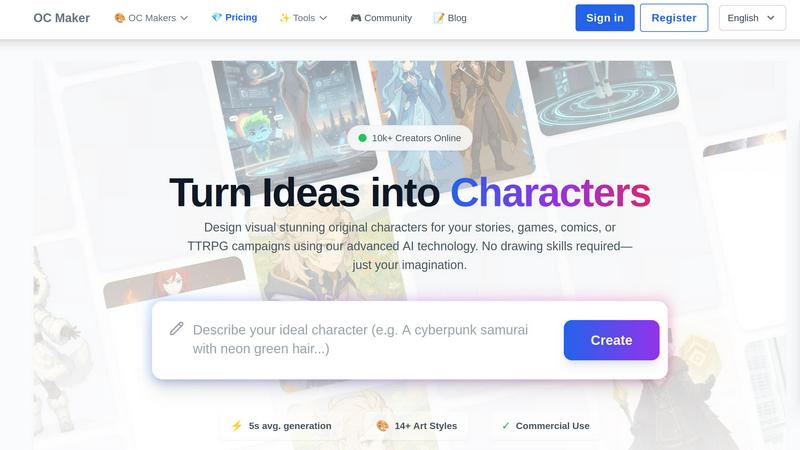
OC Maker instantly creates stunning, original characters from your ideas, no artistic skills required.
Last updated: March 1, 2026

poseup
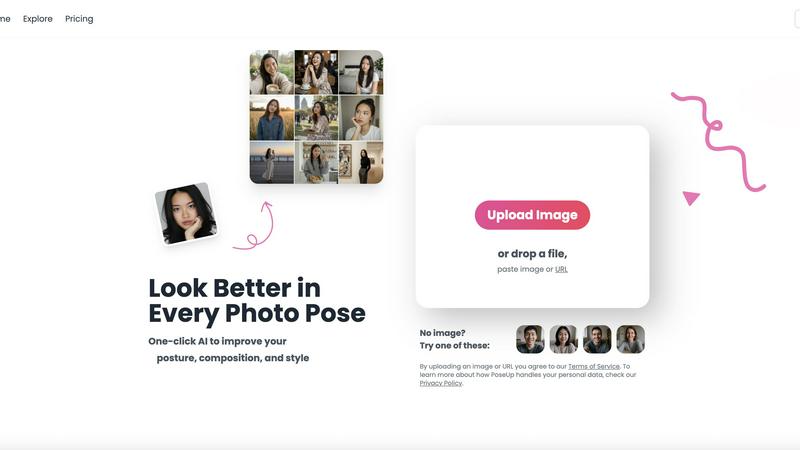
Elevate your photography effortlessly with PoseUp's AI, transforming posture and composition for stunning results in.
Last updated: February 28, 2026
Visual Comparison
OC Maker
poseup
Feature Comparison
OC Maker
Universal & Fandom-Specific Generators
This is where OC Maker shines with flexibility. You can use their robust Universal Generator for completely original creations, or dive deep into a curated list of themed universes. Want a character that perfectly fits the aesthetic of Sonic the Hedgehog, My Little Pony, or Jujutsu Kaisen? They have dedicated models trained on those specific styles, ensuring your OC looks like it belongs in that world. This attention to fandom detail is a massive time-saver and quality booster for fan creators.
Full-Body Character Generation from Scratch
Unlike some tools that just swap heads on pre-set bodies, OC Maker's AI builds characters from the ground up based on your detailed prompt. This means you get truly unique, cohesive designs where the clothing, posture, and anatomy are all generated in harmony. It’s perfect for creating reference sheets for artists or getting a complete visual of your character, not just a portrait. The "Sample Consistency Gallery" also shows their ability to maintain a character's core identity across different art styles, which is incredibly powerful.
Creative Power Tools Suite
OC Maker goes far beyond static images. Its suite of additional AI engines is like having a mini creative studio. You can animate creations with AI Video (complete with motion control), generate professional headshots, perform high-fidelity face swaps in videos, and even use the "Image to Prompt" tool to deconstruct any image into a detailed Midjourney-style prompt. This transforms the platform from a simple generator into a comprehensive workflow tool.
Commercial Use License
This is a critical feature for serious creators. The outputs from OC Maker come with a commercial use license, meaning you can legally use the characters you create in projects you intend to sell, such as indie games, published books, or merchandise. This legitimizes the platform as a professional tool and not just a fun toy, providing real economic value and peace of mind for entrepreneurs and professional artists alike.
poseup
AI Pose Enhancement
PoseUp utilizes sophisticated AI algorithms to automatically analyze your images and enhance photo poses in an instant. This feature is perfect for users looking to quickly improve their photography without needing technical skills.
Posture Correction Technology
With advanced posture correction capabilities, PoseUp identifies and suggests optimal positioning for your subjects. This ensures that your photos not only look good but also convey the right message and emotion.
Composition Optimization
PoseUp goes beyond simple pose enhancement by optimizing the overall composition of your images. The tool evaluates factors like lighting and framing to offer suggestions that elevate the visual appeal of your photos.
Versatile Photo Support
Supporting multiple formats, PoseUp can handle JPG, PNG, WEBP, and HEIC images, allowing users to upload photos up to 5MB with ease. This versatility makes it accessible for a wide range of users and use cases.
Use Cases
OC Maker
Tabletop Role-Playing Game (TTRPG) Campaigns
As a Game Master, visualizing NPCs, villains, or even unique monsters for your players can be a challenge. OC Maker lets you generate a whole cast in minutes. Need a grizzled dwarven blacksmith with a magical prosthetic arm? A mysterious elf sorcerer in crystalline robes? Describe it, and you have a visual aid to show your table, instantly elevating immersion and saving you hours of searching for the "perfect" stock art that never quite fits.
Fiction Writing and World-Building
Writers often have vivid pictures of their characters in their minds, but conveying that exact image to a cover artist or reader can be difficult. OC Maker allows authors to create detailed character portraits, concept art for locations, or even key scene visuals. This is invaluable for maintaining consistency in descriptions, inspiring new story ideas, and creating compelling marketing materials for your book.
Indie Game Development
For solo developers or small studios without an art budget, OC Maker is a game-changer (pun intended). It can be used to rapidly prototype character designs, create concept art to guide a hired artist, or even generate final assets for stylized games, especially in the anime or cartoon realms. The commercial license makes this a viable and cost-effective pipeline for bringing original characters to life.
Fan Art and Community Creation
This is where the fandom-specific generators become pure joy. Fans can create original characters that seamlessly fit into the worlds of Demon Slayer, One Piece, or Cookie Run. It’s a fantastic tool for crafting personalized avatars for social media, creating unique content for fan fiction, or simply exploring "what if" scenarios within beloved universes, all while achieving a style-authentic look.
poseup
Casual Selfies
For individuals capturing everyday moments, PoseUp provides quick enhancements that make casual selfies stand out. Users can upload their images and instantly receive suggestions to improve their poses and composition, resulting in eye-catching photos.
Professional Portraits
Photographers can leverage PoseUp to refine their portrait techniques. With automatic enhancements, they can focus on creativity and artistry while the tool handles the technical aspects of pose and composition.
Social Media Content Creation
Influencers and content creators can use PoseUp to elevate their visual storytelling. By achieving professional-looking images with ease, they can maintain a high standard of content that engages their audience effectively.
Fitness and Wellness Photography
Fitness enthusiasts can benefit from PoseUp’s ability to optimize poses and posture in workout photos. This ensures that their images not only showcase their physique but also convey strength and confidence, perfect for social media sharing.
Overview
About OC Maker
Let's cut to the chase: OC Maker is the character creation tool I wish I had when I first started world-building. It's not just another AI image generator; it's a purpose-built platform that understands the specific, often finicky needs of writers, artists, and TTRPG players. The core promise is simple yet revolutionary: democratize professional character design. You don't need a degree in digital art or years of drawing experience. If you have an imagination, OC Maker provides the bridge to turn those mental images into stunning, usable visuals in about five seconds. What truly sets it apart, in my opinion, is its commitment to being a "creative suite" rather than a one-trick pony. Beyond generating a character from a text prompt, it offers tools for animation, face-swapping, and even reverse-engineering images into prompts. With support for over 14 distinct art styles—from hyper-specific fandoms like Genshin Impact and Cuphead to broader categories like Photorealistic and Anime—it caters to an incredibly wide creative audience. Whether you're sketching concepts for a comic, designing a party for your next D&D campaign, or visualizing the protagonist of your novel, OC Maker removes the technical barrier and lets you focus on what matters most: the story.
About poseup
PoseUp is a cutting-edge AI-driven tool that revolutionizes photo enhancement by improving poses, posture, and overall composition effortlessly. This tool is tailored for a wide audience, ranging from casual selfie-takers to seasoned photographers aiming to perfect their portrait techniques. Additionally, social media influencers seeking to elevate their visual content will find PoseUp indispensable. By harnessing the power of advanced AI technology, PoseUp analyzes uploaded images and provides automatic suggestions for enhancing poor poses, correcting posture, and optimizing composition. The beauty of PoseUp lies in its one-click functionality, allowing users without extensive photography training to achieve professional-quality results easily. With PoseUp, transforming ordinary photos into breathtaking visual masterpieces becomes a seamless experience, enabling users to present themselves or their subjects in the most flattering light possible.
Frequently Asked Questions
OC Maker FAQ
What is the difference between the Universal Generator and the fandom-specific ones?
The Universal Generator is your go-to for completely original characters in broad style categories like Anime, Photorealistic, or Fantasy. It offers maximum creative freedom. The fandom-specific generators (like for Genshin Impact or Sonic) are fine-tuned on the specific visual language of that universe. Use these when you want your OC to look like it was pulled directly from that game, show, or comic, ensuring perfect stylistic cohesion with the source material.
Do I own the characters I create with OC Maker?
Yes, you own the unique characters you conceive and the specific images generated based on your prompts. Crucially, OC Maker grants a commercial use license for the generated images, meaning you can use them in projects you sell, such as books, games, or merchandise. Always double-check the current Terms of Service for the most detailed and up-to-date information on licensing.
Can I edit or modify the characters after they are generated?
Absolutely, and this is where the "Creative Power Tools" suite comes in. While OC Maker itself is primarily a generation tool, you can use its integrated features like AI Video to animate them or Face Swap to alter appearances. For more detailed edits, you would export the generated image and use traditional image editing software like Photoshop or GIMP to make further refinements, using the AI output as a high-quality base.
How detailed should my prompt be for the best results?
The more descriptive, the better. Treat it like you're briefing an artist. Don't just say "a warrior." Instead, try: "A young female elven ranger with silver braided hair, green practical leather armor, holding a carved longbow, standing in a sun-dappled forest, anime style." Mention key details: gender, age, species, clothing, hairstyle, colors, accessories, pose, setting, and the desired art style. Specificity is the key to unlocking the AI's full potential and getting a result that matches your vision.
poseup FAQ
How does PoseUp enhance my photos?
PoseUp uses advanced AI algorithms to analyze your uploaded images, suggesting improvements in pose, posture, and composition to elevate the overall quality of your photographs.
Is PoseUp suitable for beginners?
Absolutely! PoseUp is designed for users of all skill levels, enabling even those without professional photography training to achieve stunning results effortlessly.
What image formats does PoseUp support?
PoseUp supports multiple image formats including JPG, PNG, WEBP, and HEIC, allowing you to upload your photos easily regardless of their original format.
Do I need to create an account to use PoseUp?
While you can start using PoseUp without an account, signing up allows you to access additional features, manage your credits, and join the community for tips and support.
Alternatives
OC Maker Alternatives
OC Maker is a popular AI character generator that falls squarely into the image and photo creation category. It's a specialized tool that turns text prompts into unique, full-body character art across a variety of styles, making it a favorite for writers, game masters, and artists who want to visualize their ideas quickly. People often seek alternatives for a few key reasons. Some find the subscription model or pricing doesn't fit their budget or occasional usage. Others might need a platform that runs locally on their computer for privacy, or they're searching for a different artistic aesthetic or more granular control over the generation process than what OC Maker offers. When you're evaluating other options, focus on what matters most for your projects. Consider the core art style output—does it match your vision? Look at the cost structure and whether it's a one-time purchase or a subscription. Also, assess the level of creative control; some tools offer more advanced settings for posing, composition, and fine details, which can be crucial for professional work.
poseup Alternatives
PoseUp is an AI-powered tool designed to enhance photos by improving poses, posture, and composition effortlessly. It falls under the category of image and photo editing tools, making it popular among casual users, professional photographers, and social media influencers alike. Users often seek alternatives to PoseUp due to various reasons, including pricing concerns, the need for specific features, or compatibility with different platforms. When choosing an alternative, it's essential to consider the functionality offered, ease of use, and how well the tool meets your personal photography needs.