poseup vs SparkPix
Side-by-side comparison to help you choose the right tool.

poseup
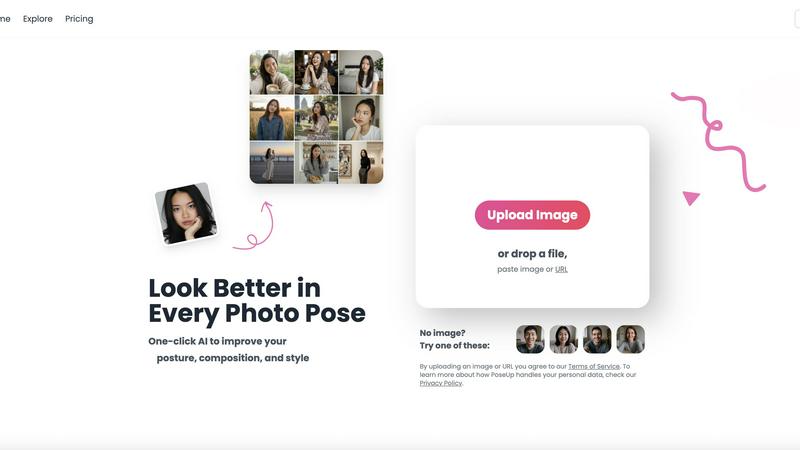
Elevate your photography effortlessly with PoseUp's AI, transforming posture and composition for stunning results in.
Last updated: February 28, 2026

SparkPix
SparkPix is my go-to AI editor where you simply type what you want, like removing a background or creating anime art, and it magically happens.
Last updated: March 11, 2026
Visual Comparison
poseup
SparkPix

Feature Comparison
poseup
AI Pose Enhancement
PoseUp utilizes sophisticated AI algorithms to automatically analyze your images and enhance photo poses in an instant. This feature is perfect for users looking to quickly improve their photography without needing technical skills.
Posture Correction Technology
With advanced posture correction capabilities, PoseUp identifies and suggests optimal positioning for your subjects. This ensures that your photos not only look good but also convey the right message and emotion.
Composition Optimization
PoseUp goes beyond simple pose enhancement by optimizing the overall composition of your images. The tool evaluates factors like lighting and framing to offer suggestions that elevate the visual appeal of your photos.
Versatile Photo Support
Supporting multiple formats, PoseUp can handle JPG, PNG, WEBP, and HEIC images, allowing users to upload photos up to 5MB with ease. This versatility makes it accessible for a wide range of users and use cases.
SparkPix
AI Photo Editor (Text-to-Edit)
This is the flagship feature and, in my opinion, the star of the show. Instead of manual tools, you simply upload an image and type a natural language command into a text box. The AI interprets your intent—whether it's "make the sky more dramatic," "add a birthday hat," or "clean up the scratches"—and executes the edit. It feels like magic the first time you use it, transforming what used to be a multi-step, skill-dependent process into a simple conversation. The specificity of your prompt directly influences the quality of the result, making it powerful yet intuitive.
Background Remover
A tool so efficient it makes dedicated background removal services sweat. With literally one click, SparkPix can isolate subjects from the most complex scenes, be it a person with flyaway hair, a furry pet, or a detailed product. The edge detection is remarkably clean, and the resulting transparent PNG is ready for new backgrounds, marketing materials, or e-commerce listings. For quick, watermark-free cuts, this is my go-to recommendation over many standalone "remove.bg" alternatives.
Photo Restoration & Enhancement
This is where SparkPix shows its heart. The photo restoration feature is designed to breathe new life into old, damaged family archives. It intelligently repairs tears, reduces fading, and removes scratches while aiming to preserve the original character and era of the photo. Coupled with the general photo enhancer—which sharpens details, reduces noise, and upscales images to HD—it provides a one-two punch for revitalizing any image, from historical treasures to yesterday's slightly blurry smartphone snap.
AI Image Generator & Style Transfer
Beyond editing, SparkPix is a potent creative studio. Its AI image generator allows you to create entirely new visuals from text prompts at high resolutions (up to 4K). Even more fun is the Style Transfer feature, which can morph your ordinary photos into artistic renditions. You can convert a portrait into an anime character, a landscape into an oil painting, or a street photo into a pencil sketch. It’s an effortless way to generate unique content for blogs, social media, or personal art projects.
Use Cases
poseup
Casual Selfies
For individuals capturing everyday moments, PoseUp provides quick enhancements that make casual selfies stand out. Users can upload their images and instantly receive suggestions to improve their poses and composition, resulting in eye-catching photos.
Professional Portraits
Photographers can leverage PoseUp to refine their portrait techniques. With automatic enhancements, they can focus on creativity and artistry while the tool handles the technical aspects of pose and composition.
Social Media Content Creation
Influencers and content creators can use PoseUp to elevate their visual storytelling. By achieving professional-looking images with ease, they can maintain a high standard of content that engages their audience effectively.
Fitness and Wellness Photography
Fitness enthusiasts can benefit from PoseUp’s ability to optimize poses and posture in workout photos. This ensures that their images not only showcase their physique but also convey strength and confidence, perfect for social media sharing.
SparkPix
E-commerce & Product Photography
For online sellers, SparkPix is a game-changer. You can instantly remove backgrounds for clean product cutouts, generate professional mockups (like a phone displaying your app), and enhance low-quality images to look crisp and appealing. It eliminates the need for expensive photo shoots or complex Photoshop edits, allowing small businesses to create a polished, consistent storefront on Shopify or Amazon with minimal cost and effort.
Family History & Photo Archiving
Genealogists and families looking to preserve memories will find the restoration tools invaluable. The ability to colorize black and white photos, repair physical damage from old prints, and enhance faded details can bring ancestral stories to life. It's a powerful and emotional use case that makes advanced technology feel personal and meaningful.
Social Media & Content Creation
Content creators, bloggers, and social media managers can use SparkPix to produce eye-catching graphics rapidly. Need to remove an unwanted object from a perfect Instagram shot? Done. Want to turn your photo into a trendy anime avatar for your profile? Easy. Create custom thumbnails for YouTube by changing backgrounds with a text prompt. It streamlines the content pipeline, enabling high-volume, high-quality visual production.
Professional & Personal Documentation
Creating official documents like passport photos, LinkedIn headshots, or resume pictures is surprisingly simple. Using text prompts like "professional headshot with a blue background," you can generate compliant images without visiting a photo booth. It’s also perfect for everyday tasks like cleaning up documents, removing watermarks from personal images, or fixing blurry pictures meant for presentations or family albums.
Overview
About poseup
PoseUp is a cutting-edge AI-driven tool that revolutionizes photo enhancement by improving poses, posture, and overall composition effortlessly. This tool is tailored for a wide audience, ranging from casual selfie-takers to seasoned photographers aiming to perfect their portrait techniques. Additionally, social media influencers seeking to elevate their visual content will find PoseUp indispensable. By harnessing the power of advanced AI technology, PoseUp analyzes uploaded images and provides automatic suggestions for enhancing poor poses, correcting posture, and optimizing composition. The beauty of PoseUp lies in its one-click functionality, allowing users without extensive photography training to achieve professional-quality results easily. With PoseUp, transforming ordinary photos into breathtaking visual masterpieces becomes a seamless experience, enabling users to present themselves or their subjects in the most flattering light possible.
About SparkPix
SparkPix is a revelation in the world of digital image editing, a tool that genuinely lives up to the promise of making professional-grade photo manipulation accessible to everyone. At its core, SparkPix is a web-based AI photo editor that operates on a brilliantly simple premise: you type what you want, and the AI makes it happen. Forget navigating complex layers, masks, and toolbars in software like Photoshop. Whether you're a small business owner needing crisp product shots, a genealogist restoring family history, or a social media enthusiast wanting to create stunning visuals, SparkPix removes the technical barrier entirely. Its main value proposition is sheer, unadulterated convenience paired with powerful AI models. You describe edits like "remove the tourist in the background," "enhance this blurry photo," or "turn this into a watercolor painting," and it delivers results in under 30 seconds. What truly won me over is its generous free tier—offering 5 credits with no credit card required—which lets you genuinely test its capabilities. It’s a democratizing force in visual content creation, proving you don't need years of training to produce polished, impressive imagery.
Frequently Asked Questions
poseup FAQ
How does PoseUp enhance my photos?
PoseUp uses advanced AI algorithms to analyze your uploaded images, suggesting improvements in pose, posture, and composition to elevate the overall quality of your photographs.
Is PoseUp suitable for beginners?
Absolutely! PoseUp is designed for users of all skill levels, enabling even those without professional photography training to achieve stunning results effortlessly.
What image formats does PoseUp support?
PoseUp supports multiple image formats including JPG, PNG, WEBP, and HEIC, allowing you to upload your photos easily regardless of their original format.
Do I need to create an account to use PoseUp?
While you can start using PoseUp without an account, signing up allows you to access additional features, manage your credits, and join the community for tips and support.
SparkPix FAQ
Is SparkPix really free to use?
Yes, SparkPix offers a genuinely free starting tier. You get 5 credits immediately upon signing up, with no credit card required. This allows you to test several of its core features. They also offer a daily credit refresh, providing ongoing access for light users. For more frequent editing, affordable paid plans start at $9.99 for a larger bundle of credits.
What kind of edits can I make by typing?
You can make a vast array of edits through text commands. Common and effective prompts include object removal ("remove the trash can"), background changes ("place me on a beach"), creative transformations ("make it look like a vintage poster"), restoration ("fix the scratches and colorize"), and enhancements ("sharpen and increase vibrancy"). The more descriptive you are, the better the AI can execute your vision.
Do I need to download any software?
No, SparkPix is entirely web-based. It works directly in your browser on any device, including desktop computers, iPhones, and Android phones. There is no software to download or install, and all processing happens on their servers, making it accessible and convenient from anywhere.
How does it compare to Photoshop?
SparkPix is not a direct replacement for Photoshop's limitless, manual control for expert graphic designers. Instead, it's a powerful alternative for the other 99% of users. Where Photoshop requires skill and time, SparkPix offers speed and simplicity through AI. For tasks like background removal, object erasure, basic restoration, and style effects, SparkPix is often faster and easier, making professional results accessible without the learning curve.
Alternatives
poseup Alternatives
PoseUp is an AI-powered tool designed to enhance photos by improving poses, posture, and composition effortlessly. It falls under the category of image and photo editing tools, making it popular among casual users, professional photographers, and social media influencers alike. Users often seek alternatives to PoseUp due to various reasons, including pricing concerns, the need for specific features, or compatibility with different platforms. When choosing an alternative, it's essential to consider the functionality offered, ease of use, and how well the tool meets your personal photography needs.
SparkPix Alternatives
SparkPix is a web-based AI photo editor that lets you transform images by simply typing commands. It falls squarely into the rapidly growing category of AI-powered, no-skill-required image editing tools, making tasks like background removal and photo restoration accessible to everyone. Users often seek alternatives for a variety of reasons. Some may find the credit-based pricing model less appealing than a flat subscription, while others might need a specific feature SparkPix lacks, like advanced layer editing. Platform preference also plays a role; someone wanting a dedicated mobile app or desktop software might look beyond this browser-only solution. When evaluating other options, consider your primary use case. Are you mostly removing backgrounds for e-commerce, or are you an aspiring digital artist needing robust style transfer? Also, weigh the importance of a free tier, output resolution limits, and whether you prefer a one-time purchase over recurring subscriptions. The best choice aligns with your workflow and budget.