AI Photo Generator vs Shrinkpad
Side-by-side comparison to help you choose the right tool.

AI Photo Generator
My top pick for AI photo generation, it creates stunning, realistic images from text or your photos with incredible speed and quality.
Last updated: March 11, 2026

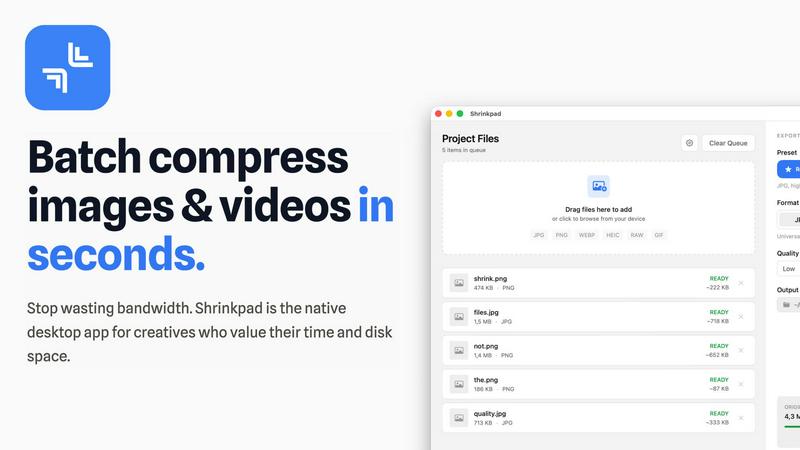
Shrinkpad
Effortlessly batch compress images and videos on Mac, saving time and space while enhancing quality with Shrinkpad.
Last updated: February 28, 2026
Visual Comparison
AI Photo Generator

Shrinkpad
Feature Comparison
AI Photo Generator
Ultra-Fast, Multi-Model Generation
This is the platform's superpower. Instead of being locked into one AI model, you get access to a curated selection of top-tier engines like Flux, Ideogram, Qwen, and others. Each model is a preset tuned for specific outcomes—whether you need the hyper-realism of Imagen4 for product shots or the stylistic flexibility of Seedream for concept art. This means you can generate multiple variants using different "brains" in parallel, finding the perfect match for your vision in a fraction of the time it would take on a single-model platform. The optimized cloud architecture ensures renders complete in seconds.
Professional-Grade Photo Transformation
Beyond text-to-image, the image-to-image (I2I) workflow is exceptionally powerful for real-world use. Upload a reference photo—a product shot, a portrait, a landscape—and use natural language to direct edits. Change the background, alter the lighting, modify the style, or expand the canvas, all while maintaining core elements of the original. This is indispensable for maintaining brand consistency or iterating on existing assets without starting from scratch, effectively acting as a best-in-class AI photo editor online.
High-Resolution & Commercial Use Rights
For professionals, output quality and licensing are non-negotiable. AI Photo Generator is built with this in mind. It delivers high-resolution exports suitable for print, web, and advertising. Critically, the images generated are provided with commercial use rights, so you can confidently use them in client work, marketing campaigns, and products without worrying about copyright infringement. This transforms it from a fun toy into a serious business tool.
Free-First, Browser-Based Workflow
The platform eliminates all friction to get started. There's no software to download; everything runs in your browser. The free plan is a genuine entry point, allowing you to test prompts, compare model outputs, and refine concepts before committing any budget. This "try before you buy" approach is respectful of the user and perfect for teams who need to validate a visual direction before scaling up production with paid credits.
Shrinkpad
Automatic Compression Adjustment
Shrinkpad intelligently analyzes the visual complexity of each file, applying the optimal compression ratio without introducing artifacts. This ensures that your images and videos maintain their quality while benefiting from reduced file sizes.
Unlimited Batch Processing
Unlike many web-based tools that struggle with large quantities of files, Shrinkpad handles thousands of assets simultaneously without crashing. This feature is essential for photographers and designers who often work with extensive media libraries.
One-Drop Folder Compression
Forget the tedious task of dragging and dropping individual files. With Shrinkpad's folder mode, you can simply drop an entire folder, and the application will automatically detect and prepare all images and videos for compression in one go.
Privacy-First Processing
Shrinkpad prioritizes user privacy by ensuring that all processing happens locally. There are no cloud uploads, meaning your sensitive media files stay safely on your device during and after the compression process.
Use Cases
AI Photo Generator
Social Media & Content Creation
Generate unique, eye-catching, and copyright-free visuals for thumbnails, Instagram posts, blog graphics, and video content. The speed of generation allows creators to produce a high volume of fresh, platform-specific assets daily, keeping their feeds dynamic and engaging without relying on stock photo subscriptions or extensive photo shoots.
Marketing & Advertising Campaigns
From concept to execution, marketers can rapidly prototype ad visuals, create multiple variants for A/B testing, and produce final campaign assets for websites, emails, and social ads. The ability to generate realistic product scenes or model photos on demand slashes production costs and timelines for small businesses and entrepreneurs.
Professional Portrait & Headshot Enhancement
Transform casual selfies into polished, professional LinkedIn profile pictures or actor headshots. Using the image-to-image feature, you can refine lighting, adjust attire, or place the subject in a more appropriate setting, saving the cost and hassle of a professional photoshoot while achieving a high-quality result.
E-commerce & Product Visualization
Create realistic product photography for online stores, especially for products that are in pre-production, hard to photograph, or need to be shown in multiple contexts and colors. Generate lifestyle images that show your product in use, in various settings, or with different stylistic treatments to boost conversion rates and visual appeal.
Shrinkpad
Optimizing Web Assets
Web developers and designers can use Shrinkpad to compress images and videos for websites, significantly improving load times and user experience. Faster loading pages can enhance SEO, making it a vital tool in digital marketing.
Preparing Media for Social Media
Content creators who frequently post on social media can utilize Shrinkpad to quickly compress their media files, allowing them to share high-quality images and videos without the worry of exceeding size limits on platforms.
Streamlining Project Workflows
For teams using design tools like Figma or Photoshop, Shrinkpad automates the export process of multiple assets. By compressing files in bulk, it saves hours of busywork, enabling creatives to focus more on their design work.
Reducing Storage Costs
Businesses and individual users alike can benefit from Shrinkpad by significantly reducing the size of their media libraries. This not only saves space on local devices but can also decrease costs associated with cloud storage solutions.
Overview
About AI Photo Generator
AI Photo Generator (aiphotogenerator.dev) is not just another image creation tool; it's a comprehensive creative engine designed for speed, quality, and practical application. At its core, it transforms simple text descriptions or existing photos into professional-grade digital art using a curated suite of the most powerful AI models available. What truly sets it apart is its commitment to removing technical barriers. You don't need to be a designer or a prompt engineer to get stunning results. The platform intelligently bridges the gap between your imagination and a polished visual asset, making high-end design accessible to entrepreneurs, marketers, and creators who need to move fast. Its value proposition is crystal clear: generate commercially viable, photorealistic images or creatively edit photos in seconds, not hours, starting with a generous free plan that lets you experiment without risk. This is the tool for teams and individuals who value a streamlined, browser-based workflow that prioritizes output quality and iteration speed over complex, bloated interfaces.
About Shrinkpad
Shrinkpad is a robust macOS application tailored for creatives who need to batch compress images and videos swiftly and effectively. Whether you are a photographer, designer, or content creator, managing large media files can be a daunting task. Shrinkpad simplifies this process with its user-friendly drag-and-drop functionality, allowing you to import hundreds of files or entire folders with ease. What sets Shrinkpad apart is its commitment to privacy; all processing occurs locally on your device, ensuring that your sensitive files remain secure and never touch the cloud. With the capability to reduce file sizes by up to 90% while preserving the original visual quality, Shrinkpad not only saves storage space but also optimizes bandwidth usage. Supporting over 50 media formats, it is an invaluable tool for anyone looking to enhance their digital asset management without compromising on quality or efficiency.
Frequently Asked Questions
AI Photo Generator FAQ
Is there a free plan available?
Yes, absolutely. AI Photo Generator operates on a free-first model. You can sign up and start generating images immediately with a limited number of free credits. This allows you to fully test the platform's capabilities, experiment with different prompts and models, and understand the workflow before deciding to purchase additional credits for higher-volume needs.
Can I use the generated images for commercial purposes?
Yes, you can. One of the key features for professional users is that the images you generate come with commercial use rights. This means you are free to use them in client projects, advertising campaigns, on your website, in products, and for other business purposes without worrying about licensing fees or copyright claims from the platform.
How does the Image-to-Image feature work?
The Image-to-Image feature allows you to upload an existing photo as a reference. The AI then uses this image as a structural and stylistic guide. You provide text instructions on what to change (e.g., "change the background to a modern office," "make it a vintage oil painting," "add a hat"). The AI regenerates the image, incorporating your edits while preserving elements from the original, enabling controlled transformations and style consistency.
Which AI model should I use for the best results?
There's no single "best" model; it depends on your goal. For ultra-realistic photos and product shots, models like Imagen4 Fast or Flux Kontext Pro are excellent. For creative, artistic styles or character generation, try Ideogram V3 or Seedream. The platform's strength is letting you quickly generate with a few different model presets to compare and choose the output that best matches your vision. I personally start with Flux for realism and Ideogram for anything requiring strong typography or cohesive characters.
Shrinkpad FAQ
Can I use Shrinkpad for free?
Yes, Shrinkpad offers a free starter version that includes essential tools for casual users, allowing you to batch process a limited number of files without any cost.
What file formats does Shrinkpad support?
Shrinkpad supports over 50 media formats, including popular ones like JPG, PNG, WEBP, AVIF, MP4, and MOV, making it a versatile solution for various media types.
Does Shrinkpad support video compression?
Absolutely! Shrinkpad is designed to handle both image and video compression, ensuring that all your media files can be optimized efficiently.
How many files can I process at once?
With Shrinkpad, you can process thousands of files simultaneously, thanks to its unlimited batch processing capability. This feature allows for efficient handling of large media libraries without performance issues.
Alternatives
AI Photo Generator Alternatives
AI Photo Generator is a powerful tool in the rapidly growing category of AI image generation. It allows users to create professional-grade digital art from simple text prompts or by transforming existing photos, making advanced visual creation accessible to everyone without requiring technical design skills. People often seek alternatives for a variety of reasons. Some might need a different pricing model or a free tier for casual use, while others may require specific features like a particular artistic style, higher resolution outputs, or integration with other creative software. The platform you choose—be it web-based, a mobile app, or a desktop plugin—also plays a crucial role in the decision. When evaluating other options, focus on what matters most for your workflow. Consider the quality and consistency of the image output, the speed of generation, the diversity of styles available, and the overall user experience. A tool that excels for a social media creator might not be the best fit for a marketer needing brand-specific assets, so align the features with your primary use case.
Shrinkpad Alternatives
Shrinkpad is an innovative macOS application that specializes in batch compressing images and videos, making it a go-to tool for photographers, designers, and content creators alike. By allowing users to effortlessly drag and drop hundreds of files or entire folders, Shrinkpad streamlines the process of managing large media files while ensuring optimal quality and significant space savings. However, users often seek alternatives due to various factors, including pricing structures, specific feature sets, or compatibility with different platforms. When searching for an alternative to Shrinkpad, consider what aspects are most important to your workflow. This might include the ease of batch processing, the ability to maintain file privacy through local processing, or the range of supported formats. Additionally, customization options can significantly enhance your user experience, so look for tools that allow you to fine-tune compression settings to meet your unique needs. Ultimately, the right choice will depend on your specific requirements and preferences.