
Shrinkpad vs Vailo AI
Side-by-side comparison to help you choose the right tool.

Shrinkpad
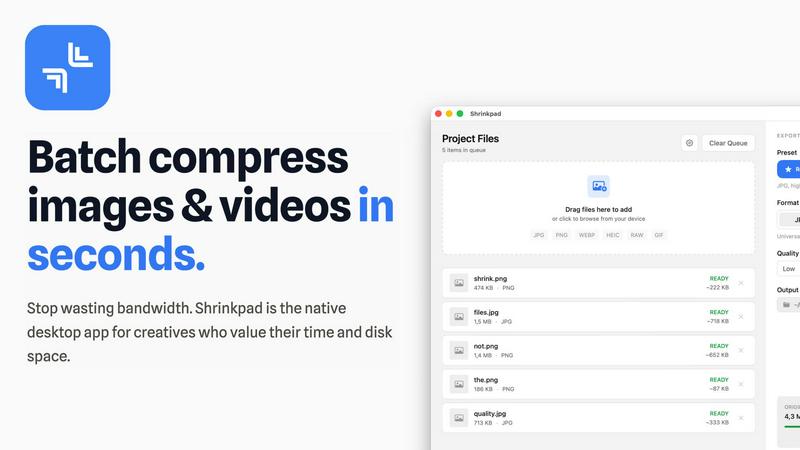
Effortlessly batch compress images and videos on Mac, saving time and space while enhancing quality with Shrinkpad.
Last updated: February 28, 2026

Vailo AI
Vailo AI effortlessly transforms text into stunning videos and images, no design skills required.
Last updated: February 28, 2026
Visual Comparison
Shrinkpad
Vailo AI

Feature Comparison
Shrinkpad
Automatic Compression Adjustment
Shrinkpad intelligently analyzes the visual complexity of each file, applying the optimal compression ratio without introducing artifacts. This ensures that your images and videos maintain their quality while benefiting from reduced file sizes.
Unlimited Batch Processing
Unlike many web-based tools that struggle with large quantities of files, Shrinkpad handles thousands of assets simultaneously without crashing. This feature is essential for photographers and designers who often work with extensive media libraries.
One-Drop Folder Compression
Forget the tedious task of dragging and dropping individual files. With Shrinkpad's folder mode, you can simply drop an entire folder, and the application will automatically detect and prepare all images and videos for compression in one go.
Privacy-First Processing
Shrinkpad prioritizes user privacy by ensuring that all processing happens locally. There are no cloud uploads, meaning your sensitive media files stay safely on your device during and after the compression process.
Vailo AI
No-Watermark Policy
Vailo AI stands out in the crowded field of content creation tools with its unique no-watermark policy. This means that users can create and share their work without the intrusive branding that often accompanies free plans in other tools, preserving the professionalism of their content.
Multi-Format Video and Image Creation
Vailo AI supports various content formats right out of the box. Whether you are creating videos for social media or web use, Vailo's native optimization for 9:16 and 16:9 formats ensures that your videos look stunning across all platforms without additional adjustments.
Comprehensive Content Workflow
Vailo AI consolidates multiple creative tasks into a single platform. Users can generate, edit, and upscale images and videos all within one seamless workflow, eliminating the need for different subscriptions and tools, which simplifies the creative process.
Access to Premium Models
The platform offers access to top-tier AI models, allowing users to create high-quality, cinematic content effortlessly. With features such as early access to new models and tools, Vailo ensures that creators always have the latest technology at their fingertips.
Use Cases
Shrinkpad
Optimizing Web Assets
Web developers and designers can use Shrinkpad to compress images and videos for websites, significantly improving load times and user experience. Faster loading pages can enhance SEO, making it a vital tool in digital marketing.
Preparing Media for Social Media
Content creators who frequently post on social media can utilize Shrinkpad to quickly compress their media files, allowing them to share high-quality images and videos without the worry of exceeding size limits on platforms.
Streamlining Project Workflows
For teams using design tools like Figma or Photoshop, Shrinkpad automates the export process of multiple assets. By compressing files in bulk, it saves hours of busywork, enabling creatives to focus more on their design work.
Reducing Storage Costs
Businesses and individual users alike can benefit from Shrinkpad by significantly reducing the size of their media libraries. This not only saves space on local devices but can also decrease costs associated with cloud storage solutions.
Vailo AI
Social Media Marketing
Marketers can utilize Vailo AI to generate engaging video content for platforms like Instagram and TikTok. The quick video generation capability allows for rapid content production that keeps pace with the fast-moving social media landscape.
Product Showcases
E-commerce brands can create captivating product videos that showcase their items in action. With Vailo AI, brands can generate polished promotional content without needing expensive filming equipment or a professional crew.
Short Film Production
Aspiring filmmakers can leverage Vailo AI to produce short films quickly. By transforming script ideas or storyboards into visually stunning videos, creators can focus more on storytelling and less on technical production hassles.
User-Generated Content
Brands that rely on user-generated content can incentivize their customers to create videos using Vailo AI. With its easy-to-use platform, customers can create authentic and appealing content that aligns with the brand's aesthetic without significant barriers to entry.
Overview
About Shrinkpad
Shrinkpad is a robust macOS application tailored for creatives who need to batch compress images and videos swiftly and effectively. Whether you are a photographer, designer, or content creator, managing large media files can be a daunting task. Shrinkpad simplifies this process with its user-friendly drag-and-drop functionality, allowing you to import hundreds of files or entire folders with ease. What sets Shrinkpad apart is its commitment to privacy; all processing occurs locally on your device, ensuring that your sensitive files remain secure and never touch the cloud. With the capability to reduce file sizes by up to 90% while preserving the original visual quality, Shrinkpad not only saves storage space but also optimizes bandwidth usage. Supporting over 50 media formats, it is an invaluable tool for anyone looking to enhance their digital asset management without compromising on quality or efficiency.
About Vailo AI
Vailo AI is a groundbreaking generative AI studio that revolutionizes content creation for digital creators. Unlike typical text-to-video tools, Vailo AI offers an all-in-one platform tailored for those who want to produce stunning, professional-grade videos and images without the hassle of multiple applications. With Vailo, users can transform simple text prompts or still images into cinematic videos in mere seconds, making it an invaluable resource for solo filmmakers, agile marketers, and innovative designers. The platform's standout feature is its commitment to a “no-watermark, ever” policy, even for users on the free plan. This commitment allows creators to maintain their brand integrity without the annoyance of watermarked drafts. Vailo is designed with modern content needs in mind, offering native optimization for both 9:16 formats (ideal for TikTok and Instagram Reels) and 16:9 formats (perfect for YouTube and website content). In essence, Vailo AI empowers creators to unleash their imagination while significantly reducing production timelines from weeks to mere minutes.
Frequently Asked Questions
Shrinkpad FAQ
Can I use Shrinkpad for free?
Yes, Shrinkpad offers a free starter version that includes essential tools for casual users, allowing you to batch process a limited number of files without any cost.
What file formats does Shrinkpad support?
Shrinkpad supports over 50 media formats, including popular ones like JPG, PNG, WEBP, AVIF, MP4, and MOV, making it a versatile solution for various media types.
Does Shrinkpad support video compression?
Absolutely! Shrinkpad is designed to handle both image and video compression, ensuring that all your media files can be optimized efficiently.
How many files can I process at once?
With Shrinkpad, you can process thousands of files simultaneously, thanks to its unlimited batch processing capability. This feature allows for efficient handling of large media libraries without performance issues.
Vailo AI FAQ
What types of content can I create with Vailo AI?
You can create a wide range of content including videos for social media, promotional product videos, short films, and even image-based content. The platform is versatile enough to cater to various creative needs.
Is there a free plan available?
Yes, Vailo AI offers a free plan that includes 40 credits, which allows users to explore all the premium models and features without any watermarks, making it a great starting point for new users.
How do the credits system and pricing work?
Vailo AI has a credit system where users purchase credits to generate content. Pricing varies based on the plan chosen, with options for casual users and professionals who need higher volumes of content.
Can I edit my videos and images on Vailo AI?
Absolutely! Vailo AI provides robust editing tools that enable users to fine-tune their videos and images, ensuring that the final output meets their creative vision without needing additional software.
Alternatives
Shrinkpad Alternatives
Shrinkpad is an innovative macOS application that specializes in batch compressing images and videos, making it a go-to tool for photographers, designers, and content creators alike. By allowing users to effortlessly drag and drop hundreds of files or entire folders, Shrinkpad streamlines the process of managing large media files while ensuring optimal quality and significant space savings. However, users often seek alternatives due to various factors, including pricing structures, specific feature sets, or compatibility with different platforms. When searching for an alternative to Shrinkpad, consider what aspects are most important to your workflow. This might include the ease of batch processing, the ability to maintain file privacy through local processing, or the range of supported formats. Additionally, customization options can significantly enhance your user experience, so look for tools that allow you to fine-tune compression settings to meet your unique needs. Ultimately, the right choice will depend on your specific requirements and preferences.
Vailo AI Alternatives
Vailo AI is an innovative generative AI studio that belongs to the realm of AI-assisted content creation, specifically focused on transforming text and images into high-quality videos. Users are drawn to Vailo AI for its ability to produce studio-grade content quickly and without watermarks, catering to a new generation of creators who prefer streamlined workflows. However, some users seek alternatives due to factors such as pricing structures, specific feature sets, or platform compatibility that better align with their unique needs. When searching for an alternative to Vailo AI, it's essential to consider the range of features offered, ease of use, and overall flexibility. Users should look for platforms that provide similar capabilities in video generation, maintain high-quality output, and support various content formats. Additionally, understanding the pricing model and whether it fits within your budget is crucial, as is ensuring that the platform meets your creative and technical requirements.