Kling 5 vs SubtitlesFast
Side-by-side comparison to help you choose the right tool.

Kling 5.0 is my top pick for creating stunning, 4K cinematic AI videos with perfectly consistent characters.
Last updated: April 13, 2026

SubtitlesFast
SubtitlesFast is the fastest way to create and burn stylish subtitles directly into your daily videos.
Last updated: March 1, 2026
Visual Comparison
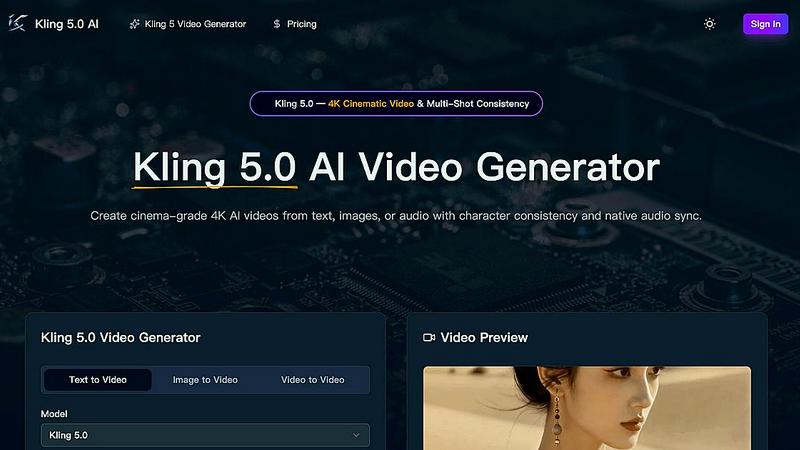
Kling 5
SubtitlesFast
Feature Comparison
Kling 5
4K Cinematic Video Generation
This is the headline act. Kling 5 generates videos up to 15 seconds long in true 4K resolution. But it's not just about pixels; it's about the cinematic language. The AI understands complex lighting, atmospheric effects, and realistic textures, rendering outputs that have a professional, filmic look and feel right out of the gate. The difference in quality compared to standard 1080p AI video is immediately noticeable and game-changing for professional use.
Omni Subject Library for Character Consistency
This is, hands down, my favorite feature and Kling 5's killer app. The Omni Subject Library allows you to "lock" a character's facial features, proportions, and style across multiple shots and camera angles. This means you can create episodic content, product series, or brand campaigns where your protagonist looks identical in every scene. It solves the single biggest headache in AI video production and opens up possibilities for serialized storytelling.
Native Audio Generation & Multilingual Lip-Sync
Kling 5 doesn't just make silent movies. It generates synchronized audio—dialogue, ambient sound, Foley effects—alongside the video in a single pass. Even more impressively, it delivers phoneme-level lip-sync in five languages (English, Chinese, Japanese, Korean, Spanish). The audio feels native to the scene, with mouth movements that accurately match the spoken words and even convey matched emotion, adding a massive layer of authenticity.
Advanced Physics Simulation Engine
Where many AI videos fall into the "uncanny valley," Kling 5 excels with its physics engine. It simulates natural movement for water, fabric, fire, and human anatomy with startling realism. This attention to the physical behavior of materials is what separates a good AI video from a believable one. It's perfect for creating dynamic nature scenes, flowing costumes, or any scenario where realistic motion is critical to immersion.
SubtitlesFast
AI-Powered Auto-Transcription
This is the engine of the whole operation. You simply upload your video file, and SubtitlesFast's AI goes to work, transcribing your speech into text with impressive accuracy. It supports over 50 languages, which is a game-changer for reaching a global audience. The best part? It's not just a block of text. The transcription is synced at a word-level, enabling dynamic, character-by-character highlighting that makes your subtitles feel professional and engaging, not just a static overlay.
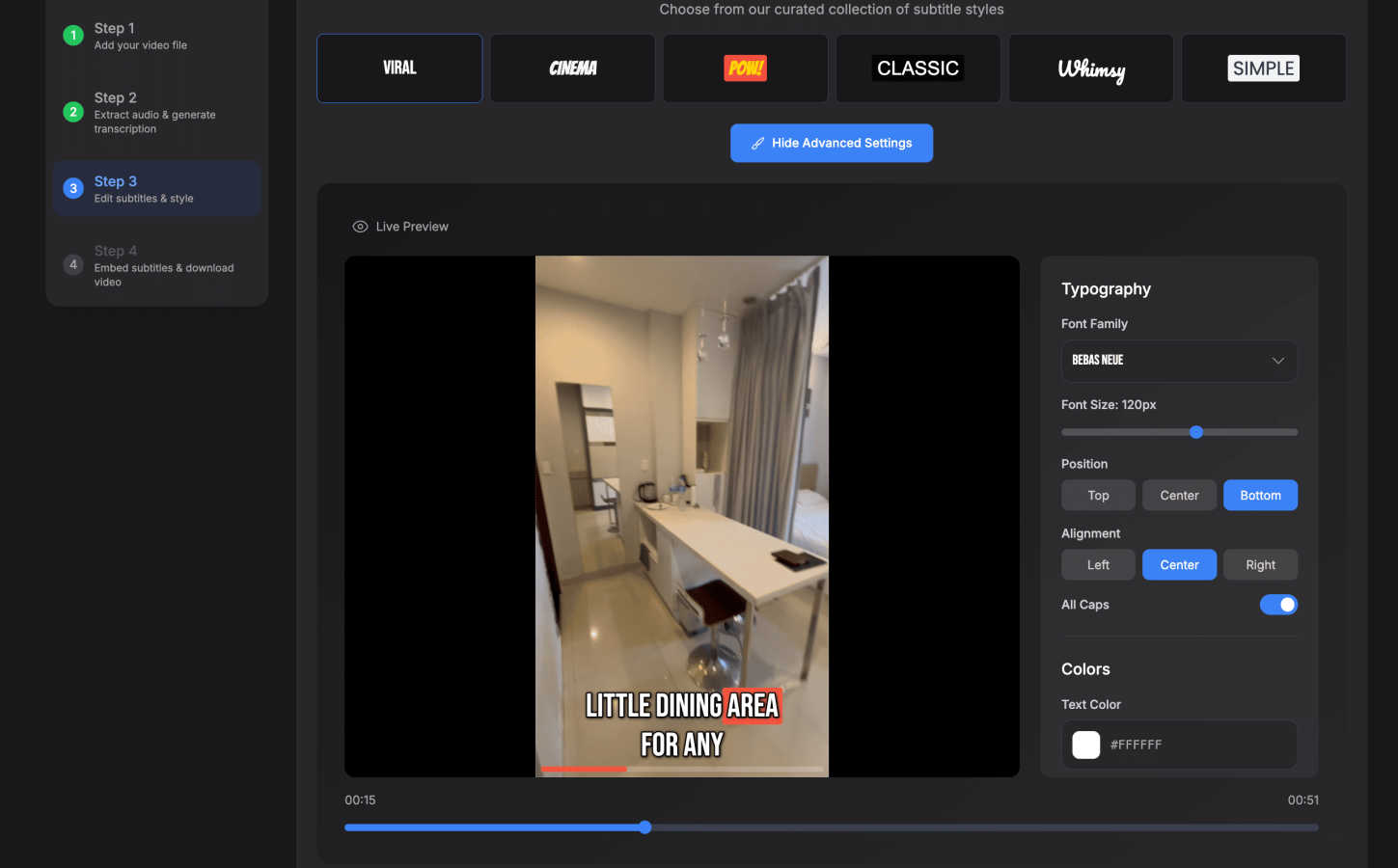
Customizable & Animated Subtitle Styling
Once transcribed, you're not stuck with a boring, default font. SubtitlesFast gives you real creative control. Choose from over 30 animated styles to make your text pop with energy. You can tweak fonts, colors, sizes, backgrounds, and that crucial word-level highlighting. This feature is where you brand your content and match the subtitle vibe to your video's tone, all through a simple, intuitive interface that requires zero design skills or prior editing knowledge.
All-in-One Browser-Based Editor
Forget downloading clunky software. SubtitlesFast runs entirely in your web browser, offering a clean, simple editor with a timeline for fine-tuning. Beyond subtitles, you can add background music, text overlays, and images. It's built with a "no learning curve" philosophy, stripping away the complexity of traditional video editors to give you just the tools you need to finish the job quickly, whether you're on a desktop or your phone.
One-Click, Watermark-Free Export
This is the feature that won me over. Even on the free trial, you can export your final video with the subtitles perfectly "burned in" (permanently embedded into the video) without any ugly watermarks. With one click, your video is rendered and ready for immediate publishing on TikTok, YouTube, Instagram Reels, or X. The export is optimized for social platforms, saving you from the hassle of conversion or compatibility issues.
Use Cases
Kling 5
Social Media Content & Short-Form Video
For influencers, brands, and marketers, Kling 5 is a content machine. Imagine generating a week's worth of unique, eye-catching 4K clips for TikTok, Instagram Reels, or YouTube Shorts in an afternoon. Describe your concept, select the 9:16 aspect ratio, and you have professional-grade vertical video ready to post, complete with synced audio and trending cinematic styles.
Prototyping for Film & Animation
Independent filmmakers and animators can use Kling 5 to rapidly prototype scenes, test storyboards, and visualize complex shots before a single real-world camera rolls. The multi-shot consistency feature is invaluable for pre-visualizing sequences with the same character, while the cinematic camera control (zoom, pan, tilt) allows for precise shot planning.
Explainer Videos & Product Marketing
Marketing teams can create stunning product demos and explainer videos without expensive production. Upload an image of your product, and Kling 5 can animate it with elegant motion. Use character consistency to create a branded spokesperson who can explain features across a whole video series, all while maintaining a polished, corporate-friendly 4K aesthetic.
Educational Content & Concept Visualization
Educators and trainers can bring complex concepts to life. Need to show the water cycle, a historical event, or a scientific process? Describe it in text, and Kling 5 will generate a clear, engaging visual representation with realistic physics. It transforms abstract ideas into concrete, memorable video segments that enhance learning and retention.
SubtitlesFast
Daily Vloggers & Social Media Creators
If you're posting daily vlogs, shorts, or reels, efficiency is everything. SubtitlesFast is built for this relentless pace. You can record a clip on your phone, upload it, style your subtitles, and have a finished video published in under five minutes. This workflow, praised by users like @woocassh, turns subtitle creation from a multi-hour chore into a seamless part of your daily routine, ensuring every piece of content is accessible and engaging.
Marketers & Content Agencies
For teams producing high volumes of social media content, brand consistency and speed are key. SubtitlesFast allows marketers to quickly add professional, on-brand animated subtitles to client videos. The multi-language support means you can easily localize content for different markets. The simple UI means less time training team members and more time producing effective, accessible marketing assets that perform better in feeds.
Educators & Course Creators
Educational content relies on clarity and accessibility. SubtitlesFast helps educators make their tutorials, lectures, and online courses accessible to viewers who are deaf or hard of hearing, as well as those who prefer to watch without sound. The accurate transcription ensures complex terminology is captured correctly, and the clean styling keeps the focus on the content without distracting from the lesson.
Accessibility Advocacy & Inclusive Content
Anyone serious about digital inclusion needs a reliable subtitling tool. SubtitlesFast empowers advocates, non-profits, and conscious creators to easily make their videos compliant with accessibility standards. By removing the technical and time barriers, it encourages more creators to adopt subtitling as a standard practice, making the digital landscape more inclusive for everyone.
Overview
About Kling 5
Let's cut to the chase: Kling 5 isn't just another AI video tool; it's the one that finally makes professional-grade video creation feel like a superpower for the rest of us. Forget the clunky, uncanny-valley outputs of older models. Kling 5.0 is a revolutionary AI video generator designed to produce stunning, cinematic 4K clips from a simple text prompt, uploaded image, or even audio. What truly sets it apart, and why I'm so bullish on it, is its obsessive focus on cinematic quality and consistency. It's built for creators, marketers, filmmakers, and businesses who need broadcast-ready content without the broadcast-level budget or technical crew. The core value proposition is breathtakingly simple: describe your vision in plain language, and in seconds, you have a video with realistic physics, multi-shot character consistency, and native audio sync. This isn't about replacing human creativity; it's about turbocharging it, removing the technical barriers so you can focus on the story. For anyone serious about video content in 2024, ignoring Kling 5 would be a strategic mistake.
About SubtitlesFast
Let's cut to the chase: if you're a content creator drowning in the tedious, soul-crushing work of adding subtitles, SubtitlesFast is your life raft. This isn't just another bloated video editor with subtitles as an afterthought. It's a purpose-built, laser-focused tool designed for one thing: getting accurate, stylish, and readable subtitles onto your video with minimal friction. Built by a developer who posts daily, it solves the exact pain points creators face—expensive subscriptions, complex interfaces, and watermarked trials that make your work look amateurish. The value proposition is beautifully simple: upload your video, let the AI handle transcription in over 50 languages, customize the style with word-level highlighting and slick animations, and export a polished, ready-to-post file in minutes, all directly from your web browser. It's for the daily vlogger, the social media marketer, the educator, and anyone who understands that subtitles are no longer optional; they're essential for accessibility, watch-time, and engagement in a sound-off world. This tool respects your time and your craft.
Frequently Asked Questions
Kling 5 FAQ
What is the maximum video length Kling 5 can generate?
Based on the provided interface, Kling 5 can generate videos with a duration setting, with the example showing a 5-second option. The descriptive text states it can create videos "up to 15 seconds" in length. This is ideal for short-form content, scenes, and clips. For longer narratives, you would sequence multiple consistent 15-second generations together.
How does the character consistency feature actually work?
The feature is powered by the Omni Subject Library. You first generate or define a character. Kling 5 then creates a unique "subject lock" for that character, storing their specific facial features, proportions, and style. In any subsequent video generation, you can reference this locked subject, and the AI will ensure the character appears identical, even across different shots, angles, and actions.
Can I use Kling 5 for commercial projects?
Absolutely. The platform is designed for professional use. The output is broadcast-ready 4K quality, making it suitable for commercial marketing, social media campaigns, paid advertising, and even elements within larger film or television projects. Always check the specific Terms of Service for the latest licensing details.
What languages are supported for lip-sync?
Kling 5.0's native audio generation supports lip-sync at the phoneme level in five key languages: English, Chinese, Japanese, Korean, and Spanish. This means the AI doesn't just overlay sound; it animates the mouth shapes to precisely match the spoken words in these languages, creating a highly realistic and synchronized result.
SubtitlesFast FAQ
Is there really no watermark on the free trial?
Yes, that's correct! This is one of SubtitlesFast's standout policies. Unlike many competitors that slap a huge, distracting watermark on your exported video during a trial, SubtitlesFast allows you to export fully usable, watermark-free videos even on the free plan. You can test the entire workflow and publish real content before deciding to upgrade.
How accurate is the AI transcription?
The auto-transcription is highly accurate for clear audio. It supports over 50 languages and uses advanced speech recognition models. For best results, ensure you have a clean audio source with minimal background noise. The built-in timeline editor also makes it very easy to quickly correct any minor errors the AI might make, giving you full control over the final text.
Can I edit the video beyond just subtitles?
Absolutely. While its superpower is subtitling, SubtitlesFast includes a simple, integrated video editor. You can trim your clips, add background music tracks, insert text overlays, and include images. It's designed to be a streamlined, all-in-one tool for the final polish your social video needs before publishing.
Do I need to download any software?
No, and this is a major advantage. SubtitlesFast is a 100% web-based application that runs directly in your browser (like Chrome or Safari). There is nothing to download or install. You can access it and work on your videos from any computer or even your mobile phone, offering incredible flexibility and convenience.
Alternatives
Kling 5 Alternatives
Kling 5.0 is a prominent player in the rapidly evolving AI video generator space. It promises to democratize video creation by turning text prompts into professional-looking clips, a category that has exploded in popularity for marketers, educators, and content creators. However, no single tool is a perfect fit for everyone, and users often explore alternatives for a variety of reasons. Common motivations include budget constraints, as premium AI video tools can be costly. Others might seek different creative styles, more granular control over the output, or specific features like advanced lip-syncing or longer video generation. Platform compatibility, such as needing a mobile app or a specific integration, also drives the search for other options. When evaluating alternatives, look beyond just the price tag. Consider the core AI model's quality and style, the flexibility of the editing suite, and the learning curve. Your ideal choice should align with your primary use case, whether it's rapid social media clips, detailed explainer videos, or something more narrative-driven.
SubtitlesFast Alternatives
SubtitlesFast is a popular all-in-one web app for video creators, squarely in the productivity and marketing tool category. It's designed to take the pain out of adding accurate, stylish subtitles to videos, which is essential for accessibility and audience engagement. People look for alternatives for a few key reasons. Maybe the pricing doesn't fit a tight budget, or they need a specific feature like advanced translation or integration with a different editing suite. Others might prefer a downloadable desktop application over a browser-based tool, or simply want to compare options to ensure they're getting the best value. When evaluating other tools, focus on what matters most for your workflow. Core considerations should be transcription accuracy, language support, ease of styling and customization, and how smoothly the final product exports into your video platform. The right choice balances power with simplicity, saving you time without sacrificing quality.