Looktara vs poseup
Side-by-side comparison to help you choose the right tool.

Looktara
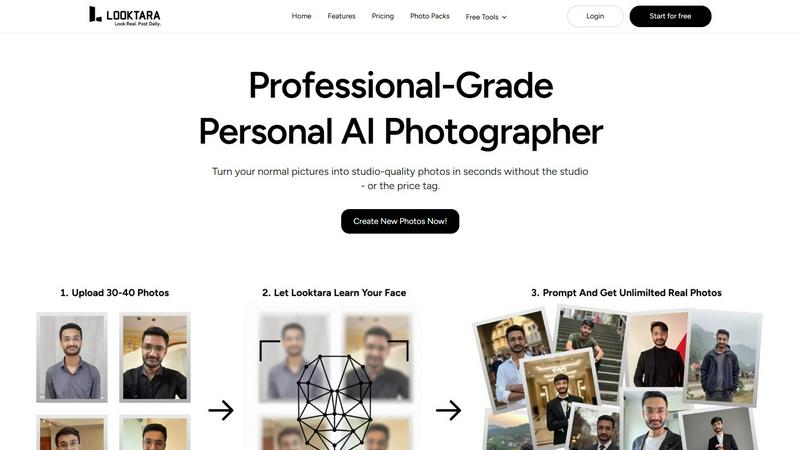
Looktara trains your personal AI to create authentic, professional photos on demand.
Last updated: February 28, 2026

poseup
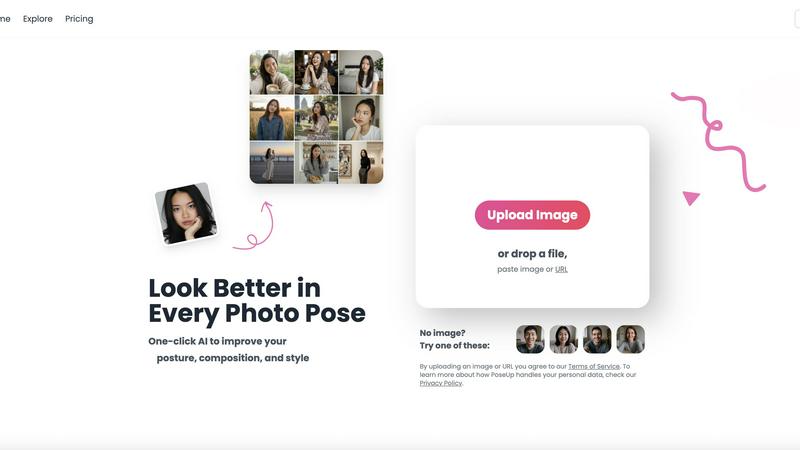
Elevate your photography effortlessly with PoseUp's AI, transforming posture and composition for stunning results in.
Last updated: February 28, 2026
Visual Comparison
Looktara
poseup
Feature Comparison
Looktara
Private AI Model Training
This is the foundational magic. Looktara doesn't slap a generic filter on a stock face. You upload around 30 photos of yourself, and the system builds a private, encrypted model that learns your specific likeness. This process, taking about 10 minutes, ensures every image generated is deeply personalized, capturing your authentic expressions and avoiding the uncanny valley effect that makes other AI photos look so off-putting.
Context-Aware Prompt Generation
Once your model is trained, you become the creative director. Simply type a text prompt describing exactly what you need. Want a confident headshot against a modern office backdrop? A warm, casual photo for a newsletter? A dynamic shot for a speaking engagement thumbnail? You describe the scene, style, and mood, and Looktara interprets it, placing the real you into that context. This level of creative control is what sets it apart from preset, one-size-fits-all solutions.
Platform-Optimized Styling
A single, static headshot doesn't work everywhere. Looktara is built with this nuance in mind. It empowers you to generate images styled for the specific vibe of each platform—authoritative and polished for LinkedIn, authentic and engaging for Instagram, or friendly and approachable for a dating profile. It’s one consistent you, expertly adapted to fit the context, which is a game-changer for personal branding.
Integrated Free Editing Tools
Beyond generation, Looktara provides a suite of handy utilities to polish your photos, making it a one-stop shop. Need to remove a distracting background, blur a face for privacy, crop, resize, or compress an image for a specific platform? These tools are built right in, saving you from juggling multiple apps and ensuring your final image is perfectly ready for publication.
poseup
AI Pose Enhancement
PoseUp utilizes sophisticated AI algorithms to automatically analyze your images and enhance photo poses in an instant. This feature is perfect for users looking to quickly improve their photography without needing technical skills.
Posture Correction Technology
With advanced posture correction capabilities, PoseUp identifies and suggests optimal positioning for your subjects. This ensures that your photos not only look good but also convey the right message and emotion.
Composition Optimization
PoseUp goes beyond simple pose enhancement by optimizing the overall composition of your images. The tool evaluates factors like lighting and framing to offer suggestions that elevate the visual appeal of your photos.
Versatile Photo Support
Supporting multiple formats, PoseUp can handle JPG, PNG, WEBP, and HEIC images, allowing users to upload photos up to 5MB with ease. This versatility makes it accessible for a wide range of users and use cases.
Use Cases
Looktara
Refreshing Your Professional Headshots
Gone are the days of using a five-year-old LinkedIn photo. Professionals can generate a suite of fresh, on-brand headshots in minutes. Need one with a serious boardroom vibe, another with a collaborative team energy, and a third for a "About Me" page? With Looktara, you can create a diverse portfolio of professional images that reflect different facets of your role and personality, all while maintaining perfect consistency.
Creating Consistent Social Media Content
For creators, influencers, and entrepreneurs, visual consistency is key. Looktara allows you to generate a steady stream of authentic photos of yourself for stories, posts, and profile updates. Whether it's a "behind-the-scenes" shot, a celebratory milestone post, or a thoughtful portrait for a caption, you can ensure you're always presenting a cohesive, high-quality personal brand without ever needing to stage a photoshoot.
Sourcing Authentic Marketing Imagery
Small business owners and solopreneurs often struggle with stock photos that feel fake or hiring models for campaigns. With Looktara, you can become the authentic face of your own brand. Generate images of yourself using your product, offering a service, or simply conveying the trusted authority of your business, creating genuine marketing assets that resonate far more deeply with customers.
Crafting Personalized Dating Profile Photos
Dating profiles thrive on authentic, recent, and varied photos. Looktara solves the awkward "selfie" or "friend-photo" dilemma by allowing you to generate natural-looking photos of yourself in different settings and styles—from a smart-casual coffee shop shot to a relaxed outdoors image. This helps present a well-rounded, genuine, and appealing profile.
poseup
Casual Selfies
For individuals capturing everyday moments, PoseUp provides quick enhancements that make casual selfies stand out. Users can upload their images and instantly receive suggestions to improve their poses and composition, resulting in eye-catching photos.
Professional Portraits
Photographers can leverage PoseUp to refine their portrait techniques. With automatic enhancements, they can focus on creativity and artistry while the tool handles the technical aspects of pose and composition.
Social Media Content Creation
Influencers and content creators can use PoseUp to elevate their visual storytelling. By achieving professional-looking images with ease, they can maintain a high standard of content that engages their audience effectively.
Fitness and Wellness Photography
Fitness enthusiasts can benefit from PoseUp’s ability to optimize poses and posture in workout photos. This ensures that their images not only showcase their physique but also convey strength and confidence, perfect for social media sharing.
Overview
About Looktara
Looktara isn't just another AI photo app; it's the personal photographer you've always wanted but could never justify hiring full-time. Forget the awkward, plastic-skinned avatars that plague other generators. This tool is a revelation for anyone who understands that their face is their brand. The core proposition is brilliantly simple yet powerful: you train a private, encrypted AI model on yourself using about 30 photos. In roughly 10 minutes, it learns your unique essence—your smile, your expressions, the way you carry yourself. From that moment, you have a studio-grade creative partner on demand. Need a new headshot? Don't book a photographer, just type a prompt. Describe the scene, the mood, the professional vibe you're going for, and in about 5 seconds, Looktara generates a photo that is context-aware and unmistakably you. It’s built for the modern professional, creator, or entrepreneur who needs a consistent, high-quality visual identity across platforms without the exorbitant cost, scheduling headaches, and inflexibility of traditional photoshoots. This is about authentic, scalable personal branding, finally made effortless.
About poseup
PoseUp is a cutting-edge AI-driven tool that revolutionizes photo enhancement by improving poses, posture, and overall composition effortlessly. This tool is tailored for a wide audience, ranging from casual selfie-takers to seasoned photographers aiming to perfect their portrait techniques. Additionally, social media influencers seeking to elevate their visual content will find PoseUp indispensable. By harnessing the power of advanced AI technology, PoseUp analyzes uploaded images and provides automatic suggestions for enhancing poor poses, correcting posture, and optimizing composition. The beauty of PoseUp lies in its one-click functionality, allowing users without extensive photography training to achieve professional-quality results easily. With PoseUp, transforming ordinary photos into breathtaking visual masterpieces becomes a seamless experience, enabling users to present themselves or their subjects in the most flattering light possible.
Frequently Asked Questions
Looktara FAQ
How many photos do I need to train my AI model?
You'll need to upload approximately 30 photos of yourself. The key is variety: include different angles, expressions (smiling, serious, neutral), and lighting conditions. This diverse set helps the AI learn a comprehensive and accurate version of your likeness, ensuring the highest quality and most natural-looking generated images.
Is my personal data and image model secure?
Absolutely. According to Looktara, your uploaded photos are used to train a private AI model that is encrypted and unique to you. The company emphasizes that this model is yours alone, suggesting a strong commitment to data privacy and security, which is crucial when dealing with sensitive biometric data like your facial likeness.
Can I control the style and background of the generated photos?
Yes, this is one of Looktara's core strengths. You have full creative control via text prompts. You describe the desired scene (e.g., "modern office," "cozy cafe," "studio with soft light"), style ("professional," "casual," "confident"), and any specific details. The AI then generates a photo placing your learned likeness into that specific context.
How long does it take to generate a new photo?
Once your personal AI model is trained (which takes about 10 minutes), generating a new photo is remarkably fast. Based on the provided content, you can expect to receive your context-aware, personalized image in roughly 5 seconds after submitting your text prompt.
poseup FAQ
How does PoseUp enhance my photos?
PoseUp uses advanced AI algorithms to analyze your uploaded images, suggesting improvements in pose, posture, and composition to elevate the overall quality of your photographs.
Is PoseUp suitable for beginners?
Absolutely! PoseUp is designed for users of all skill levels, enabling even those without professional photography training to achieve stunning results effortlessly.
What image formats does PoseUp support?
PoseUp supports multiple image formats including JPG, PNG, WEBP, and HEIC, allowing you to upload your photos easily regardless of their original format.
Do I need to create an account to use PoseUp?
While you can start using PoseUp without an account, signing up allows you to access additional features, manage your credits, and join the community for tips and support.
Alternatives
Looktara Alternatives
Looktara is a specialized AI tool in the generative art category, designed to act as your personal AI photographer. It creates authentic, professional photos of you on demand by training a private model on your own images. This solves the need for consistent, high-quality personal branding visuals without the traditional photoshoot. Users often explore alternatives for various reasons. Some might be seeking a different pricing model or a free tier to start. Others may need features beyond personal photo generation, like editing existing images or creating entirely fictional characters. Platform compatibility, such as a dedicated mobile app, or a desire for less niche, more generalized AI art tools can also drive the search. When evaluating other options, focus on a few key areas. Prioritize tools that respect your privacy and data security, especially when handling personal photos. Consider the output quality and consistency—does it avoid the uncanny valley? Finally, assess the creative control you have. Can you easily guide the style and context to match your professional or personal needs?
poseup Alternatives
PoseUp is an AI-powered tool designed to enhance photos by improving poses, posture, and composition effortlessly. It falls under the category of image and photo editing tools, making it popular among casual users, professional photographers, and social media influencers alike. Users often seek alternatives to PoseUp due to various reasons, including pricing concerns, the need for specific features, or compatibility with different platforms. When choosing an alternative, it's essential to consider the functionality offered, ease of use, and how well the tool meets your personal photography needs.