NB2 Hub vs RemoveTexts
Side-by-side comparison to help you choose the right tool.

Create stunning, high-quality AI images with perfect control over text and layout in just one click using Nano Banana.
Last updated: March 1, 2026

RemoveTexts
RemoveTexts is my go-to for effortlessly erasing any text from images using AI, no Photoshop skills required.
Last updated: March 11, 2026
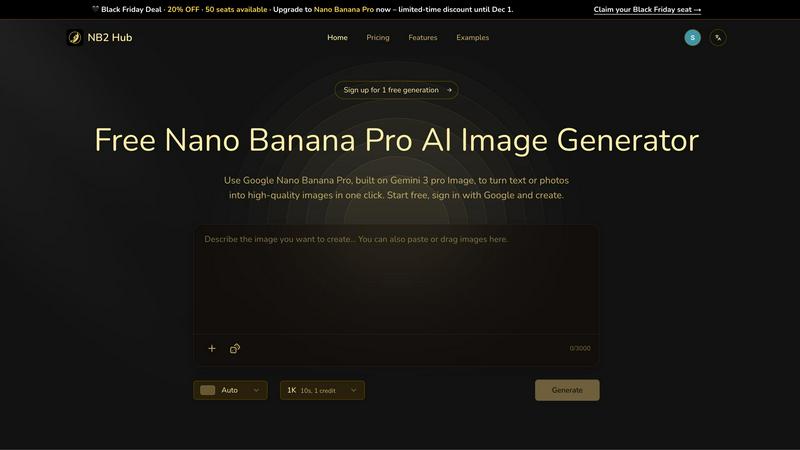
Visual Comparison
NB2 Hub
RemoveTexts

Feature Comparison
NB2 Hub
Faithful text + image remix
With this feature, users can upload a reference image and a brief prompt. The Nano Banana Pro model excels at preserving the original layout and lighting while enhancing details and textures. This is particularly beneficial for tasks such as UI iterations, product photography, and comic panels, ensuring that the core elements of the original image remain intact while improvements are made.
Crisp text inside images
This feature allows users to generate clean and legible text directly within images, free from blurriness or halo effects. It supports multilingual typography, making it perfect for a variety of applications, from posters and advertisements to social media covers. The ability to create visually appealing text-heavy designs without compromising quality is a significant advantage for marketers and content creators.
Grounded to real-world facts
NB2 Hub harnesses the power of world knowledge and retrieval grounding to produce images that are not only beautiful but also factually accurate. This feature enables users to visualize data, places, and styles authentically, which is essential for educational and informative content. The integrity of the generated images supports credibility and trust in professional settings.
Multi-reference fusion & identity consistency
This feature allows users to fuse multiple reference images while maintaining consistency in characters, products, and brand elements across different shots. It is particularly useful for creating storyboards or multi-angle product sets, ensuring that all elements adhere to a unified visual style. This functionality is invaluable for content creators aiming for cohesive branding.
RemoveTexts
Paint to Remove
This is the flagship feature and my personal favorite for its surgical precision. Instead of relying solely on AI detection, you take direct control. Simply upload your image, use the brush tool to paint over the exact text or watermark you want gone, and let the AI work its magic. It's intuitive, fast, and perfect for complex images where you only need to remove specific words or logos while preserving everything else around it. The brush gives you the granularity that fully automatic tools sometimes lack.
Auto Remove All Text
When you need a clean sweep, this one-click wonder is a lifesaver. The AI scans your entire image, detects every text element—be it subtitles, captions, date stamps, or embedded watermarks—and removes them all simultaneously. It’s the ultimate tool for quickly cleaning up busy screenshots or images cluttered with multiple text overlays. You get a completely text-free canvas in seconds, which is perfect for creating clean backgrounds or repurposing visual content.
Edit & Replace Text
This feature moves beyond simple removal into intelligent editing, and it's genuinely impressive. Not only can you erase text, but you can also replace it with new words. The AI attempts to match the original font style, size, and color, blending your new text into the image naturally. It’s incredibly useful for updating old graphics, fixing typos in memes, or localizing text in images without having to recreate the entire design from scratch.
Remove Objects
While text is its specialty, RemoveTexts is powerful enough to handle other unwanted elements. The "Remove Objects" mode allows you to erase logos, people, blemishes, or any other distracting visual element from your photos. You use the same intuitive brush to paint over the object, and the AI seamlessly reconstructs the background. It turns a specialized text tool into a more versatile image cleanup assistant.
Use Cases
NB2 Hub
Marketing Campaigns
NB2 Hub can be utilized to create compelling visuals for marketing campaigns that require high-quality images with accurate branding. The ability to generate crisp text within images and maintain brand consistency makes it an essential tool for marketers looking to enhance their promotional materials.
UI/UX Design
Designers can leverage NB2 Hub to iterate on user interfaces quickly. By remixing existing designs while preserving the original layout and lighting, users can refine their work efficiently, allowing for rapid prototyping and testing of new concepts.
Educational Content Creation
The grounded real-world facts feature makes NB2 Hub an excellent choice for educators and content creators who need to produce accurate infographics or visual aids. This ensures that the information presented is not only visually appealing but also factually sound, enhancing the learning experience.
Product Development
For product teams, NB2 Hub offers the capability to create detailed mockups and prototypes, applying branding elements to 3D objects. This allows teams to visualize their products in marketing contexts, facilitating better decision-making and stakeholder engagement.
RemoveTexts
Cleaning Product Photos for E-Commerce
Online sellers can instantly remove price tags, promotional text, or competing watermarks from product images to create a clean, professional-looking catalog. This is essential for building a trustworthy brand presence on platforms like Amazon, Etsy, or Shopify without needing a graphic designer for every single photo edit.
Preparing Professional Presentations & Documents
Professionals can quickly clean up screenshots, charts, and diagrams by removing irrelevant UI elements, timestamps, or annotations. It's also invaluable for legal or administrative work, allowing for the quick redaction of sensitive information from documents before sharing, ensuring clarity and confidentiality.
Enhancing Social Media & Blog Content
Content creators and marketers can repurpose images by stripping out old watermarks, subtitles, or intrusive text overlays. This allows a single great visual to be used across multiple campaigns or platforms. It’s perfect for creating pristine, on-brand imagery for Instagram, YouTube thumbnails, or blog headers in a fraction of the usual time.
Reviving Personal Photos & Memes
For personal use, it’s fantastic for removing date stamps from old digital photos, erasing unwanted text or people from vacation pictures, or even editing meme templates. You can take a great photo that’s been spoiled by a random watermark or caption and restore it to a clean state worthy of printing or framing.
Overview
About NB2 Hub
NB2 Hub is redefining the landscape of digital creativity through its integration of advanced AI technology. At its core is the Google Nano Banana Pro model, which operates on the innovative Gemini 3 Pro Image architecture. This potent combination ensures that users can generate high-quality images that boast incredible character consistency and layout fidelity. Unlike many other AI tools that tend to produce unpredictable results, NB2 Hub is designed specifically for professionals—designers, marketers, content creators, and product teams—who require reliable outputs that maintain brand integrity and accurate text rendering. The platform allows users to transform text into stunning 4K images or make precise edits to existing photos, offering a level of control that is almost surgical. With the option to start for free, users can experience the power of this tool risk-free, making it feel less like just another image generator and more like an essential, professional-grade extension of their creative toolkit.
About RemoveTexts
Let's be honest: we've all been there. You find the perfect image for your project, but it's marred by an ugly watermark, a dated timestamp, or some meme text you just don't need. The thought of firing up Photoshop, wrestling with the clone stamp tool, and spending an hour on a 30-second fix is enough to make you abandon the idea entirely. This is the exact problem RemoveTexts was built to solve. It's not just another basic photo editor; it's a specialized, AI-powered scalpel designed for one precise operation: seamlessly removing unwanted text and elements from images. The core value proposition is breathtakingly simple: professional-grade, traceless editing in under 30 seconds, with zero design skills required. It leverages the same class of deep learning inpainting technology pioneered by giants like NVIDIA and Adobe, making cutting-edge AI accessible to everyone. Whether you're a marketer cleaning product photos, a creator prepping social media visuals, a student tidying up presentation screenshots, or a professional redacting documents, RemoveTexts hands you the power to reclaim your images. With over 100,000 images processed by 50,000+ users, it’s proven, trusted, and my absolute go-to recommendation for this specific task.
Frequently Asked Questions
NB2 Hub FAQ
What types of images can I create with NB2 Hub?
You can create a wide range of images, including high-quality 4K images from text prompts, remixed photos, and educational infographics. The platform is versatile enough for both artistic and professional applications.
Is there a cost to use NB2 Hub?
NB2 Hub offers a free tier that allows users to generate two high-quality 4K images at no cost. For more extensive use, there are options to upgrade to the full Nano Banana Pro capabilities.
How does NB2 Hub ensure accuracy in generated images?
NB2 Hub utilizes advanced AI technology, specifically the Google Nano Banana Pro model, which grounds its outputs in real-world knowledge. This ensures that the images produced are not only visually appealing but also factually accurate.
Can I use NB2 Hub for multilingual text?
Yes, NB2 Hub supports multilingual typography, allowing users to generate clean and legible text in various languages without any blurriness, making it perfect for global marketing efforts.
RemoveTexts FAQ
Is RemoveTexts really free to use?
Yes, the core functionality of RemoveTexts is completely free. You can upload an image, use the brush to remove text or objects, and download the result without any cost or watermarks on your output image. This makes it an exceptional value for casual and regular users alike.
What image formats and sizes does it support?
RemoveTexts supports all the common web image formats: JPG, PNG, and WebP. You can upload files up to 10MB in size, which is more than sufficient for most high-resolution screenshots, product photos, and digital images used online.
How does the AI remove text without leaving a trace?
The tool uses advanced deep learning inpainting technology. The AI analyzes the pixels surrounding the text you want to remove, understands the patterns, textures, and colors of the background, and then intelligently generates new pixels to fill the space. This results in a seamless reconstruction that blends perfectly, unlike a simple copy-paste or blur tool.
What are the limitations of the tool?
According to the website, RemoveTexts does not support the processing of NSFW (Not Safe For Work) content. Additionally, it is not designed for the removal of copyrighted logos or trademarks, which is an important legal and ethical consideration for users. The AI works best on clear text and distinct objects.
Alternatives
NB2 Hub Alternatives
NB2 Hub is a powerful production-ready platform that utilizes state-of-the-art AI technology to generate stunning 4K images with precise text and layout control. This tool is particularly favored by designers, marketers, and content creators who require accuracy and fidelity in their visual assets. As users explore their creative needs, they often seek alternatives due to factors such as pricing, feature sets, or compatibility with specific workflows and platforms. When searching for alternatives to NB2 Hub, it's essential to consider the core functionalities that suit your project requirements. Look for platforms that offer similar capabilities in image generation, text clarity, and user-friendly interfaces. Additionally, assess whether the alternatives can seamlessly integrate into your existing processes or if they provide unique features that enhance your creative endeavors.
RemoveTexts Alternatives
RemoveTexts is a specialized AI-powered image editor that instantly removes text from any picture. It falls into the category of automated, user-friendly photo editing tools designed for quick cleanup tasks. It’s the go-to for anyone needing to erase watermarks, subtitles, or unwanted captions without the complexity of professional software like Photoshop. Users often seek alternatives for various reasons. Some need a different pricing model, like a one-time purchase instead of a subscription. Others might require specific features RemoveTexts lacks, or they need a tool that works directly on their mobile device or within a particular operating system. It’s a common search driven by individual workflow and budget needs. When evaluating other options, focus on a few key areas. Consider the core AI quality for clean, seamless removals, the speed of processing, and the overall user experience. Also, weigh the cost structure and any platform limitations to ensure the tool fits your specific use case, whether it's for professional design work or casual social media editing.