Blueberry vs Shrinkpad
Side-by-side comparison to help you choose the right tool.

Blueberry
Blueberry is an all-in-one Mac app that integrates your editor, terminal, and browser for seamless web app development.
Last updated: February 28, 2026

Shrinkpad
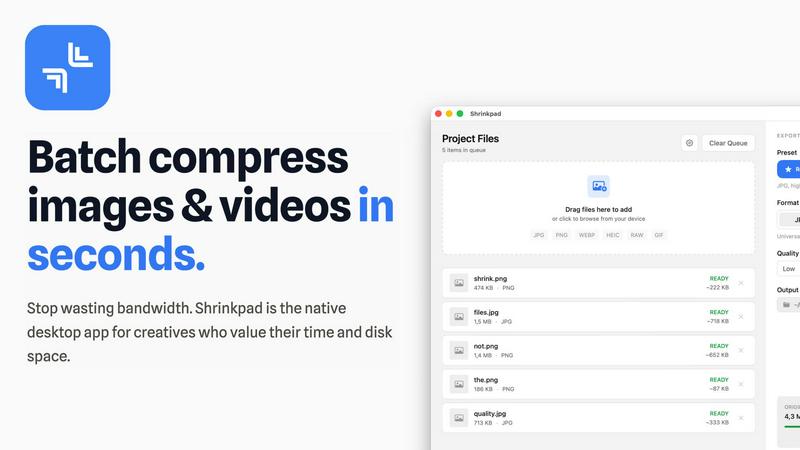
Effortlessly batch compress images and videos on Mac, saving time and space while enhancing quality with Shrinkpad.
Last updated: February 28, 2026
Visual Comparison
Blueberry

Shrinkpad
Feature Comparison
Blueberry
Integrated Workspace
Blueberry brings together a code editor, terminal, and live preview browser in one cohesive workspace. This integration allows developers to work more efficiently, eliminating the need to switch between different applications and providing a unified environment for coding, testing, and deploying web applications.
AI-Powered Contextual Assistance
With the built-in Blueberry MCP, developers can connect to various AI models, which can access the entire workspace. These AI models gain full context, including open files and real-time terminal output, enabling them to provide intelligent suggestions and support directly within the development process.
Live Preview Across Devices
Blueberry offers a built-in live preview feature that allows users to see how their web applications will look across different devices, including desktops, tablets, and mobile screens. This functionality ensures that developers can make design adjustments on the fly and deliver a polished product.
Pinned Apps Integration
Users can dock essential tools like GitHub, Linear, Figma, and PostHog directly within the Blueberry workspace. This feature ensures that critical applications are always accessible, sharing live context with your AI, which enhances collaboration and productivity during the development process.
Shrinkpad
Automatic Compression Adjustment
Shrinkpad intelligently analyzes the visual complexity of each file, applying the optimal compression ratio without introducing artifacts. This ensures that your images and videos maintain their quality while benefiting from reduced file sizes.
Unlimited Batch Processing
Unlike many web-based tools that struggle with large quantities of files, Shrinkpad handles thousands of assets simultaneously without crashing. This feature is essential for photographers and designers who often work with extensive media libraries.
One-Drop Folder Compression
Forget the tedious task of dragging and dropping individual files. With Shrinkpad's folder mode, you can simply drop an entire folder, and the application will automatically detect and prepare all images and videos for compression in one go.
Privacy-First Processing
Shrinkpad prioritizes user privacy by ensuring that all processing happens locally. There are no cloud uploads, meaning your sensitive media files stay safely on your device during and after the compression process.
Use Cases
Blueberry
Rapid Prototyping
Developers can use Blueberry to quickly prototype web applications by leveraging the integrated code editor and live preview. This allows for immediate feedback and iteration, making it easier to refine ideas and functionalities.
Collaborative Development
Teams can collaborate more effectively by using Blueberry's pinned apps and AI context features. This setup facilitates communication and ensures that everyone is aligned on the project, reducing the chances of miscommunication or errors.
Learning and Experimentation
Blueberry serves as an excellent platform for learners and developers experimenting with new technologies or frameworks. The AI's contextual awareness helps users understand their code better and receive real-time assistance, making the learning curve less steep.
Comprehensive Debugging
Debugging becomes more straightforward with Blueberry's integrated terminal and live preview. Developers can run commands, view output, and see immediate changes in their browser, creating a more efficient debugging workflow that saves time and reduces frustration.
Shrinkpad
Optimizing Web Assets
Web developers and designers can use Shrinkpad to compress images and videos for websites, significantly improving load times and user experience. Faster loading pages can enhance SEO, making it a vital tool in digital marketing.
Preparing Media for Social Media
Content creators who frequently post on social media can utilize Shrinkpad to quickly compress their media files, allowing them to share high-quality images and videos without the worry of exceeding size limits on platforms.
Streamlining Project Workflows
For teams using design tools like Figma or Photoshop, Shrinkpad automates the export process of multiple assets. By compressing files in bulk, it saves hours of busywork, enabling creatives to focus more on their design work.
Reducing Storage Costs
Businesses and individual users alike can benefit from Shrinkpad by significantly reducing the size of their media libraries. This not only saves space on local devices but can also decrease costs associated with cloud storage solutions.
Overview
About Blueberry
Blueberry is a revolutionary macOS application that redefines the workspace for modern product builders by combining an intuitive code editor, terminal, and live browser preview into a single focused environment. Designed for developers, designers, and product teams, Blueberry eliminates the hassle of juggling multiple windows and applications, enabling users to streamline their workflow. With its powerful integration of AI through the Blueberry MCP, users can connect to advanced models like Claude, Gemini, and Codex, allowing these AIs to have real-time context of your files, terminal output, and live previews. This unique setup not only enhances productivity but also fosters a collaborative atmosphere where building and shipping web applications becomes a seamless experience. Currently available as a free beta, Blueberry is tailored for those who aspire to create delightful web apps without the clutter of traditional development tools.
About Shrinkpad
Shrinkpad is a robust macOS application tailored for creatives who need to batch compress images and videos swiftly and effectively. Whether you are a photographer, designer, or content creator, managing large media files can be a daunting task. Shrinkpad simplifies this process with its user-friendly drag-and-drop functionality, allowing you to import hundreds of files or entire folders with ease. What sets Shrinkpad apart is its commitment to privacy; all processing occurs locally on your device, ensuring that your sensitive files remain secure and never touch the cloud. With the capability to reduce file sizes by up to 90% while preserving the original visual quality, Shrinkpad not only saves storage space but also optimizes bandwidth usage. Supporting over 50 media formats, it is an invaluable tool for anyone looking to enhance their digital asset management without compromising on quality or efficiency.
Frequently Asked Questions
Blueberry FAQ
What operating system does Blueberry support?
Blueberry is currently designed exclusively for macOS and is available as a free beta version for Mac users.
Is Blueberry really free during the beta period?
Yes, Blueberry is 100% free during its beta phase, allowing users to explore all features without any costs involved.
Can I integrate my existing tools with Blueberry?
Absolutely! Blueberry allows you to dock essential applications like GitHub, Linear, Figma, and PostHog within your workspace, providing easy access and shared context.
How does Blueberry enhance productivity for developers?
By integrating an editor, terminal, and live preview, along with AI context, Blueberry minimizes the need to switch between different tools, thereby streamlining the development process and enhancing productivity.
Shrinkpad FAQ
Can I use Shrinkpad for free?
Yes, Shrinkpad offers a free starter version that includes essential tools for casual users, allowing you to batch process a limited number of files without any cost.
What file formats does Shrinkpad support?
Shrinkpad supports over 50 media formats, including popular ones like JPG, PNG, WEBP, AVIF, MP4, and MOV, making it a versatile solution for various media types.
Does Shrinkpad support video compression?
Absolutely! Shrinkpad is designed to handle both image and video compression, ensuring that all your media files can be optimized efficiently.
How many files can I process at once?
With Shrinkpad, you can process thousands of files simultaneously, thanks to its unlimited batch processing capability. This feature allows for efficient handling of large media libraries without performance issues.
Alternatives
Blueberry Alternatives
Blueberry is a Mac app designed for developers, integrating an editor, terminal, and browser into a singular workspace. This innovative approach allows users to streamline their workflow, eliminating the hassle of switching between multiple windows. With the capability to connect models like Claude, Codex, or Gemini through MCP, Blueberry enhances productivity by providing a unified view of files, terminal outputs, and live previews. However, many users seek alternatives for various reasons, including pricing, specific feature sets, or platform compatibility. When searching for an alternative, it’s crucial to consider factors such as the user interface, integration capabilities with other tools, and overall functionality to ensure it meets individual workflow needs. A well-chosen alternative can provide similar or enhanced features while fitting better into a user’s unique development environment.
Shrinkpad Alternatives
Shrinkpad is an innovative macOS application that specializes in batch compressing images and videos, making it a go-to tool for photographers, designers, and content creators alike. By allowing users to effortlessly drag and drop hundreds of files or entire folders, Shrinkpad streamlines the process of managing large media files while ensuring optimal quality and significant space savings. However, users often seek alternatives due to various factors, including pricing structures, specific feature sets, or compatibility with different platforms. When searching for an alternative to Shrinkpad, consider what aspects are most important to your workflow. This might include the ease of batch processing, the ability to maintain file privacy through local processing, or the range of supported formats. Additionally, customization options can significantly enhance your user experience, so look for tools that allow you to fine-tune compression settings to meet your unique needs. Ultimately, the right choice will depend on your specific requirements and preferences.