MyImageUpscaler vs Shrinkpad
Side-by-side comparison to help you choose the right tool.

MyImageUpscaler
MyImageUpscaler enhances and upscales your photos in seconds while preserving text clarity, all for free.
Last updated: February 28, 2026

Shrinkpad
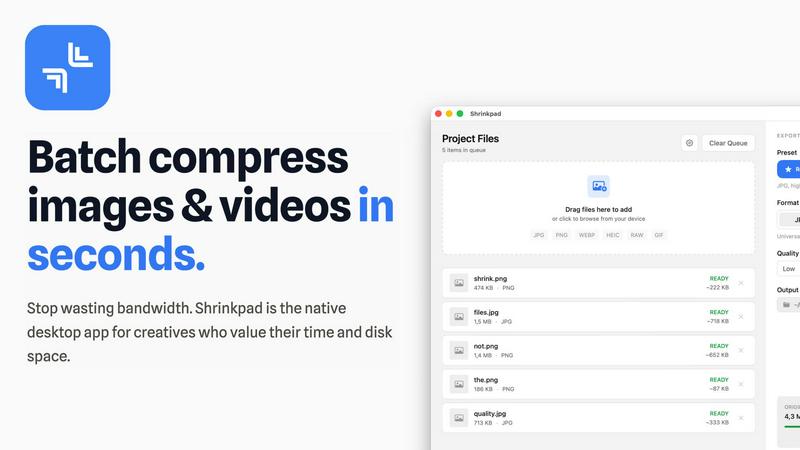
Effortlessly batch compress images and videos on Mac, saving time and space while enhancing quality with Shrinkpad.
Last updated: February 28, 2026
Visual Comparison
MyImageUpscaler

Shrinkpad
Feature Comparison
MyImageUpscaler
Advanced Detail Preservation
This feature allows users to upscale images without losing crucial details. The AI technology identifies and preserves fine details, ensuring that images remain crisp and clear, which is essential for marketing materials and product images.
Fast Processing Speed
MyImageUpscaler boasts an impressive processing speed, allowing users to upscale images in under 10 seconds. This rapid turnaround time is perfect for busy professionals who need to enhance multiple images quickly without compromising on quality.
Multiple Upscaling Options
Users can choose between 2x and 4x upscaling options, providing flexibility depending on the specific needs of their projects. This versatility ensures that images can be tailored for different platforms, whether for high-resolution prints or online use.
Batch Processing Capabilities
With the ability to process up to 500 images in one go, MyImageUpscaler is ideal for users who need to manage large volumes of images efficiently. This feature saves time and effort, making it perfect for real estate agents, photographers, and e-commerce sellers.
Shrinkpad
Automatic Compression Adjustment
Shrinkpad intelligently analyzes the visual complexity of each file, applying the optimal compression ratio without introducing artifacts. This ensures that your images and videos maintain their quality while benefiting from reduced file sizes.
Unlimited Batch Processing
Unlike many web-based tools that struggle with large quantities of files, Shrinkpad handles thousands of assets simultaneously without crashing. This feature is essential for photographers and designers who often work with extensive media libraries.
One-Drop Folder Compression
Forget the tedious task of dragging and dropping individual files. With Shrinkpad's folder mode, you can simply drop an entire folder, and the application will automatically detect and prepare all images and videos for compression in one go.
Privacy-First Processing
Shrinkpad prioritizes user privacy by ensuring that all processing happens locally. There are no cloud uploads, meaning your sensitive media files stay safely on your device during and after the compression process.
Use Cases
MyImageUpscaler
E-commerce Sellers
For online retailers, high-quality product images can significantly impact sales. MyImageUpscaler allows sellers to enhance product photos, ensuring they stand out on platforms like Amazon, thus attracting more customers.
Content Creators
Social media influencers and content creators can use MyImageUpscaler to resize and enhance images for platforms like Instagram and TikTok. This ensures their visuals look professional, helping to increase engagement and follower counts.
Real Estate Agents
Real estate professionals can prepare stunning MLS listings by using MyImageUpscaler to enhance property images. High-quality visuals can make listings more appealing, leading to faster sales.
Photographers
For photographers managing large batches of images, MyImageUpscaler simplifies the editing process. With batch processing capabilities, photographers can quickly enhance multiple images, saving time and allowing them to focus on creative aspects.
Shrinkpad
Optimizing Web Assets
Web developers and designers can use Shrinkpad to compress images and videos for websites, significantly improving load times and user experience. Faster loading pages can enhance SEO, making it a vital tool in digital marketing.
Preparing Media for Social Media
Content creators who frequently post on social media can utilize Shrinkpad to quickly compress their media files, allowing them to share high-quality images and videos without the worry of exceeding size limits on platforms.
Streamlining Project Workflows
For teams using design tools like Figma or Photoshop, Shrinkpad automates the export process of multiple assets. By compressing files in bulk, it saves hours of busywork, enabling creatives to focus more on their design work.
Reducing Storage Costs
Businesses and individual users alike can benefit from Shrinkpad by significantly reducing the size of their media libraries. This not only saves space on local devices but can also decrease costs associated with cloud storage solutions.
Overview
About MyImageUpscaler
MyImageUpscaler is an innovative AI-driven image enhancement and upscaling platform designed specifically for businesses and content creators who demand high-quality visuals. This tool allows users to upscale images by 2x to 4x while maintaining sharpness and enhancing fine details, making it an indispensable resource for anyone looking to improve their visual content. Whether you're an e-commerce seller needing to elevate product images, a photographer processing large batches, or a content creator resizing images for various social media platforms, MyImageUpscaler has you covered. The platform's user-friendly interface and advanced technology ensure that even those with minimal technical skills can achieve professional-grade results. With a free tier offering 10 credits and paid plans starting at just $9/month, MyImageUpscaler is accessible to all, empowering users to upscale smarter, not harder.
About Shrinkpad
Shrinkpad is a robust macOS application tailored for creatives who need to batch compress images and videos swiftly and effectively. Whether you are a photographer, designer, or content creator, managing large media files can be a daunting task. Shrinkpad simplifies this process with its user-friendly drag-and-drop functionality, allowing you to import hundreds of files or entire folders with ease. What sets Shrinkpad apart is its commitment to privacy; all processing occurs locally on your device, ensuring that your sensitive files remain secure and never touch the cloud. With the capability to reduce file sizes by up to 90% while preserving the original visual quality, Shrinkpad not only saves storage space but also optimizes bandwidth usage. Supporting over 50 media formats, it is an invaluable tool for anyone looking to enhance their digital asset management without compromising on quality or efficiency.
Frequently Asked Questions
MyImageUpscaler FAQ
What is MyImageUpscaler?
MyImageUpscaler is an AI-powered platform that enhances and upscales images for businesses and content creators, improving image quality while preserving detail and sharpness.
How does the AI enhancement work?
The AI technology analyzes images and intelligently enhances them, focusing on preserving important details while enlarging the image size, ensuring professional results.
Is there a free tier available?
Yes, MyImageUpscaler offers a free tier that includes 10 credits for users to test the platform without requiring a credit card, making it accessible for anyone interested in trying it out.
What are the payment plans?
Paid plans start at just $9/month, allowing users to choose a plan that fits their needs, whether they require occasional use or frequent access to advanced features.
Shrinkpad FAQ
Can I use Shrinkpad for free?
Yes, Shrinkpad offers a free starter version that includes essential tools for casual users, allowing you to batch process a limited number of files without any cost.
What file formats does Shrinkpad support?
Shrinkpad supports over 50 media formats, including popular ones like JPG, PNG, WEBP, AVIF, MP4, and MOV, making it a versatile solution for various media types.
Does Shrinkpad support video compression?
Absolutely! Shrinkpad is designed to handle both image and video compression, ensuring that all your media files can be optimized efficiently.
How many files can I process at once?
With Shrinkpad, you can process thousands of files simultaneously, thanks to its unlimited batch processing capability. This feature allows for efficient handling of large media libraries without performance issues.
Alternatives
MyImageUpscaler Alternatives
MyImageUpscaler is an AI-powered image enhancement tool that falls under the category of productivity and management solutions. It specializes in upscaling images with remarkable detail preservation, making it a go-to choice for businesses and content creators alike. However, users often seek alternatives due to various reasons such as pricing structures, specific feature sets that may not align with their needs, or compatibility with different platforms. Whether you’re looking for more extensive batch processing capabilities or a different user interface, it’s essential to evaluate what features matter most to you when considering an alternative to MyImageUpscaler. When choosing an alternative, look for key features such as processing speed, image quality, and the range of upscaling options available. Additionally, consider the user experience, the availability of a free tier, and whether the platform offers batch processing for large projects. Understanding your specific requirements will help you find a solution that not only meets your upscaling needs but also enhances your overall workflow.
Shrinkpad Alternatives
Shrinkpad is an innovative macOS application that specializes in batch compressing images and videos, making it a go-to tool for photographers, designers, and content creators alike. By allowing users to effortlessly drag and drop hundreds of files or entire folders, Shrinkpad streamlines the process of managing large media files while ensuring optimal quality and significant space savings. However, users often seek alternatives due to various factors, including pricing structures, specific feature sets, or compatibility with different platforms. When searching for an alternative to Shrinkpad, consider what aspects are most important to your workflow. This might include the ease of batch processing, the ability to maintain file privacy through local processing, or the range of supported formats. Additionally, customization options can significantly enhance your user experience, so look for tools that allow you to fine-tune compression settings to meet your unique needs. Ultimately, the right choice will depend on your specific requirements and preferences.