Nano Banana vs TinyFast
Side-by-side comparison to help you choose the right tool.

Nano Banana
Transform your ideas into stunning images effortlessly with Nano Banana's intuitive AI, now at an exclusive 50% off for a limited time.
Last updated: March 19, 2026

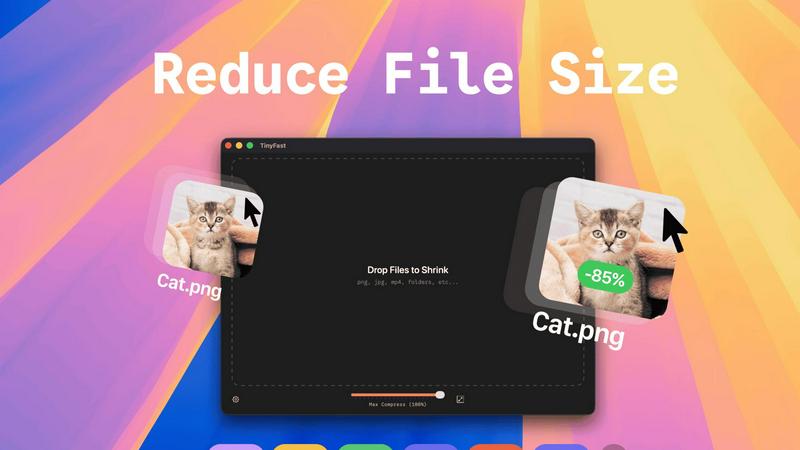
TinyFast instantly compresses files on your Mac while keeping your data private and secure with simple drag-and-drop.
Last updated: February 28, 2026
Visual Comparison
Nano Banana

TinyFast
Feature Comparison
Nano Banana
AI-Powered Image Generation
Nano Banana uses advanced AI algorithms to generate high-quality images from simple text descriptions. This feature allows users to create visuals that align closely with their vision, ensuring that even those with no design experience can produce stunning graphics effortlessly.
AI Image Upscaler
The AI Image Upscaler enhances image resolution, allowing users to improve the quality of their visuals without losing detail. This feature is particularly beneficial for professionals who need high-quality images for print or online use, ensuring that every image looks sharp and vibrant.
Background Remover
The AI Background Remover tool enables users to eliminate unwanted backgrounds from images instantly. This feature is perfect for creating clean, professional-looking visuals that highlight the subject without distractions, making it a must-have for marketers and content creators alike.
Browser Extension
With the Nano Banana Browser Extension, users can seamlessly integrate the platform’s powerful capabilities into their web browsing experience. This feature allows for quick access to image generation and editing tools directly from the browser, enhancing convenience and productivity.
TinyFast
Batch & Drag-Drop Shrink
TinyFast supports batch processing, allowing you to drop entire folders for optimization in seconds. This feature is ideal for users dealing with large volumes of files, saving you time and effort as you streamline your workflow.
Blazing-Fast Compression
Experience lightning-fast compression speeds with TinyFast, thanks to its optimized native engines. Unlike online tools that require uploads and downloads, TinyFast compresses files locally, so you get immediate results without any waiting.
Resize Resolution
With TinyFast's automatic resize resolution feature, you can easily adjust the dimensions of your images and videos. This is particularly useful for social media posts or web uploads, where specific dimensions are required.
100% Local & Private
Privacy is paramount with TinyFast. All files remain on your device, meaning there are no uploads to unknown servers or cloud storage. This feature ensures that your sensitive documents and assets are protected, giving you peace of mind while you work.
Use Cases
Nano Banana
Marketing Campaigns
Marketers can use Nano Banana to quickly generate eye-catching graphics for social media ads or promotional materials. The ability to create visuals rapidly allows for more agile marketing strategies and timely campaign adjustments.
Blog Graphics
Content creators can leverage Nano Banana to produce unique graphics for blog posts, enhancing visual engagement without the need for extensive design skills. This allows for more captivating content that attracts and retains readers' attention.
Social Media Content
With Nano Banana, users can easily create tailored images for their social media platforms. Whether it’s for Instagram, Twitter, or Facebook, the platform enables the rapid production of visually appealing content that aligns with brand aesthetics.
Educational Materials
Educators can utilize Nano Banana to create infographics, diagrams, and other visual aids that enhance learning. The platform's ability to generate clear text and detailed illustrations makes it an invaluable resource for producing educational content.
TinyFast
Graphic Designers
Graphic designers often work with large image files that can slow down their workflow. TinyFast enables them to compress and optimize images quickly, ensuring they can deliver projects on time without sacrificing quality.
Video Editors
Video editors frequently deal with hefty video files that can be cumbersome to manage. With TinyFast, they can swiftly compress videos for easier sharing and storage, all while maintaining the integrity of the original footage.
Document Management
For professionals who handle numerous PDFs and DOCX files, TinyFast provides a seamless way to reduce file sizes. This is especially useful when sending documents to clients or colleagues, as smaller files are easier to manage and share.
Web Developers
Web developers can benefit from TinyFast by compressing images and videos used in websites. Smaller file sizes lead to faster load times and improved website performance, enhancing user experience and SEO.
Overview
About Nano Banana
Nano Banana is a revolutionary AI-driven platform designed to democratize professional-grade image creation and editing. It enables users to transform their ideas into stunning visuals using simple text prompts, breaking down the barriers typically associated with graphic design. Whether you are a marketer in need of quick ad mockups, a content creator searching for unique graphics, a designer seeking inspiration, or simply someone looking to enhance personal photos, Nano Banana caters to all. The platform’s main value proposition lies in its speed and simplicity: instead of navigating complex software, users articulate their vision in natural language, allowing the AI to manage the technical details. From background replacement to lighting adjustments and scene generation, Nano Banana handles it all. With advanced models like Nano Banana Pro, users gain access to features like consistent character editing, 4K ultra-resolution output, and precise text generation. This makes it a versatile tool for both casual and professional projects. Additionally, Nano Banana includes specialized tools such as an AI Image Upscaler and Background Remover, creating a comprehensive creative suite that harnesses the power of artificial intelligence.
About TinyFast
TinyFast is a revolutionary file compression application designed specifically for Mac users who prioritize efficiency and privacy. In a world filled with clunky online tools, TinyFast stands out by providing a sleek, native experience that allows users to compress their PNGs, JPEGs, videos, PDFs, and more directly on their devices. The core functionality is refreshingly simple: drag a file in, and drag a smaller, optimized version out. This eliminates the need for uploads, ensuring that sensitive files remain securely on your Mac. Whether you are a developer, designer, or creative professional handling confidential work, TinyFast's local-first approach not only saves time but also enhances security. With blazing-fast compression powered by your hardware, you can reclaim hours lost to slow web interfaces while keeping your proprietary assets safe. In short, TinyFast is the essential tool you never knew you needed, transforming how you manage file sizes and protecting your privacy in the process.
Frequently Asked Questions
Nano Banana FAQ
What is Nano Banana?
Nano Banana is an AI-driven platform that simplifies image creation and editing by allowing users to generate visuals through natural language prompts, making professional design accessible to everyone.
How does the AI Image Upscaler work?
The AI Image Upscaler uses advanced algorithms to enhance the resolution of images, improving quality without sacrificing detail. This feature is particularly useful for users needing high-resolution images for various applications.
Can I integrate Nano Banana into my existing tools?
Yes, Nano Banana offers a browser extension that allows you to integrate its capabilities directly into your web browsing experience, making it easier to access and utilize the platform's features on the go.
Is there a free trial available?
Absolutely! Nano Banana provides users with 20 free credits to explore its features, including the Pro model, allowing you to experience the platform without any initial investment.
TinyFast FAQ
What file types can TinyFast compress?
TinyFast supports a wide range of file types, including images (PNG, JPG, TIFF, HEIC, WEBP, GIF, BMP, SVG), videos (MP4, MOV, M4V), documents (PDF, DOCX), code (JS, CSS, JSON), and audio (MP3).
Is my data safe with TinyFast?
Absolutely. TinyFast operates completely locally on your Mac, meaning your files never leave your device. This ensures maximum privacy and security, as there are no uploads to third-party servers.
Can I use TinyFast for batch processing?
Yes, you can! TinyFast allows users to drag and drop entire folders for batch compression, making it easy to optimize multiple files at once without any hassle.
Is there a free version of TinyFast?
Yes, TinyFast offers a free version that allows you to compress up to 5 files per day. This is a great way to test the application and experience its features before committing to a paid plan.
Alternatives
Nano Banana Alternatives
Nano Banana is an innovative AI-driven platform designed for image creation and editing, making it accessible for users of all skill levels. It allows users to transform their ideas into stunning visuals through simple text prompts, eliminating the need for complex design software. This ease of use appeals to a wide range of users, from marketers to casual photographers. However, many users often seek alternatives to Nano Banana due to various reasons such as pricing, specific feature sets, or compatibility with different platforms. When searching for alternatives, it's crucial to consider factors like user-friendliness, the range of creative tools offered, and the quality of AI-generated images. A good alternative should align with your specific needs, whether that means advanced editing capabilities or more flexible pricing options.
TinyFast Alternatives
TinyFast is an innovative Mac application designed to streamline the file compression process, allowing users to compress various file types—including images, videos, and PDFs—quickly and privately right on their devices. As a native tool, it caters to those who prioritize efficiency and data security, setting itself apart from clunky online alternatives. Users often seek alternatives to TinyFast for various reasons, such as pricing constraints, specific feature requirements, or compatibility with different platforms. When searching for a suitable replacement, it's crucial to consider aspects like speed, privacy, ease of use, and the range of supported file types to ensure the chosen tool meets your unique needs without sacrificing quality or security.