
TinyFast
TinyFast instantly compresses files on your Mac while keeping your data private and secure with simple drag-and-drop.
Visit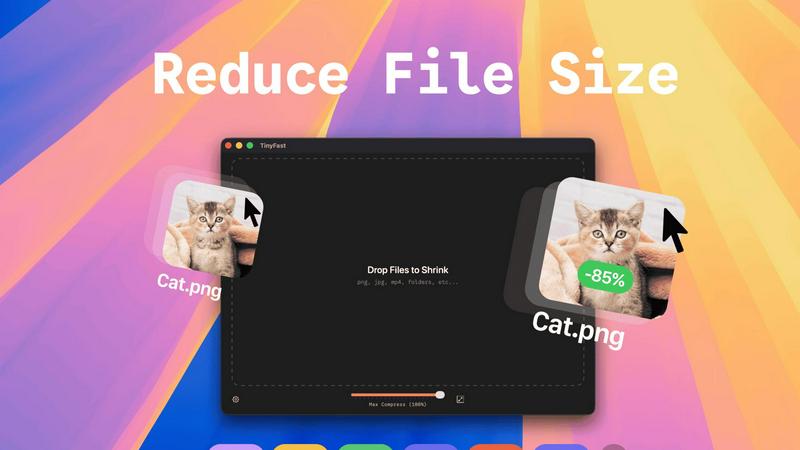
About TinyFast
TinyFast is a revolutionary file compression application designed specifically for Mac users who prioritize efficiency and privacy. In a world filled with clunky online tools, TinyFast stands out by providing a sleek, native experience that allows users to compress their PNGs, JPEGs, videos, PDFs, and more directly on their devices. The core functionality is refreshingly simple: drag a file in, and drag a smaller, optimized version out. This eliminates the need for uploads, ensuring that sensitive files remain securely on your Mac. Whether you are a developer, designer, or creative professional handling confidential work, TinyFast's local-first approach not only saves time but also enhances security. With blazing-fast compression powered by your hardware, you can reclaim hours lost to slow web interfaces while keeping your proprietary assets safe. In short, TinyFast is the essential tool you never knew you needed, transforming how you manage file sizes and protecting your privacy in the process.
Features of TinyFast
Batch & Drag-Drop Shrink
TinyFast supports batch processing, allowing you to drop entire folders for optimization in seconds. This feature is ideal for users dealing with large volumes of files, saving you time and effort as you streamline your workflow.
Blazing-Fast Compression
Experience lightning-fast compression speeds with TinyFast, thanks to its optimized native engines. Unlike online tools that require uploads and downloads, TinyFast compresses files locally, so you get immediate results without any waiting.
Resize Resolution
With TinyFast's automatic resize resolution feature, you can easily adjust the dimensions of your images and videos. This is particularly useful for social media posts or web uploads, where specific dimensions are required.
100% Local & Private
Privacy is paramount with TinyFast. All files remain on your device, meaning there are no uploads to unknown servers or cloud storage. This feature ensures that your sensitive documents and assets are protected, giving you peace of mind while you work.
Use Cases of TinyFast
Graphic Designers
Graphic designers often work with large image files that can slow down their workflow. TinyFast enables them to compress and optimize images quickly, ensuring they can deliver projects on time without sacrificing quality.
Video Editors
Video editors frequently deal with hefty video files that can be cumbersome to manage. With TinyFast, they can swiftly compress videos for easier sharing and storage, all while maintaining the integrity of the original footage.
Document Management
For professionals who handle numerous PDFs and DOCX files, TinyFast provides a seamless way to reduce file sizes. This is especially useful when sending documents to clients or colleagues, as smaller files are easier to manage and share.
Web Developers
Web developers can benefit from TinyFast by compressing images and videos used in websites. Smaller file sizes lead to faster load times and improved website performance, enhancing user experience and SEO.
Frequently Asked Questions
What file types can TinyFast compress?
TinyFast supports a wide range of file types, including images (PNG, JPG, TIFF, HEIC, WEBP, GIF, BMP, SVG), videos (MP4, MOV, M4V), documents (PDF, DOCX), code (JS, CSS, JSON), and audio (MP3).
Is my data safe with TinyFast?
Absolutely. TinyFast operates completely locally on your Mac, meaning your files never leave your device. This ensures maximum privacy and security, as there are no uploads to third-party servers.
Can I use TinyFast for batch processing?
Yes, you can! TinyFast allows users to drag and drop entire folders for batch compression, making it easy to optimize multiple files at once without any hassle.
Is there a free version of TinyFast?
Yes, TinyFast offers a free version that allows you to compress up to 5 files per day. This is a great way to test the application and experience its features before committing to a paid plan.
Explore more in this category:
Similar to TinyFast

DebutPin
A launch platform where products keep collecting visibility, feedback and connections long after launch day.

Sprite Sheet Maker
A free browser-based toolkit for creating, cutting, converting, and previewing sprite sheet animations.

Product Launch Checklist
A free launch checklist for SaaS, apps, AI tools and more. Every step says why it matters and when you can skip it.

Kody Tools
Free collection of online developer utilities, code formatters, and digital converters designed to streamline your daily workflow.

tallycounterweb.com
Online tally counter for tracking attendance, workouts, inventory, sports scores, visitors, habits, and everyday counting tasks.
Forms Plugin
The #1 Native Form Builder Plugin for Framer - No Code, No Embeds, No External Platforms.

FaceCoda
Free AI attractiveness test and face analysis with private, on-device photo processing.
