TinyFast vs WA Reminders
Side-by-side comparison to help you choose the right tool.

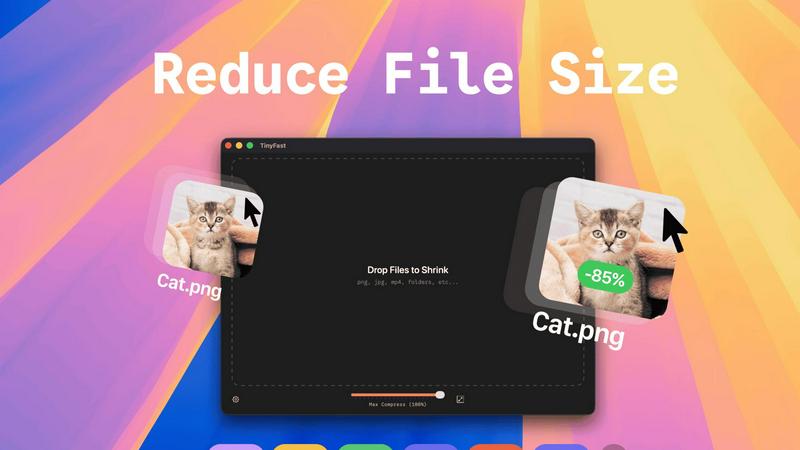
TinyFast instantly compresses files on your Mac while keeping your data private and secure with simple drag-and-drop.
Last updated: February 28, 2026

WA Reminders
WA Reminders is my top pick for effortlessly scheduling WhatsApp messages to save time and boost client communication.
Last updated: April 4, 2026
Visual Comparison
TinyFast
WA Reminders

Feature Comparison
TinyFast
Batch & Drag-Drop Shrink
TinyFast supports batch processing, allowing you to drop entire folders for optimization in seconds. This feature is ideal for users dealing with large volumes of files, saving you time and effort as you streamline your workflow.
Blazing-Fast Compression
Experience lightning-fast compression speeds with TinyFast, thanks to its optimized native engines. Unlike online tools that require uploads and downloads, TinyFast compresses files locally, so you get immediate results without any waiting.
Resize Resolution
With TinyFast's automatic resize resolution feature, you can easily adjust the dimensions of your images and videos. This is particularly useful for social media posts or web uploads, where specific dimensions are required.
100% Local & Private
Privacy is paramount with TinyFast. All files remain on your device, meaning there are no uploads to unknown servers or cloud storage. This feature ensures that your sensitive documents and assets are protected, giving you peace of mind while you work.
WA Reminders
Dual Scheduling Hubs
This is my favorite feature because it adapts to how you already work. You have two powerful entry points. First, schedule directly in the WA Reminders app, which automatically imports your phone's full contact list—no manual entry needed. Second, and this is a game-changer for Calendly users, you can schedule by simply adding a phone number to any Google Calendar event title or description. It turns your existing calendar into a powerful command center for reminders.
Native WhatsApp Integration
WA Reminders doesn't send messages from a strange, unknown number. It works like WhatsApp Web, linking via a QR code. All messages are sent from your own verified business or personal WhatsApp account. This maintains trust and familiarity for your clients, and the conversation continues naturally in your main WhatsApp inbox. It’s authentic automation.
Recurring Event Support
Forget manually setting up the same reminder every week. WA Reminders supports recurring messages for both events created in its own app and those synced from Google Calendar. This is perfect for weekly appointment reminders, monthly payment nudges, or regular class schedules, saving you from repetitive setup tasks.
Full Contact List Sync
The moment you connect the app, it pulls in your phone's entire contact list. This eliminates the tedious and error-prone process of manually typing or uploading phone numbers. Scheduling a reminder for a client becomes as simple as selecting their name from your familiar contacts, making the process incredibly fast and efficient.
Use Cases
TinyFast
Graphic Designers
Graphic designers often work with large image files that can slow down their workflow. TinyFast enables them to compress and optimize images quickly, ensuring they can deliver projects on time without sacrificing quality.
Video Editors
Video editors frequently deal with hefty video files that can be cumbersome to manage. With TinyFast, they can swiftly compress videos for easier sharing and storage, all while maintaining the integrity of the original footage.
Document Management
For professionals who handle numerous PDFs and DOCX files, TinyFast provides a seamless way to reduce file sizes. This is especially useful when sending documents to clients or colleagues, as smaller files are easier to manage and share.
Web Developers
Web developers can benefit from TinyFast by compressing images and videos used in websites. Smaller file sizes lead to faster load times and improved website performance, enhancing user experience and SEO.
WA Reminders
Reducing Clinic No-Shows
For medical, dental, or physiotherapy clinics, missed appointments are a direct hit to revenue. WA Reminders automates appointment confirmations and 24-hour reminders via WhatsApp. Clients receive a familiar message from their doctor's clinic, leading to significantly higher confirmation rates and fewer empty slots, all managed seamlessly through the staff's existing Google Calendar.
Automating Service-Based Business Reminders
Independent professionals like personal trainers, therapists, and consultants can automate session reminders and follow-ups. By scheduling messages through Google Calendar integration, they ensure clients are prepared and on time, improving the professional experience and maximizing billable hours without constant manual texting.
Streamlining Payment Follow-Ups
For small shops, freelancers, or service providers who invoice clients, timely payments are crucial. Schedule polite payment reminder messages to be sent a few days after an invoice is due. This gentle, automated nudge from your own number improves cash flow without awkward manual chasing.
Managing Class or Workshop Attendance
Fitness studios, tutors, and workshop organizers can use the recurring message feature to send weekly class reminders, links, or preparation notes to all registered participants. This boosts attendance rates and engagement, ensuring clients remember and value the service they've signed up for.
Overview
About TinyFast
TinyFast is a revolutionary file compression application designed specifically for Mac users who prioritize efficiency and privacy. In a world filled with clunky online tools, TinyFast stands out by providing a sleek, native experience that allows users to compress their PNGs, JPEGs, videos, PDFs, and more directly on their devices. The core functionality is refreshingly simple: drag a file in, and drag a smaller, optimized version out. This eliminates the need for uploads, ensuring that sensitive files remain securely on your Mac. Whether you are a developer, designer, or creative professional handling confidential work, TinyFast's local-first approach not only saves time but also enhances security. With blazing-fast compression powered by your hardware, you can reclaim hours lost to slow web interfaces while keeping your proprietary assets safe. In short, TinyFast is the essential tool you never knew you needed, transforming how you manage file sizes and protecting your privacy in the process.
About WA Reminders
Let's be honest: missed appointments are a silent killer for small businesses and independent professionals. You lose revenue, waste valuable time slots, and damage client relationships. WA Reminders is the elegantly simple solution I wish every service-based entrepreneur knew about. It's a dedicated scheduling app that lets you automate WhatsApp messages and reminders, directly from your own phone number. The core genius here is its seamless integration with the platform your clients already use every day—WhatsApp—eliminating the friction of unfamiliar apps or SMS costs. Whether you're a physiotherapist, a salon owner, a consultant, or run a small clinic, this tool is designed for you. Its main value proposition is crystal clear: drastically reduce no-shows and save administrative hours by automating your most important client communications. You can schedule messages directly within the WA Reminders app or, in a stroke of brilliance, sync it with your existing Google Calendar workflow. This isn't about creating more work; it's about working smarter by putting your reminders on autopilot through the world's most popular messaging app.
Frequently Asked Questions
TinyFast FAQ
What file types can TinyFast compress?
TinyFast supports a wide range of file types, including images (PNG, JPG, TIFF, HEIC, WEBP, GIF, BMP, SVG), videos (MP4, MOV, M4V), documents (PDF, DOCX), code (JS, CSS, JSON), and audio (MP3).
Is my data safe with TinyFast?
Absolutely. TinyFast operates completely locally on your Mac, meaning your files never leave your device. This ensures maximum privacy and security, as there are no uploads to third-party servers.
Can I use TinyFast for batch processing?
Yes, you can! TinyFast allows users to drag and drop entire folders for batch compression, making it easy to optimize multiple files at once without any hassle.
Is there a free version of TinyFast?
Yes, TinyFast offers a free version that allows you to compress up to 5 files per day. This is a great way to test the application and experience its features before committing to a paid plan.
WA Reminders FAQ
How will my WhatsApp reminder messages look?
Your messages will appear in your client's WhatsApp chat list exactly as if you sent them manually from your phone. They come from your name and number, with your profile picture. You can customize the message text with appointment details, dates, and polite calls to action, making them look personal and professional.
Can I send reminders directly from Google Calendar?
Absolutely, and this is one of the most powerful features. Simply create an event in Google Calendar and include an internationally formatted phone number (e.g., +1234567890) in the event title or description. WA Reminders will detect it and schedule a WhatsApp reminder based on the event time. It integrates perfectly with tools like Calendly that populate Google Calendar.
Do you have a Calendly integration?
Yes, but it works through the Google Calendar bridge. Since Calendly can add events to your Google Calendar, you simply need to ensure the guest's phone number is captured in Calendly and passed to the calendar event. WA Reminders will then read that event and send the WhatsApp reminder. It's an indirect but highly effective integration.
Do you offer a free plan?
No, there is no unlimited free plan due to the server costs required for reliable message delivery. However, they offer a transparent 14-day money-back guarantee on all paid plans. If you try it and find it's not the right fit, you can request a full refund with no questions asked, making it a risk-free trial.
Alternatives
TinyFast Alternatives
TinyFast is an innovative Mac application designed to streamline the file compression process, allowing users to compress various file types—including images, videos, and PDFs—quickly and privately right on their devices. As a native tool, it caters to those who prioritize efficiency and data security, setting itself apart from clunky online alternatives. Users often seek alternatives to TinyFast for various reasons, such as pricing constraints, specific feature requirements, or compatibility with different platforms. When searching for a suitable replacement, it's crucial to consider aspects like speed, privacy, ease of use, and the range of supported file types to ensure the chosen tool meets your unique needs without sacrificing quality or security.
WA Reminders Alternatives
WA Reminders is a specialized productivity tool designed for appointment-based businesses. It falls into the category of automated messaging and reminder software, with a laser focus on WhatsApp. The core promise is simple: reduce no-shows and save valuable time by scheduling messages directly to your clients' most-used chat app. Users often explore alternatives for a few key reasons. Perhaps they need to communicate on multiple platforms beyond WhatsApp, or they require more advanced CRM features like client databases and payment tracking. Budget is another common factor, as some solutions can become expensive as contact lists grow. The specific needs of a clinic, consultant, or shop can vary greatly. When evaluating other options, consider your primary communication channel first. Do you live on WhatsApp, or do you need SMS, email, or social media integration? Look closely at automation capabilities—can you set up recurring reminders or trigger messages based on calendar events? Finally, assess the overall value: does the tool genuinely save you administrative time and directly improve your show-up rates?