BlueHumanizer
BlueHumanizer is my go-to for instantly turning clunky AI text into clear, natural prose without losing your meaning or citations.
Visit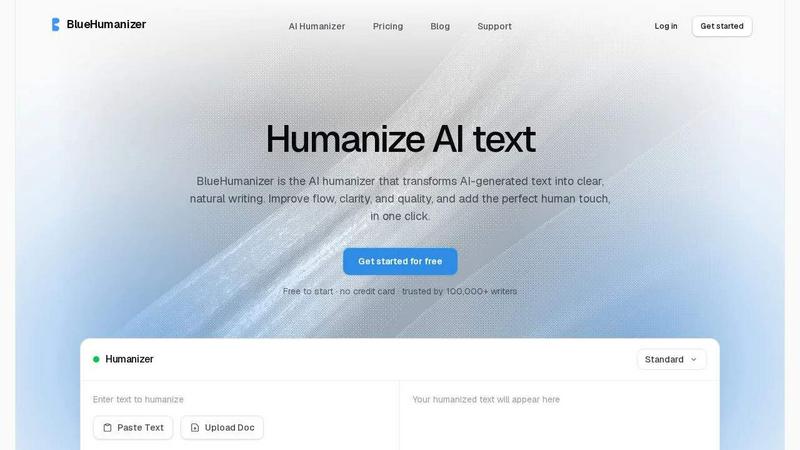
About BlueHumanizer
Look, I have tested dozens of AI humanizers, and most of them are honestly disappointing. They swap a few words for synonyms and call it a day, leaving you with text that still reads like a robot wrote it. BlueHumanizer is different, and it has become my personal favorite for one simple reason: it actually rewrites the way a person would. This tool takes AI-generated text from ChatGPT, Claude, Gemini, or any other AI writer and transforms it into clear, natural prose that flows like a human wrote it. No more stiff sentences, no more awkward phrasing, just polished writing that sounds real.
What makes BlueHumanizer stand out is its approach. Instead of surface-level word swaps, it reshapes sentence structure, varies rhythm, and restores the natural cadence that makes writing feel authentic. Your meaning, tone, and key points stay intact, which is crucial for anyone who needs precise communication. Quotes and citations remain untouched, so researchers and academics can breathe easy. With support for over 50 languages, adjustable humanization levels, and tone controls, this tool adapts to your specific needs. Whether you are a student refining an essay, a marketer shipping on-brand copy, or a non-native writer making English flow naturally, BlueHumanizer delivers writing that is ready to publish. Free to start, no credit card required, and trusted by over 100,000 writers. That is a recommendation I stand behind.
Features of BlueHumanizer
Humanize AI Text in One Click
This is the feature that sold me immediately. Copy your AI-generated text, paste it into BlueHumanizer, and hit humanize. That is it. No setup, no learning curve, no complicated settings to fiddle with. The output comes back clean, polished, and natural. I have used it with ChatGPT, Claude, Gemini, and even some obscure AI models, and every time the result reads like a thoughtful human wrote it. The simplicity here is deceptive because the underlying technology is doing serious work to reshape sentence structure and restore natural rhythm. For anyone who values their time, this one-click workflow is a game changer.
Clearer, Smoother Writing
Most humanizers make text slightly less robotic but still clunky. BlueHumanizer actually improves the writing. It tightens phrasing, varies sentence rhythm, and improves overall flow so your writing reads smoothly and naturally. I noticed this immediately when I tested it on a dense academic paragraph. The original was technically correct but painfully stiff. After BlueHumanizer processed it, the same information was clearer, more engaging, and easier to read. The tool does not change what you said, it just says it better. For writers who care about quality, this feature alone justifies using the tool.
Keeps Your Intent and Tone Intact
Here is where BlueHumanizer separates itself from the pack. Many humanizers strip away your voice and replace it with generic blandness. This tool preserves your tone, your intent, and your key points while cleaning up the phrasing. I tested it on a sarcastic marketing email and a formal research abstract, and both came out with their distinct voices intact. The sarcasm was still sharp, the academic tone was still professional, but both were smoother and more natural. If you have a specific voice or brand tone you need to maintain, this feature is invaluable.
Keeps Citations Untouched
For researchers, academics, and anyone who works with sources, this is a killer feature. BlueHumanizer leaves your quotes, citations, and references exactly as they are. Only the writing around them changes. I tested this with APA, MLA, and Chicago style citations, and every single one came through untouched. No broken links, no mangled author names, no lost page numbers. This means you can humanize entire research papers and abstracts without worrying about your scholarly apparatus getting destroyed. It is a small detail that makes a massive difference for serious writers.
Use Cases of BlueHumanizer
Students Refining Essays and Assignments
If you are a student using AI to draft essays, you know the struggle. Turnitin and other detectors are getting smarter, and robotic text stands out to professors. BlueHumanizer is your secret weapon. Paste in your AI-generated draft, humanize it, and get clear, well-structured writing that flows naturally. Your arguments stay intact, your citations remain untouched, and the final product reads like you actually wrote it. I have seen students go from panicking about detection to confidently submitting polished work. For anyone in academia who uses AI as a writing assistant, this tool is essential.
Researchers and Academics Polishing Papers
Academic writing has a unique challenge. You need precision and formality, but AI-generated academic text often sounds hollow and repetitive. BlueHumanizer refines AI-drafted papers and abstracts into clear, natural prose without losing scholarly rigor. Every citation stays exactly where it belongs, and your technical terminology remains accurate. I have used it to polish conference abstracts and journal article drafts, and the difference is striking. The writing becomes more readable without sacrificing complexity. For researchers who want their work to be both rigorous and accessible, this is the tool I recommend.
Marketers and Content Teams Shipping On-Brand Copy
Marketing copy needs to sound human. It needs personality, rhythm, and a voice that connects with readers. AI-generated marketing text often falls flat because it lacks that human touch. BlueHumanizer fixes this. Paste in your blog posts, emails, landing pages, and social media copy, and the tool reshapes them into clear, engaging writing that matches your brand tone. I have used it to humanize product descriptions and email sequences, and the results consistently outperform the originals in engagement. For content teams who need to ship high-quality copy fast, this tool pays for itself.
Non-Native Writers Making English Flow Naturally
Writing in a second language is hard. Even if your grammar is correct, the flow often feels off to native speakers. BlueHumanizer is a game changer for non-native writers. It takes AI-generated English and makes it flow naturally, so your writing reads as fluent and effortless. I have seen international students and professionals use this tool to transform their emails, reports, and presentations. The output sounds like a confident native speaker wrote it. For anyone who writes in English as a second language, this tool removes the biggest barrier to professional communication.
Frequently Asked Questions
How is BlueHumanizer different from other AI humanizers?
Most humanizers just swap words for synonyms, which leaves your text still sounding robotic and unnatural. BlueHumanizer reshapes sentence structure, varies rhythm, and restores the natural cadence of human writing. It rewrites the way a person would, so the result actually flows and reads clearly. Your meaning, tone, and key points stay intact, and quotes and citations remain untouched. Other tools cannot match this level of natural rewriting quality.
Does BlueHumanizer work with any AI model?
Yes, absolutely. BlueHumanizer works with text from ChatGPT, Claude, Gemini, Mistral AI, and any other AI writing tool. I have tested it across multiple models and the quality is consistently excellent. The tool does not care which AI generated the text. It just makes it sound human. Whether you are using the latest GPT model or an older version, the output will be clear, polished, and natural.
Will BlueHumanizer change my quotes or citations?
No, and this is one of my favorite features. BlueHumanizer leaves your quotes, citations, and references exactly as they are. Only the writing around them changes. I tested this extensively with various citation styles and formatting, and every single reference came through untouched. This makes the tool safe to use on research papers, academic articles, and any document where citation accuracy is critical.
Is there a free version of BlueHumanizer?
Yes, BlueHumanizer is free to start with no credit card required. You can begin humanizing text immediately without any commitment. The free version gives you access to the core humanization features, and you can upgrade if you need higher word limits or advanced controls. Over 100,000 writers trust this tool, and the free tier is generous enough to let you truly test its capabilities before deciding to upgrade.
Pricing of BlueHumanizer
BlueHumanizer offers a free tier that requires no credit card to start. You can begin humanizing AI-generated text immediately with access to core features. For users who need higher word limits, adjustable humanization levels, tone controls, and priority support, there are paid plans available. Specific pricing details for premium tiers are available on the BlueHumanizer website. The free option is robust enough for casual users, while paid plans cater to professionals and teams who need more volume and advanced customization.
Similar to BlueHumanizer

Memorable Contact
AI-powered relationship memory that helps you remember people, the context behind your connections, and reconnect when it matters.
Video Text Remover
Video Text Remover — Erase Subtitles & Watermark from Video