Cece AI
Cece AI is my top pick for small businesses needing an email-based executive assistant that handles scheduling, follow-ups, quotes, and invoices for.
Visit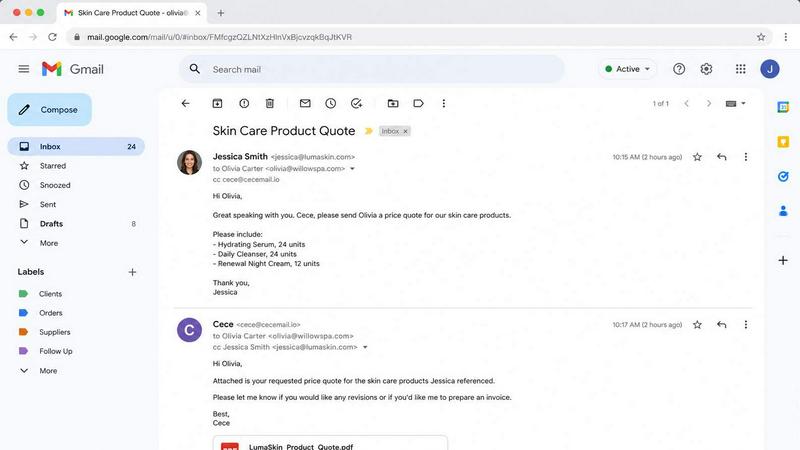
About Cece AI
Cece AI is my new favorite antidote to the daily grind of small business email chaos. It is an AI executive assistant built specifically for business owners who are drowning in inbox clutter, admin work, and those half-finished follow-ups that haunt you at 10 PM. Cece works where you already live: inside your email. You CC [email protected] on a thread, and it handles scheduling, customer responses, quotes, invoices, reminders, and follow-ups without you ever leaving your inbox. This is not another chatbot you have to babysit or a complicated dashboard you have to check every hour. It is a practical, set-it-and-forget-it assistant that turns messy threads into completed tasks. You configure your calendar, business profile, price book, and preferences once in the Cece dashboard, and then Cece executes daily through email. For small business owners in trades, professional services, med spas, real estate, and more, Cece is the hire you need at a fraction of the cost. Starting at 88 dollars a month, it replaces the need for a full-time virtual assistant or an expensive admin hire. Cece handles the repetitive, time-sucking work so you can focus on what actually grows your business. I recommend it wholeheartedly for anyone who feels like their inbox is running their life instead of the other way around.
Features of Cece AI
Automated Email Management and Response
Cece reads your incoming emails, understands the context based on your business profile and pricing, and drafts professional replies automatically. You are not getting generic chatbot nonsense here. Cece sends responses that match your tone, include accurate pricing from your price book, and move conversations forward. Whether it is a client asking about availability or a vendor confirming an order, Cece handles the reply, and you just review and send. This feature alone saves hours every week and ensures no customer inquiry falls through the cracks.
Calendar Integration and Meeting Scheduling
This is where Cece really shines for me. When you CC Cece on an email requesting a meeting, it checks your calendar, coordinates timing with the other participants, and sends a calendar invite with a Google Meet link automatically. The entire process happens inside the email thread without back-and-forth scheduling headaches. Cece locks the time, adds the guests, and provides the meeting details in a clean, organized format. It is the kind of frictionless experience that makes you wonder why you ever scheduled meetings manually.
Quote and Invoice Generation
Cece creates professional PDF quotes and invoices directly from email requests. You simply CC Cece on an email asking for pricing, and it pulls your services, unit prices, and terms from your configured price book. The result is a polished, branded PDF document with your company details, payment terms, and itemized costs. Cece can also send invoices and track whether they have been paid. For businesses that send multiple quotes daily, this feature is a game-changer that turns a 15-minute task into a 15-second email CC.
Follow-up and Reminder Automation
Dropped balls are the enemy of small business growth, and Cece eliminates them. After you send a quote or schedule a meeting, Cece automatically tracks follow-ups. It knows when you last contacted a client and suggests a friendly nudge if it has been too long. You can tell Cece to chase again on a specific day, and it handles the reminder. This feature ensures that no opportunity goes cold and no invoice goes unpaid because you simply forgot to follow up. It is like having a diligent operations manager watching your back 24/7.
Use Cases of Cece AI
Scheduling Client Meetings and Calls
For consultants, real estate agents, and service providers, scheduling is a constant pain point. CC Cece on an email from a potential client who wants to chat, and Cece instantly checks your calendar, proposes a time, and sends a Google Meet invite. No more playing email tag with "What about Tuesday at 2?" Cece handles the coordination, and both parties get a clean calendar event with all the details. This use case alone pays for the subscription in time saved.
Creating and Sending Professional Quotes
Trades like plumbers, electricians, and HVAC companies send quotes daily. Instead of manually creating PDFs with your pricing and terms, you CC Cece on the email request. Cece generates a branded quote with unit prices, order totals, payment terms like Net 30, and lead times. The quote is attached as a PDF and sent to the client immediately. This speeds up your sales cycle and makes you look incredibly professional without any extra effort.
Managing Invoice Follow-ups and Payment Reminders
Accountants, lawyers, and med spas often struggle with late payments because follow-ups are awkward and easy to forget. Cece tracks when you send an invoice and automatically reminds you to follow up after a set period. You can even tell Cece to send a polite nudge to the client on your behalf. This keeps your cash flow healthy and removes the emotional burden of chasing payments.
Handling Customer FAQs and Standard Responses
Many small businesses answer the same questions repeatedly: pricing, availability, service descriptions. Cece stores your FAQs and business profile, so when a customer emails asking about your services, Cece can draft a comprehensive response with accurate information. For property managers, insurance agents, and hair salons, this means every inquiry gets a fast, consistent, and professional reply without you typing a single word.
Frequently Asked Questions
How do I start using Cece AI?
Starting is simple. Go to the Cece AI website and sign up for a free 14-day trial. During setup, you configure your calendar, business profile, price book, and preferences in the Cece dashboard. After that, you simply CC [email protected] on any email thread, and Cece handles the rest. No complicated integrations or training required.
Is Cece AI safe with my business data?
Yes. Cece identifies you by your sender domain, so only emails from your business address trigger Cece actions. All data is encrypted and handled according to standard security protocols. Cece does not share your business information or customer data. You maintain full control over what Cece can access and do.
What industries does Cece work best for?
Cece is designed for any small business that runs on email. It works exceptionally well for trades like plumbers, electricians, roofers, and HVAC companies. It also serves professional services including law firms, insurance agencies, accountants, property managers, med spas, hair salons, consultants, and real estate agents. If you send quotes, schedule meetings, and manage invoices via email, Cece is for you.
How much does Cece AI cost compared to hiring an assistant?
Cece starts at 88 dollars per month, which is a fraction of the cost of a full-time virtual assistant or admin hire. Virtual assistants typically cost 3,000 dollars or more per month and still require training and oversight. Cece is always available, never takes time off, and works instantly based on your configured preferences. It is the most cost-effective way to get executive assistant support for your small business.
Pricing of Cece AI
Cece AI offers a 14-day free trial so you can test the assistant with your real workflows before committing. After the trial, pricing starts at 88 dollars per month. Payment details are collected at checkout, and there are no hidden fees. This all-inclusive price covers email management, calendar integration, quote and invoice generation, follow-up automation, and all other features. Compared to the 3,000 dollars plus per month cost of a human assistant, Cece is an unbeatable value for small business owners who want to reclaim their time and stop drowning in admin work.
Similar to Cece AI
DebutPin
A launch platform where products keep collecting visibility, feedback and connections long after launch day.

Product Launch Checklist
A free launch checklist for SaaS, apps, AI tools and more. Every step says why it matters and when you can skip it.
Kody Tools
Free collection of online developer utilities, code formatters, and digital converters designed to streamline your daily workflow.
tallycounterweb.com
Online tally counter for tracking attendance, workouts, inventory, sports scores, visitors, habits, and everyday counting tasks.

Forms Plugin
The #1 Native Form Builder Plugin for Framer - No Code, No Embeds, No External Platforms.


DockGroups
Your Dock, your rules. Simple and clean. Workflows in one click