
Cozy
Cozy is a private, local-only journal that keeps your words in plain files on your device, no servers, no AI.
VisitPublished on:
July 13, 2026
Pricing:
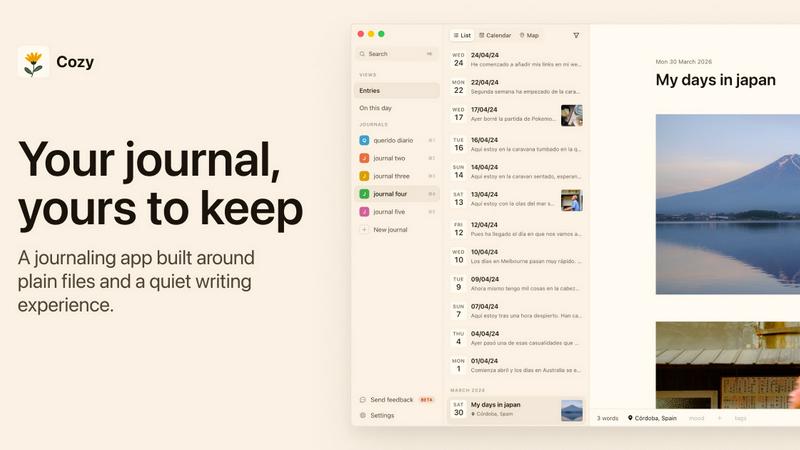
About Cozy
Cozy is a 100% local journaling application for macOS and Windows that I genuinely believe is one of the most thoughtful writing tools available right now. It is a private, offline-first space where your words never leave your device. No syncing to a server, no data fed to an AI, no subscription fees. Your journal lives in plain files on your computer, entirely under your control. This product is for anyone who values true privacy in their personal writing, whether you are a daily diarist, a sporadic note taker, or someone migrating from another app like Day One, Notion, Obsidian, or Bear. The main value proposition is radical simplicity and ownership. Cozy does not try to be everything to everyone. Instead, it focuses on making the act of writing feel good and feel safe. You get features like multimedia attachments, tagging, location markers, custom habit trackers, a full-screen writing mode with ambient soundscapes, and multiple ways to revisit your entries through a calendar or a map view. It supports writing in any language, including right-to-left scripts, and offers a generous 14-day money-back guarantee. Cozy is the journal you have been waiting for if you are tired of apps that treat your private thoughts as a resource to be mined.
Features of Cozy
Your Files, on Your Computer
Cozy stores everything you write in plain Markdown and CSV files directly on your hard drive. There is no mysterious cloud, no proprietary database, and no server to breach. Your journal lives exactly where you put it, and you can access, back up, or copy those files with any standard file manager. This means you are never locked in, and your privacy is not a feature that can be revoked in a future update.
More Than Text
Your entries are not limited to words. Cozy lets you attach photos, audio clips, and videos from your computer or embed content from YouTube. This transforms your journal into a rich, multimedia archive of your life. Drop in a short clip of a morning walk by the river, a voice memo from a coffee with a friend, or a photo from a local festival. Everything that made your day can live together in one entry.
Make It Yours
Cozy bends to your preferred style of journaling. You can tag entries with custom keywords, mark your location on a map, or build your own trackers for habits, moods, or anything else you want to follow. The app does not impose a rigid structure on you. Instead, it provides the tools to organize your thoughts exactly the way you like, from simple freeform writing to structured daily logs.
A Quiet Place to Write
When you are ready to write, Cozy offers a full-screen, distraction-free mode paired with ambient soundscapes. You can choose from rain, a forest, a café, or a fireplace to help you settle in and focus. These small, intentional touches make opening the app feel like entering a calm, private sanctuary, a deliberate escape from the noise of notifications and multitasking.
Use Cases of Cozy
Daily Personal Journaling
The core use case is straightforward: you write about your day, your thoughts, and your feelings in a completely private space. You can add photos from your phone, tag your mood, and mark your location. Over time, you build a personal archive that is searchable and browsable by date or tag, all without any third party ever seeing a single word.
Migrating from Legacy Journaling Apps
If you have years of entries locked inside Day One, Notion, Obsidian, or Bear, Cozy makes the transition painless. It offers dedicated import tools for each of these apps, so you can bring your entire history with you. You do not have to start from a blank page. You can keep your old memories and continue writing in a tool that respects your privacy.
Creative Writing and Drafting
Writers who want a safe, local space for drafts, ideas, and fragments will find Cozy useful. The plain Markdown files are portable, and the distraction-free writing mode helps you focus. You can add reference images or audio notes to your drafts, and because everything is stored locally, you never have to worry about a service going down or changing its terms.
Habit and Mood Tracking
Beyond narrative journaling, Cozy lets you build custom trackers for any habit or aspect of your life you want to monitor. You can track your daily water intake, your exercise routine, or your emotional state over time. Because the data lives in CSV files, you can also analyze it with your own tools if you wish, giving you complete ownership over your personal analytics.
Frequently Asked Questions
Is my data really private with Cozy?
Yes, completely. Cozy stores all your writing and attachments in plain files on your own computer. Nothing is ever sent to a server, synced to a cloud, or fed to any AI. Your words stay on your device, and you control who sees them. There is no account, no login, and no data collection of any kind.
Can I import my entries from another journaling app?
Yes. Cozy offers dedicated import tools for Day One, Notion, Obsidian, and Bear. You can bring in your entire history of entries, including photos and attachments, so you do not have to start over. The import process is designed to be straightforward and preserves your existing content.
What happens if I lose my computer or my files are deleted?
Because Cozy stores everything as plain files on your computer, you are responsible for your own backups. The app does not offer cloud backup, as that would compromise its core privacy promise. You should use your operating system's built-in backup tools or a third-party backup service to copy your journal folder to an external drive or another location you trust.
Does Cozy work on my operating system?
Cozy is currently available for macOS and Windows. It is a native desktop application, not a web app or a mobile app. The developers have confirmed it is a one-time purchase with no subscription, and there is a 14-day money-back guarantee if you find it is not the right fit for you.
Similar to Cozy

Clever AI Humanizer
Clever AI Humanizer is a free tool that makes AI-generated text sound more human.


AIdorable
Adopt a virtual baby who grows, learns, and remembers you.

LinkedIn Translator
Turn rough notes into credible LinkedIn writing, or decode professional jargon into plain English.

ScreenWeaver
Write the script, build the storyboard from it, and drive AI video prompts, all in one project.

Magic Eraser
AI photo editor for removing objects and backgrounds, enhancing images, and creating visuals on web and mobile.

ConnectMachine
AI-powered digital business cards with QR sharing, card scanning, and smart contact management.

Peekviewer
Anonymous Instagram viewer. Browse profiles, stories, and posts without an account or leaving a trace.