
CustomTattoo AI
CustomTattoo AI is my go-to for generating and previewing custom tattoo designs on your own skin before you ever book an appointment.
Visit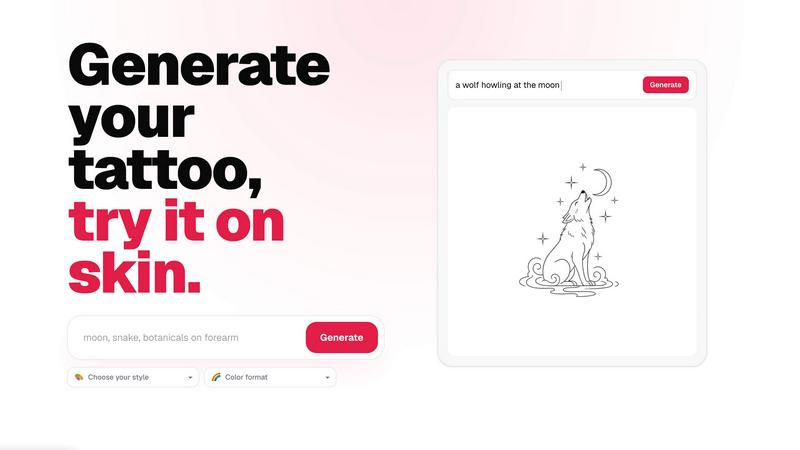
About CustomTattoo AI
Let’s be honest: getting a tattoo is a leap of faith, and the gap between what you imagine and what you actually get can be terrifying. CustomTattoo AI is the tool that bridges that gap. It is an AI-powered tattoo design and try-on platform built for anyone planning their next piece of ink. Whether you are a first-timer nervously scrolling through Pinterest or a seasoned collector with a half-sleeve, this product gives you the power to generate custom tattoo concepts, preview them directly on your own skin, and build a clear, artist-ready reference before you ever sit in the chair. The core value proposition is simple and brilliant: the result should be obvious before you book. You start by describing your idea — a crescent moon with botanicals, a gothic dragon with wide wings, anything — and the AI generates multiple visual directions in an endless array of styles. From there, you can save your favorites to a personal library, test placement on a photo of your own body, and compare different aesthetics side-by-side. This is not just a novelty generator; it is a serious planning tool that helps you refine your visual direction, build confidence, and walk into the studio with a design that feels like yours. The platform is especially useful for first-time clients who lack the vocabulary to articulate their vision, tattoo enthusiasts who want to explore wild variations without commitment, and anyone who values certainty before making a permanent decision. CustomTattoo AI democratizes the design process, turning the dreaded "I'll know it when I see it" into a curated, visual conversation.
Features of CustomTattoo AI
AI-Powered Design Generation
This is the beating heart of the product. Instead of scrolling through generic flash sheets or hoping your artist interprets your vague description correctly, you simply type in your tattoo idea. The AI takes your text — the subject, the placement, the mood — and generates a fully realized tattoo concept in seconds. It is like having a brilliant artist who never gets tired of your revisions. You can iterate endlessly, tweaking the prompt until the design feels exactly right. This feature eliminates the guesswork and gives you a concrete starting point that you can actually see and evaluate.
On-Skin Preview
This is the feature that separates CustomTattoo AI from every other design tool on the market. You are not just looking at a flat image on a white background. The platform lets you upload a photo of your own body — your arm, your back, your wrist — and then overlays the generated tattoo design directly onto your skin. You can see how the size, placement, and curvature work with your anatomy. It is a game-changer for placement anxiety. You can test a tiny wrist piece versus a sprawling forearm design, all from the comfort of your couch, before making any permanent decisions.
Style and Color Format Selection
Tattoos are not one-size-fits-all, and neither are the designs here. CustomTattoo AI offers a robust selection of tattoo styles — from traditional American and Japanese Irezumi to fine line, neo-traditional, gothic blackwork, and watercolor. You can also choose your color format, whether you want bold black and grey, vibrant full color, or a muted sepia tone. This feature allows you to explore the same subject across multiple aesthetics. A dragon in blackwork feels completely different from a dragon in neo-traditional color, and this tool lets you compare those options instantly.
Personal Design Library and Artist-Ready Export
Good tattoo planning is a process of elimination and curation. CustomTattoo AI provides a personal library where you can save your favorite generated designs. You can build a shortlist, compare them side-by-side, and decide which direction is strongest. Once you have made your choice, the platform allows you to export the design as a high-quality reference image that you can take directly to your tattoo artist. This is not about replacing the artist; it is about giving them a clear, visual target so they can focus on their craft rather than decoding your description.
Use Cases of CustomTattoo AI
First-Time Tattoo Clients Overcoming Indecision
If you have never gotten a tattoo, the fear of the unknown is paralyzing. You do not know what style you like, how big it should be, or where it should go. CustomTattoo AI is the perfect sandbox for first-timers. You can start with a simple idea like "crescent moon and botanicals" and generate dozens of variations in different styles. You can preview each one on your arm. You can sleep on it. You can show your friends. By the time you book your appointment, you will have a crystal-clear vision and the confidence that comes from having already seen your tattoo on your own body.
Tattoo Enthusiasts Exploring New Styles and Mashups
Even seasoned collectors get stuck in a rut. Maybe you only have blackwork, but you are curious about watercolor. Or you want to see what a traditional Japanese koi would look like in a neo-traditional style. CustomTattoo AI is a low-risk playground for experimentation. You can mash up ideas that would normally take hours of artist consultation to explore. It is the best way to discover a new aesthetic direction without committing to a deposit or a long session. I personally love using it to see how different placements change the flow of a design.
Bridging the Communication Gap with Your Tattoo Artist
The most common complaint from tattoo artists is vague client references. "I want something tribal, but like, flowy, with a wolf." CustomTattoo AI solves this problem elegantly. Instead of describing a feeling, you bring a printout of a generated design. The artist can then use that as a foundation, tweaking the anatomy, line weight, and shading to create a custom piece that is technically sound and perfectly suited for your skin. It turns the consultation from a guessing game into a collaborative refinement process. You get a better tattoo, and the artist gets a happier client.
Planning a Sleeve or Multi-Piece Composition
Large-scale tattoos require serious planning. How does this piece flow into that piece? Where should the focal point be? CustomTattoo AI allows you to generate designs for different parts of your body and preview them together. You can test a shoulder cap, a half-sleeve, and a chest panel to see how they interact. This is invaluable for avoiding the "patchwork" look and ensuring your entire collection feels cohesive. You can build your entire roadmap visually before you ever book the first session.
Frequently Asked Questions
Is CustomTattoo AI free to try?
Yes, absolutely. You can sign up for free and you will receive 3 free tattoo credits added to your account at signup. This allows you to test the generator, create a few designs, and even use the on-skin preview feature without paying a single cent. No credit card is required to claim these credits. It is a genuine free test drive designed to show you the power of the platform before you decide to purchase more credits.
How does the on-skin preview work?
The on-skin preview feature is surprisingly simple and effective. After you generate a tattoo design, you can upload a photo of the body part where you want the tattoo. The AI then analyzes the photo and intelligently maps the design onto your skin, accounting for the natural curves and contours of your body. You can adjust the size and rotation to get the perfect placement. The result is a realistic preview that shows you exactly how the tattoo will look on your specific anatomy, not just on a generic model.
Will there be hidden subscriptions?
No, there are no hidden subscriptions or surprise charges. CustomTattoo AI operates on a straightforward credit-based system. You start with 3 free credits. If you want to generate more designs, you can purchase additional credit packs as needed. There are no recurring monthly fees or auto-renewing plans. You have complete control over your spending, and you can use the platform as little or as much as you want without any financial commitment beyond the credits you choose to buy.
Can I take the design to my tattoo artist?
Yes, and that is one of the primary goals of the platform. CustomTattoo AI is designed to generate "artist-ready directions." The designs you create are high-quality visual references that you can download and take to your tattoo artist. It is important to understand that these designs are concepts, not finished tattoos. A professional artist will use your generated design as a strong starting point, applying their technical expertise in line work, shading, and anatomy to create a final piece that is both beautiful and technically sound. It is the best way to bring a clear, collaborative idea to the studio.
Similar to CustomTattoo AI

Z Image Turbo
Create photorealistic images, bilingual posters, ecommerce visuals, and social content online with Z Image Turbo.

Presentation Intelligence
AI-native presentation and visual content platform that turns prompts, documents, images, videos, and data into polished, shareable decks.

Magic Eraser
AI photo editor for removing objects and backgrounds, enhancing images, and creating visuals on web and mobile.

PNG to SVG
Free, private image conversion tools that run entirely in your browser.

StopScroll
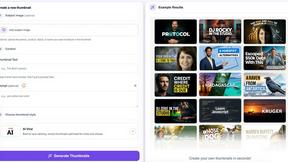
AI YouTube thumbnail maker that generates multiple thumbnail concepts from a URL, title, or prompt.
HubVanta AI
HubVanta AI helps creators generate images and videos with advanced AI tools for visual content workflows.