
Flowton: the time particle
Flowton turns your goals into game-like cores where you bank productive time and ditch distractions to level up your real life.
VisitPublished on:
July 5, 2026
Pricing:
About Flowton: the time particle
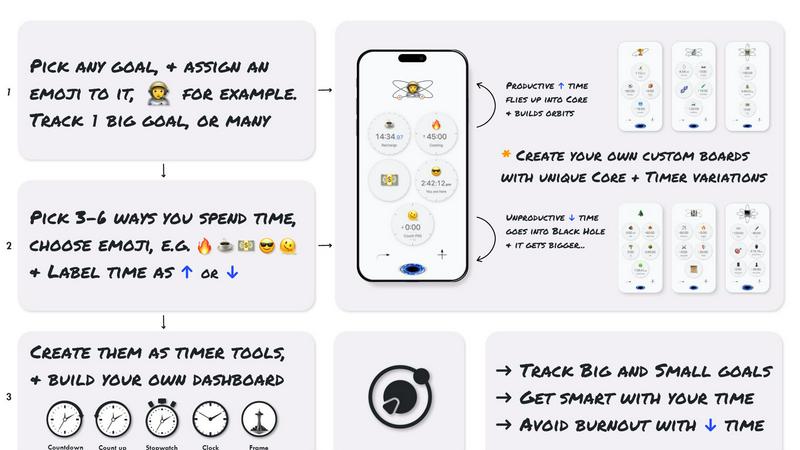
Let's be honest: the biggest lie we tell ourselves is that we know where our time goes. You feel busy, maybe even exhausted, but at the end of the day, what did you actually move forward? Flowton is the antidote to that fog. It is a beautifully gamified, sci-fi inspired time tracking tool that reimagines your entire day as a battle between "Up time" (productive, goal-advancing activities) and "Down time" (the distractions, the black holes, the things you want to cut back on). Instead of a boring stopwatch, you get a personal productivity universe where time is a particle called a "flowton." You bank these particles into "Cores" (your goals) by running timers that either deposit flowtons into your orbit or eject them into a Black Hole. The core mechanic is brutally simple: track what you want more of, track what you want less of, and watch your ratio improve. This app is for students grinding through exams, creators building their craft, developers deep in flow state, and anyone who understands that focused, prolonged effort is the only real hack for meaningful progress. Flowton is opinionated software: it forces you to classify every minute, to see the truth of your day, and to build a streak of intentional living. It is currently available on iOS, with an Android version on the horizon. If you are tired of time management apps that feel like spreadsheets, Flowton offers a universe worth exploring.
Features of Flowton: the time particle
Core and Orbit Mechanics
This is the heart of Flowton. Each goal you set becomes a "Core," and every time you complete a productive timer, you deposit flowtons that orbit around that Core. The visual feedback is incredibly satisfying: you see your progress accumulating in real time, forming a miniature solar system of your own making. Unproductive time gets ejected into a Black Hole, creating a clear, stark visual of what you are discarding. This isn't just a timer; it is a narrative of your day.
Bankable Timers with Dual Directionality
Flowton gives you two distinct timer modes. "Bankability Up" timers are for activities that feed your goals: studying, coding, writing, working out. When you finish one, flowtons are captured and added to your Core. "Bankability Down" timers are for the distractions you want to control: social media, gaming, mindless browsing. You still track them, but they subtract from your progress. This dual-axis tracking is the secret sauce for understanding your true time ratio.
Reverse Time and Fast-Finish Mechanics
Flowton understands that real life is messy. The "Reverse Time" mechanic lets you run a timer backwards, effectively counting down from a set limit to help you avoid overrunning a break or a low-value activity. The "Fast-Finish" mechanic rewards you for completing a task ahead of schedule. These aren't gimmicks; they are tactical tools that give you flexibility and a little dopamine hit for beating the clock. It makes time tracking feel like a game you want to win.
Board and Multi-Core Management
You are not limited to one goal. Flowton lets you create multiple "Boards," each containing several Cores. You might have a board for "Career Goals" with Cores for learning a new framework, writing documentation, and networking. Another board could be "Personal Growth" with Cores for reading, exercise, and meditation. This structure lets you compartmentalize your life without losing sight of the big picture. It is productivity architecture for your brain.
Offline Functionality and Streak Tracking
This is a non-negotiable for any serious productivity tool. Flowton works fully offline, meaning you never lose a second of data because your signal dropped. You can track your time on a plane, in a basement, or on a hike. The streak tracking system then gamifies your consistency. Maintaining a daily streak of deposits into your Core builds momentum and makes you think twice before breaking the chain. It is accountability without the shame.
Use Cases of Flowton: the time particle
The Student Grinding for Exams
Imagine a medical student who needs to study 6 hours a day but is constantly pulled away by YouTube. They set up a Core called "Board Prep." Every study session is a "Bankability Up" timer, and every YouTube break is a "Bankability Down" timer. At the end of the day, they see their ratio: 5.5 hours of Up time vs. 2 hours of Down time. The visual of flowtons orbiting their Core versus disappearing into the Black Hole is a powerful motivator to close that gap tomorrow.
The Freelancer Balancing Client Work and Distractions
A freelance designer struggles with context switching. They create a Board called "Client Work" with a Core for each project. They use "Bankability Up" timers for deep design work and client calls. They use "Bankability Down" timers for checking email and browsing design inspiration sites. The Reverse Time mechanic is perfect for limiting social media breaks to exactly 10 minutes. They end each week with a clear picture of which projects are profitable and which are time sinks.
The Skill Builder Learning a New Language
Someone learning Japanese sets up a Core called "Nihongo Mastery." They use "Bankability Up" timers for active study sessions with flashcards and grammar drills. They also track passive listening time (podcasts) as "Bankability Up" but with a different timer setting. "Bankability Down" timers track the time spent watching anime without subtitles (a guilty pleasure). The Fast-Finish mechanic rewards them for finishing a lesson in 25 minutes instead of 30, building a sense of efficiency.
The Developer in Deep Work Mode
A software developer wants to maximize their flow state. They create a Board called "Project Phoenix" with a single Core. They use a "Bankability Up" timer for coding and debugging. They use a "Bankability Down" timer for Slack, code reviews, and meetings. The offline functionality is critical here: they can track their time even when they are in a remote cabin with no internet. The streak tracking ensures they don't miss a day of meaningful code commits.
Frequently Asked Questions
What exactly is a flowton?
A flowton is a hypothetical "productivity particle" that Flowton uses as its unit of time measurement. Think of it as the XP of real life. When you complete a productive timer, you "bank" flowtons into your Core. The more flowtons you accumulate, the more you have moved the needle on your goals. It is a conceptual framework that makes abstract time feel tangible and collectible.
How does the Black Hole work?
The Black Hole is where your unproductive time goes. When you run a timer set as "Bankability Down," the time you spend is ejected into the Black Hole instead of orbiting your Core. This is not a punishment; it is a visual and psychological tool. Seeing your time disappear into a void is a powerful reminder that some activities are not serving your goals. The goal is to minimize the time you feed the Black Hole.
Can I track multiple goals at the same time?
Yes, absolutely. Flowton allows you to create multiple "Cores" within multiple "Boards." Each Core represents a distinct goal or objective. You can switch between them seamlessly. For example, you could have a Core for "Work Project A" and another for "Fitness Training," and track them both throughout the same day. The data is stored separately for each Core, so you can analyze your progress on each goal independently.
Is Flowton available on Android?
Flowton is currently live globally on iOS. The Android version is actively in development and is expected to launch later this year. You can sign up on the Flowton website to get notified as soon as it becomes available. The team is focused on delivering the same polished, offline-capable experience on both platforms.
Similar to Flowton: the time particle
DebutPin
A launch platform where products keep collecting visibility, feedback and connections long after launch day.
Product Launch Checklist
A free launch checklist for SaaS, apps, AI tools and more. Every step says why it matters and when you can skip it.
Aptitude Test Prep
Free timed practice for real employer aptitude tests

Solve Game Prep
Practice the McKinsey Solve game before it practices you.
HireVue Practice
Practice the HireVue before it practices you.
Kody Tools
Free collection of online developer utilities, code formatters, and digital converters designed to streamline your daily workflow.
Interview Practice
Rehearse behavioral interview answers out loud on a timer, then an AI mock scores each answer and shows a stronger one.
tallycounterweb.com
Online tally counter for tracking attendance, workouts, inventory, sports scores, visitors, habits, and everyday counting tasks.