
FormBlink - AI Form Builder
FormBlink is an AI form builder that transforms your ideas into ready-to-use forms in seconds, no drag-and-drop needed.
Visit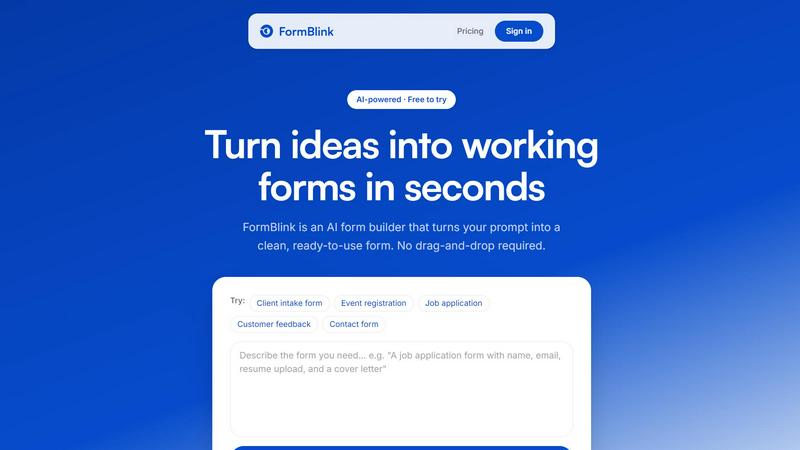
About FormBlink - AI Form Builder
FormBlink is an innovative AI-powered form builder that revolutionizes the way forms are created, making it a faster and simpler alternative to traditional tools like Typeform and Jotform. By allowing users to describe their form requirements in plain English, FormBlink eliminates the tedious process of starting from scratch or navigating through complex templates. This AI-first approach means that what typically takes 30 to 60 minutes can now be accomplished in just seconds. Each form generated is clean, responsive, and optimized, requiring no design work or technical knowledge. Ideal for founders, marketers, and service businesses, FormBlink caters to various needs, from lead generation to client intake forms. The platform enables users to collect responses immediately, streamlining workflows and significantly reducing the time spent on form creation.
Features of FormBlink - AI Form Builder
Instant Form Generation
FormBlink allows you to create forms in a flash. By simply describing what you need in plain English, the AI constructs a complete, production-ready form. This feature eliminates the traditional drag-and-drop interface, cutting down form creation time to mere seconds.
AI-Powered Editing
Unlike other form builders that require manual adjustments post-generation, FormBlink lets you edit forms by typing out your changes. This intuitive feature enables you to refine your forms seamlessly, using natural language to make alterations like adding fields or changing question types without ever needing to navigate a complex editor.
Comprehensive Integrations
FormBlink supports integrations with popular tools such as Google Sheets, Slack, Notion, and HubSpot, all included in every plan without tier restrictions. This means you can easily set up a flow of information from your forms into your preferred platforms, ensuring that responses are managed efficiently.
Unlimited Responses
With FormBlink, there are no caps on the number of responses you can receive, making it a cost-effective solution for businesses that need to handle large volumes of data. Unlike many competitors that restrict responses based on pricing tiers, FormBlink provides unlimited data collection at a competitive price point.
Use Cases of FormBlink - AI Form Builder
Lead Generation Forms
FormBlink is perfect for creating lead generation forms that capture potential clients' information seamlessly. By generating forms quickly, businesses can start collecting leads without the usual hassle, improving their marketing efforts significantly.
Client Intake Forms
Service-based businesses can utilize FormBlink to create client intake forms that gather essential information efficiently. The AI-driven process allows for rapid deployment, ensuring that new clients can be onboarded smoothly and effectively.
Surveys and Feedback
Gathering insights from customers or employees is crucial, and FormBlink makes it easy to set up surveys and feedback forms. The instant generation feature allows organizations to respond to changing needs quickly, collecting valuable data in real time.
Event Registration Forms
Planning an event can be daunting, but FormBlink simplifies the creation of event registration forms. Whether it's for webinars, conferences, or workshops, users can generate professional forms in seconds, ensuring that they capture all necessary attendee information.
Frequently Asked Questions
How does FormBlink generate forms so quickly?
FormBlink uses advanced AI technology to interpret your plain English descriptions and instantly generates a complete, production-ready form. This eliminates the long setup times associated with traditional form builders.
Can I edit a form after it has been created?
Yes, FormBlink allows you to edit forms by simply typing out the changes you want to make. This feature enables quick refinements without the need for complex interfaces.
What types of integrations does FormBlink offer?
FormBlink offers integrations with a variety of tools, including Google Sheets, Slack, Notion, and HubSpot. These integrations are available on all plans, ensuring seamless data management.
Is there a limit to the number of responses I can collect?
No, FormBlink allows for unlimited responses, making it an ideal solution for businesses that anticipate high volumes of data collection without worrying about additional costs.
Explore more in this category:
Similar to FormBlink - AI Form Builder


Capafy AI
Agent Skills marketplace: discover expert AI agents, run them online, or publish a Skill and earn from every sale.
Novastart
Apps and files on an infinite canvas where people and AI agents work together.
Verla AI
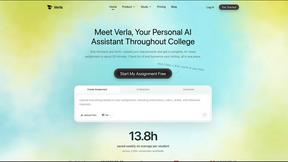
Verla is an AI academic assistant for university and college students, combining AI essay writing, academic research, AI detection, AI humanization.

JevModel
Turn text or JSON into structured Choice, Score and Noul decisions with probabilities.

Tapetide
AI-first stock research for India. Ask TapeAi about any NSE or BSE stock, or connect Claude, ChatGPT and Cursor to Tapetide's MCP server.

Memorable Contact
AI-powered relationship memory that helps you remember people, the context behind your connections, and reconnect when it matters.