
HappyHorse AI
HappyHorse AI instantly creates stunning, cinematic videos for ads and social media directly from your text or images.
Visit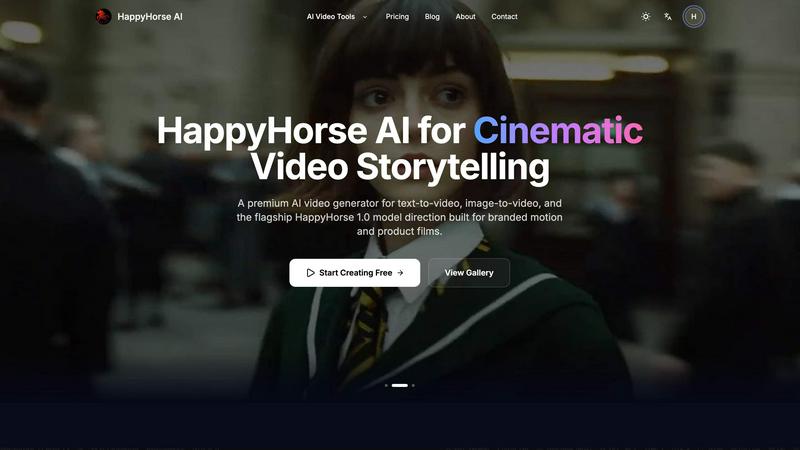
About HappyHorse AI
Let's cut through the noise: HappyHorse AI is a browser-based video generator that actually gets out of your way. In a market flooded with overcomplicated "AI suites," this tool stands out by focusing on one thing: turning your ideas into cinematic motion, fast. Whether you're a solo creator, a marketer on a tight deadline, or part of a team needing rapid prototypes, HappyHorse AI demystifies AI video generation. Its core promise is speed, simplicity, and usability, eliminating the need for editing skills or complex software. You describe a scene with text or upload an image, and its advanced models—including the flagship HappyHorse 1.0 model built for branded content—do the heavy lifting. It’s designed for the practical creator who values a clean, iterative workflow over flashy, unusable features. You start from text, anchor with images when you have a reference, and generate export-ready clips for social media, marketing materials, or storytelling in minutes, not hours. This is my go-to recommendation for anyone who needs quality AI video without the technical headache.
Features of HappyHorse AI
Multi-Model Video Workspace
This is arguably the smartest feature for power users. Instead of juggling five different browser tabs and accounts for various AI video models, HappyHorse AI lets you compare and generate from leading models in one unified interface. You can test a prompt across different engines to see which yields the best cinematic scene or product shot, saving immense time and streamlining your creative experimentation. It turns a chaotic process into a controlled, curatorial one.
Text-to-Video & Image-to-Video Core Workflows
HappyHorse AI nails the two fundamental ways creators think. The text-to-video path is perfect for pure ideation: write a prompt with camera direction and style, and generate concepts from scratch. The image-to-video path is my favorite for brand consistency; upload a product photo or portrait, and the AI animates it while preserving your original composition and tone. This dual approach covers everything from brainstorming to executing on existing assets.
Flexible Commercial-Grade Controls
Beyond just a prompt box, the platform offers granular controls that serious creators need. You can select aspect ratios (like 16:9 for films), set duration, adjust resolution, and use optional seeds for reproducible results. When a model supports it, you even get audio-aware options. These aren't just checkboxes; they're thoughtful parameters that let you tailor output for specific platforms like Instagram Reels or client presentations without post-editing.
Fast Iteration and Simple Credit System
The interface is built for speed. You go from prompt to preview rapidly, and can tweak settings or switch models without restarting your entire workflow. This encourages experimentation. Coupled with a straightforward credit-based pricing plan (including free credits for new users), it creates a low-friction loop where you can generate, assess, and iterate without financial anxiety per click. It's built for doing, not deliberating.
Use Cases of HappyHorse AI
Social Media Content Creation
For influencers and social media managers, this tool is a powerhouse. You can generate a week's worth of engaging, eye-catching clips for TikTok, Instagram Reels, or YouTube Shorts in an afternoon. Describe a trendy scene, animate a branded image, and export directly. The speed allows you to stay relevant and post consistently without a production team, making it perfect for testing what resonates with your audience.
Product Marketing and Ad Films
The HappyHorse 1.0 model is specifically tuned for this, and it shows. Marketers can create sleek, cinematic product films and advertisement scenes directly from text descriptions or product stills. Need to showcase a new feature in motion? Upload a photo and animate it. This slashes production timelines and costs for e-commerce brands and agencies, enabling rapid prototyping of campaign ideas.
Creative Storytelling and Concept Art
Writers and concept artists can breathe life into their visions. Imagine generating a short, moody clip to visualize a scene from a script or a book cover. The text-to-video capability allows for exploring "what if" scenarios, creating animated mood boards, or pitching creative concepts with compelling visuals that static images can't match. It's a bridge between imagination and a tangible first draft.
Internal Business Communications
Teams can elevate internal presentations, training materials, and investor decks with custom, professional-grade video snippets. Animate data points, create short explainers for new processes, or add branded motion to company announcements. It’s far more engaging than static slides and demonstrates a modern, innovative approach without requiring a dedicated video editor on staff.
Frequently Asked Questions
What is the HappyHorse 1.0 model?
The HappyHorse 1.0 model is the platform's flagship AI model, specifically engineered for high-quality, cinematic output suitable for branded motion and product films. It represents their most advanced technology for generating coherent, visually stunning videos with a professional polish. Early users often get exclusive access and discounts on this model as it evolves.
Do I need video editing experience to use HappyHorse AI?
Absolutely not. In fact, that's the whole point. HappyHorse AI is designed to be a zero-setup, browser-based tool. You choose a mode (text or image), describe what you want, adjust some basic settings like aspect ratio, and generate. The platform handles the complex rendering, so you can create compelling videos without any prior editing or animation skills.
What kind of files can I upload for Image-to-Video?
You can upload common image formats including PNG, JPG, JPEG, and WEBP files. The system supports up to 2 files at a time, with a maximum size of 50MB per upload. This is perfect for product photos, portraits, illustrations, or any still frame you want to bring to life with AI-powered motion.
Are the generated videos free to use for commercial projects?
Yes, but with an important caveat. According to their policy, videos generated on the platform are intended for creative and commercial workflows. However, this is "subject to model-specific policies." It's always wise to check the terms for the specific AI model you use, as some underlying technologies may have their own licensing rules, especially for very large-scale distribution.
Similar to HappyHorse AI

Suparelay
Call landlines and mobiles in 200+ countries from your browser. The person you call needs no app. Prepaid, from about 2 cents a minute.
Novastart
Apps and files on an infinite canvas where people and AI agents work together.
SightRadar
Face recognition API, a drop-in replacement for AWS Rekognition. Index, search, compare and detect faces, billed per photo with no subscription.
Nijia
See where Mac storage goes, review items before cleanup, inspect developer workspaces, and monitor system health. Try every feature free for 7 days.

Low Quality Image
Free browser-based low quality image maker that degrades photos on purpose with compression, downscaling, and pixelation.

Memorable Contact
AI-powered relationship memory that helps you remember people, the context behind your connections, and reconnect when it matters.
gamespadtesterpro.com
Gamepad Tester Pro makes it easy to check whether your controller is working properly directly from your browser. Test compatible PS