
JustPDF
JustPDF is a privacy-first PDF toolkit offering 17 free, browser-based tools to manage your documents securely and efficiently.
Visit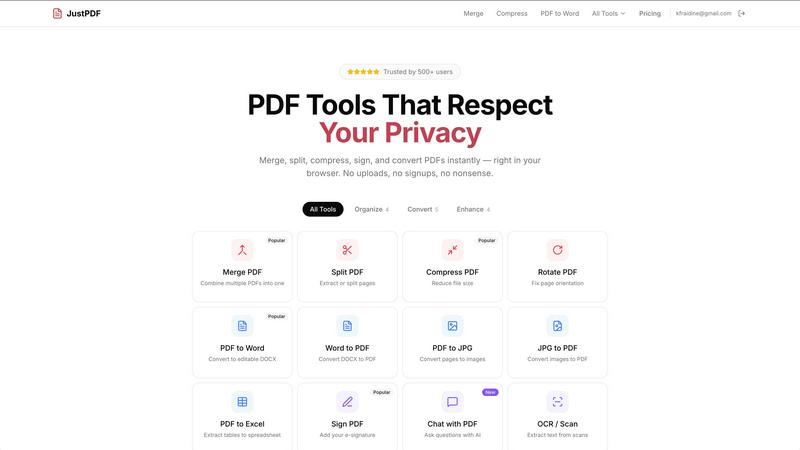
About JustPDF
JustPDF is a cutting-edge online PDF tool that offers a suite of 17 professional-grade utilities designed to handle PDF files directly in your browser. What sets JustPDF apart from competitors like Smallpdf and iLovePDF is its commitment to user privacy; it processes all files locally using JavaScript and WebAssembly, ensuring that your documents never leave your device. This means enhanced security and peace of mind, as you can verify that no data is uploaded to remote servers by checking the Network tab in your browser's DevTools. JustPDF caters to a wide range of users, from students needing to manipulate academic documents to professionals looking to manage contracts and reports efficiently. With a user-friendly interface and no account required for the free tier (which allows for three operations per day), JustPDF prioritizes accessibility without compromising on functionality. Whether you need to merge, split, compress, or convert PDFs, JustPDF provides fast, reliable, and completely private solutions.
Features of JustPDF
Merge PDF
The Merge PDF feature allows users to seamlessly combine multiple PDF documents into a single cohesive file. This is especially useful for organizing reports, presentations, or any collection of related documents. The interface is intuitive; simply drag and drop your PDFs, and they will be combined in the order you specify. This tool is perfect for anyone looking to streamline their document management without the hassle of complex software.
Split PDF
With the Split PDF feature, users can easily extract or separate specific pages from a larger PDF document. This functionality is invaluable for those who need to share only certain sections of a document, such as a chapter from a lengthy report or a specific form from a multi-page PDF. The tool ensures precision and simplicity, making it a go-to for quick page management.
Compress PDF
The Compress PDF feature is designed to reduce the file size of your PDFs in mere seconds. This is particularly useful for users who need to send documents via email or upload them to online platforms with file size limitations. JustPDF’s compression retains the quality of the original document while significantly decreasing the size, making it an essential tool for anyone who frequently works with large PDFs.
Chat with PDF (AI)
The innovative Chat with PDF feature leverages AI technology to allow users to ask questions about the content of their PDFs. This interactive tool is a game-changer for students and professionals alike, enabling them to extract information quickly without manually searching through entire documents. Whether you need to clarify complex data or locate specific details, this feature enhances productivity and comprehension.
Use Cases of JustPDF
Academic Use
Students and educators can utilize JustPDF to manage course materials, lecture notes, and research papers. The ability to merge, split, and convert documents on the fly is invaluable for creating organized and easily shareable content. Furthermore, the Chat with PDF feature allows for quick access to information, enhancing the learning experience.
Professional Documentation
For professionals, JustPDF serves as a reliable tool for handling contracts, reports, and presentations. The ability to compress files ensures that large documents can be easily shared via email without compromising quality. Additionally, the Unlock PDF feature allows users to access and edit secured documents, making it easier to collaborate with colleagues.
Personal Use
JustPDF is also perfect for personal projects, such as converting family photos into PDFs or organizing travel itineraries. The JPG to PDF and PDF to JPG features make it simple to create and share memories in a polished format. Users can compress files to save space on their devices, ensuring that personal documents are well-organized and easily accessible.
Legal and Compliance
JustPDF is FERPA-compliant, making it an excellent choice for educational institutions and organizations that handle sensitive information. The Sign PDF feature allows users to add e-signatures securely, ensuring that legal documents can be signed and shared safely. The comprehensive suite of tools ensures that all PDF handling is done with compliance and privacy in mind.
Frequently Asked Questions
How does JustPDF ensure my files remain private?
JustPDF processes all files locally in your browser using JavaScript and WebAssembly. This means that your files never leave your device, providing a high level of privacy and security. You can verify this by checking the Network tab in your browser's DevTools.
Is there a limit to how many times I can use JustPDF for free?
Yes, the free tier of JustPDF allows for three operations per day. This is a great way to test out the various tools available without committing to a paid plan.
What types of files can I convert using JustPDF?
JustPDF supports a variety of file conversions, including but not limited to PDF to Word, Word to PDF, PDF to JPG, and JPG to PDF. It also supports conversions from image formats like WebP and HEIC into PDF.
How can I access the Pro features?
To access unlimited operations and additional features, users can subscribe to the Pro plan, which starts at just $4 per month. This plan is ideal for heavy users who require extensive PDF management capabilities on a regular basis.
Similar to JustPDF

Suparelay
Call landlines and mobiles in 200+ countries from your browser. The person you call needs no app. Prepaid, from about 2 cents a minute.
Novastart
Apps and files on an infinite canvas where people and AI agents work together.
Verla AI
Verla is an AI academic assistant for university and college students, combining AI essay writing, academic research, AI detection, AI humanization.
JevModel
Turn text or JSON into structured Choice, Score and Noul decisions with probabilities.
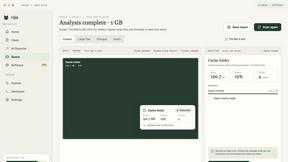
Nijia
See where Mac storage goes, review items before cleanup, inspect developer workspaces, and monitor system health. Try every feature free for 7 days.
JustTools
JustTools offers a growing collection of free online tools that run directly in your browser, with no sign-up and no uploads.

Memorable Contact
AI-powered relationship memory that helps you remember people, the context behind your connections, and reconnect when it matters.
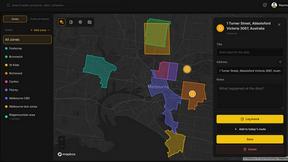
BetterKnocks
One powerful software for D2D (Door to door) fields reps to manage their sales and their teams to easily track territories and complete powerhouse CRM