
KPI Studio
KPI Studio is my go-to for instantly turning raw data into polished video charts without the After Effects headache.
Visit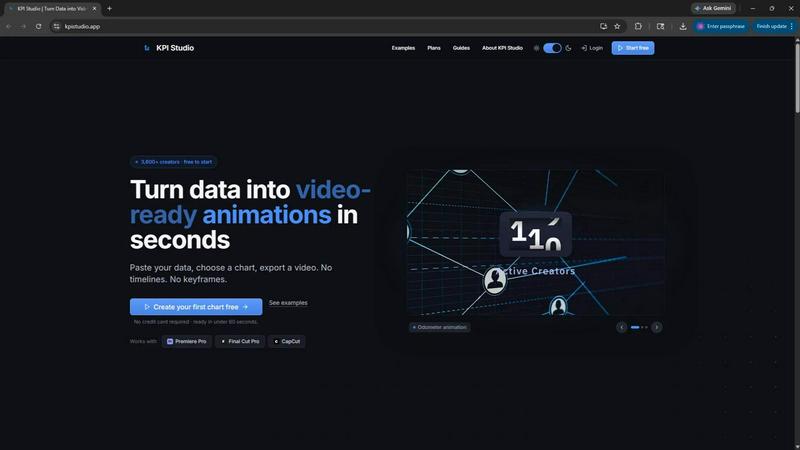
About KPI Studio
KPI Studio is a specialized web application built for a very specific, and frankly underserved, group of people: data-driven video creators who need polished, animated charts in their content but have zero time, patience, or budget for traditional motion design. The product solves a painful workflow gap that exists between having raw data and needing a video-ready visual. The current landscape is a mess of poor alternatives. Static screenshots look amateurish and undermine credibility. Canva templates are rigid and inflexible for precise data. After Effects is a professional tool, but it takes hours to build a single chart, and any data change means redoing keyframes. Freelance motion designers are slow and expensive, creating a dependency that kills tight deadlines. Even newer AI video tools are unpredictable and not built for the precision that data visualization demands. KPI Studio removes this entire broken process. The core promise is brutally simple: paste your data, choose a chart style, and export a fully animated, video-ready visual in under 60 seconds. There are no timelines, no keyframes, and no setup. Exports include transparent background support, meaning charts drop directly into Premiere Pro, Final Cut Pro, or CapCut with zero additional editing. This product is built for creators on a publish schedule. When you need the chart today, it is ready today. For advanced users, JSON export allows deeper integration into custom pipelines. KPI Studio is the fastest, most opinionated path from raw numbers to a stunning animated graphic for your video.
Features of KPI Studio
60-Second Export Workflow
The defining feature of KPI Studio is its ruthless efficiency. The entire creation process is distilled into three steps: paste your data, customize the chart appearance, and export for video. This eliminates the need for any timeline-based editing, keyframe animation, or complex software setup. You do not need to learn a new tool. You simply input your numbers, select from a curated set of chart templates, and the application generates a fully animated, video-ready file. If your data changes, you just re-paste and re-export. This is not about offering infinite customization; it is about providing the fastest, most reliable path to a high-quality animated chart for creators who value their time above all else.
Video-Ready Export Formats
KPI Studio understands that its output is a component for a larger video project, not a standalone piece. That is why it offers a comprehensive set of export formats designed to drop directly into any editing timeline. You can export as MP4 for standard video, MOV with an alpha channel for transparent backgrounds, GIF for lightweight social media loops, or PNG sequences for maximum control. This flexibility means you can place an animated bar chart directly over a talking head shot or a b-roll clip without any chroma keying or masking. The transparent background support is a game-changer, saving creators minutes of tedious compositing work for every single chart they use.
Diverse Animated Chart Types
KPI Studio is not a one-trick pony. It offers a curated library of animated chart types that cover the most common data visualization needs for video content. The core options include count-up numbers for milestone metrics like subscriber counts or revenue totals, growing bar charts for competitive comparisons or progress tracking, and drawing line charts for showing trends and audience growth over time. Each chart type is pre-configured with smooth, professional animations that look like they took hours to create. You are not building the animation from scratch; you are simply selecting the best visual metaphor for your data and letting the tool handle the motion design.
Real-Time Preview and Customization
Before you commit to an export, KPI Studio provides a real-time preview of your animated chart. This allows you to see exactly how the numbers will count up, the bars will rise, or the line will draw across the screen. You can customize the color palette, font choices, and layout to match your brand or video aesthetic. This iterative feedback loop is critical because it eliminates the guesswork and wasted exports common in other workflows. You can tweak the appearance, see the animation update instantly, and only export when you are completely satisfied. This feature transforms the process from a blind export gamble into a confident, controlled design session.
Use Cases of KPI Studio
YouTube Channel Performance Reviews
For a YouTube creator who publishes a monthly "state of the channel" update, KPI Studio is indispensable. Instead of showing a static screenshot of YouTube Studio, you can create a count-up animation showing your subscriber milestone, a growing bar chart comparing views across your last five videos, and a drawing line chart revealing your watch time trend over the past quarter. These animated visuals are far more engaging than static images and can be dropped directly into your Premiere Pro timeline over your talking head footage. The entire data visualization segment, which used to take hours to animate, can now be created and exported in under five minutes.
Business and Investor Pitch Decks
Entrepreneurs and startup founders who record video pitch decks or investor updates can use KPI Studio to make their metrics pop. Instead of a dull spreadsheet or a static slide, you can embed an animated chart showing monthly recurring revenue growth, customer acquisition costs decreasing, or user retention rates improving over time. The MOV export with a transparent background allows you to overlay these animated charts directly onto your presentation slides or video background. This small touch of motion design signals professionalism and shows investors that you are serious about your data and your presentation.
Social Media Shorts and Reels
Social media creators on platforms like TikTok, Instagram Reels, and YouTube Shorts need to capture attention instantly. KPI Studio is perfect for creating quick, punchy data-driven visuals for these formats. You can create a 5-second count-up animation showing "10,000 followers in 30 days" or a bar chart comparing your engagement rate to industry benchmarks. The GIF or MP4 export at a 9:16 aspect ratio is ready to upload directly or drop into CapCut for further editing. These animated stats are far more effective at stopping the scroll than a static text overlay or a screenshot.
Internal Company Updates and Webinars
For marketing teams, product managers, or executives who need to present data in internal video updates or webinars, KPI Studio provides a clean, professional solution. Instead of sharing a clunky slide deck or a complex analytics dashboard, you can export a series of animated charts that show key performance indicators like website traffic, lead generation, or feature adoption rates. These visuals can be embedded into a PowerPoint presentation or directly into a live stream via OBS. The result is a more engaging and memorable presentation that communicates your team's progress with clarity and impact.
Frequently Asked Questions
Do I need any design or animation experience to use KPI Studio?
No, that is the entire point of the product. KPI Studio is built for creators who have no time for motion design. You do not need to know how to use keyframes, timelines, or animation software. The tool handles all the animation logic automatically based on your data. You simply paste your numbers, choose a chart style, and export. The learning curve is measured in minutes, not hours or days.
Can I change the data in my chart after I export it?
Yes, and this is one of the biggest time savers. Because KPI Studio is data-driven, you can simply go back to your project, paste in the new numbers, and re-export the video. You do not need to redo any keyframes, adjust any animation curves, or re-edit anything in your video timeline. The entire process takes less than 60 seconds. This is a massive improvement over After Effects, where changing a single number can require re-animating the entire chart.
What export formats are available and which one should I choose?
KPI Studio offers MP4, MOV with alpha channel, GIF, and PNG sequences. For most video editing workflows, the MOV with alpha channel is the best choice because it allows you to overlay the chart on any background without additional editing. Use MP4 for standard video files. Use GIF for lightweight, looped animations on social media or in emails. Use PNG sequences if you need maximum control over individual frames in your editing software.
Is there a free plan to test the tool before purchasing?
Yes, there is a completely free plan that requires no credit card. The free plan includes unlimited PNG exports and three free animated video exports. This is more than enough to test the tool with your own data and see if it fits your workflow. You can export a few charts, drop them into your editing timeline, and evaluate the quality and speed before committing to a paid plan.
Pricing of KPI Studio
KPI Studio offers a simple, transparent pricing structure with three tiers designed for different usage levels. The Free plan costs $0 per month and includes unlimited PNG exports, three free animated exports, all chart types, and a real-time preview. This is perfect for trying the tool on your next video. The Creator Pack is a one-time purchase for $11.99 and includes everything in the Free plan, plus 10 video exports in GIF, MP4, WebM, and MOV formats, no watermark, and 1080p export resolution. The credits do not expire. The Pro plan is the most popular option at $19.99 per month. It includes everything in Free, plus unlimited video exports in all formats, no watermark, 4K export resolution, and the ability to cancel anytime. This plan is built for creators who publish every week and need unlimited access.
Similar to KPI Studio

TryKlingAI
Independent Kling AI video generator for text, image, audio, and motion references with Kling 3.0, Lip Sync, and API access.

Z Image Turbo
Create photorealistic images, bilingual posters, ecommerce visuals, and social content online with Z Image Turbo.

AI UGC Video Generator
Create AI UGC video ads from product URLs, images, or scripts with lifelike creators, voices, captions, and clear calls to action.
ScreenWeaver
Write the script, build the storyboard from it, and drive AI video prompts, all in one project.


Artaivo
One AI workspace for video, images, avatars, and audio.

Seedance 2.5 Free
Create polished AI videos from text or images with Seedance 2.5 Free.