
Opal
Opal is your all-in-one visual workspace to effortlessly organize projects and notes, ensuring you find everything instantly.
Visit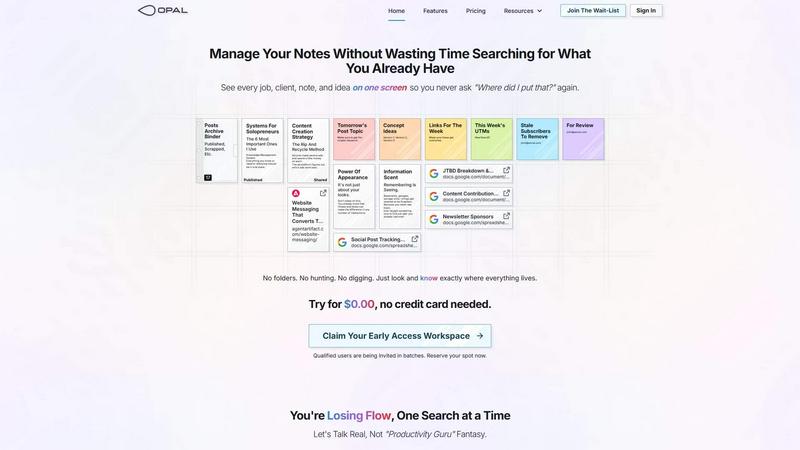
About Opal
Opal is a groundbreaking visual knowledge and project management workspace that caters specifically to individuals who think spatially. If you're constantly misplacing notes within convoluted folder structures or forgetting brilliant ideas that get lost in traditional applications, Opal is here to change the game. It offers an infinite digital canvas where users can freely drag and drop notes, documents, files, and links. This visual organization mimics the layout of a physical desk, allowing you to remember where things are located, rather than just their names. Opal is tailored for solopreneurs, consultants, agency owners, writers, and anyone whose work hinges on detailed conversations and commitments. With Opal, your active projects, client details, and creative inspirations are always visible and easily accessible, helping you maintain focus and boost productivity. Say goodbye to the frustration of searching and hello to doing your best work effortlessly.
Features of Opal
Infinite Digital Canvas
Opal provides a limitless virtual workspace where you can arrange notes, documents, and ideas spatially. This canvas allows for an intuitive layout, helping users visualize their tasks and projects just as they would on a physical desk.
Drag-and-Drop Functionality
Organizing your workspace has never been easier. With Opal's drag-and-drop feature, you can easily move notes, files, and links around the canvas, creating a personalized layout that suits your workflow and enhances your productivity.
Visual Memory Assistance
Forget the traditional methods of filing information. Opal enables you to visually place your notes and ideas, making it easier for your brain to recall their locations. This spatial memory approach ensures that you can instantly retrieve what you need without wasting time searching.
Comprehensive Project Overview
Opal allows you to see every job, client, note, and idea on a single screen. This feature eliminates the anxiety of losing critical information and ensures that you are always aware of what needs your attention at a glance.
Use Cases of Opal
Solo Business Management
For solopreneurs managing multiple clients and projects, Opal serves as an effective tool to keep everything organized in one place. You can visualize your tasks, ideas, and commitments without getting lost in folders.
Creative Collaboration
Opal is perfect for teams working on creative projects. It allows members to share notes and files visually, making collaboration seamless and ensuring everyone stays on the same page.
Client Relationship Management
Agency owners can use Opal to manage client details and project timelines. The visual organization helps keep track of conversations, commitments, and follow-ups, ensuring that nothing slips through the cracks.
Content Planning and Strategy
Writers and content creators can utilize Opal for brainstorming and organizing their ideas. The platform's visual layout helps in developing content strategies, tracking progress, and ensuring that every idea is accounted for.
Frequently Asked Questions
How does Opal improve productivity?
Opal enhances productivity by allowing users to visualize their tasks and projects in a single workspace. This eliminates the need for constant searching and helps maintain focus on critical tasks.
Is Opal suitable for team collaboration?
Yes, Opal is designed for both individual and team use. Its visual organization and drag-and-drop functionality make it an excellent tool for collaborative projects, ensuring everyone can contribute effectively.
Can I integrate existing documents into Opal?
Absolutely! Opal allows you to import documents, notes, and files from other applications, making it easy to transition your workflow into this visual workspace.
Is there a trial period for Opal?
Yes, Opal offers a free trial period where you can explore its features without any obligation. This allows you to experience the benefits of the platform before committing to a paid plan.
Similar to Opal

Suparelay
Call landlines and mobiles in 200+ countries from your browser. The person you call needs no app. Prepaid, from about 2 cents a minute.
Novastart
Apps and files on an infinite canvas where people and AI agents work together.

Verla AI
Verla is an AI academic assistant for university and college students, combining AI essay writing, academic research, AI detection, AI humanization.

JevModel
Turn text or JSON into structured Choice, Score and Noul decisions with probabilities.
Nijia
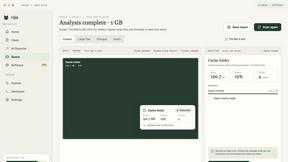
See where Mac storage goes, review items before cleanup, inspect developer workspaces, and monitor system health. Try every feature free for 7 days.
JustTools
JustTools offers a growing collection of free online tools that run directly in your browser, with no sign-up and no uploads.

Memorable Contact
AI-powered relationship memory that helps you remember people, the context behind your connections, and reconnect when it matters.
BetterKnocks
One powerful software for D2D (Door to door) fields reps to manage their sales and their teams to easily track territories and complete powerhouse CRM