
PicExtender
PicExtender is my go-to for expanding canvases, sharpening blurry photos, and reviving old memories with flawless AI.
Visit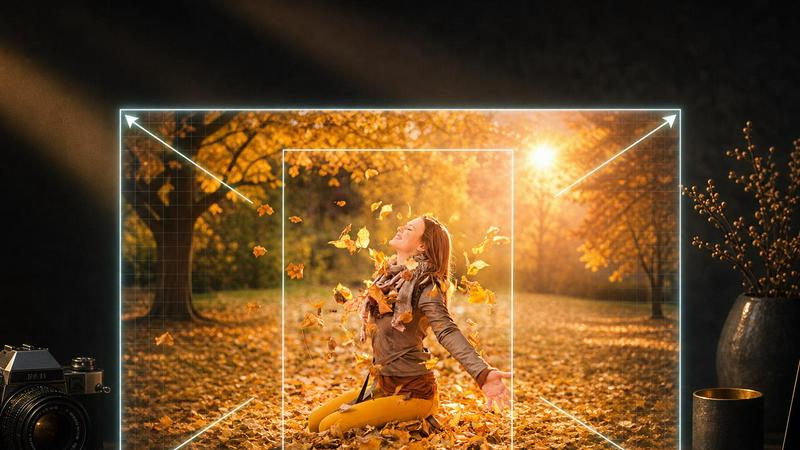
About PicExtender
PicExtender is my current favorite AI tool for anyone who has ever felt trapped by a bad crop, a too-small canvas, or a damaged family photo. It is an all-in-one platform that uses artificial intelligence to intelligently expand image borders, enhance details, and restore old photographs, effectively eliminating the need for tedious manual editing in Photoshop. What sets PicExtender apart in a crowded market is its laser focus on a single, streamlined workflow: upload one image and let the AI handle the heavy lifting of completing missing edges, improving clarity, or repairing visual damage. The value proposition is simple and powerful for creators who need to produce larger, sharper visuals for modern layouts, social media formats, e-commerce catalogs, and archival projects. It is purpose-built for photographers, graphic designers, ecommerce teams, and content creators who need to expand canvases for ads, restore cherished memories, or enhance product photos without becoming experts in complex editing software. The tool supports common formats like JPG, PNG, and WEBP, and offers a remarkably intuitive interface that guides users from upload to export in minutes. Whether you are a professional designer or a casual user trying to save a precious photograph, PicExtender delivers professional-grade results without the steep learning curve.
Features of PicExtender
Seamless AI Image Expansion
This is the feature that first caught my attention and remains my personal favorite. The context-aware generation engine studies the edge lighting, colors, and texture of your original image before intelligently filling new canvas areas with realistic detail. You can expand images up to an impressive 4096x4096 pixels, making it perfect for creating high-resolution ads, product pages, stories, banners, and any other creative work that demands a larger canvas. The AI does not just stretch your image; it actually generates new, coherent visual information that blends seamlessly with the original.
Efficient Batch Outpainting
For professional users managing multiple projects, this feature is an absolute game changer. PicExtender allows you to prepare a full product set or an entire campaign library with consistent output settings, instead of resizing and extending images one by one. This batch processing capability saves hours of repetitive work and ensures that every image in your set maintains the same quality and aesthetic. It is a must-have tool for ecommerce teams and social media managers who need to produce large volumes of optimized visuals quickly.
AI Image Enhancement and Repair
PicExtender goes far beyond simple expansion. Its enhancement tools can fix blur and noise in portraits and low-resolution images, reducing compression artifacts while keeping the result looking natural and unprocessed. The repair functionality is equally impressive, detecting scratches, creases, stains, fading, and blur in old photos, then intelligently repairing missing areas and recovering lost detail. This dual capability makes it an indispensable tool for both modern content creation and historical photo preservation.
AI Colorization for Black-and-White Photos
This is where PicExtender truly shines for archival work. After repairing damage in old photographs, you can add natural-looking color to skin, clothing, and environments. The AI does a remarkably good job of understanding the context of the image, applying appropriate colors that bring black-and-white memories to life. It transforms faded, monochrome images into vibrant, shareable, and printable assets that feel fresh and contemporary while preserving their historical essence.
Use Cases of PicExtender
Social Media Optimization
This is the most obvious and popular use case, and for good reason. PicExtender makes it incredibly easy to resize and extend images for every major platform, including Instagram posts, Facebook covers, LinkedIn banners, YouTube thumbnails, and Twitter headers. Instead of manually cropping your best photos to fit awkward aspect ratios, you can let the AI intelligently extend the background, creating natural space for headlines, buttons, and layouts. The result is a cohesive, professional-looking social media presence without the usual design headaches.
E-commerce Enhancement
For online sellers and ecommerce teams, PicExtender is an absolute powerhouse. The AI keeps product details perfectly intact while intelligently expanding clean backgrounds and adding safe margins around your items. This is crucial for creating consistent, professional-looking product listings across different marketplaces. The enhancement tools also sharpen product photos, improving lighting, edges, and material detail so that packaging, labels, and surface textures look clearer and more appealing to potential buyers.
Photography Restoration
Photographers and family archivists will find immense value in PicExtender's restoration capabilities. The tool can recover accidentally cropped edges from your favorite shots, rebuilding missing visual context around a photo with remarkable accuracy. For old, damaged photographs, it can detect and repair scratches, creases, stains, and fading, essentially giving a second life to cherished memories. The ability to then colorize these restored images makes them ready for sharing, printing, and preserving for future generations.
Content Creation and Design
Digital artists, graphic designers, and content creators will love how PicExtender streamlines their workflow. You can extend backgrounds for anime art, cartoons, thumbnails, ads, and design concepts without worrying about awkward stretching or distortion. The AI image editing feature even allows you to change scenes with prompts, letting you describe edits like background replacement or mood changes. This turns a simple expansion tool into a versatile creative assistant that helps you iterate on designs faster than ever before.
Frequently Asked Questions
What image formats does PicExtender support?
PicExtender supports JPG, JPEG, PNG, and WEBP formats. However, it is important to note that transparent background images are not supported by the platform. For best results, upload images with solid backgrounds or standard color profiles. The tool is designed to work seamlessly with these common formats, ensuring that most users can start expanding and enhancing their images immediately without needing to convert files.
How large can I expand my images?
PicExtender allows you to create canvases up to an impressive 4096x4096 pixels. This high-resolution output is perfect for professional ads, product pages, social media stories, banners, and any other high-resolution creative work. The AI expansion is context-aware, meaning it studies the edge lighting, colors, and texture of your original image before filling new canvas areas with realistic detail, so you do not lose quality as you scale up.
Can PicExtender repair old and damaged photos?
Absolutely, and this is one of my favorite features. PicExtender can detect and repair scratches, creases, stains, fading, and blur in damaged photographs. It intelligently repairs missing areas and recovers lost detail, making it an excellent tool for preserving family archives and historical photos. After repair, you can also use the colorization feature to add natural color to black-and-white images, bringing old memories to life in a fresh and vibrant way.
Is PicExtender suitable for beginners?
Yes, PicExtender is designed with a user-friendly interface that makes it accessible to non-experts. The workflow is simple and intuitive: upload a photo, choose a preset or custom size, preview the expansion, and download a polished result in minutes. There are no complex settings to learn or steep learning curves to overcome. This makes it an ideal tool for content creators, small business owners, and anyone who needs professional-looking results without spending hours learning photo editing software.
Pricing of PicExtender
PicExtender offers a straightforward pricing model that starts with free credits for new users, allowing you to test the platform before committing. For those who need more resolution or batch capacity, the Basic plan is available at $9.9 per month. This plan is ideal for light uncropping tasks and daily social media asset creation. Users can upgrade from the free tier to access higher resolution outputs and more efficient batch processing, making it a cost-effective solution for both casual users and professionals.
Similar to PicExtender

GenX
All-in-one AI workspace to generate images, videos, and audio with multiple leading AI models.

Bloom
An adaptive AI tutor that turns topics or your materials into courses, lessons, and answers tailored to how you learn.

Lemongraph
Almost every conversation ends with a promise. Lemongraph keeps track of them for you and lines up your day the way you would.
CustomerFlows
Track, manage, and convert every lead, in one place.

Zeptap
Zeptap lets AI use your real iPhone like you do: open apps, read the screen, tap, swipe and type. Reply to DMs, post Stories, book rides, test apps.

FreeVideoGenerator
Free AI video generator for text and photos, powered by Sora 2, Veo 3.1 and Wan. Get free starter credits and watermark-free downloads.

ChatterAPI
One API key and one credit balance for Reddit and X data. REST endpoints and a hosted MCP server, so your code and your agents call the same tools.
BacklinkBot
AI SEO agent that finds pages ranking for your keywords, pitches the people behind them from your inbox, and follows up. You approve every send.