
ProcessSpy
ProcessSpy is your ultimate Mac process monitor, offering in-depth insights and powerful filters for seamless performance tracking.
Visit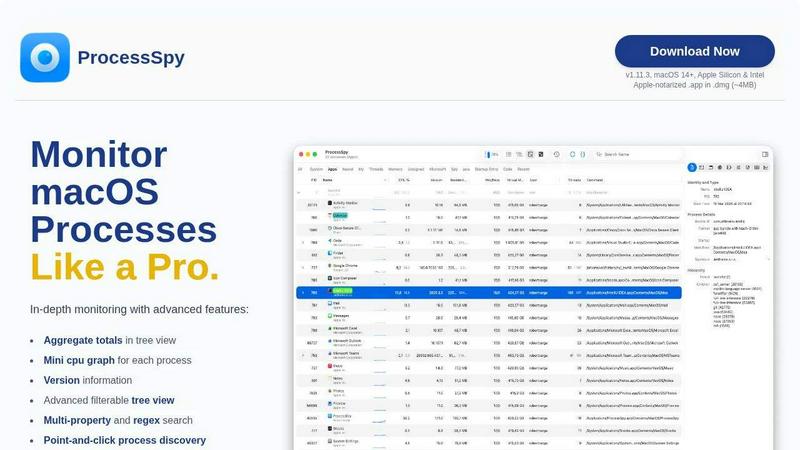
About ProcessSpy
ProcessSpy is a powerful process monitoring tool designed exclusively for macOS, providing users with insights that go far beyond what the standard Activity Monitor can offer. Developed for developers, system administrators, and power users who demand comprehensive visibility into their system processes, ProcessSpy reveals intricate details such as full command-line arguments, version information, and environment variables. Whether you are troubleshooting performance issues, managing multiple applications, or simply curious about what's running in the background, ProcessSpy is your go-to application. The app's streamlined interface and advanced features, like customizable JavaScript filters and detailed process trees, ensure that you can quickly locate and manage processes with ease. With its commitment to user experience and native macOS integration, ProcessSpy delivers a fast, responsive, and Mac-first experience that is both intuitive and efficient.
Features of ProcessSpy
Advanced Tree View
The advanced tree view in ProcessSpy presents a detailed hierarchy of processes, enabling users to visualize CPU, Memory, and Thread usage in real-time. It allows for easy navigation and offers aggregate totals, making it simple to identify resource-heavy applications at a glance.
Javascript Filters
ProcessSpy empowers users with the ability to create complex filters using JavaScript. This feature enables multi-condition filtering, allowing users to refine their process searches with precision, whether for debugging or performance monitoring.
Environment Variables (Paid)
Unlock the ability to view environment variables associated with each process through a simple upgrade. This feature is invaluable for developers seeking to understand the context in which an application is running, aiding in debugging and optimization efforts.
Process History Recording (Paid)
For those who need to track process performance over time, the process history recording feature captures historical values for CPU, Memory, and Threads. Users can export this data to CSV for in-depth analysis, making it an essential tool for performance tuning.
Use Cases of ProcessSpy
Development Monitoring
Developers managing multiple applications can use ProcessSpy to quickly identify which Java Development Kit (JDK) version is being used by each process. This clarity allows for better debugging and performance tuning of Java applications.
Resource Management
System administrators can benefit from ProcessSpy's aggregate view of CPU, Memory, and Thread usage. By identifying resource-heavy processes, they can optimize system performance and ensure that critical applications receive the necessary resources.
Troubleshooting Applications
When applications behave unexpectedly, ProcessSpy allows users to inspect open files and connections. This capability aids in diagnosing issues by revealing what resources an application is accessing at any given time.
Historical Performance Analysis
For users who need to analyze application performance trends, the process history recording feature provides valuable insights into how resource usage changes over time. This information can help in making informed decisions about software updates or system upgrades.
Frequently Asked Questions
Is ProcessSpy safe to install on my Mac?
Yes, ProcessSpy is Apple-notarized and distributed as a signed application within a DMG file. It is verified for safety on both Intel and Apple Silicon Macs, ensuring a secure installation process.
Does ProcessSpy support older versions of macOS?
No, ProcessSpy is specifically designed for macOS 14 and newer versions. Users with older macOS versions will not be able to run the application effectively.
What is the license model?
The license for ProcessSpy is valid for one user across unlimited devices. It includes lifetime updates and access to new features, providing excellent value for users who rely on continuous process monitoring.
How can I access advanced features?
Advanced features, such as environment variable viewing and historical performance tracking, are available through a paid upgrade. A one-time purchase unlocks these features for an enhanced monitoring experience.
Similar to ProcessSpy
Nijia
See where Mac storage goes, review items before cleanup, inspect developer workspaces, and monitor system health. Try every feature free for 7 days.

JustTools
JustTools offers a growing collection of free online tools that run directly in your browser, with no sign-up and no uploads.


Sprite Sheet Maker
A free browser-based toolkit for creating, cutting, converting, and previewing sprite sheet animations.

Product Launch Checklist
A free launch checklist for SaaS, apps, AI tools and more. Every step says why it matters and when you can skip it.


Forms Plugin
The #1 Native Form Builder Plugin for Framer - No Code, No Embeds, No External Platforms.
JsonTranslate
A structured JSON, Markdown, and TXT translator that preserves keys, nested paths, and project structure.