Receipt Taxer
Receipt Taxer transforms your receipts into organized digital data, simplifying bookkeeping and making tax filing a breeze with seamless TurboTax.
Visit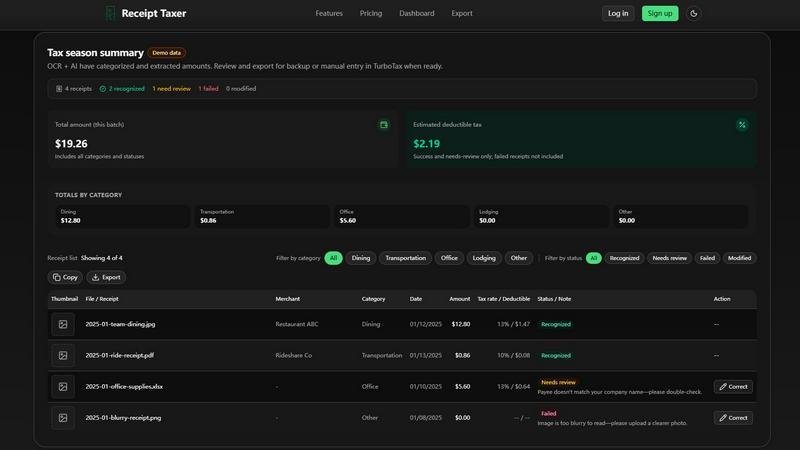
About Receipt Taxer
Receipt Taxer is an innovative tool designed for busy professionals and small business owners looking to streamline their bookkeeping processes. This powerful software utilizes advanced OCR (Optical Character Recognition) technology to automate the extraction of data from your receipts, allowing you to quickly scan and export important financial details into formats like CSV, Excel, or PDF. Ideal for anyone who needs to manage expenses efficiently, Receipt Taxer simplifies the often tedious task of organizing receipts and preparing for tax season. With its integration capabilities with tools like TurboTax, users can ensure their financial records are accurate and up-to-date, ultimately saving time and reducing stress during tax filing periods. By turning piles of paper into organized digital data, Receipt Taxer empowers users to focus on what truly matters—growing their business.
Features of Receipt Taxer
OCR Technology
Receipt Taxer harnesses cutting-edge OCR technology to instantly extract key information from your receipts. This feature allows you to upload and parse images, capturing amounts, categories, and tax details with remarkable accuracy, ensuring that you have all the necessary data for your financial records.
Seamless Exporting Options
Once your receipts are processed, Receipt Taxer provides seamless exporting options. You can choose from CSV, Excel, or PDF formats, making it easy to back up your financial data, share it with accountants, or prepare for manual entry into TurboTax. This flexibility ensures that your data is always in a format that suits your workflow.
User-Friendly Dashboard
The intuitive dashboard of Receipt Taxer allows users to easily navigate through their receipts and view categorized expense summaries at a glance. With filters for status and category, you can quickly find the information you need, whether it's for review, adjustment, or export.
Simple Pricing Structure
Receipt Taxer offers a straightforward pricing model that is designed to be accessible for everyone. For just $9.99 per period, users can process up to 200 receipts, making it a cost-effective solution for those who want to streamline their bookkeeping without breaking the bank.
Use Cases of Receipt Taxer
Small Business Expense Tracking
Small business owners can benefit immensely from Receipt Taxer by efficiently tracking their expenses. The automatic categorization of receipts allows for better budgeting and financial planning, ensuring that no deductible expenses are overlooked.
Tax Preparation Simplified
As tax season approaches, Receipt Taxer becomes an invaluable tool for individuals and professionals alike. By organizing receipts and extracting relevant tax information, users can prepare for filing with TurboTax without the usual last-minute panic.
Expense Reporting for Employees
Companies can utilize Receipt Taxer to simplify the expense reporting process for employees. By allowing staff to scan and submit receipts digitally, the approval and reimbursement process becomes quicker and more efficient, enhancing productivity.
Financial Data Backup
For anyone concerned about losing important financial data, Receipt Taxer provides a reliable solution. The ability to export data in various formats ensures that your financial records are securely backed up and easily retrievable when needed.
Frequently Asked Questions
How does Receipt Taxer work?
Receipt Taxer uses advanced OCR technology to scan and extract information from uploaded receipt images. The extracted data is then categorized and made available for export in various formats.
What file formats can I export my receipts to?
You can export your receipts in CSV, Excel, or PDF formats. This flexibility allows you to choose the format that best fits your needs, whether for reporting, archiving, or manual entry into tax software.
Is there a limit on how many receipts I can process?
Yes, the standard plan allows you to process up to 200 receipts per period for a fee of $9.99. This limit is designed to accommodate the needs of most small businesses and individuals while keeping costs manageable.
Can Receipt Taxer integrate with other software?
Yes, Receipt Taxer is designed to work seamlessly with TurboTax and other financial tools. This integration allows for a smoother experience when preparing your financial records and filing taxes.
Explore more in this category:
Similar to Receipt Taxer



benchmark.directory
An independent directory of 146 AI tools. Every listing was paid for, set up and used on real work. Nobody can buy a place or a score.

saasgrow.ai
Get your SaaS tool discovered. Free listing, honest screening, a dofollow link — and no way for anyone to outbid you.

Tools Network
Tools Network is a curated directory that brings the internet's best AI tools together in one organized place. Spanning 25+ categories

Built2WinWeb AI SEO
A development studio and AI‑native infrastructure provider that builds high‑performance, agent‑ready websites and AI discovery tools.

PixRestorer
Restore and colorize old photos with AI in seconds. PixRestorer repairs scratches, fading, blur, and tears, brings black-and-white prints to life in n